SAP Insiders
Articles/SAP CPI/SAP CPI iFlow Automation with Claude Fable 5 — Download, Analyze, Build, Package and Deploy
SAP CPI

SAP CPI iFlow Automation with Claude Fable 5 — Download, Analyze, Build, Package and Deploy

A step-by-step guide to automating SAP CPI iFlow design and packaging using Claude Fable 5 — with enterprise security practices, OData v2/v4 support, and a zero hard-coded-credentials rule.
SAP CPI iFlow Automation with Claude Fable 5 — 6-step pipeline from iFlow export to import-ready ZIP with enterprise security governance

Glossary

iFlow (Integration Flow) — the unit of work in SAP CPI. An iFlow defines how a message is received, transformed, routed, and sent between sender and receiver systems.

SAP CPI (Cloud Platform Integration) — now called SAP Integration Suite. SAP's cloud-based middleware for connecting SAP and non-SAP systems via APIs, EDI, and messaging.

OData (Open Data Protocol) — a REST-based protocol used by SAP to expose business data as APIs. SAP supports OData v2 (older S/4HANA releases) and OData v4 (current standard).

Security Material — SAP CPI's secure credential store. Stores usernames, passwords, OAuth tokens, and certificates by name. iFlows reference these by name, never by value.

ZIP Package — the export format for SAP CPI iFlows. Contains the BPMN flow definition, scripts (Groovy/JavaScript), mappings, and metadata.

Claude Fable 5 — Anthropic's most capable AI model as of 2025, suited for complex reasoning tasks including reading and designing integration architecture.

Metadata Accuracy — in OData context, the $metadata document that describes entity sets, properties, and relationships. Incorrect metadata causes SAP to reject the integration at runtime.


Designing SAP CPI iFlows has always been skilled, time-consuming work. A consultant downloads an existing iFlow, reads through scripts, reverse-engineers mappings, checks OData metadata documents, builds a new flow, configures security material references, tests in a non-production tenant, and packages the result. For a moderately complex integration this can take several days.

Claude Fable 5 compresses this into a structured, repeatable pipeline — while keeping the human in control of every governance decision.

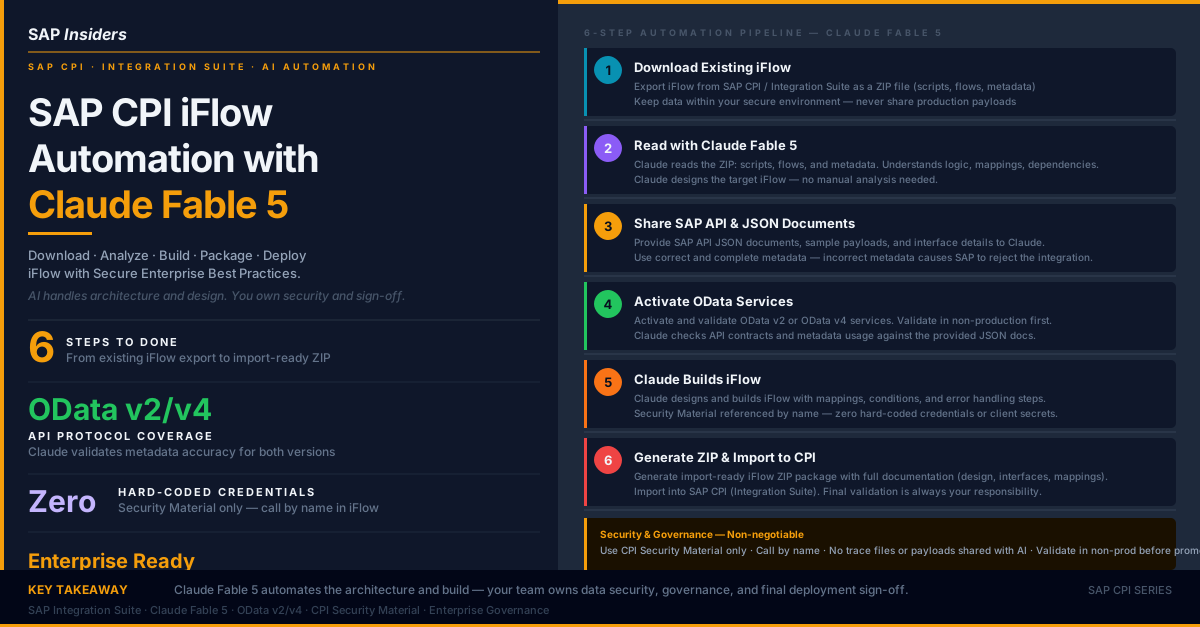
This article walks through the complete six-step process shown below, explains what Claude is doing at each step, and sets out the security and compliance guardrails that must never be skipped.

SAP CPI iFlow Automation with Claude Fable 5 — complete 6-step pipeline diagram showing Download, Read, Share APIs, Activate OData, Claude Builds iFlow, and Generate ZIP stages with High Level Architecture and Security Governance panel


The six-step pipeline

Step 1 — Download the existing iFlow

Start by exporting the existing iFlow from SAP CPI (Integration Suite) as a ZIP file.

In the Integration Suite Fiori launchpad:

  1. Navigate to Design > Packages > [your package]
  2. Select the iFlow artifact
  3. Click Export — this downloads a .zip containing:
    • The BPMN-based flow definition (.iflw)
    • Groovy or JavaScript scripts
    • Message mapping artefacts
    • Parameters and externalized configuration
    • Metadata (MANIFEST.MF, metainfo.prop)

Security rule from step 1: Do not include trace files, message logs, or payload samples with real business data in anything you share with an AI model. Extract the structural files only. Keep business data in your secure environment.


Step 2 — Read with Claude Fable 5

Open Claude Fable 5 and upload the iFlow ZIP.

Claude reads and analyses:

  • The flow logic (sender adapter → mapping → receiver adapter)
  • Script content (Groovy/JavaScript processing logic)
  • Externalized parameters and their purposes
  • Adapter types in use (HTTPS, OData, SOAP, SFTP, etc.)
  • Error handling configuration (dead letter, retry, exception subprocesses)
  • Existing mapping structures

Claude produces a design brief: a plain-language description of what the existing iFlow does, what its dependencies are, and what the target iFlow needs to accomplish differently.

This is the point where you confirm Claude has understood the flow correctly before proceeding. If the existing iFlow has undocumented logic (a Groovy script with business rules embedded), Claude will surface it here.

Q: The existing iFlow has a Groovy script that manipulates GSTIN numbers before sending to the receiver. Will Claude understand what it does?

A: Yes — Claude Fable 5 can read Groovy and JavaScript and will explain the script's logic in plain English as part of the design brief. You should verify this explanation against your own knowledge of the business rule before proceeding.


Step 3 — Share SAP API and JSON Documents

Provide Claude with the API documentation for the target integration:

  • OData $metadata document — the XML document describing all entity sets, properties, navigation properties, and data types for the target SAP system
  • Sample request/response JSON payloads (containing no real business data — use synthetic examples)
  • Interface specification — which entity set, which HTTP method (GET/POST/PATCH), which fields are required
  • Business rules — any transformation logic, field mappings, or conditional routing the new iFlow must implement

Why metadata accuracy matters: SAP validates every OData request against the $metadata document at runtime. If your iFlow sends a field that the metadata says is read-only, or omits a required key field, SAP rejects the request with a cryptic error. Claude checks the metadata document against your interface specification to catch these mismatches before deployment.

If you are migrating from OData v2 to OData v4, note that entity set names, key fields, and navigation property syntax differ between versions. Provide the correct version's metadata document — do not use a v2 document for a v4 target endpoint.


Step 4 — Activate OData Services

Before Claude can validate the integration end to end, the OData service must be active in the target SAP system.

For SAP S/4HANA Cloud:

  • Navigate to Custom Business Objects or Communication Arrangements depending on the API
  • For standard SAP APIs, go to the Communication Arrangements tile and confirm the relevant communication scenario is active

For SAP S/4HANA On-Premise:

  • Use transaction /IWFND/MAINT_SERVICE to activate the OData service
  • Use /IWFND/ERROR_LOG to monitor activation errors
  • For OData v4 services, check the newer ABAP RESTful Application Programming (RAP) model activation

Validation rule: Always validate in a non-production tenant (Development or Quality) before promoting to Production. Do not bypass this step even when under time pressure.

Claude can review the service metadata response (the output of $metadata) to confirm the entity set you intend to use exists and has the properties your iFlow will reference.

Q: You activate an OData v4 service and the $metadata shows the entity set as SalesOrderSet. Your existing OData v2 iFlow uses SalesOrderCollection. Are they the same?

A: Not necessarily. OData v2 and v4 entity set names are independent. Check the v4 metadata document to confirm the correct entity set name — do not assume the v2 name carries over.


Step 5 — Claude Builds the iFlow

With the existing iFlow ZIP, the API documentation, and the confirmed OData metadata in hand, Claude Fable 5 now designs and builds the new iFlow.

Claude produces:

Flow structure: The BPMN iFlow definition — sender adapter, receiver adapter, content modifier steps, router steps, exception subprocesses, and end events laid out in the correct sequence.

Mappings: Message mapping or XSLT mapping artefacts that transform the source message structure to the target OData payload format.

Scripts: Any Groovy or JavaScript processing logic — header enrichment, dynamic property setting, error message formatting.

Security Material references: Every credential, OAuth token, or certificate reference is handled by name only. Claude will never produce an iFlow that embeds a password, client secret, or certificate value in the flow definition or a script.

For example, if the receiver system requires OAuth 2.0, Claude will:

  • Configure the OData receiver adapter to use OAuth 2.0 credential type
  • Reference a named Security Material alias (e.g. S4HANA_OAUTH_PROD) — not the token value itself
  • Document which Security Material alias needs to be created in CPI before deployment

Error handling: Dead letter channels, retry configurations, alert rules, and exception subprocess flows are included by default following SAP integration best practices.


Step 6 — Generate ZIP and Import to CPI

Claude packages the complete iFlow as an import-ready ZIP file, together with:

  • iFlow ZIP Package — the complete artifact ready for upload to SAP CPI
  • Documentation — a design document covering the flow architecture, interface definitions, and mapping logic
  • OData Service Activation checklist — confirms which v2 or v4 services must be active before deployment
  • Security Material references — a list of all Security Material aliases the iFlow references, with the credential type each requires

To import into SAP CPI:

  1. Navigate to Design > Packages
  2. Select the target package (or create a new one)
  3. Click Import and upload the ZIP
  4. Configure externalized parameters (environment-specific values like target host, service path)
  5. Create the referenced Security Material aliases in Monitor > Security Material
  6. Deploy the iFlow and test in non-production

Final responsibility: Claude produces the artifact. You own the deployment, the security configuration, and the validation. Data governance and compliance sign-off are always human responsibilities.


High-Level Architecture

The complete architecture of this pipeline is:

SAP CPI           iFlow Export    Claude Fable 5      SAP APIs        OData Services   iFlow Build      Import to
(Integration  →   (ZIP file)   →  (Analysis &      →  & JSON Docs  →  (v2 / v4)     →  & Package     →  SAP CPI
 Suite)                            Design)                             Activate                          (Integration
                                                                                                          Suite)

Each arrow represents a human handoff point. The human controls what goes into the ZIP, what API documents are shared, whether the OData service is actually active, and whether the final ZIP passes internal review before import.

Claude operates between the handoffs — it reads, designs, builds, and packages. It does not have access to your SAP system. It does not connect to any API. It does not store your iFlow or your API documents after the session.


What Claude Fable 5 does — and does not do

Claude doesClaude does not do
Read and understand iFlow ZIP structureConnect to your SAP system
Analyse scripts, mappings, and flow logicAccess live OData services
Design the target iFlow architectureStore your iFlow or API documents
Build mappings and scriptsMake deployment decisions
Reference Security Material by nameHandle credentials or secrets
Validate metadata against interface specsSign off on compliance
Package the import-ready ZIPBypass your change management process

Security and Governance — the non-negotiable rules

These rules apply regardless of how you use AI in the integration design process:

Security Material only. All credentials — username/password, OAuth client credentials, X.509 certificates — must be stored in CPI Security Material. The iFlow references them by alias name. Never embed credential values in the iFlow definition, a Groovy script, an externalized parameter, or any document shared with an AI tool.

Call by name. When configuring receiver adapters, use the Security Material alias name in the credential field. Example: S4HANA_OAUTH_DEV — not the actual client ID or secret.

Data Privacy. Do not share trace files, message processing logs, or payloads containing real business data (customer names, PAN numbers, GSTIN, bank details, order amounts) with any AI model. Use synthetic data for interface design.

Metadata Accuracy. Provide the correct OData $metadata document for the target system and release. An incorrect metadata document causes silent design errors that only surface at runtime in production.

Validate in Non-Production First. No iFlow produced by this process (or any process) goes directly to production. Development tenant → Quality tenant → Production, with testing at each stage.

Compliance First. Follow your organisation's SAP naming conventions, transport procedures, and change management policies. An iFlow that works technically but violates naming standards or bypasses transport routes fails an audit.

Q: A colleague suggests sharing the production iFlow trace log with Claude so it can see "exactly what data is flowing." Is this acceptable?

A: No. Production trace logs contain real business data — customer names, order values, bank account numbers. Sharing these with any external AI service violates data privacy rules. Use synthetic sample payloads for interface design.


Deliverables checklist

After running this pipeline, you should have:

  • [ ] iFlow ZIP Package — import-ready, tested in non-production
  • [ ] Design documentation — flow architecture, interface definitions, mapping logic
  • [ ] OData Service Activation confirmation — v2 or v4 services active in target tenant
  • [ ] Security Material list — all aliases referenced by the iFlow, with credential type
  • [ ] Test evidence — message processing logs from non-production showing successful end-to-end execution
  • [ ] Change record — approved change request if your organisation uses ITSM (ServiceNow, Remedy, etc.)

When to use this approach — and when not to

Use this approach when:

  • You are building a new iFlow that is conceptually similar to an existing one (same adapter types, similar mapping logic)
  • You are migrating an iFlow from OData v2 to OData v4
  • You need to document an undocumented iFlow before modification
  • You are onboarding a new integration consultant and want to accelerate their understanding of existing flows

Do not use this approach when:

  • The integration involves highly sensitive personal data and your organisation's data classification policy prohibits sharing even structural information externally
  • The iFlow implements proprietary business logic that is trade-secret sensitive
  • You do not have the governance bandwidth to validate the AI-produced artifact before deployment

AI automation in integration design is a productivity tool, not a replacement for integration expertise. The consultant who understands SAP adapter configuration, OData protocol behaviour, and CPI error handling patterns will use this pipeline effectively. A consultant who does not understand these fundamentals will not be able to validate Claude's output — and should build that knowledge first.


This article is part of the SAP Insiders AI series. Related: How the Transformer Works · AI in Your Daily Life — India.