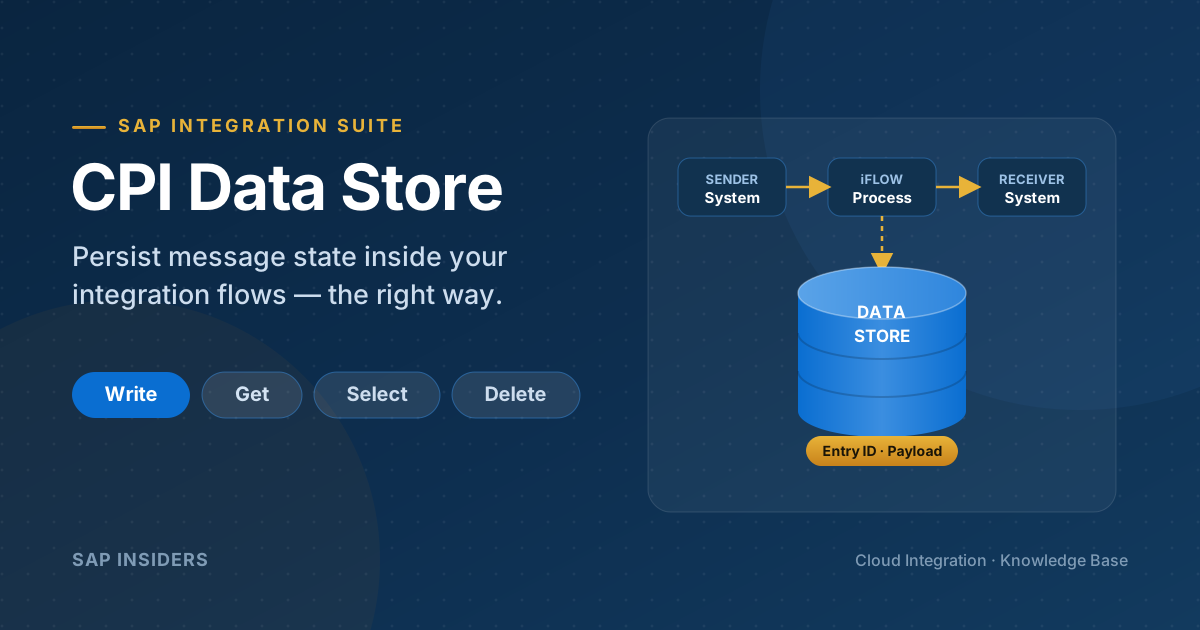
In SAP Cloud Integration (CPI), part of SAP Integration Suite, the Data Store is the built-in mechanism for persisting message data — temporarily or for a defined retention window — inside an integration flow. It is one of the most useful and most misused capabilities on the platform. Used well, it gives you idempotency, decoupling and replay for free. Used badly, it quietly becomes an unmanaged database that bloats your tenant and triggers payload-storage alerts.
This guide is the practitioner's reference: what the Data Store actually is, every operation and parameter, the patterns that matter (duplicate check, async hand-off, retry), how transactions and retention behave, the real limits, and the discipline that keeps it healthy.
The one-line mental model: the Data Store is for integration-state management — not a business database. Persist just enough to make a flow correct and resilient, then let retention clean it up.
What the Data Store Is (and Is Not)
A Data Store is a named, key-value collection of message entries that lives in your tenant's database (the same persistence layer that backs message processing). Each entry is identified by an Entry ID and holds a payload (and, optionally, the message headers). Entries have a lifetime governed by an expiration period, after which the platform's housekeeping job removes them automatically.
| It is good for… | It is not a substitute for… |
|---|---|
| Short-lived integration state (minutes to days) | A relational/business database |
| Idempotency keys for duplicate detection | High-volume transactional storage |
| Async hand-off between iFlows | Large-payload archiving |
| Holding messages for batch/scheduled processing | A queue with guaranteed ordering (use JMS for that) |
| Audit snapshots of a business payload | Long-term records of truth (use HANA, SFTP, Object Store) |
Typical use cases
| Use Case | Example |
|---|---|
| Store message payload | Save a request/response for later processing |
| Duplicate check | Store a document ID and check whether it was already processed |
| Retry handling | Park failed messages and reprocess them on a schedule |
| Async processing | Write data in one iFlow and read it in another |
| Audit / logging | Keep a business-payload snapshot for traceability |
How It Works Under the Hood
When a Write step executes, CPI serializes the current message body (and optionally the headers) and inserts a row into the tenant database, keyed by Data Store Name + Entry ID + Visibility. Read operations (Get, Select) deserialize entries back onto the message channel. Because these operations are database operations, they participate in the iFlow's transaction handler — so a rollback can undo a Write, and a committed transaction makes the entry durable.
Two properties shape almost every design decision:
- Visibility — whether the store is private to one iFlow or shared across the whole tenant.
- Expiration — how long the entry survives before automatic cleanup.
Get those two right and most Data Store designs fall into place.
The Operations
The Data Store palette in the iFlow editor exposes four operations. Together they cover the full lifecycle of an entry.
| Operation | Purpose |
|---|---|
| Write | Persist the current message into the store under an Entry ID |
| Get | Read a single entry by its Entry ID |
| Select | Read multiple entries (a batch) from the store |
| Delete | Remove a specific entry by Entry ID |
There is no dedicated "Delete All" step. To clear a store in bulk, delete its entries in the Monitor → Manage Stores → Data Stores view, or rely on the expiration/retention job. In a flow, you bulk-process with Select (using Delete on Completion) rather than a single mass-delete call.
Write
Write is the workhorse. Its key parameters:
| Parameter | What it controls |
|---|---|
| Data Store Name | The logical store. Follow a naming convention (see below). |
| Visibility | Integration Flow (private to this iFlow) or Global (shared tenant-wide). |
| Entry ID | The unique key. Leave blank to auto-generate a UUID; set it explicitly for deterministic keys. |
| Retention Threshold for Alerting (in d) | When the entry becomes "overdue" and surfaces in monitoring/alerting. |
| Expiration Period (in d) | How long before housekeeping deletes the entry. Defaults apply if left empty. |
| Encrypt Stored Message | Encrypts the payload at rest in the data store. |
| Overwrite Existing Message | If enabled, an existing entry with the same ID is replaced; if disabled, a duplicate ID raises an exception. |
| Include Message Headers | Persists the message headers alongside the body so they can be restored on read. |
The Overwrite Existing Message flag is subtly powerful. Leave it unchecked and a second Write with the same Entry ID will throw — which is itself a cheap duplicate guard you can catch in an exception subprocess. Leave it checked for upsert-style "latest wins" semantics.
Get
Get reads exactly one entry by Entry ID and places it on the message channel.
| Parameter | What it controls |
|---|---|
| Data Store Name / Visibility / Entry ID | Which entry to read. |
| Delete on Completion | If enabled, the entry is removed once the flow step completes successfully. |
If the entry does not exist, the message body comes back empty/null — which is the basis of the duplicate-check pattern. If the entry was written with Include Message Headers, you can restore those headers after the Get.
Select
Select reads a batch of entries — ideal for scheduled "drain the store" flows.
| Parameter | What it controls |
|---|---|
| Data Store Name / Visibility | Which store to read from. |
| Number of Polls / page size | How many entries to pull per execution. |
| Delete on Completion | Whether to remove the read entries after successful processing. |
Select returns an aggregated XML envelope wrapping each entry, which you typically iterate with a Splitter:
<?xml version="1.0" encoding="UTF-8"?>
<messages>
  <message id="INV-1000-DE-2026">
    <!-- original stored payload for this entry -->
  </message>
  <message id="INV-1001-DE-2026">
    <!-- ... -->
  </message>
</messages>
A General Splitter on /messages/message turns each persisted entry back into an individual message you can map and route.
Delete
Delete removes one entry by Entry ID — use it for explicit cleanup once downstream processing is confirmed, rather than relying solely on expiration.
Key Concepts at a Glance
| Field | Meaning |
|---|---|
| Data Store Name | Logical storage name (scoped by visibility) |
| Entry ID | Unique key for the stored record |
| Payload | The actual stored content (the message body) |
| Headers / Properties | Optionally stored when Include Message Headers is enabled |
| Visibility | Integration Flow (private) or Global (tenant-wide) |
| Expiration | Time after which the entry is auto-deleted |
Pattern 1 — Duplicate Check (Idempotent Processing)
The classic. You receive an invoice and must guarantee it is processed exactly once, even if the sender retries.
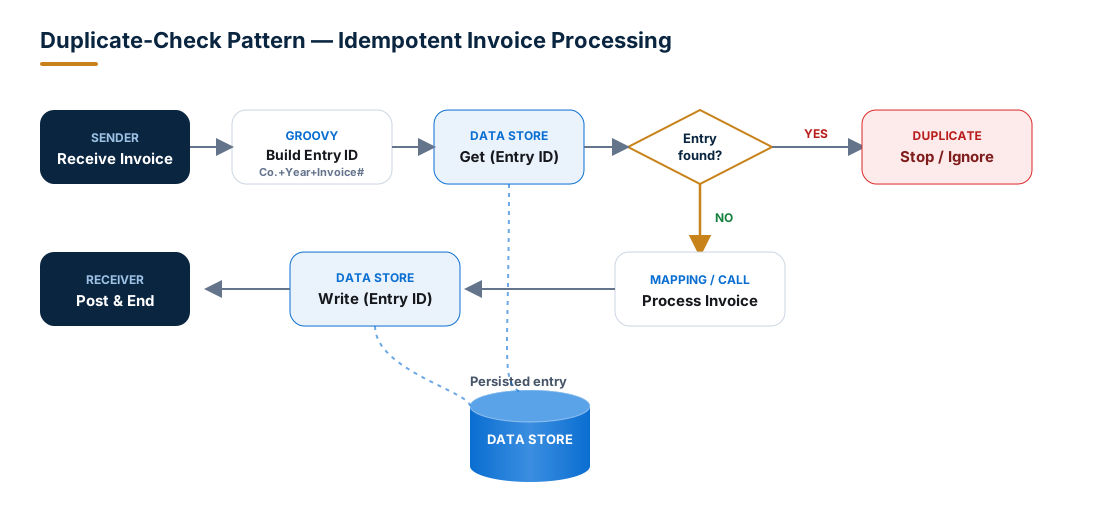
Flow logic:
- Receive the invoice.
- Build a deterministic Entry ID from business keys (Groovy).
- Get from the Data Store using that Entry ID.
- Router — if an entry came back, it's a duplicate → Stop/Ignore. If the body is empty → it's new.
- Process the invoice (map, call the receiver).
- Write the Entry ID back to the Data Store.
Building a deterministic Entry ID
Never key on a single field. Combine the fields that actually make a document unique:
import com.sap.gateway.ip.core.customdev.util.Message

def Message processData(Message message) {
    def body = message.getBody(java.lang.String)
    def inv  = new XmlSlurper().parseText(body)

    // Compose a stable, collision-resistant key
    def entryId = "${inv.CompanyCode.text()}-" +
                  "${inv.FiscalYear.text()}-"  +
                  "${inv.InvoiceNumber.text()}"

    message.setHeader("DSEntryId", entryId.toString())
    return message
}
Then set the Entry ID of both the Get and Write steps to ${header.DSEntryId}.
The router condition
After the Get step, branch on whether a body was returned:
Route "Duplicate"  →  ${in.body} is not null and not empty   → End / Stop
Route "New"        →  default                                 → Process + Write
Tip: for very simple cases you can skip the Get entirely — set Overwrite Existing Message = false on the Write and catch the resulting exception in an Exception Subprocess. It's terser, but the Get-then-Route version is far easier to read and to monitor.
Pattern 2 — Asynchronous iFlow-to-iFlow Hand-off
Decouple a fast producer from a slower consumer. iFlow A writes to a Global store; iFlow B, on a timer, drains it with Select.
- Producer (iFlow A):
Writewith Visibility = Global, a unique Entry ID, and an expiration that comfortably exceeds the consumer's polling interval. - Consumer (iFlow B): a Timer/Scheduler start event →
Select(page size N, Delete on Completion = true) → Splitter on/messages/message→ map → send.
This gives you a lightweight, store-backed buffer between flows without standing up JMS queues. Use it when ordering is not critical and volumes are modest. When you need guaranteed FIFO ordering, retries with exponential backoff, and high throughput, reach for JMS instead.
Pattern 3 — Retry / Reprocessing Park
Catch failures, park the payload, and retry later from a scheduled flow.
- In the main iFlow's Exception Subprocess,
Writethe failed payload to aDS_<iFace>_Retrystore with Include Message Headers enabled (so you can rebuild context). - A scheduled retry iFlow does a
Selectover that store, attempts the downstream call again, and on success uses Delete on Completion to clear the entry. - Cap the attempts: stamp a
RetryCountheader into the persisted headers and route exhausted entries to a dead-letter store or an alert.
Transactions and Error Handling
Data Store operations are transactional. Configure the integration process's Transaction Handling to Required for JDBC when a Write must be atomic with the rest of the step. On a rollback, the Write is undone — you won't be left with a half-committed entry.
Common runtime behaviours to design around:
- Writing a duplicate ID with overwrite disabled → raises an exception. Handle it deliberately (treat as "already processed").
- Getting a non-existent entry → returns an empty body, not an error. Route on emptiness.
- Select on an empty store → returns an empty
<messages/>envelope; guard your splitter for the zero-row case. - Encrypted entries can only be read back by a step configured to read that store; plan key/usage consistency.
Retention, Expiration and Housekeeping
Every entry has an Expiration Period. A platform housekeeping job runs periodically and deletes entries past their expiration — this is your primary cleanup mechanism, so set expirations deliberately rather than leaving everything on the default.
| Setting | Guidance |
|---|---|
| Expiration Period (in d) | Set to the shortest window that satisfies the use case. Dedup keys often need only days; async buffers only hours. |
| Retention Threshold for Alerting (in d) | Set below expiration so "stuck" entries surface in monitoring before they silently expire. |
| Explicit Delete / Delete on Completion | Prefer active deletion once processing is confirmed — don't lean on expiration as your only cleanup. |
If you never delete and never set sensible expirations, the store grows unbounded and eventually trips tenant payload-storage thresholds. That is the single most common Data Store incident in production.
Limits and Sizing
Treat the Data Store as small and short-lived. Exact ceilings depend on your tenant tier and can change, so always confirm against current SAP documentation and your tenant's monitoring — but the design rules are constant:
| Dimension | Practical guidance |
|---|---|
| Per-entry payload size | Keep entries small. Persist keys, references and compact payloads — not multi-megabyte documents. |
| Number of entries | Bounded by tenant storage; drain and expire aggressively. High cardinality is a smell. |
| Total store / tenant storage | Shared across the tenant — one runaway store can affect everything. Monitor it. |
| Throughput | Each operation is a DB round-trip; it is not a high-TPS cache. |
If you find yourself fighting these limits, that is the signal to externalize: push to SAP HANA, an SFTP server, Object Store, or a backend SAP table.
Monitoring Data Stores
Operate the store, don't just write to it. In Monitor → Manage Stores → Data Stores you can:
- See every store, its entry count, and overdue entries (those past the alerting threshold).
- Drill into individual entries, download payloads for troubleshooting, and delete entries manually.
- Spot stores that are growing when they should be draining — the early warning for a cleanup bug.
Wire the overdue count into your alerting. A store that should hover near zero but is steadily climbing means your consumer or delete logic has stalled.
Data Store vs. the Alternatives
Choosing the right persistence primitive is half the battle.
| Capability | Data Store | Variables (Global/Local) | JMS Queue | Number Range | External DB / Object Store |
|---|---|---|---|---|---|
| Stores full payloads | Yes | No (small values) | Yes (as messages) | No (counters) | Yes |
| Keyed random access (by ID) | Yes | Yes (by name) | No | No | Yes |
| Batch read | Yes (Select) | No | Yes (consume) | No | Yes |
| Guaranteed ordering / retry semantics | No | No | Yes | No | Depends |
| Cross-iFlow sharing | Yes (Global) | Yes (Global) | Yes | Yes | Yes |
| Best for | Integration state, dedup, async buffer | Small flags/counters/state | Reliable queueing & retry | Sequential numbering | Volume & long-term storage |
Best Practices
- Always use a unique, deterministic Entry ID. Compose it from real business keys, e.g.
InvoiceNumber + CompanyCode + FiscalYear. Random IDs defeat duplicate detection. - Don't store huge payloads. The Data Store is not a database. Persist references and compact data; keep large documents in HANA, SFTP or Object Store.
- Clean up actively. Combine explicit Delete / Delete on Completion with sensible expiration — never rely on one alone.
- Use a naming convention.
DS_<InterfaceName>_<Purpose>(e.g.DS_InvoiceInbound_Dedup) makes monitoring and ownership obvious. - Be deliberate about visibility. Use
Integration Flowby default; switch toGlobalonly when another iFlow genuinely needs the data. - Avoid sensitive data unless required — and when it is required, enable Encrypt Stored Message. The store is persistent; treat it accordingly.
- Make operations transactional (
Required for JDBC) when a Write must be atomic with the surrounding step. - Monitor overdue counts and alert on stores that grow when they should drain.
Common pitfalls
- Single-field Entry IDs that collide across company codes or years.
- No expiration set, so the store grows until it trips storage alerts.
- Forgetting Include Message Headers, then being unable to rebuild context on read.
- Treating Select as ordered — it is not a FIFO queue.
- Using Global visibility everywhere, creating accidental cross-iFlow coupling.
Strong Opinion
Use the CPI Data Store for integration-state management — not as a business database. It exists to make flows correct and resilient: idempotency, decoupling, short-lived buffering, replay. The moment you're tempted to keep data "just in case," or for weeks, or in megabytes, that's your cue to push it to HANA DB, SFTP, an Object Store, or a backend SAP table. Keep the Data Store small, keyed, and short-lived, and it will never be the thing that pages you at 3 a.m.
Summary & Key Takeaways
- The Data Store persists message data inside an integration flow, keyed by Entry ID and scoped by Visibility.
- Four operations cover the lifecycle: Write, Get, Select, Delete — with Delete on Completion and Overwrite Existing as the flags that shape behaviour.
- The headline patterns are duplicate check, async iFlow-to-iFlow hand-off, and retry parking.
- Operations are transactional; a non-existent Get returns empty (not an error) — the foundation of dedup.
- Retention + active deletion + monitoring keep your tenant healthy; unmanaged stores are the #1 incident.
- For volume, ordering, or long-term storage, choose JMS, HANA, SFTP or Object Store instead.
Treat it as integration plumbing — precise, minimal, and self-cleaning — and the Data Store becomes one of the most dependable tools in your SAP Integration Suite toolkit.