Vajra Precision Tools. Their MES pushes planned orders to S/4HANA Cloud every time a production slot is confirmed. At 09:47 on a Tuesday, three requests fail back-to-back. The error logs show two different HTTP codes: a 401 on the first request, then 403 on the second and third.
A developer who treats OAuth2 and CSRF as "the same kind of thing you put in the pre-request script" will spend an hour debugging this. A developer who understands they are different tokens solving different problems will fix it in ten minutes.
Here is the difference.
What each token actually does
OAuth2 access token — proves who the integration is. Vajra's middleware authenticates itself to SAP's identity provider using a client ID and client secret (client-credentials grant — no user login involved).
The actual token request:
POST https://<tenant>.authentication.eu10.hana.ondemand.com/oauth/token
Content-Type: application/x-www-form-urlencoded

grant_type=client_credentials
&client_id=sb-vajra-mes-integration!t12345
&client_secret=<secret>
Response:
{
  "access_token": "eyJhbGciOiJSUzI1NiIsInR5cCI6IkpXVCJ9...",
  "token_type": "bearer",
  "expires_in": 3599
}
Every outbound request then carries:
Authorization: Bearer eyJhbGciOiJSUzI1NiIsInR5cCI6IkpXVCJ9...
SAP Gateway validates this token on arrival. Expired or missing → 401 Unauthorized.
CSRF token — proves the request came through a legitimate OData session. This has nothing to do with identity. You fetch it with a GET to any safe OData endpoint:
GET https://<s4-host>/sap/opu/odata4/sap/api_plannedorder/srvd_a2x/sap/plannedorder/0001/$metadata
Authorization: Bearer eyJhbGciOiJSUzI1NiIsInR5cCI6IkpXVCJ9...
x-csrf-token: fetch
Response headers (the data in the body doesn't matter — you want the headers):
200 OK
x-csrf-token: A1B2C3D4E5F6...
Set-Cookie: sap-usercontext=sap-client=100; path=/
Store both the x-csrf-token value and the session cookie. Every state-changing call must carry both:
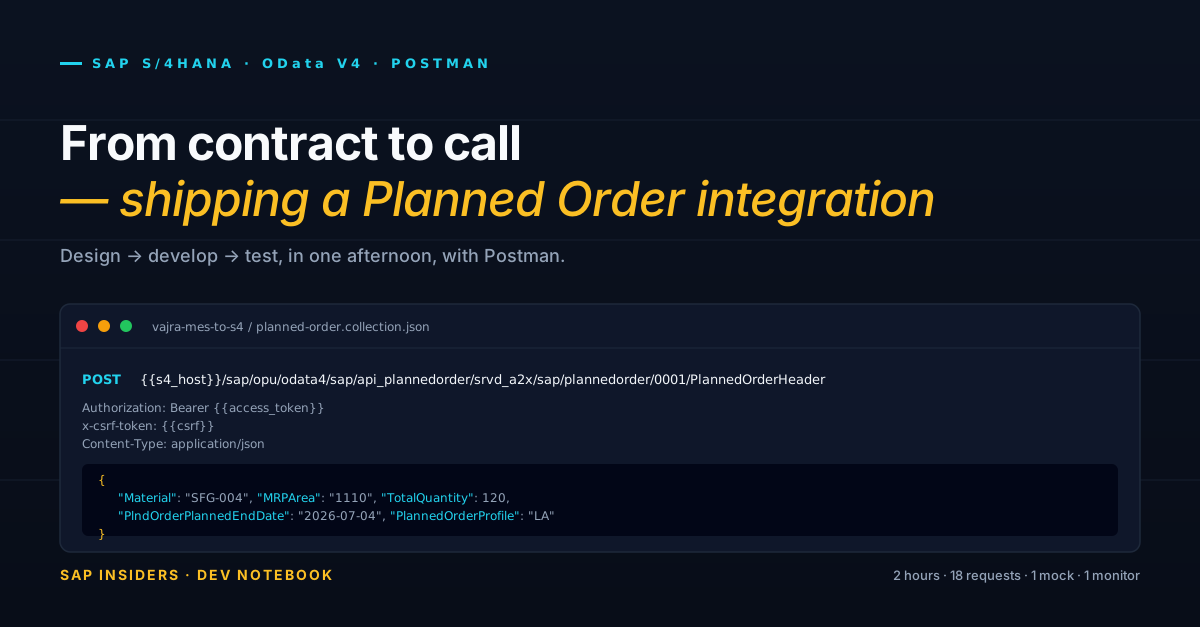
POST .../PlannedOrderHeader
Authorization: Bearer eyJhbGciOiJSUzI1NiIsInR5cCI6IkpXVCJ9...
x-csrf-token: A1B2C3D4E5F6...
Cookie: sap-usercontext=sap-client=100
Content-Type: application/json
Missing or stale CSRF token → 403 Forbidden.
The 401 and the 403 are telling you completely different things. Do not treat them the same way.
Three tokens, three clocks
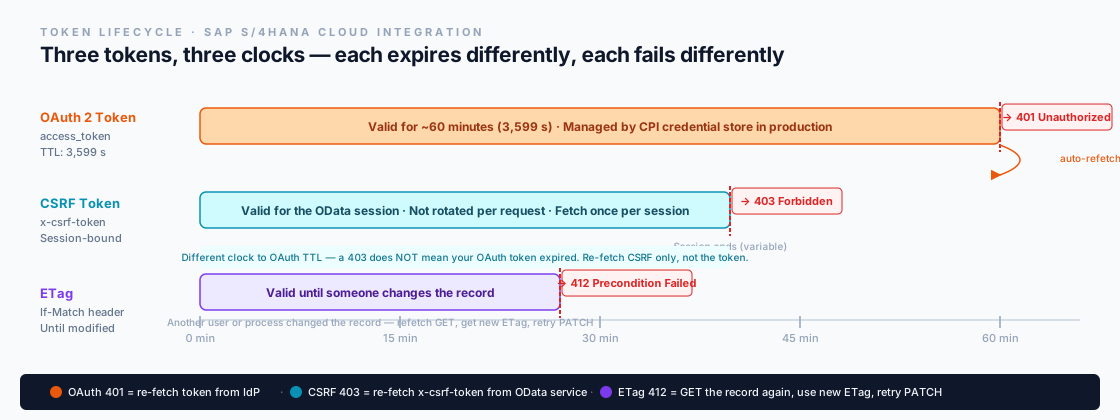
The timeline shows the core problem. The OAuth TTL is fixed at 3,599 seconds (just under 60 minutes). The CSRF token has no fixed TTL — it lives and dies with the OData session, which the server can end for reasons unrelated to time (idle timeout, server restart, session limit). The ETag is not time-based at all — it changes the moment someone else modifies the same planned order.
Three expiry events, three different triggers, three different recovery steps. If you handle all three with the same "just retry" logic, you will sometimes fix the wrong problem.
How SAP CPI changes the picture
When you build the Vajra MES integration using SAP CPI (Cloud Integration) rather than custom middleware:
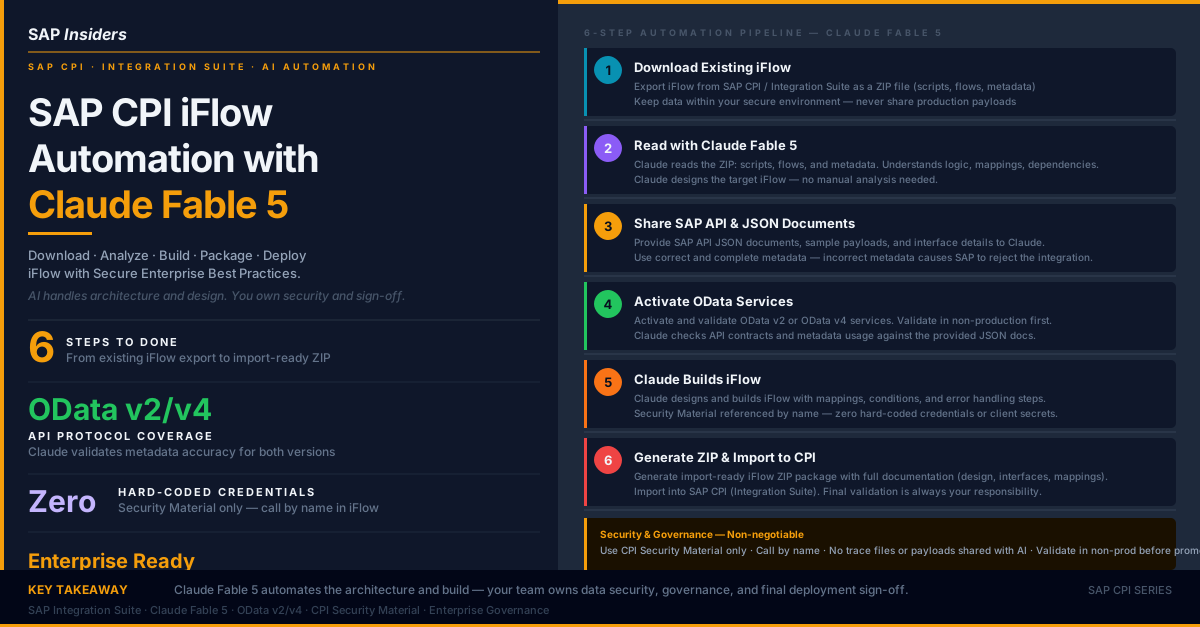
OAuth lifecycle — CPI handles it. You configure the service credential in the CPI credential store. CPI fetches the token on the first outbound call, caches it, and requests a new one automatically when it detects expiry (or gets a 401 back). You write no token-refresh code. This is genuinely better than hand-rolling it in a Postman pre-request script or a Node.js integration service.
CSRF lifecycle — still your responsibility. CPI does not manage CSRF automatically. In your iFlow, you need an explicit HTTP sender step before every write that fetches the CSRF token via a GET to $metadata with x-csrf-token: fetch, extracts the token from the response header, and carries it into the POST/PATCH/DELETE call. If you skip this step, every write operation returns 403.
This asymmetry trips up most first-time CPI integrations. The OAuth just works. The CSRF doesn't, and it fails silently if the iFlow is not built to check for it.
What a 401 means vs what a 403 means
| Response | Token | Root cause | Recovery |
|---|---|---|---|
401 Unauthorized | OAuth | Token expired or wrong client_id/client_secret | Re-fetch token from IdP (/oauth/token) |
403 Forbidden | CSRF | Token missing, stale, or session ended | Re-fetch CSRF via GET $metadata?x-csrf-token=fetch |
412 Precondition Failed | ETag | Record changed since you last read it | GET the record, read new ETag, retry PATCH |
The recovery endpoint is completely different in each case. A 401 calls the identity provider. A 403 calls the OData service itself. A 412 calls the same OData entity you were trying to update. Routing the retry to the wrong endpoint wastes a round trip and sometimes makes the problem worse (a CSRF re-fetch doesn't help a 401; a token re-fetch doesn't help a 403).
The attack nobody shows you — CSRF against the OAuth2 flow itself
Everything above is about CSRF protecting OData writes. There is a second, more serious problem: CSRF can be used to attack the OAuth2 authorization flow itself.
This only applies to the Authorization Code grant — the flow where a human user logs in and approves access (used for user-facing apps, Fiori, portal integrations). It does not apply to Client Credentials (the server-to-server flow Vajra uses). But if you build or maintain any SAP BTP app with user login, you need to understand this.
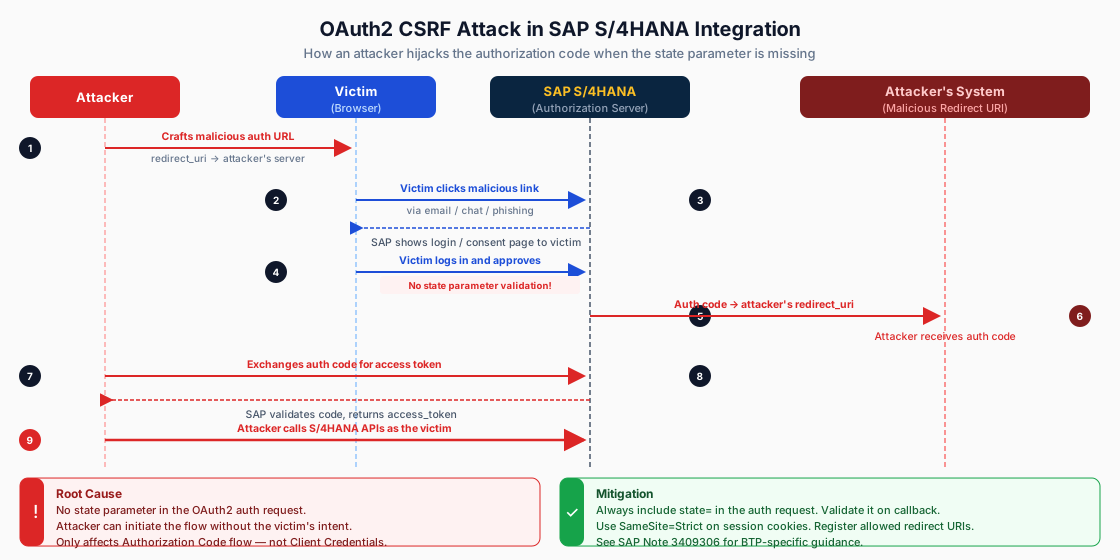
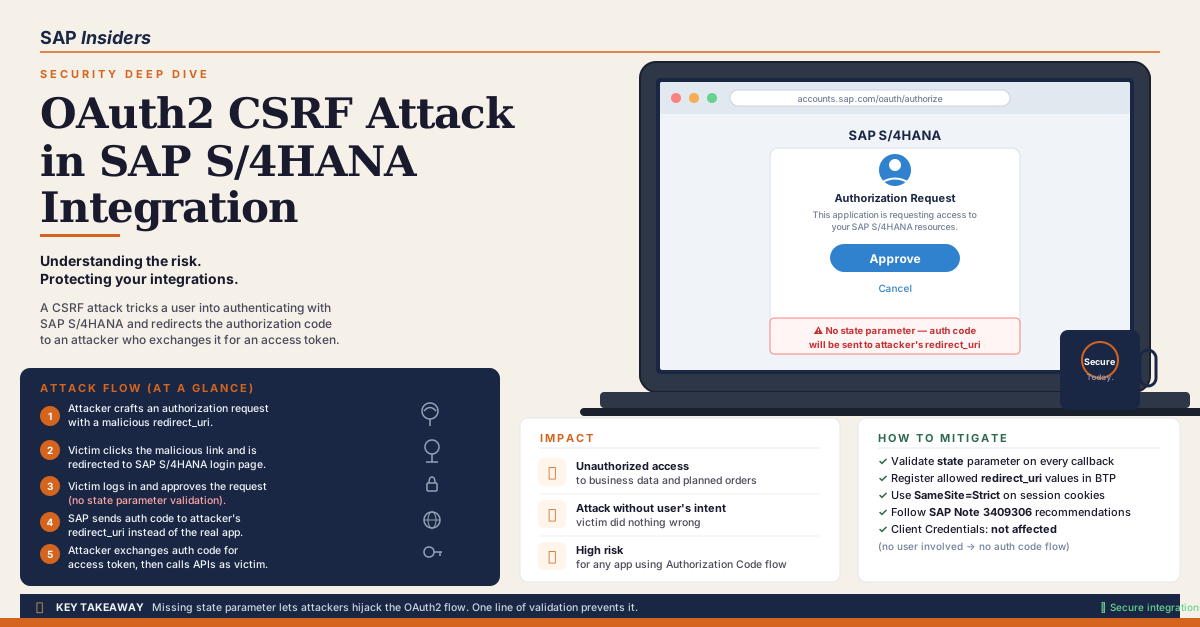
The attack in plain language. An attacker crafts an OAuth2 authorization URL that points the redirect_uri at the attacker's own server. They send that URL to a victim (phishing email, chat link, embedded iframe). The victim clicks it, sees the legitimate SAP login page, enters their credentials, and approves access — because the consent screen looks real. SAP then sends the authorization code to the attacker's redirect_uri. The attacker exchanges that code for an access token and now calls S/4HANA APIs as the victim.
The victim did nothing wrong. They logged in to a real SAP page. The flaw is that the authorization request had no state parameter — so nothing proves the flow was initiated by the legitimate app.
The fix: the state parameter. When your app starts an OAuth2 Authorization Code flow, it must include a state value in the authorization URL:
GET https://<tenant>.authentication.eu10.hana.ondemand.com/oauth/authorize
  ?response_type=code
  &client_id=vajra-portal
  &redirect_uri=https://vajra-portal.example.com/callback
  &scope=PlannedOrder.Read
  &state=a7f3k9p2m1   ← random, stored server-side
When SAP redirects back to your redirect_uri after the user approves, the state value comes back in the query string. Your app must check that it matches what was stored. If it doesn't match — or if state is missing — reject the callback immediately. An attacker who initiates the flow from outside your app will not know your state value and cannot forge a valid callback.
GET /callback?code=AUTH_CODE_HERE&state=a7f3k9p2m1
// In your callback handler
const returnedState = req.query.state;
const expectedState = session.oauthState;   // stored when you started the flow

if (!returnedState || returnedState !== expectedState) {
    return res.status(403).send("State mismatch — possible CSRF attack");
}

// Only proceed to token exchange if state is valid
const tokenResponse = await exchangeCodeForToken(req.query.code);
Three additional controls that work together with state:
- Registered redirect URIs only. In SAP BTP OAuth configuration, whitelist exactly which
redirect_urivalues are allowed. SAP will refuse any authorization request that specifies an unregistered redirect_uri. - SameSite=Strict on session cookies. Prevents the session cookie from being sent on cross-origin requests, which stops a second class of CSRF attacks against your own app's endpoints.
- Short-lived authorization codes. SAP's authorization codes expire in 30 seconds. An attacker who intercepts a code has a narrow window to exchange it before it expires.
Scope check. If your Vajra integration uses only Client Credentials (service-to-service, no user login) this attack does not apply. Client Credentials has no redirect URI and no user consent step. The risk is specific to Authorization Code flows — Fiori apps, customer portals, any SAP BTP app that logs in a named user.
The Tuesday incident, explained
Back to Vajra's 09:47 failure. The three requests that failed:
401on the first POST — the OAuth token fetched at 09:00 expired at 09:59:59. But the MES burst of 30 planned orders started at 09:47, which was still within the 60-minute window. Why a 401? The token was fetched at startup of the integration service, not at first use. The service had been running since 09:00 but was restarted at 09:45 and re-fetched the token. The new token started its clock at 09:45. The burst at 09:47 went fine. Then at 10:45 the token expired and the next burst produced401— logged at 10:45:XX but the developer was looking at the 09:47 log window.403on requests two and three — fixing the 401 by refetching the token (without also refetching the CSRF token) left a stale CSRF token in place. The session had ended when the service restarted at 09:45. The CSRF token from before the restart was no longer valid. Every write with the old CSRF token returns403regardless of whether the OAuth token is fresh.
Fix sequence: refetch CSRF first (new session), then refetch OAuth token if needed, then retry the POST. The order matters because the CSRF fetch itself needs a valid OAuth token.
Working Postman pre-request script
In Postman you handle both in the collection-level pre-request script. The key is keeping the two refreshes separate so a 403 doesn't cause you to throw away a perfectly good OAuth token:
// ── Step 1: OAuth token (refresh if older than 50 minutes) ──────────────
const tokenFetchedAt = pm.collectionVariables.get("token_fetched_at");
const tokenAge = Date.now() - Number(tokenFetchedAt || 0);
const FIFTY_MINUTES = 50 * 60 * 1000;

if (!tokenFetchedAt || tokenAge > FIFTY_MINUTES) {
    const tokenResp = pm.sendRequest({
        url:    pm.collectionVariables.get("token_url"),
        method: "POST",
        header: { "Content-Type": "application/x-www-form-urlencoded" },
        body: {
            mode: "urlencoded",
            urlencoded: [
                { key: "grant_type",    value: "client_credentials" },
                { key: "client_id",     value: pm.collectionVariables.get("client_id") },
                { key: "client_secret", value: pm.collectionVariables.get("client_secret") }
            ]
        }
    }, (err, resp) => {
        pm.collectionVariables.set("access_token",    resp.json().access_token);
        pm.collectionVariables.set("token_fetched_at", String(Date.now()));
    });
}

// ── Step 2: CSRF token (refresh if not set or explicitly cleared) ────────
// CSRF is cleared by the test script whenever a 403 comes back (see below).
const csrf = pm.collectionVariables.get("csrf_token");

if (!csrf) {
    pm.sendRequest({
        url:    pm.collectionVariables.get("s4_host")
              + "/sap/opu/odata4/sap/api_plannedorder/srvd_a2x/sap/plannedorder/0001/$metadata",
        method: "GET",
        header: {
            "Authorization": "Bearer " + pm.collectionVariables.get("access_token"),
            "x-csrf-token":  "fetch"
        }
    }, (err, resp) => {
        pm.collectionVariables.set("csrf_token", resp.headers.get("x-csrf-token"));
    });
}
Then in the test tab of every POST/PATCH/DELETE request, clear the CSRF token if a 403 comes back — so the next request's pre-script re-fetches it:
// In the Tests tab of every write request
if (pm.response.code === 403) {
    pm.collectionVariables.unset("csrf_token");
    pm.test("403 Forbidden — CSRF cleared, re-run this request", () => {
        pm.expect(pm.response.code).to.equal(200); // force a visible failure
    });
}

if (pm.response.code === 401) {
    pm.collectionVariables.unset("access_token");
    pm.collectionVariables.unset("token_fetched_at");
    pm.test("401 Unauthorized — OAuth token cleared, re-run this request", () => {
        pm.expect(pm.response.code).to.equal(200);
    });
}

if (pm.response.code === 412) {
    // ETag is stale — the test script for GET already captured the new one
    pm.test("412 Precondition Failed — GET the record first, then retry PATCH", () => {
        pm.expect(pm.response.code).to.equal(200);
    });
}
The pattern: each token lives in its own collection variable. Each failure clears only the variable for that token. The next request's pre-script re-fetches only what's missing.
In Postman vs in production
In Postman you handle both in a pre-request script because Postman has no credential store and no session management. That is a valid testing approach. Do not carry the "one script does everything" mental model into production middleware design.
In SAP CPI:
- OAuth token → configure the OAuth2 Client Credentials credential in Security Material. Set it on the OData receiver channel. CPI refreshes automatically.
- CSRF token → add a dedicated HTTP call step before every write operation. Use a Request-Reply step to GET
$metadatawithx-csrf-token: fetch. Extract the response header with an XSLT or Content Modifier step. Pass it as a header into the POST/PATCH step. - ETag → add a GET step before every PATCH. Read the
ETagresponse header. Map it to theIf-Matchheader on the subsequent PATCH request.
Each concern in its own iFlow step, with its own error handler. That is the design that holds up at 80 requests per day and at 80 requests per minute during a shift burst.
Reference: SAP Cloud Integration documentation — OAuth 2.0 Client Credentials, OData Receiver adapter CSRF handling. SAP Help Portal, S/4HANA Cloud 2602. © SAP SE. Narrative and integration examples by SAP Insiders.