Vajra Precision Tools, Pune. Their CNC machining line runs two shifts. Every morning, the production planner finalises the shop-floor schedule in the MES — which operations run on which machines, in which slots, with which materials. Until three months ago, that schedule had to be re-keyed into S/4HANA Cloud manually: MD11 for each planned order, one at a time. Forty-five minutes every morning, three data-entry errors per week on average.
The fix: MES emits a planned-order.create event for each confirmed slot. A lightweight middleware picks it up and POSTs to S/4HANA Cloud. The planner stops touching S/4 for this step entirely.
Here is how that integration was built — from reading the API contract to a Postman collection that tests itself.
The brief, in five lines
- Trigger: MES confirms a production slot and emits
planned-order.create. - Outcome: a planned order exists in S/4HANA Cloud for plant 1110, with the correct production version, quantity, and schedule dates.
- Volume: ~80 events/day, bursts to 30/minute at shift-start.
- Window: 30-second retry budget; after that the MES queues for the next batch.
- Auth: existing communication user, OAuth 2 client-credentials.
That is the entire design brief. Everything else came from the API contract.
Design phase — read the contract before you open Postman
The single most useful 20 minutes you'll spend on any S/4HANA Cloud integration: open the API on Business Accelerator Hub, read the entities, read the operations, read the constraints. Three questions to answer before you write a single URL:
- Which entity holds what you want to write? For us:
PlannedOrderHeader(the production order proposal) andPlannedOrderComponent(the components, used when MES knows the exact BOM without triggering a BOM explosion). - What's mandatory in the request body? For "Create without account assignment" —
Material,MRPArea,TotalQuantity, and at least one ofPlndOrderPlannedStartDate/PlndOrderPlannedEndDate/PlannedOrderOpeningDate. - What do the constraint warnings actually cost you? Two that matter for a manufacturing MES: Variant Configuration is not supported and automatic integration to PP/DS is not enabled. Either of those would have killed scope in week two.
The endpoint pattern:
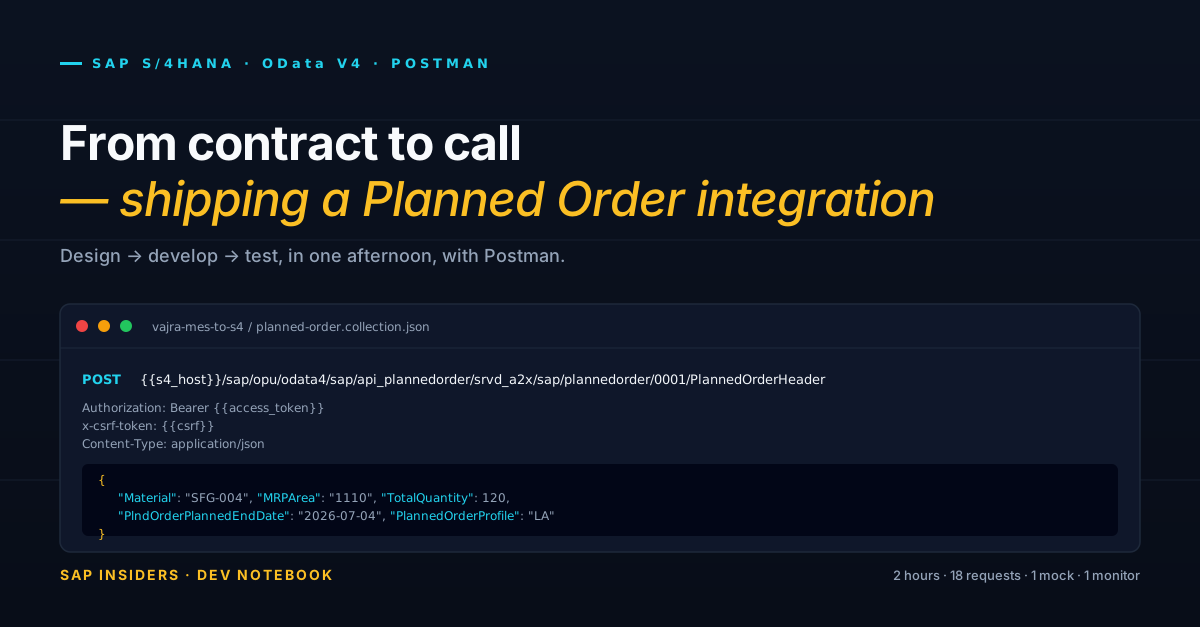
<host>/sap/opu/odata4/sap/api_plannedorder/srvd_a2x/sap/plannedorder/0001/PlannedOrderHeader
Bookmark it. You will type variations of this URL forty times.
Two ceremonies before the real call
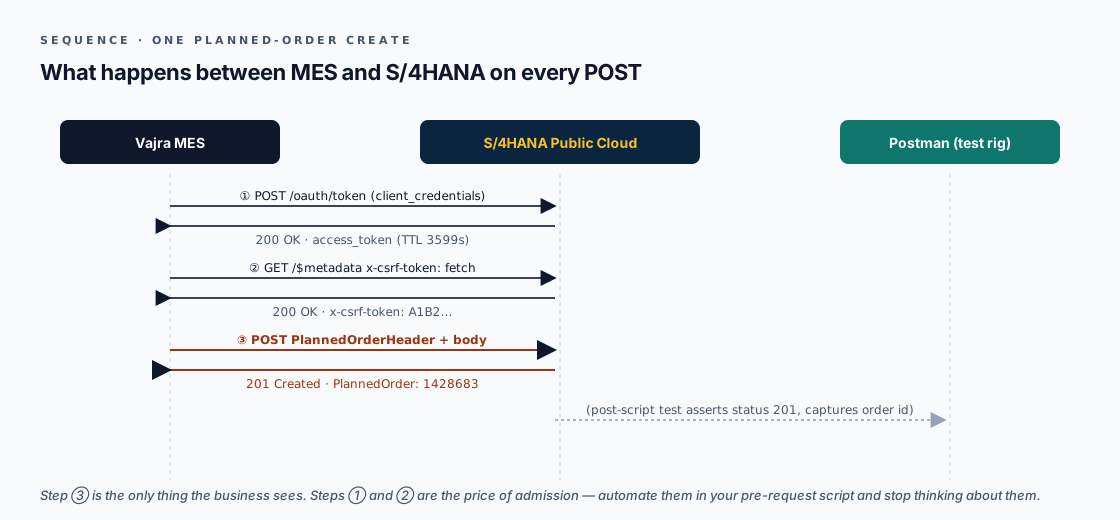
Two things you do on every S/4HANA Cloud OData write — but they are not the same kind of thing:
OAuth 2 token — authentication layer. Client-credentials flow against the tenant's token endpoint. Returns an access_token with TTL 3599 seconds. This proves who you are. In a production runtime like SAP Cloud Integration, the platform manages the token lifecycle for you — it fetches, caches, and silently refreshes on expiry. In Postman you handle it manually in a pre-request script. Failure here returns 401 Unauthorized.
CSRF token — session integrity guard. S/4HANA's OData layer requires an x-csrf-token header on every POST, PATCH, and DELETE. This is not about identity — it guards against cross-site request forgery by proving the request came through an active, legitimate OData session. You fetch it with a GET to any safe endpoint carrying x-csrf-token: fetch; the response header contains the real token, and you reuse it for the life of that session. It does not rotate per request. It expires when the session ends — which is a different clock to the OAuth TTL. Failure here returns 403 Forbidden.
In Postman, both live in the pre-request script on the collection root because that is the only place to automate them. In a production iFlow or middleware, you configure them in separate steps with separate error handling — a 401 triggers an OAuth retry on a different endpoint; a 403 triggers a new CSRF fetch on the same OData service. They fail differently, they recover differently, and conflating them costs you debugging time.
What happens inside SAP when you POST
Most Postman tutorials stop at the HTTP boundary. But if something fails — a 400, a silent error in sap-messages, a slow response — you need to know which layer to blame. Here are the four layers your POST travels through before a planned order number comes back.
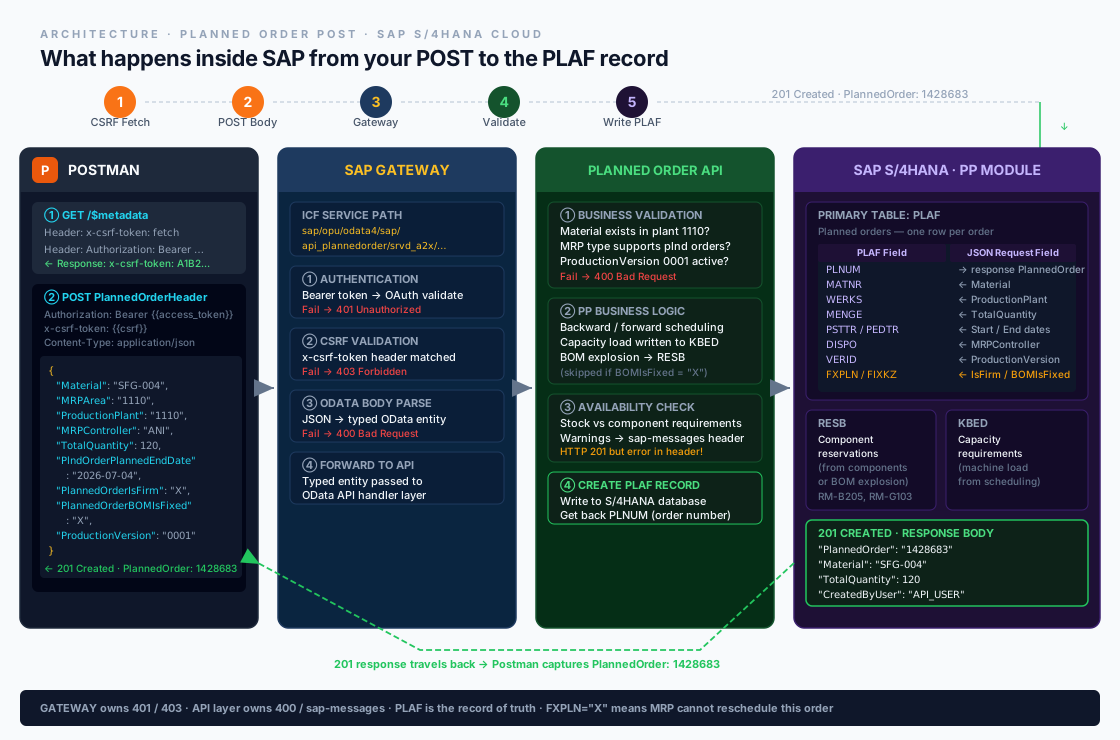
Layer 1 — SAP Gateway. Your request hits the ICF service at sap/opu/odata4/sap/api_plannedorder/srvd_a2x/…. Gateway checks the Bearer token (OAuth validation), checks the x-csrf-token header (fails fast with 403 if missing or stale), then parses the JSON body into a typed OData entity. This is the layer that returns 401 and 403. It knows nothing about production planning.
Layer 2 — Planned Order OData API. The typed entity reaches the API handler, which runs four checks before touching any data:
- Does the material exist in plant 1110 with an MRP type that supports planned orders?
- Is the specified
ProductionVersionactive and assigned to this plant/material combination? - Are the planned dates within the material's planning horizon?
- Does the
MaterialProcurementCategorymatch what the material master allows?
A failure here returns 400 Bad Request with a meaningful message in the body — read it. A warning returns 201 Created with an error-severity entry in the sap-messages response header — which is why you must parse that header on every response.
Layer 3 — PP business logic. If validation passes, the API calls the PP scheduling engine. Dates are confirmed via backward/forward scheduling against the routing. Capacity requirements are written to KBED. If PlannedOrderBOMIsFixed is not set, BOM explosion runs and populates component reservations in RESB. If you send your own components (the deep-body pattern), explosion is skipped and your components land in RESB directly.
Layer 4 — PLAF table. The planned order is written to PLAF (the primary planned order table in S/4HANA). Key fields: PLNUM (the generated order number), MATNR, WERKS, MENGE (quantity), PSTTR/PEDTR (start/end dates), DISPO (MRP controller), VERID (production version), LGORT (storage location), FXPLN (firm flag from PlannedOrderIsFirm), FIXKZ (BOM fixed flag). The PLNUM value is what comes back as PlannedOrder in your 201 response — store it.
Practical implication. If the MES retries on a timeout and the first POST actually wrote to
PLAF, the retry creates a second PLAF record — a genuine duplicate planned order. The API has no built-in idempotency check. See the "Best in principle" section at the bottom for the external number assignment fix.
Develop phase — the full JSON body
A minimum-body request creates a valid planned order. A full-body request creates the right one. Here is what Vajra's MES actually sends:
{
  "Material":                    "SFG-004",
  "MRPArea":                     "1110",
  "ProductionPlant":             "1110",
  "MRPController":               "ANI",
  "TotalQuantity":               120,
  "BaseUnit":                    "PC",
  "PlndOrderPlannedStartDate":   "2026-07-01",
  "PlndOrderPlannedEndDate":     "2026-07-04",
  "PlannedOrderProfile":         "LA",
  "MaterialProcurementCategory": "E",
  "PlannedOrderIsFirm":          "X",
  "PlannedOrderBOMIsFixed":      "X",
  "ProductionVersion":           "0001",
  "StorageLocation":             "1110"
}
What each field is doing and why it matters:
| Field | Value | Why it's here |
|---|---|---|
Material | SFG-004 | Bearing pre-assembly — the output of this production slot |
MRPArea | 1110 | Plant 1110; required, must match ProductionPlant for in-house orders |
ProductionPlant | 1110 | Explicit — never rely on the MRP area default when both are known |
MRPController | ANI | Anitha's controller code; without it, the order lands in the "unassigned" worklist |
TotalQuantity | 120 | Units the slot is scheduled to produce |
BaseUnit | PC | Pieces; matches the material master unit |
PlndOrderPlannedStartDate | 2026-07-01 | When the machine slot starts — MES knows this exactly |
PlndOrderPlannedEndDate | 2026-07-04 | Confirmed end; capacity scheduling uses both |
PlannedOrderProfile | LA | In-house production profile; determines order type and scheduling rule |
MaterialProcurementCategory | E | E = in-house production. If you omit this on a material that also has external procurement, the API can default to F and create a purchase requisition instead of a production order proposal |
PlannedOrderIsFirm | X | The MES has committed this slot to a machine. MRP must not reschedule it |
PlannedOrderBOMIsFixed | X | MES will push its own components (see next section); block automatic BOM re-explosion |
ProductionVersion | 0001 | Which routing and BOM combination to use — critical for plants with multiple production routes |
StorageLocation | 1110 | Where the finished goods land after production confirmation |
PlannedOrderIsFirm and PlannedOrderBOMIsFixed are the two fields most integrations skip on day one and regret on day 30. If MRP runs after the MES pushes an order without firming, MRP will reschedule it. The MES and S/4 then disagree about when things are happening. Firm from the start.
Create with components — skipping BOM explosion
Vajra's MES has the BOM from its own data model. For SFG-004 Bearing Pre-assembly, the MES knows exactly: 120 bearing races (RM-B205) and 240 grease inserts (RM-G103). No need for S/4 to explode the BOM — push the components directly.
{
  "Material":                "SFG-004",
  "MRPArea":                 "1110",
  "ProductionPlant":         "1110",
  "MRPController":           "ANI",
  "TotalQuantity":           120,
  "BaseUnit":                "PC",
  "PlndOrderPlannedStartDate": "2026-07-01",
  "PlndOrderPlannedEndDate": "2026-07-04",
  "PlannedOrderProfile":     "LA",
  "MaterialProcurementCategory": "E",
  "PlannedOrderIsFirm":      "X",
  "PlannedOrderBOMIsFixed":  "X",
  "ProductionVersion":       "0001",
  "StorageLocation":         "1110",
  "_PlannedOrderComponent": [
    {
      "Material":                       "RM-B205",
      "ComponentQuantity":              120,
      "ComponentUnit":                  "PC",
      "ItemNumber":                     "0010",
      "StorageLocation":                "1110",
      "MaterialComponentIsPhantomItem": false
    },
    {
      "Material":                       "RM-G103",
      "ComponentQuantity":              240,
      "ComponentUnit":                  "PC",
      "ItemNumber":                     "0020",
      "StorageLocation":                "1110",
      "MaterialComponentIsPhantomItem": false
    }
  ]
}
The _PlannedOrderComponent navigation property is a deep-body insert. One POST creates both the header and the components atomically. If the component array is malformed, the entire request fails — no partial creates.
Two things that will bite you once: ItemNumber must be a four-character string ("0010", not 10), and MaterialComponentIsPhantomItem must be false for real stockable components — not omitted, not null.
Collection structure
Vajra MES → S/4HANA
├── _setup
│   ├── 1. Get access token            (POST oauth/token)
│   └── 2. Fetch CSRF                  (GET $metadata, x-csrf-token: fetch)
├── Planned Order
│   ├── GET by id                      (GET PlannedOrderHeader('{{id}}'))
│   ├── Create — no components         (POST PlannedOrderHeader, full body)
│   ├── Create — with components       (POST PlannedOrderHeader, deep body)
│   ├── Change quantity                (PATCH PlannedOrderHeader('{{id}}'))
│   └── Delete                         (DELETE PlannedOrderHeader('{{id}}'))
└── _mocks
    └── 201 Created · planned order    (Postman mock URL)
The _setup folder exists only to document the auth chain. In production the pre-request script on the collection root handles it automatically.
Capture the created order number in the test script so the next request (PATCH, DELETE) can consume it:
pm.test("201 Created", () => pm.response.to.have.status(201));

const order = pm.response.json().PlannedOrder;
pm.collectionVariables.set("last_planned_order", order);

pm.test("PlannedOrder is numeric and non-zero", () => {
  pm.expect(Number(order)).to.be.greaterThan(0);
});
ETags — the change request that bites once
The API uses ETags for optimistic concurrency. You cannot PATCH without telling the server which version you're updating. The version comes from an If-Match header:
GET …/PlannedOrderHeader('1428683')
→ 200 OK
  ETag: W/"SADL-020260310080153C~20260310080153"
PATCH …/PlannedOrderHeader('1428683')
If-Match: W/"SADL-020260310080153C~20260310080153"
Content-Type: application/json

{ "TotalQuantity": 144 }
Without If-Match → 412 Precondition Required. With a stale If-Match → 412 Precondition Failed. The second one is your friend — it means somebody changed the record since you read it; refetch and retry. Do not suppress it.
In the test script, capture the ETag from every GET:
const etag = pm.response.headers.get("ETag");
pm.collectionVariables.set("po_etag", etag);
Test phase — environments, assertions, mocks, monitors
Environments. One per system: dev, qa, prod. Each carries s4_host, client_id, client_secret, token_url. Switch in the top-right dropdown. Never put a credential in the request body or a collection variable that gets exported.
Three assertions on every request, minimum:
pm.test("status is 2xx",    () => pm.expect(pm.response.code).to.be.within(200, 299));
pm.test("response is JSON", () => pm.response.to.be.json);
pm.test("under 1500 ms",    () => pm.expect(pm.response.responseTime).to.be.below(1500));
The 1500 ms test caught a real problem: a specific Material value triggered a five-second response because of a missing planning version. No error — just silence and a very slow call.
Mocks. Publish a Postman mock URL that returns canned 201 responses. Point the MES at the mock during week one. The MES team integrated without touching real S/4. When we cut over, only the base URL changed. Three lines in their config.
Monitors. A monitor running the full create flow against dev every 15 minutes tells you the end-to-end path is healthy — not just that the GET endpoint responds, but that auth, CSRF, the POST body, and the ETag PATCH all work together.
Three failure modes we caught before production
1. Token expiry. First script fetched the token once and reused it forever. After 3,599 seconds, every request returned 401 Unauthorized. Fix: check token age in the pre-request script, refetch if older than 50 minutes.
const fetched = pm.collectionVariables.get("token_fetched_at");
const now = Date.now();
if (!fetched || now - Number(fetched) > 50 * 60 * 1000) {
  // …request a new token, store it…
  pm.collectionVariables.set("token_fetched_at", String(now));
}
2. CSRF expiry in long-running monitors. The CSRF token expires with the session. In a monitor that runs auth → CSRF → create → patch → delete, the CSRF was stale by step 4. Fix: fetch CSRF just before each write, not once at collection root.
3. sap-messages carrying errors inside a 200 or 201. When a request succeeds it can still return a sap-messages header with error-severity entries. "Material not maintained for plant" comes back dressed as a 201 Created. Parse it explicitly:
const raw = pm.response.headers.get("sap-messages");
if (raw) {
  const messages = JSON.parse(raw);
  const errors = messages.filter(m => m.severity === "error");
  pm.test("no sap-messages errors", () => pm.expect(errors).to.have.length(0));
}
This one test has caught three silent failures in production that would otherwise have required a planner to manually reconcile the MES against S/4.
Best in principle
If you are building a production integration (not just a Postman demo), five things that pay for themselves:
Idempotency via external number assignment. OData V4 here has no idempotency token. If MES retries on a network blip, you get duplicate planned orders — both valid, neither flagged. Fix: configure external number ranges on the planned order number object, have MES supply its own reference number in the POST. The second attempt hits a conflict and returns a key-duplicate error instead of silently creating a second order.
Read before you write. Never PATCH without a preceding GET. The GET gives you the ETag, confirms the current state, and lets you short-circuit if the first attempt already succeeded (check if the MES's values are already there before POSTing a change).
Retry strategy. Retry on 503 Service Unavailable — transient. Retry on network timeout. Do not retry on 412 Precondition Failed without first refetching the ETag. Never retry 400 Bad Request — that is a bug in your message body, not a transient failure.
Secrets in environments only. client_id, client_secret, token_url: Postman environment variables. In CI/CD, pull from a secrets manager and inject at runtime. A Postman collection export should contain zero credentials. If someone exports the collection for a demo, it should not also export the production secret.
Monitor the full path, not just the GET. A health check that pings GET PlannedOrderHeader('1428683') every 15 minutes tells you the API responds. It does not tell you that the token flow, the CSRF fetch, and the POST body are working. Run the full create → PATCH → DELETE flow in the monitor against a stable test material. That is the signal worth alerting on.
What stayed unsolved
- Conversion to production orders is not supported by this API. The MES wanted it in scope. The constraint section of the API documentation said no on line one. Build that path separately against the Production Order API.
- No automatic PP/DS integration. If Vajra activates PP/DS later, planned orders pushed through this API won't be visible to PP/DS as plannable. Acknowledged in the brief; re-evaluate in 18 months.
- PlannedOrderIsFirm is a flag, not a lock. A planner with the right authorisation can unset it in S/4HANA. The MES has no way to know. If the line schedule changes in S/4 after the MES has committed the slot, you get a conflict. The right answer is a webhook or polling job from S/4 back to MES — out of scope for this phase.
Source: SAP Help Portal — "APIs for Manufacturing" (S/4HANA Cloud Public Edition 2602, Planned Order OData V4 service). Endpoint paths, mandatory fields, ETag rules and sample message codes are from the official documentation. © SAP SE. Article narrative and worked examples by SAP Insiders.