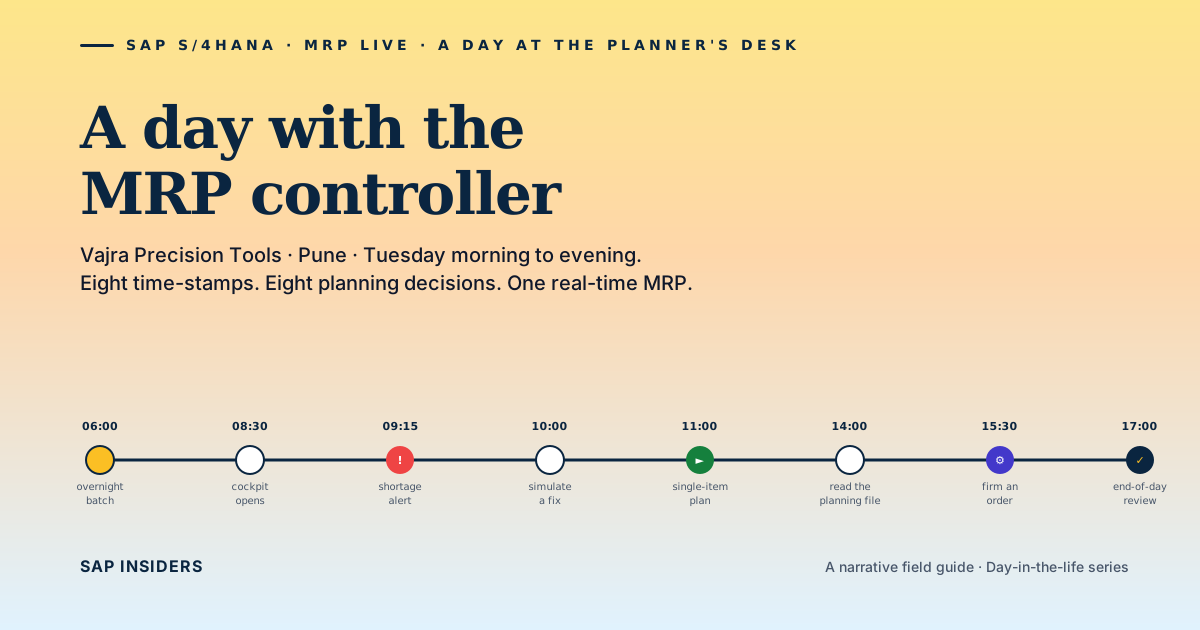
Vajra Precision Tools, Pune. Tuesday. Anitha, MRP controller, 3,847 active SKUs across one plant. She has thirty-five minutes before the 08:30 daily production huddle.
This is what those thirty-five minutes look like — and what they tell you about MRP Live.
06:00 · The night batch is already old
The overnight MRP run finished at 04:11. By 06:00 it's stale: the night-shift posted three production confirmations, dispatch picked four kitted assemblies, and Sales pushed in a CNC spindle order for delivery in six weeks. None of that is in the 04:11 report.
In ECC, this was the daily reality. The first job every morning was "run MD04 on the materials I care about, because the batch report is yesterday's truth."
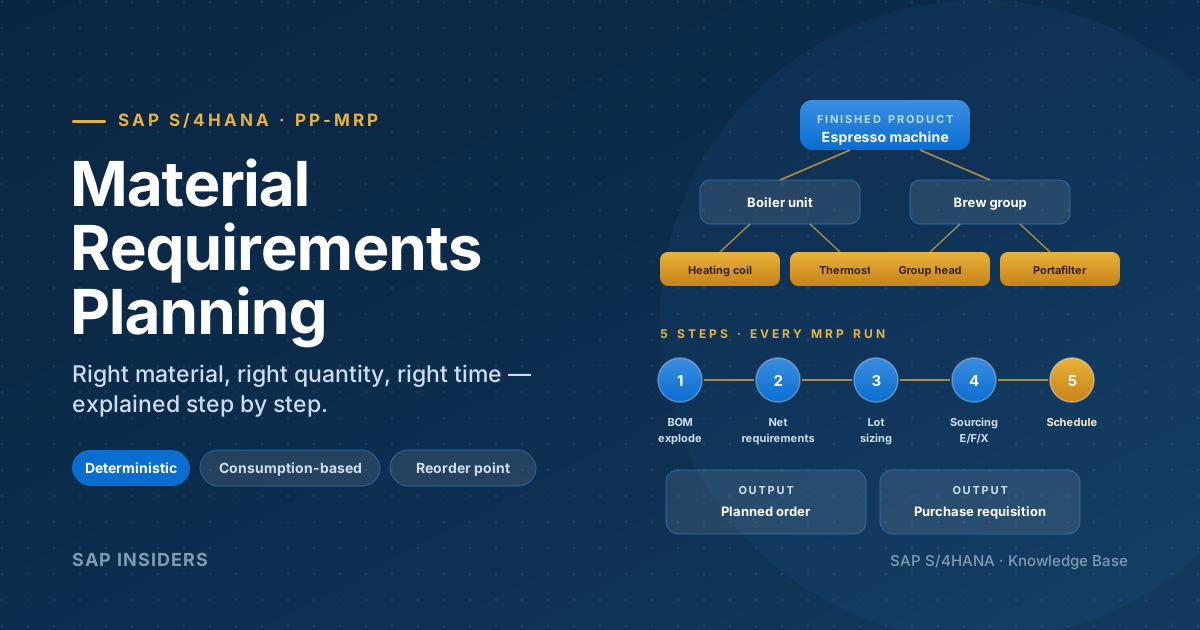
In S/4HANA, MRP runs as a HANA stored procedure. Anitha's last full run was 11 minutes 22 seconds for 3,847 SKUs. The same volume took 1 hour 42 minutes on the ECC system Vajra retired in 2024. Eleven minutes is short enough that the run no longer dictates the rhythm of the morning.
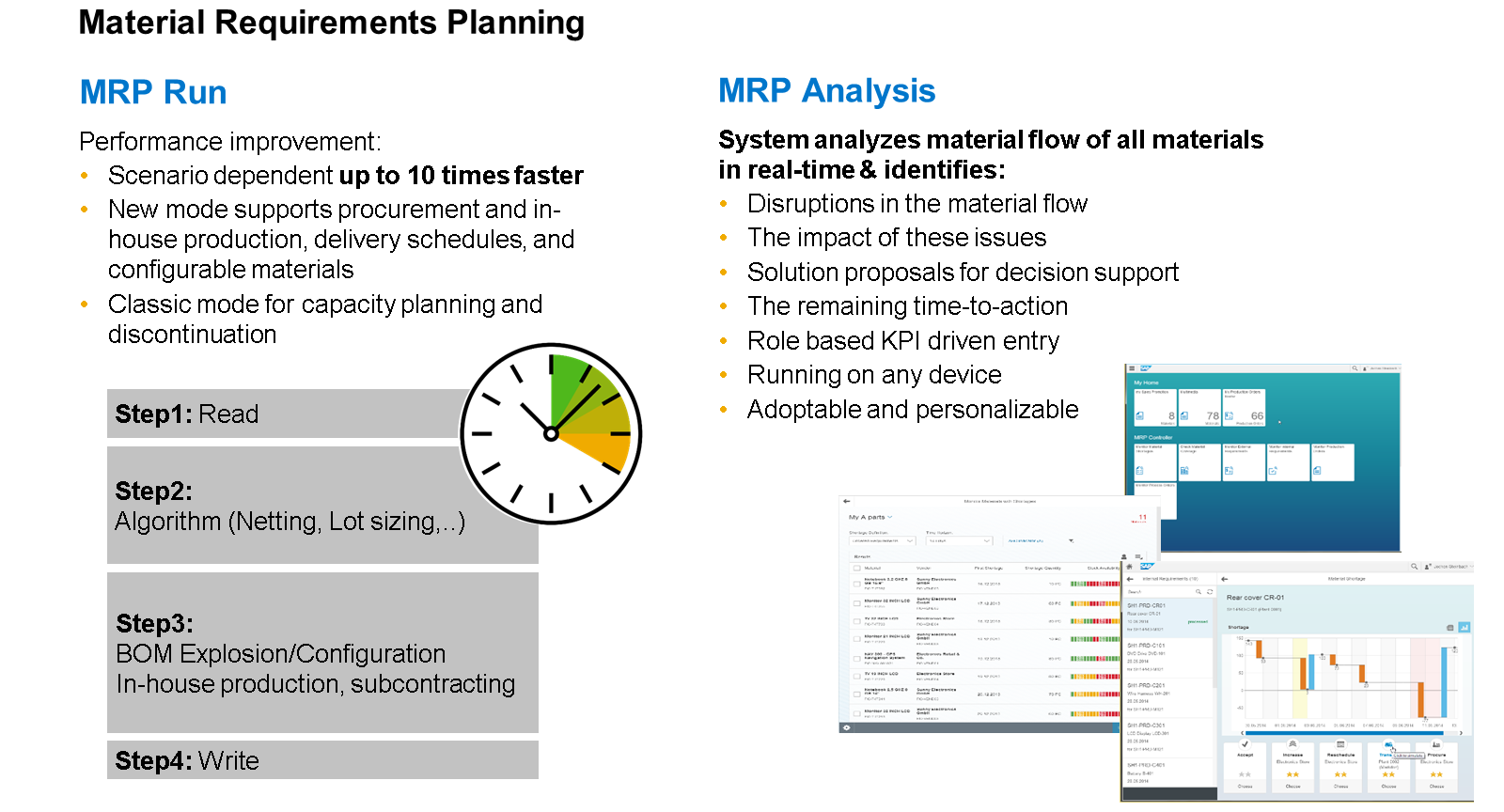
The story it's telling: the bottleneck was never the algorithm. It was moving the data from the database to the application server, computing, and writing back. HANA collapsed that round-trip. Twelve minutes is not "ten times one hour" — it's "the data never moves."
08:30 · The cockpit
Anitha opens the Fiori MRP Cockpit. Three tiles she actually uses: Monitor External Requirements, Monitor Material Coverage, Maintain MRP Controllers. The other tiles in the launchpad — she has not opened most of them in two months.
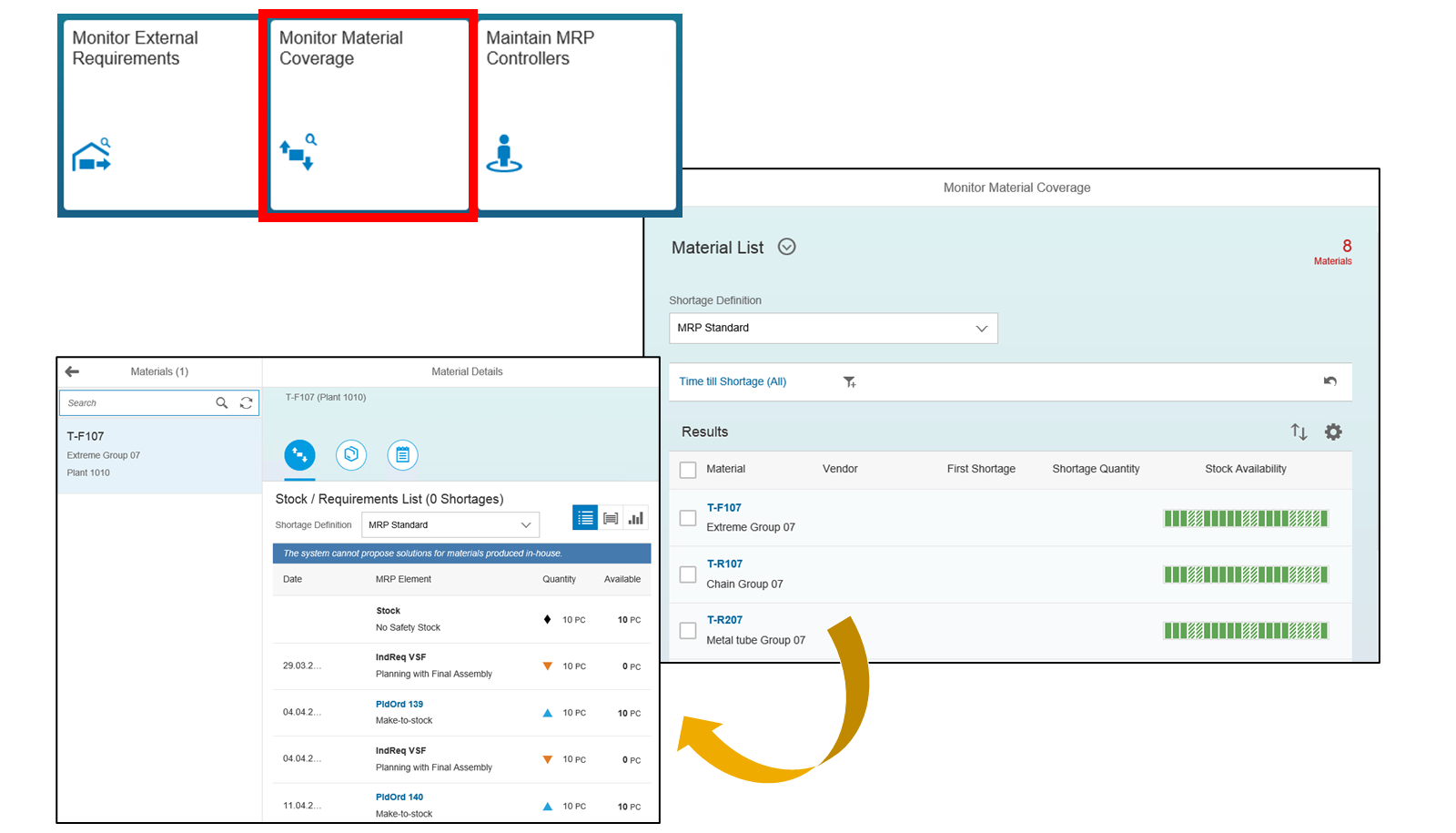
Eight shortages on Monitor Material Coverage today. Some weeks she has eighteen. The cockpit's job is to filter 3,847 materials down to the 8 that need her in the next hour.
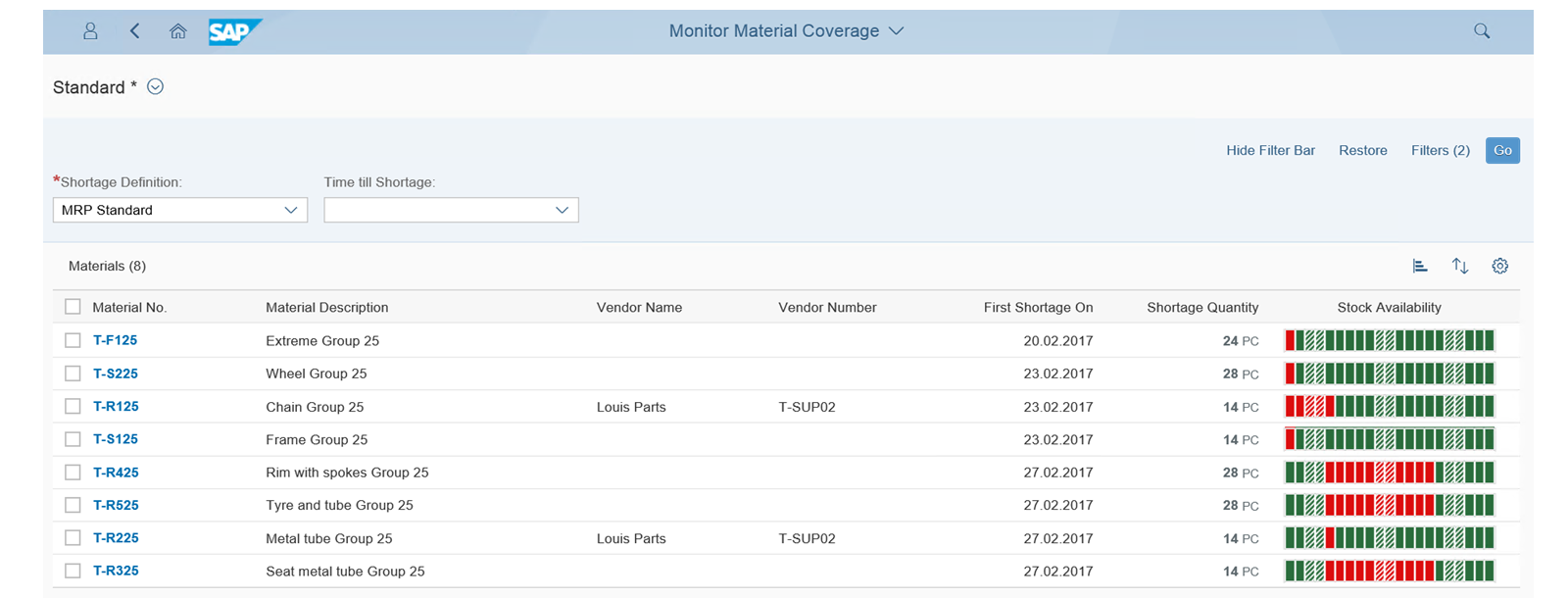
Her eye goes to T-R125 Chain Group 25. First shortage in five days. Vendor lead time is six. That's outside the window.
She clicks the row.
09:15 · The simulate-then-apply discipline
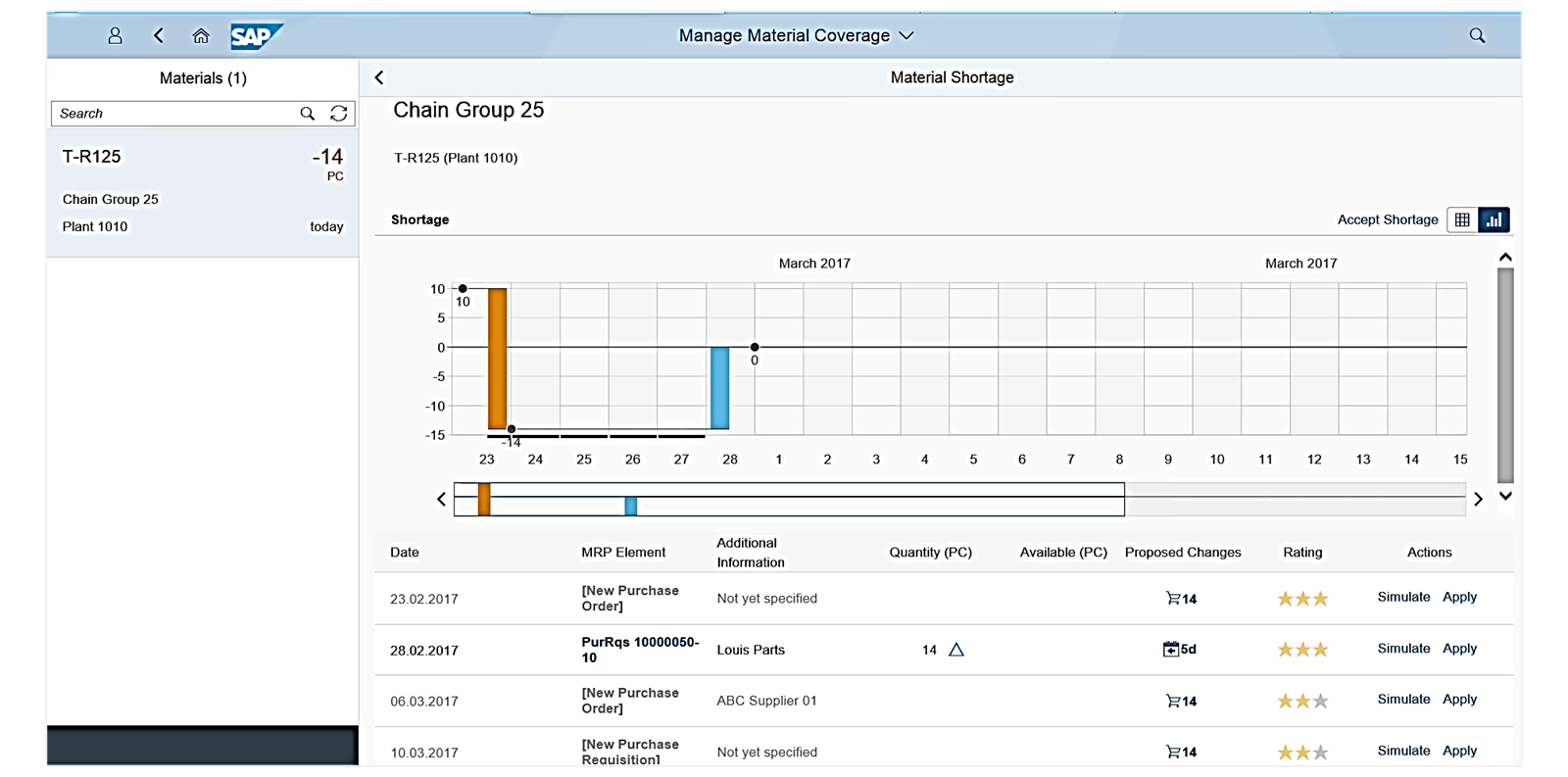
The shortage chart for T-R125 shows the dip on the 27th. Row 2 of the proposals table catches her: PurRqs 10000050-10 from Louis Parts is already in the system, arriving 28th — one day late. The system proposes pulling it forward five days. Three-star feasibility.
She clicks Simulate.
Behind the button: MRP Live re-runs the planning algorithm with the change overlaid, in memory. The result returns in about two seconds. The shortage closes. No downstream materials turn red.
She clicks Apply.
That one click does what three transactions used to: amend the requisition delivery date (ME52N), re-plan (MD02), verify (MD04). Done.
Real-world story. Six weeks ago another planner on the team — junior, six months in — clicked Apply on a one-star proposal because she was rushing for the daily huddle. The proposal was transfer from Plant 1120. It closed the shortage on T-R125, but the transfer demand it created at 1120 then triggered an unplanned production order there for a different material whose BOM had been changed but not re-costed. The variance flagged in the next CKMLCP run: ₹1.84 lakh on one material in one week.
The lesson: the star rating is real. The cockpit shows it for a reason. One-star = read the simulate result twice before you click Apply.
10:00 · A planning-mode mistake we caught in time
10:00. Engineering walks over. They've signed off a BOM revision on SFG-004 Bearing Pre-assembly — bigger bearing, different supplier, immediate effect. Anitha needs the plan for SFG-004 and everything that consumes it to reflect the new structure now.
She opens single-item planning (Fiori app, replaces MD02). Three fields matter:
- Planning mode: single-item, multilevel (plan the material and explode its BOM)
- Planning type: regenerative (force a full re-explosion)
- Processing key: NETCH is the default
She nearly leaves it on net change. That would have been a mistake — a BOM-structure change does not always set the NETCH flag on the parent or its consumers. Net change would skip the parents and read the old structure.
She switches to regenerative and runs.
What this actually means in practice. Net change is your default for the daily picture — fast, light, only touches what's known to have changed. Regenerative is what you reach for after a master-data change. The trap is that "master-data change" is broader than people think: BOM, routing, MRP type, lot-size procedure, scheduling margin key, production version. Half of these don't set NETCH automatically. If in doubt: regenerative for that one material. It costs you maybe forty seconds.
14:00 · The planning file and low-level codes
After lunch Anitha pulls up the planning file. Two reasons: the morning's BOM change should be visible there, and tomorrow she needs to explain to a new ABAP developer why MRP plans materials in the order it does.
The planning file holds three things per material: the low-level code, the NETCH indicator, and a re-explosion flag.
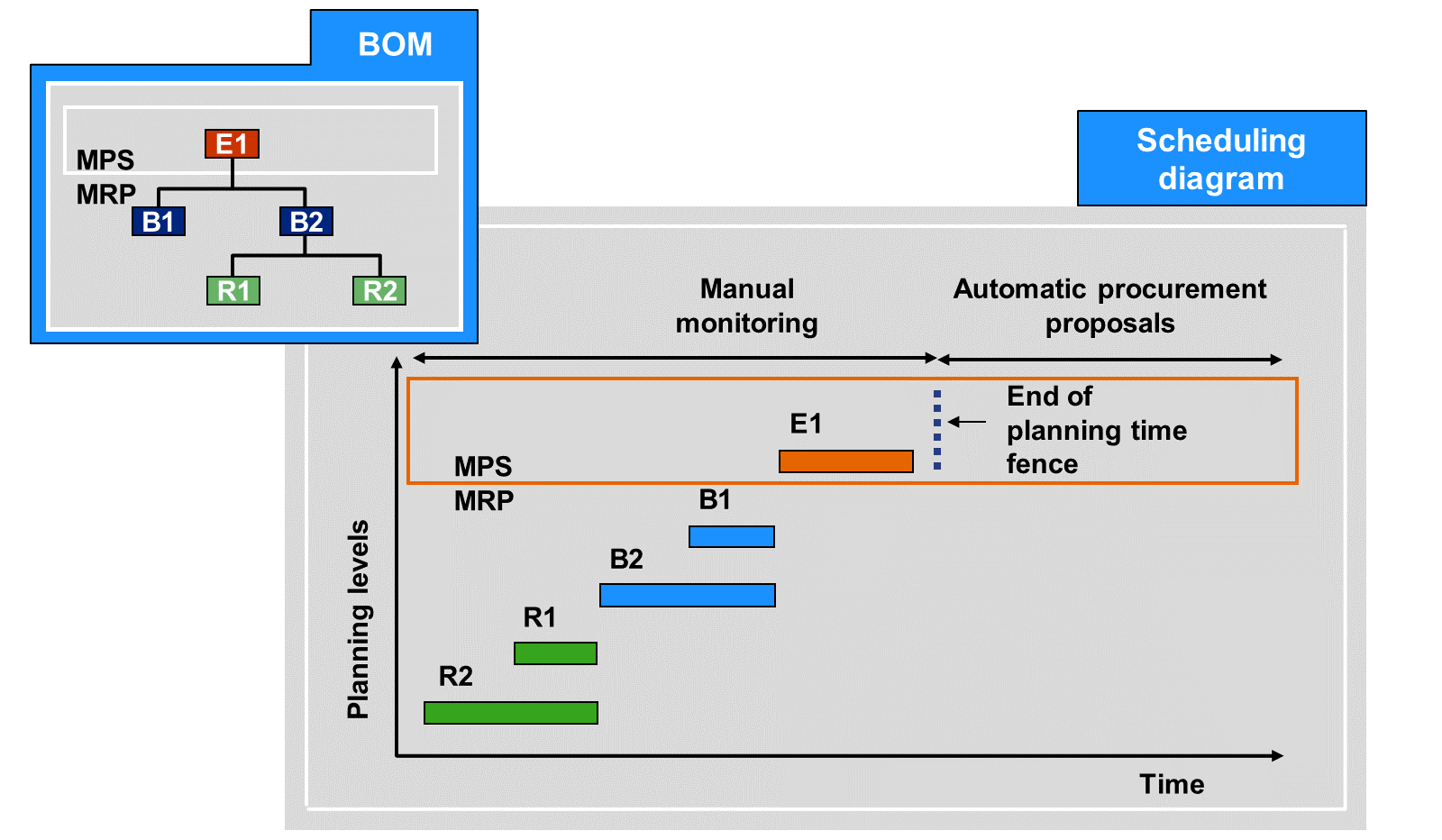
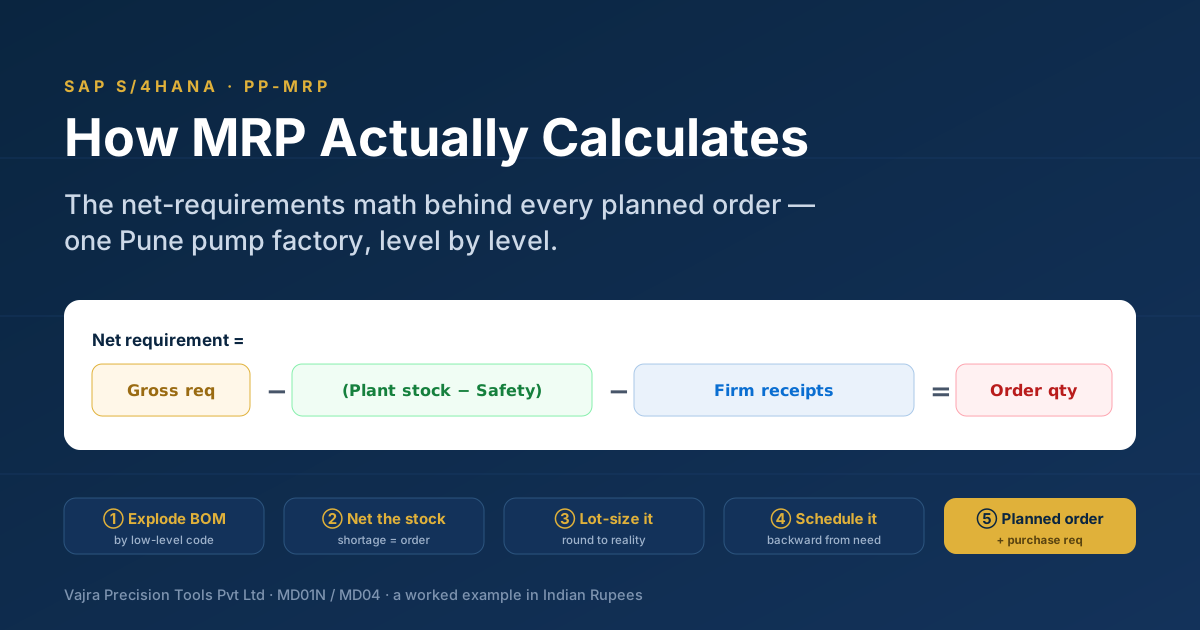
The low-level code is the deepest level at which a material appears in any BOM. MRP plans materials in ascending low-level-code order — raws first, semi-finished next, finished goods last. This is so a finished good has accurate demand for its inputs by the time it's planned itself.
The diagram makes the second point too: the planning time fence is the horizon-line. To its right MRP can create new procurement proposals automatically. To its left is the planner's zone — MRP can't touch existing proposals there without explicit firming rules.
This combination — sequence (low-level code) plus zone (planning time fence) — is the entire MRP execution model in one picture. The other 200 pages of SAP documentation are footnotes.
15:30 · Firming, and the day Firming Type 2 cost us six lakh
Mid-afternoon, the production manager calls. "The line schedule for FG-001 in week 23 must not change again. I have committed to the customer."
Translation: firm the planned orders. Anitha needs to know what firming type to use.
There are five. The system asks two questions and crosses them:
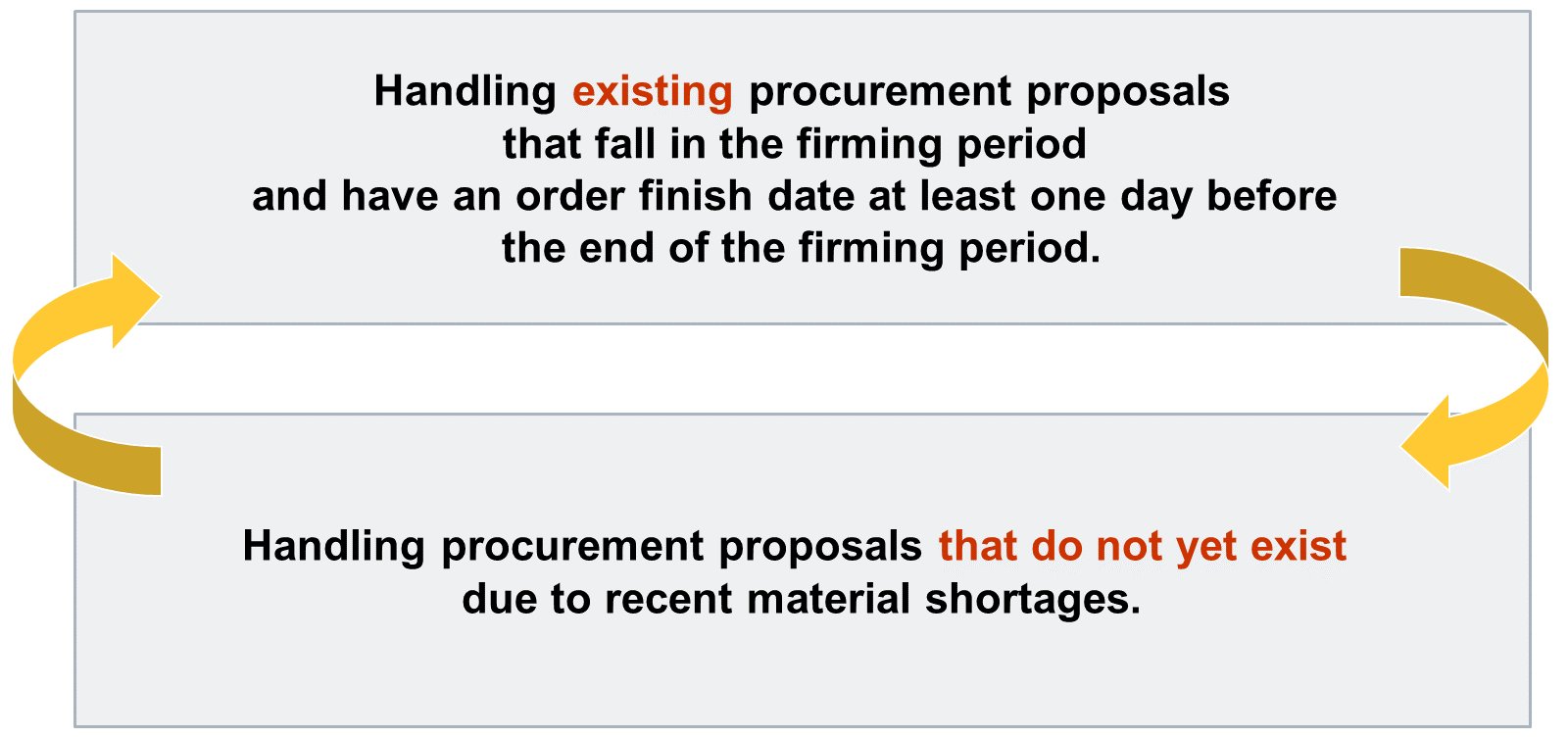
Two questions: existing proposals — do they auto-firm? New shortages — does the system generate proposals for them?
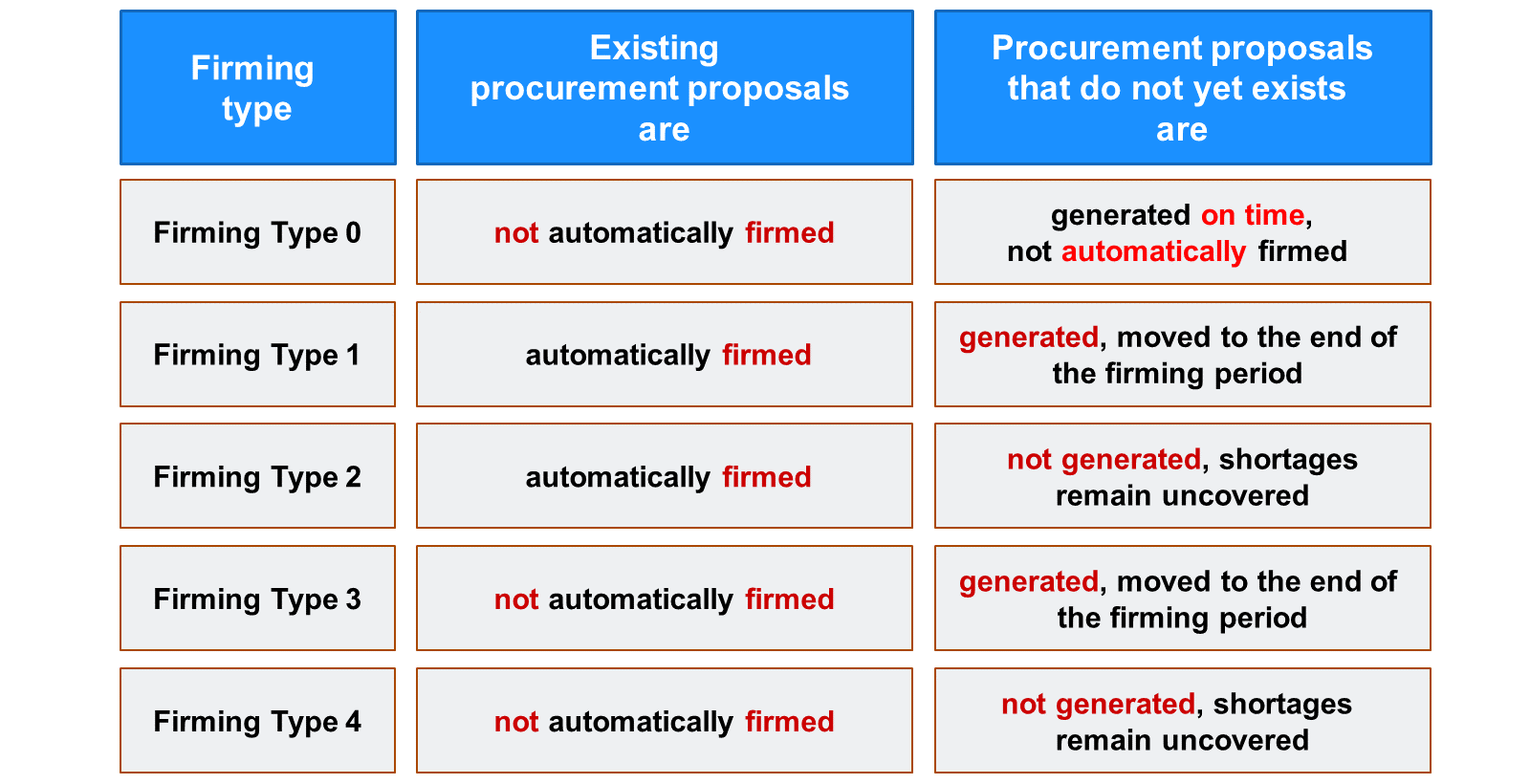
Anitha needs Type 1 — existing proposals firmed (line schedule frozen) and new shortages still visible (so she can react manually). She sets it on the MRP type.
What this looked like when it went wrong. Two Aprils ago, the previous controller set Firming Type 2 on a critical MRP type for a high-value SFG family — by mistake, copy-pasting from another customising entry without reading the second column. Existing firmed, new not generated. New shortages stopped appearing on Monitor Material Coverage for that family. Nobody noticed for four days because the existing plan was running.
Day five: production stopped on three FGs because a Z-grade casting wasn't ordered. The expedited freight bill alone was ₹6.4 lakh, plus the customer-penalty exposure on two orders.
Lesson the team carried out of that month: Firming Type 2 and Type 4 are dangerous defaults. They look like "lock down" options, but what they really do is silence the alert system. If you mean "firm but keep telling me about new problems" — that's Type 1 (firm + push new to end-of-fence) or Type 3 (don't firm existing but push new to end-of-fence).
The team posted the firming-type matrix on the wall behind the planners' desks the next week. It's still there.
17:00 · MRP list vs stock/requirements list
Last hour of the day. Anitha exports the MRP list for the three materials she touched today (T-R125, SFG-004, FG-001) and attaches the export to the production-meeting minutes.
The MRP list (MD05) is a snapshot — what the last planning run produced. The stock/requirements list (MD04) is the live picture — what's true right now. With MRP Live they tend to agree because the run is cheap enough to be run frequently, but the snapshot still has the audit role: when the auditor asks "what did the planner see and decide on", the MRP list is the answer.
She saves the cockpit filter as "End-of-day · Anitha" so it loads tomorrow with the same materials in scope.
Tomorrow morning
When Anitha walks back in at 08:30 on Wednesday, the cockpit loads with last night's run plus everything that happened between then and now — overnight confirmations, the simulated changes she applied yesterday, the BOM revision now reflected in the FGs that consume SFG-004. T-R125 is no longer on the shortage list. FG-001 shows as firmed in the planned-orders view but no longer carries an exception message.
This is the headline of MRP Live in one paragraph: the work you did yesterday is already reflected today. No overnight gap, no two-hour batch, no stale snapshot. The cockpit is the live system.
What this article is not trying to do
It's not a definitions list. It's not a tour of every Fiori app in the MRP family. It's not a config guide. SAP help portal has all of that and it's better at it than I am.
What I wanted you to leave with: the rhythm of an MRP controller's day in S/4HANA, the two or three places where decisions actually get made, and the specific kinds of mistakes that cost real money. If that's clearer now than it was twenty minutes ago, the article worked.
Screenshots: SAP training material — "Exploring Business Processes in SAP S/4HANA Production Planning". Used for educational illustration. © SAP SE. Narrative and worked examples by SAP Insiders.