Imagine an espresso-machine manufacturer takes an order for 200 commercial espresso machines for a coffee-chain rollout, to ship in three weeks. Behind that single line in a sales order sits an avalanche of questions: How many boiler units do we need? Which heating coils? When do we have to start brazing the brew groups? Do we have enough portafilters in stock — or do we order them, and from whom? When does each step start so the machines ship on time?
Material Requirements Planning (MRP) is how SAP S/4HANA answers all of those questions, automatically, every night for every material in the plant. Get it right and procurement is on autopilot. Get it wrong and you either drown in inventory or stop the line waiting for a screw.
This guide walks through MRP the way it actually runs in S/4HANA — the two planning approaches, the five steps every MRP run executes, the master data behind the scenes, and the Fiori apps you use in real life.
What MRP is — in one sentence
MRP is the engine that turns demand (what customers want and what we forecast) into supply proposals (planned orders to make, purchase requisitions to buy) — sized, scheduled, and exploded down the bill of material to every single component.
In SAP terms, MRP answers three questions for every material:
- What do we need? — by exploding sales orders, planned independent requirements (PIRs) and dependent demand through the BOM.
- How much do we need? — by subtracting supply from demand to get a net requirement, then applying a lot-size rule.
- When do we need it? — by working backward from the required date through goods-receipt, production, and procurement lead times.
Two ways MRP plans materials
In the material master, MRP 1 view, every material gets an MRP type. That single field tells the planning engine which philosophy to use. The MRP types fall into two big families.
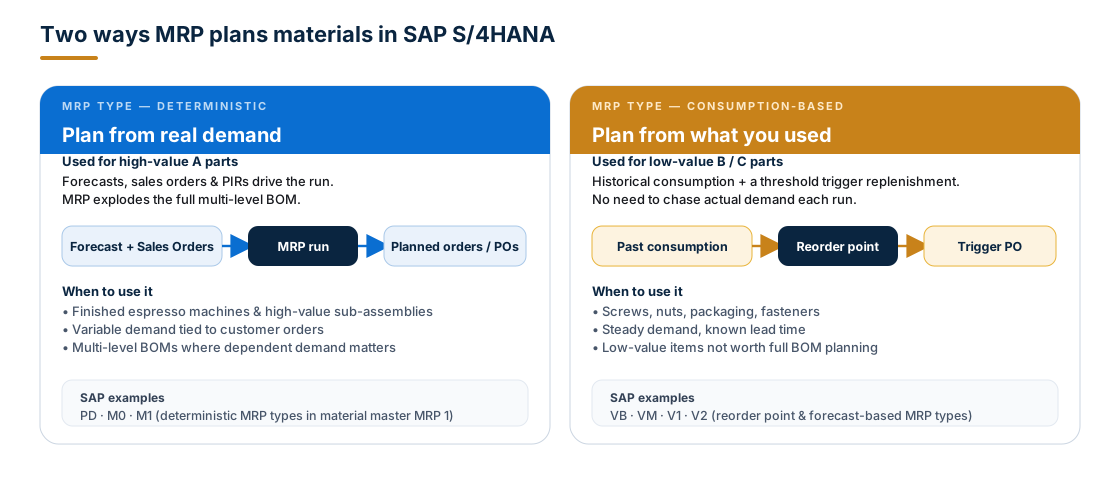
Deterministic planning — for high-value A parts
Deterministic MRP looks at actual demand signals — sales orders, planned independent requirements (PIRs), stock-transfer requests — and explodes the full multi-level BOM for every required material. It is the workhorse for finished goods and important sub-assemblies, where every unit is worth planning precisely.
Our espresso-machine maker plans finished machines, boiler units and brew groups deterministically. Each sales order produces a chain of dependent demand all the way down to heating coils and group heads.
Common SAP MRP types: PD (standard deterministic MRP), M0/M1 (master production scheduling).
Consumption-based planning — for B and C parts
For thousands of low-value parts (screws, nuts, packaging, cleaning supplies), planning every BOM is overkill. Consumption-based MRP ignores future demand entirely and triggers replenishment off historical consumption and a simple threshold.
The same factory will use consumption-based planning for M3 screws, O-rings, gaskets and packaging foam — there are tens of thousands of them; nobody plans each one against a sales order.
Two sub-approaches:
- Reorder-point planning — stock falls below a level → reorder.
- Forecast-based planning — use a statistical model of past usage to project future need.
Common SAP MRP types: VB (manual reorder point), VM (automatic reorder point), V1/V2 (forecast-based).
Reorder-point planning: the simplest MRP
Reorder-point planning is the lightest form of consumption-based MRP. It needs three numbers in the material master: the reorder point, the safety stock, and a lot size. That's it.
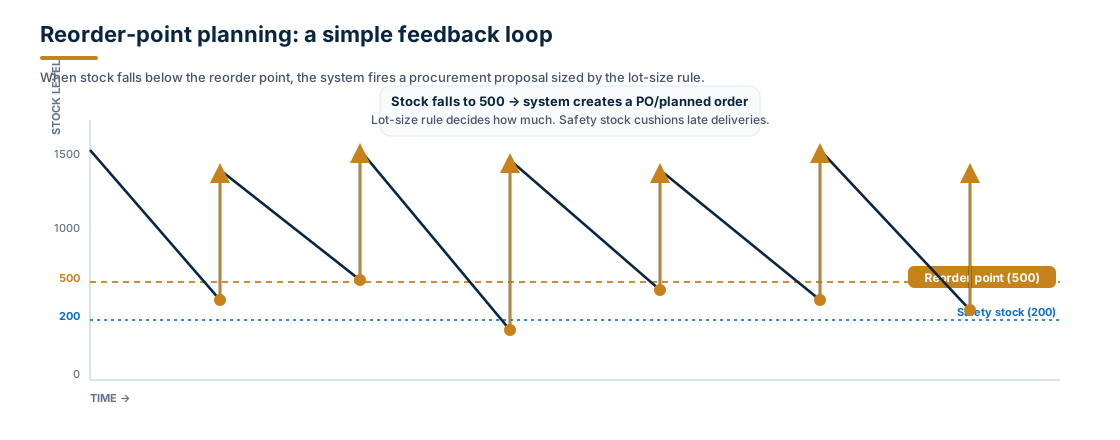
The logic is intentionally dumb:
- Stock burns down through normal consumption.
- The MRP run checks: is stock < reorder point?
- If yes → create a procurement proposal sized by the lot rule (exact, fixed, weekly, EOQ…).
- Safety stock is a cushion below the reorder point — if you dip into it, the system replenishes immediately.
Use it when demand is stable, lead time is known, and the cost of running out is bigger than the cost of a small extra stock.
The five steps of every MRP run
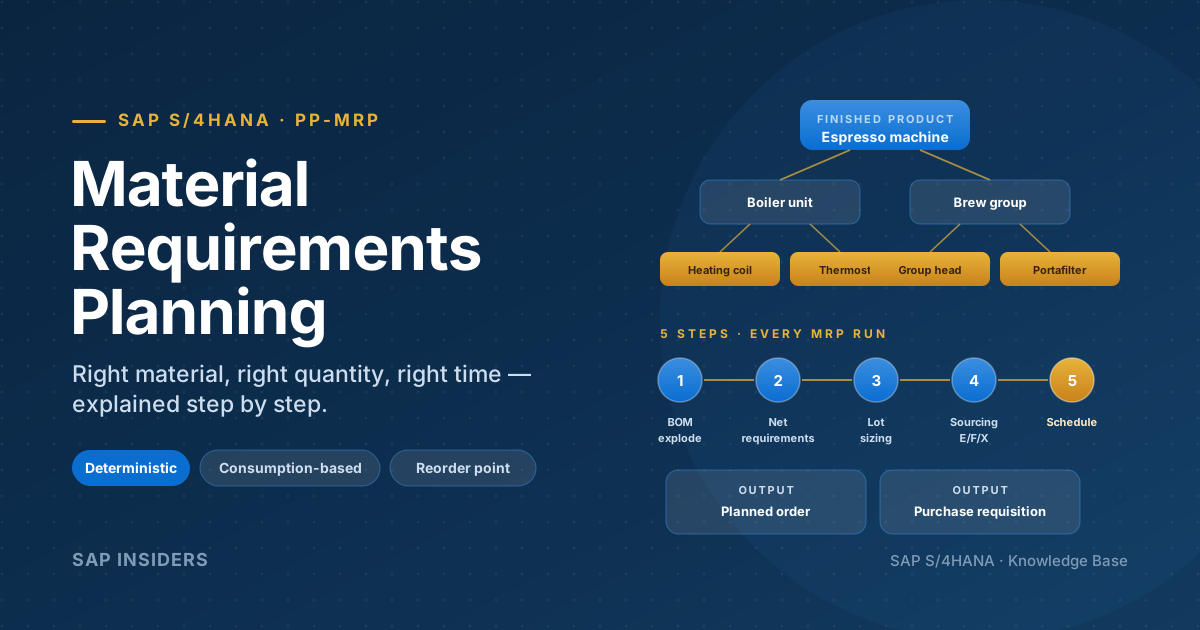
Whatever the MRP type, the planning engine in S/4HANA runs the same five steps for every material that has a planning file entry. Internalise these and the system stops feeling like a black box.
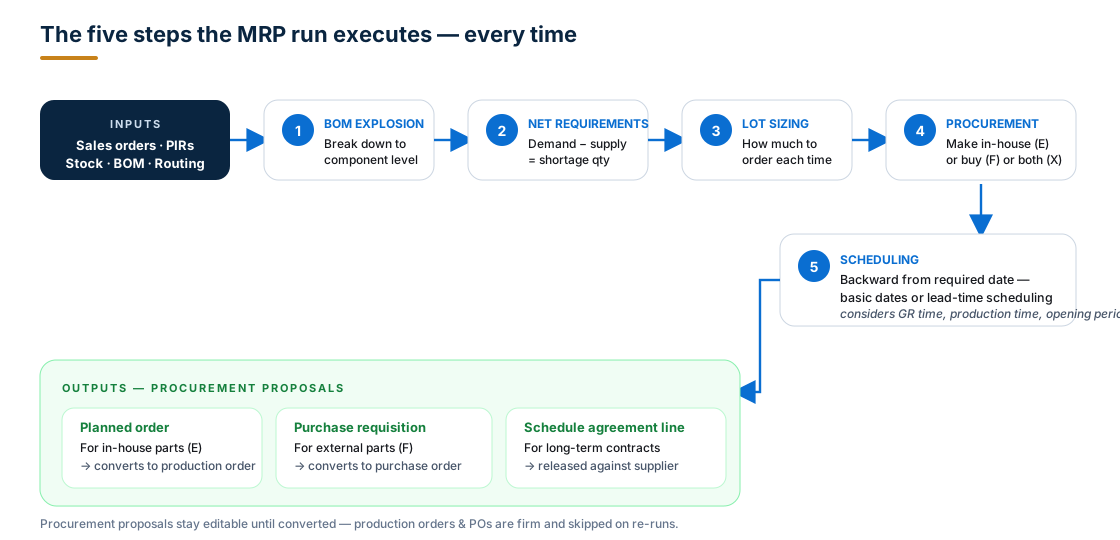
Step 1 — BOM explosion and backward scheduling
MRP starts at the finished product and walks down the BOM, generating dependent demand for every component and sub-assembly. At the same time it schedules each level backwards from the required date, so each parent has its components ready when assembly is supposed to start.
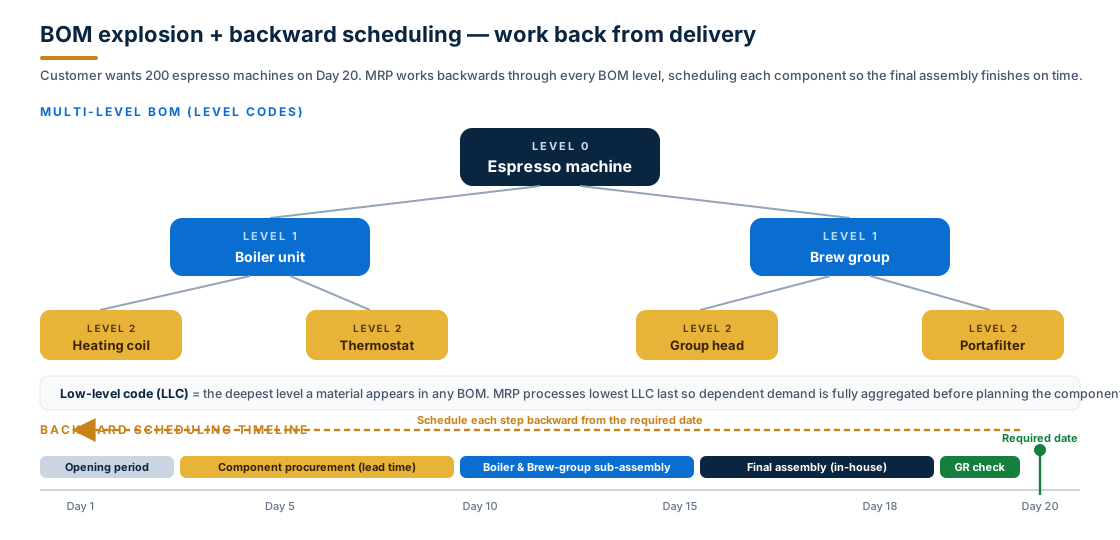
A few S/4HANA concepts worth knowing here:
- Low-level code (LLC) — the deepest level a material ever appears at, across all BOMs. MRP uses LLC to plan a component only once, after every parent has contributed its dependent demand. Without LLC, you'd plan a heating coil for the commercial-machine BOM, then plan it again for the home-machine BOM, and so on.
- Multi-level vs. single-level —
MD02plans a single material plus all its components multi-level;MD03plans only the header material single-level.
Step 2 — Net requirements calculation
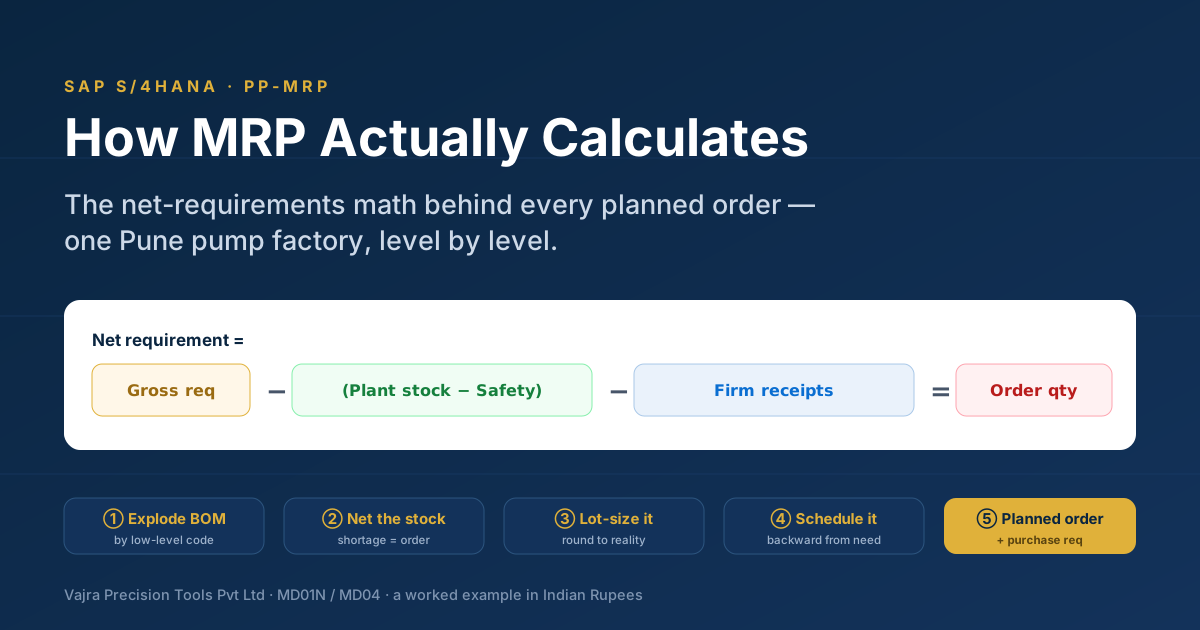
For every requirement date, the system runs the MRP equation:
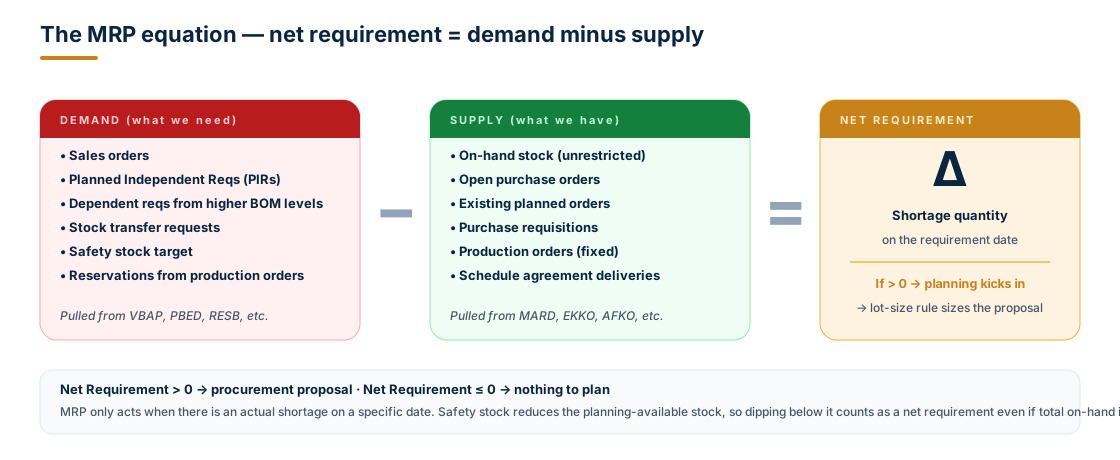
If demand minus supply is positive, MRP has found a shortage and creates a procurement proposal. If supply already covers demand, MRP does nothing. This is why MRP is sometimes called "a planning system that knows when to stay silent."
A subtle but important detail: safety stock is treated as demand, not stock. If your physical inventory is 250 and your safety stock is 200, only 50 is "available for planning." Dipping into safety stock — even by one unit — triggers replenishment.
Step 3 — Lot sizing
Once MRP knows how short you are, it has to decide how big each procurement proposal should be. The lot-size rule on MRP 1 controls this.
| Lot-size key | Behaviour | Good for |
|---|---|---|
| EX — Exact | One proposal per requirement, exact qty | Make-to-order, high-value A parts |
| FX — Fixed | Always order the same quantity | Standard pack/container sizes |
| WB / MB — Weekly / Monthly | Combine all shortages in a period | Smoothing, low-value parts |
| HB — Replenish to max | Refill stock up to a target level | Reorder point with min/max |
| EX with rounding | Exact + round-up to multiple | Pack sizes, MOQ enforcement |
| EOQ / ROQ | Cost-optimised — balance order vs. holding cost | When ordering cost is significant |
Real example. If three sales orders need 7, 11 and 4 brew groups in the same week, an exact lot rule creates three planned orders (7 + 11 + 4). A weekly lot rule creates one planned order of 22. Same net result for inventory; very different number of orders to manage on the shop floor.
Step 4 — Procurement type (make or buy?)
The system now knows what, when and how much. The next question is where it comes from — and the procurement type on MRP 2 decides.
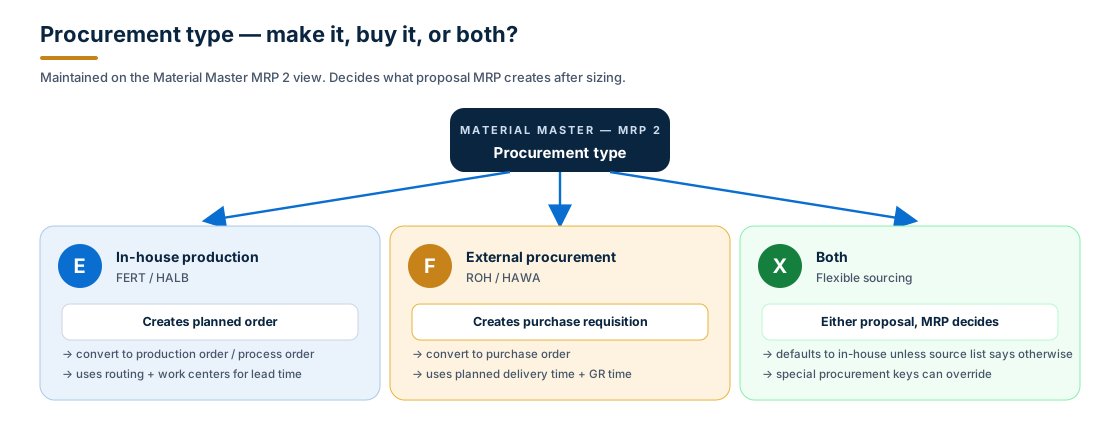
- E — In-house production (typical of FERT finished goods and HALB semi-finished): MRP creates a planned order. The MRP controller later converts it into a production order (discrete) or a process order (process industries).
- F — External procurement (typical of ROH raw materials and HAWA trading goods): MRP creates a purchase requisition. Procurement converts it into a purchase order to a supplier — or, if a scheduling agreement is in place, a delivery schedule line.
- X — Both (flexible sourcing): both in-house and external are allowed. MRP defaults to in-house unless the source list or a special procurement key says otherwise.
Special procurement keys can further refine this — e.g. stock transfer from another plant (40), consignment (10), subcontracting (30), phantom assembly (50). The procurement type chooses the broad path; the special procurement key chooses the lane.
Step 5 — Scheduling
Finally, MRP has to put the proposal on a calendar. There are two scheduling modes, controlled by the planning-run parameter:
- Basic-date scheduling (parameter 1) — fast. Uses just the material master times (in-house production time, planned delivery time, GR processing time, opening period). No capacity check. Good for the overnight long run.
- Lead-time scheduling and capacity planning (parameter 2) — slower. Uses the routing and work centers to schedule individual operations and also calculates capacity requirements. Used selectively, often for the master schedule.
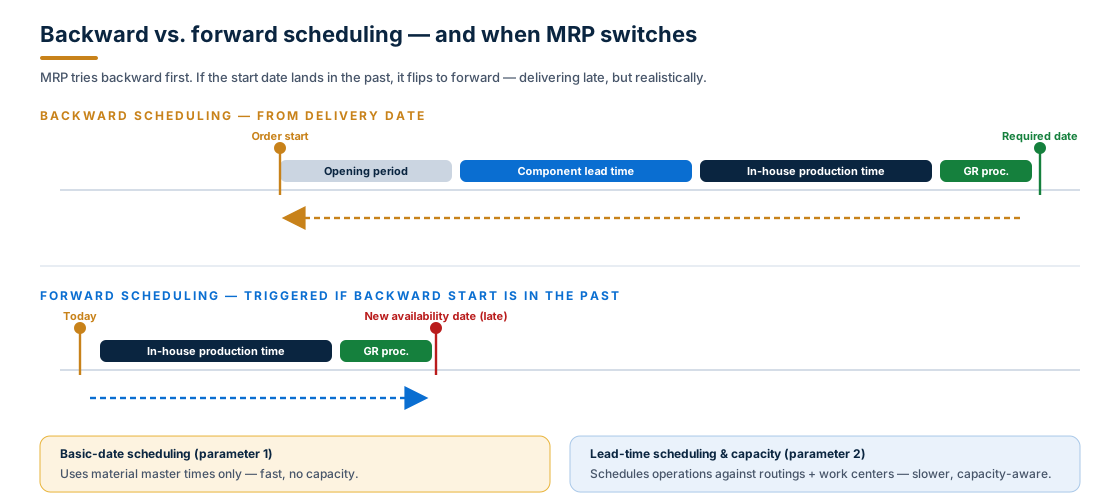
The default is backward scheduling — start from the required date and walk back. If the calculated start date lands in the past, MRP automatically switches to forward scheduling, starts the order today, and tells you the new (late) availability date. That late date is your signal that the plan is in trouble.
The master data MRP relies on
MRP is only as good as the master data behind it. The five "MRP-touching" objects:
| Object | Where | What MRP reads from it |
|---|---|---|
| Material Master — MRP 1 | MM01/02/03 | MRP type, lot-size rule, MRP group, plant |
| Material Master — MRP 2 | MM01/02/03 | Procurement type (E/F/X), special procurement, planned delivery time, GR processing time, safety stock |
| Material Master — MRP 3 | MM01/02/03 | Strategy group, availability check, period of adjustment, mixed MRP |
| Material Master — MRP 4 | MM01/02/03 | Individual/collective indicator, BOM explosion control |
| Bill of Material | CS01/02/03 | Component list per finished/semi-finished material |
| Routing | CA01/02/03 | Operations, work centers, durations (only used with lead-time scheduling) |
| Source List / Purchasing Info Record | ME01, ME11 | Where externally-procured materials are bought |
| Stock | live | Unrestricted, blocked, in QI, in transit — supply side of the equation |
Skip the MRP 2 view (or leave the procurement type blank) and MRP literally cannot decide make-or-buy — it will quietly skip the material.
Where you actually run MRP in S/4HANA
Classic SAP GUI transactions still work, but in S/4HANA the recommended path is MRP Live plus Fiori apps. Here is the modern-vs-classic map.
| Task | Classic GUI | S/4HANA recommended |
|---|---|---|
| Run total MRP | MD01 (batch) / MDBT | MRP Live — MD01N (runs in-memory on HANA) |
| Plan a single material | MD02 (multi-level) / MD03 (single) | MD02 still works; Manage Material Coverage Fiori app |
| Stock/Requirements list | MD04 | MD04 or Monitor Material Coverage Fiori |
| MRP list | MD05 | MD05 |
| Maintain PIRs | MD61 / MD62 | MD61; Manage PIRs Fiori |
| Schedule MRP | MDBT | Schedule MRP Runs Fiori app |
| Demand-driven (DDMRP) buffers | — | Schedule DD Replenishment Planning |
| Predictive MRP simulation | — | pMRP (Schedule pMRP Simulations) |
A few S/4HANA-specific notes:
- MRP Live (
MD01N) is the headline. The classic MD01 reads from disk; MRP Live runs entirely in HANA's column store, which is why a planning run that took 6 hours on ECC routinely finishes in 20–30 minutes on S/4HANA. - Predictive MRP (pMRP) lets you run simulation MRPs against future capacity and demand without touching the live planning file. Useful for new-product introduction and S&OP scenarios.
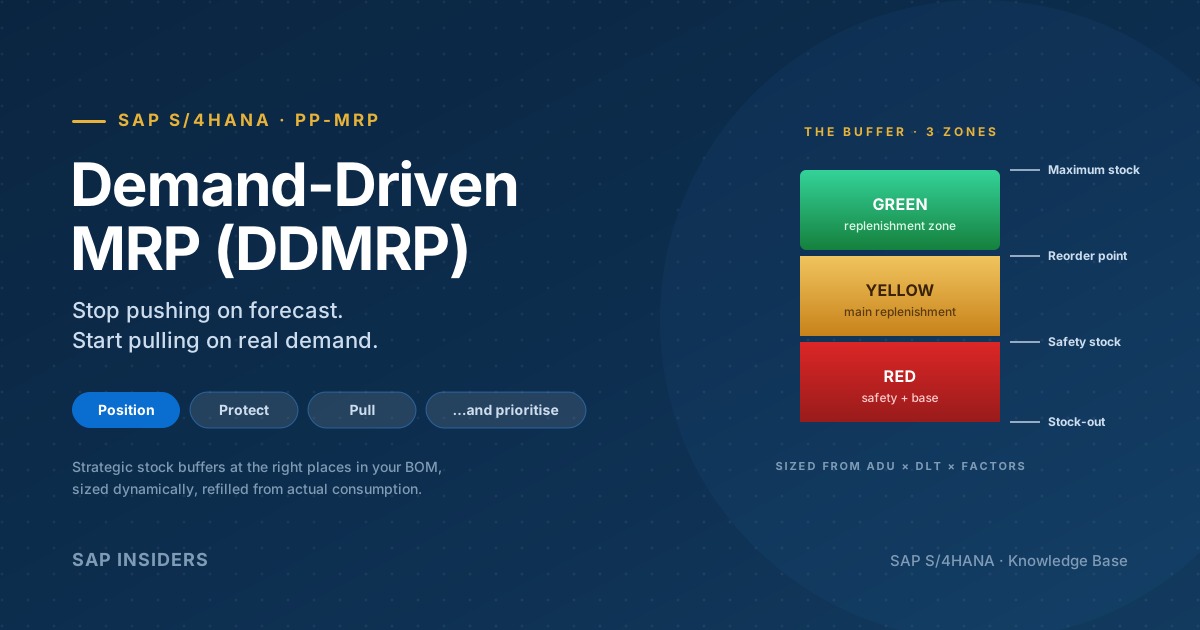
- Demand-Driven Replenishment (DDMRP) is the buffer-based planning approach added in S/4HANA — MRP types R1/M1 drive it. Stock is segmented into red/yellow/green buffer zones; the system replenishes based on buffer status, not forecasts.
- The Monitor Material Coverage Fiori app gives MRP controllers a daily worklist of materials with shortages, complete with one-click actions to accept proposals, reschedule, or expedite.
What MRP produces — and what happens next
MRP doesn't make anything firm. Its outputs are procurement proposals, still editable, still re-plannable:
- Planned order → becomes a production order (or process order). Once converted and released, it's firm — MRP stops touching it.
- Purchase requisition → becomes a purchase order sent to a supplier. Once converted, also firm.
- Schedule line → released against an existing scheduling agreement with a contracted supplier.
The "firm vs. proposal" distinction matters: on the next MRP run, the system deletes and rebuilds all unconverted proposals to reflect the latest demand picture. Firm orders are honoured. Convert too late and you re-do the planning controller's work; convert too early and you lose flexibility.
Common gotchas
A short list of things that bite every MRP controller at least once:
- MRP type blank → material gets ignored. Check the MRP 1 view first when a material is "not being planned."
- No planning file entry → MRP run skips the material.
MD20to create the entry,MD21to display it. - Wrong procurement type → planned orders for a part you actually buy, or purchase reqs for a part you make. Fix on MRP 2.
- Safety stock too high → MRP keeps replenishing unnecessarily and inventory drifts up; revisit periodically.
- GR processing time = 0 → goods arrive on the day of need with no time to QM/put-away; pad it for realism.
- Backward scheduling lands in the past → MRP flipped to forward and the order is going to be late. Look for exception messages
10/15inMD04/ Monitor Material Coverage. - Reorder point not updated as demand grows → consumption-based planning is "set it and forget it" only if demand is stable. Re-evaluate every quarter.
Frequently asked questions
Is MRP only for manufacturing? No. Distribution centres run consumption-based MRP for finished-goods replenishment, and trading companies use it for purchased stock. The make-or-buy lever just defaults to buy.
What's the difference between MRP and MPS? Master Production Scheduling (MPS) is a constrained, manually validated plan for the most critical materials — typically the top of the BOM. MRP then explodes that plan down to components. In SAP, MPS materials use MRP types M0–M4.
Do I need a BOM and routing for every material? A BOM for in-house parts (E or X). A routing only if you want lead-time scheduling and capacity planning. Externally procured materials need neither — just an info record or contract.
Can MRP propose stock transfers between plants? Yes — via special procurement key 40 (stock transfer). MRP creates a stock-transport requisition instead of a purchase requisition.
How is MRP Live different from classic MD01? Same logic, same output, but MRP Live runs the calculations as a single in-memory job on HANA instead of touching the database row by row. Result: 5–20× faster on real plant data, with the same exception messages and result tables.
What is DDMRP and should I use it? Demand-Driven MRP (DDMRP) replaces forecast-driven planning with stock buffers at strategic decoupling points. It's particularly good for high-mix, high-variability supply chains. In S/4HANA it lives alongside classic MRP — you can convert specific materials to DDMRP without ripping out the rest.
Key takeaways
- MRP turns demand into sized, scheduled procurement proposals — automatically, for every material that has a planning file entry.
- Pick the right MRP type: deterministic for A-parts that justify full BOM planning, consumption-based for B/C parts where a reorder point is enough.
- Every MRP run executes the same five steps: BOM explosion → net requirements → lot sizing → procurement type → scheduling.
- Backward scheduling is the default; if the start date lands in the past, MRP switches to forward and exposes the delay.
- The output is always a proposal (planned order, purchase requisition, schedule line) — still editable until the MRP controller converts it.
- In S/4HANA, prefer MRP Live (
MD01N) and the Monitor Material Coverage Fiori app; use pMRP for simulations and DDMRP where buffer-based planning fits.
Good MRP isn't about pressing the right button at 10 p.m. — it is about good master data, deliberate MRP-type choices, and the discipline to convert proposals on time. The engine is fast; humans are the bottleneck.