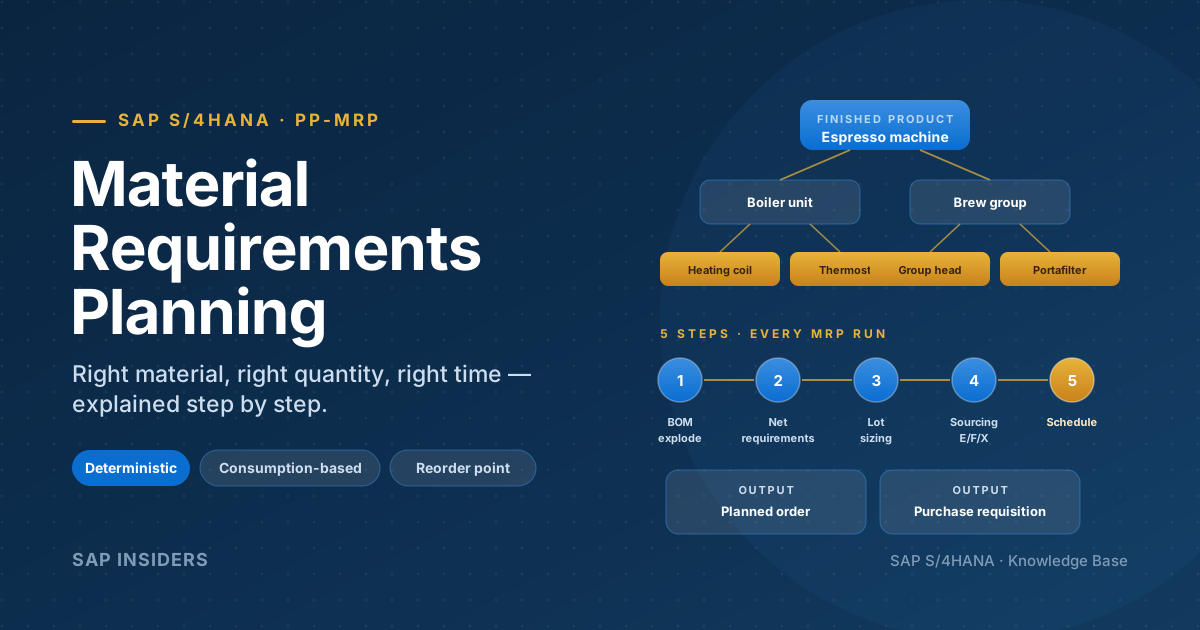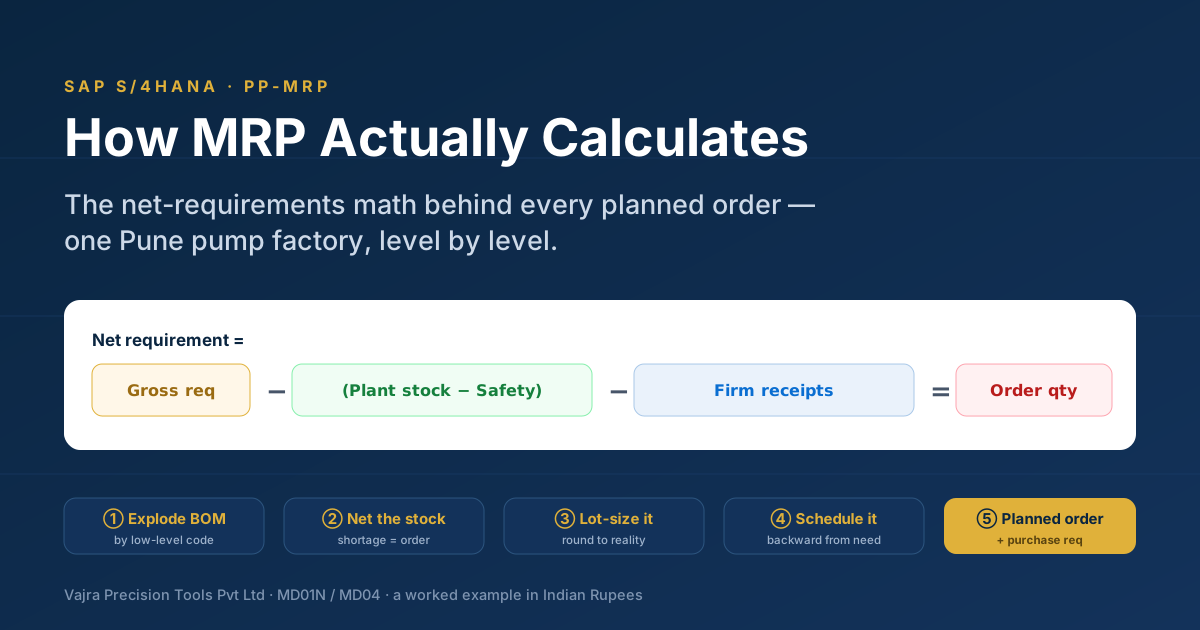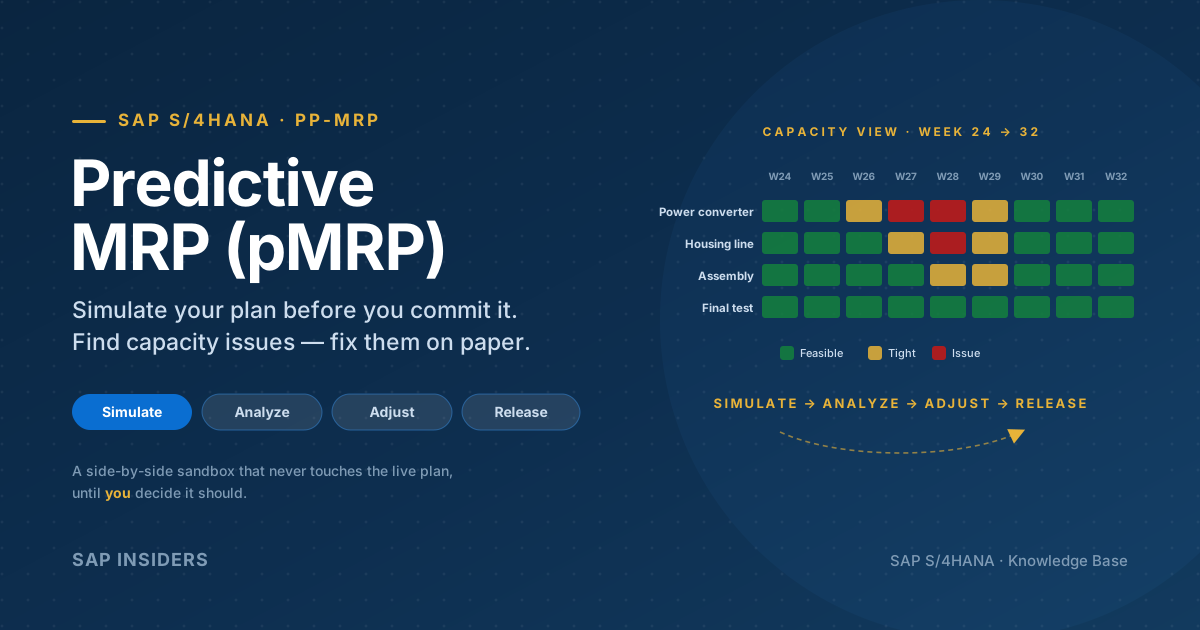
A production planner runs the overnight MRP. A reasonable forecast goes in. By morning, a thousand purchase requisitions and planned orders come out — correct by the rule book, optimistic by reality. The supplier of one long-lead-time motor missed a shipment last week. A customer added two unscheduled orders. The forecast for next month was off by 8%. Each of those small bumps amplifies as it travels upstream until the supplier at Tier 3 is being asked to swing capacity by 40%. Just-in-case safety stock piles up everywhere. Working capital is locked up. The line still stops when one screw runs out.
This is the bullwhip effect — and classic MRP, however well configured, can't make it go away on its own. MRP pushes on forecast; the forecast wobbles; the wobble amplifies.
Demand-Driven MRP (DDMRP) is the answer. Built into SAP S/4HANA as Demand-Driven Replenishment (DDR), it's not a replacement for MRP — it's an extension that picks up the materials where forecast-driven planning hurts the most (long lead times, high variability, BOM convergence) and switches them to a pull model: strategic stock buffers at the right places, sized dynamically, refilled from actual consumption.
This guide walks DDMRP the way a planner uses it in S/4HANA — the philosophy, the math, the master data, the apps, and the day-to-day workflow.
What DDMRP is — in one sentence
DDMRP is a multi-echelon pull-based replenishment method that places strategically positioned, dynamically sized stock buffers at critical points in your supply chain — so upstream supply replenishes the buffers from real consumption, not the customer orders from a forecast.
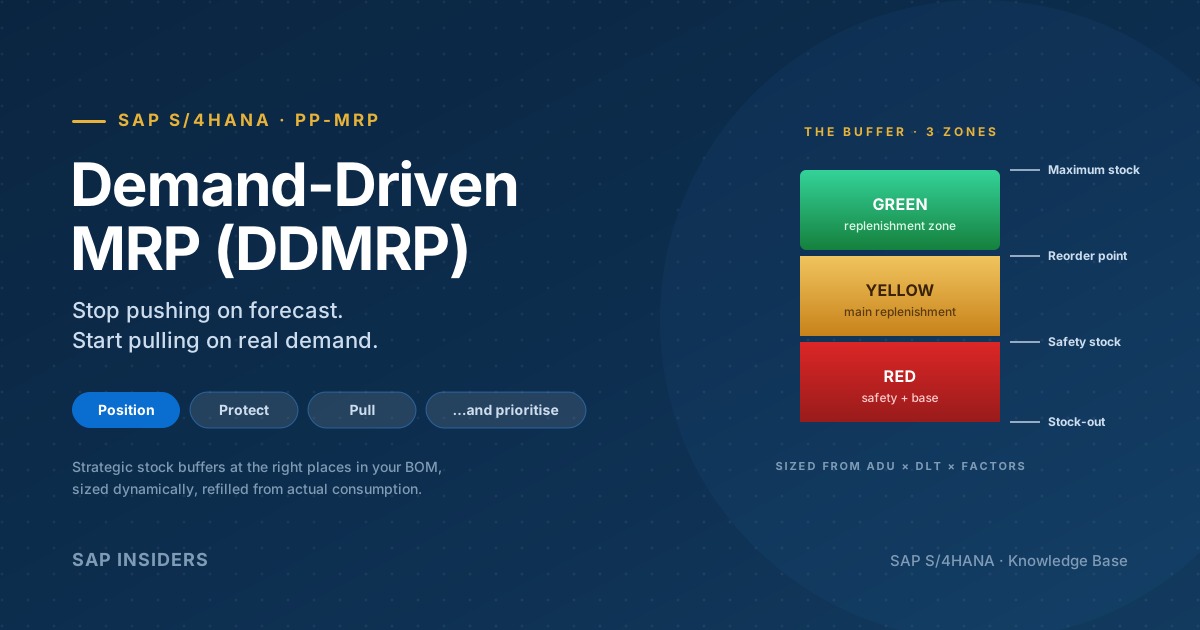
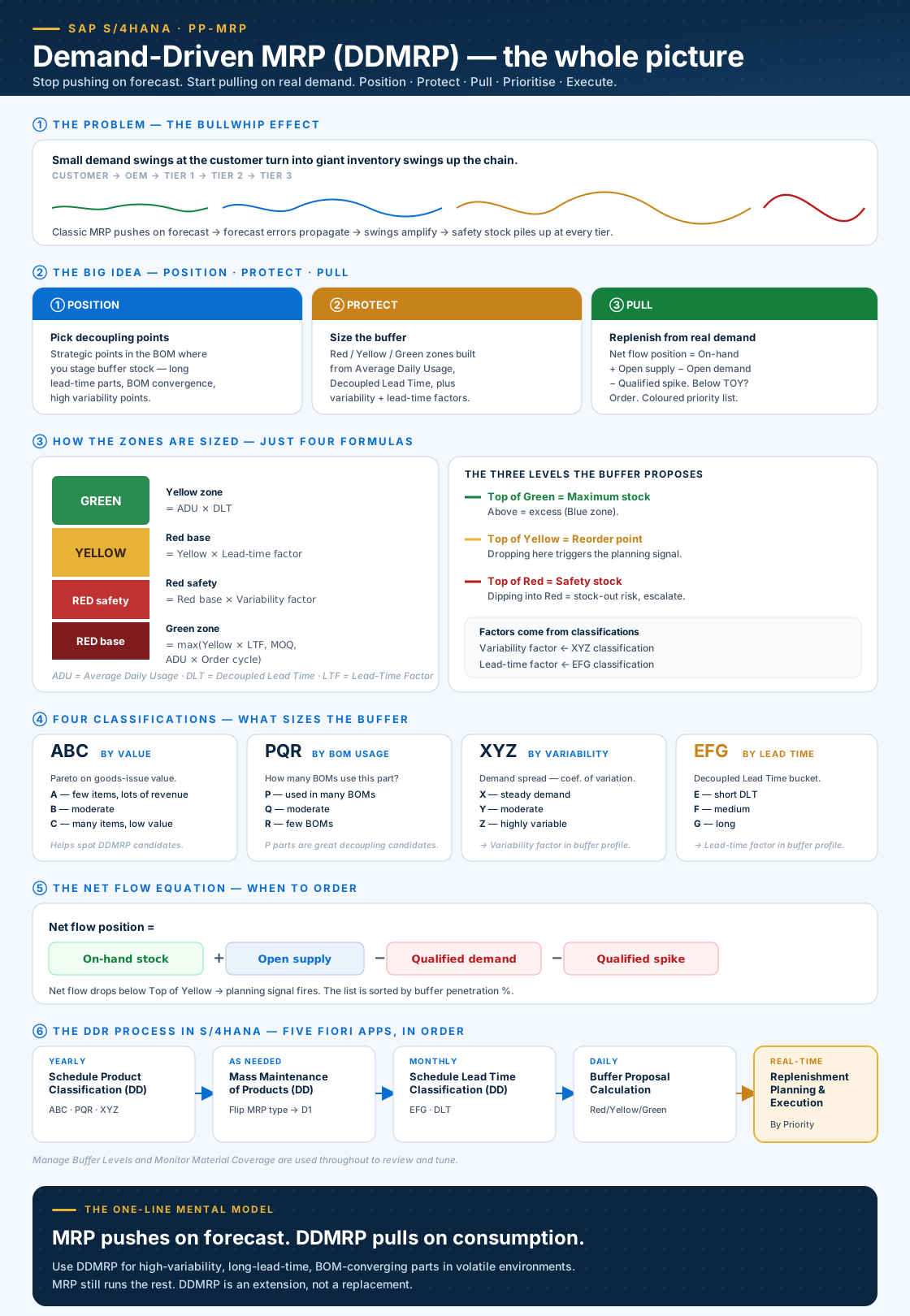
Here is the whole concept in one frame. Use it as your map; the sections below expand each part.
The problem — the bullwhip effect
Long before DDMRP arrived, the supply-chain literature had a name for the pattern at the heart of the planner's problem: the bullwhip effect. A small variation in demand at the customer end becomes a giant variation by the time it reaches a Tier-3 supplier, because every link in the chain layers in its own forecast error, its own safety stock, and its own reorder timing.
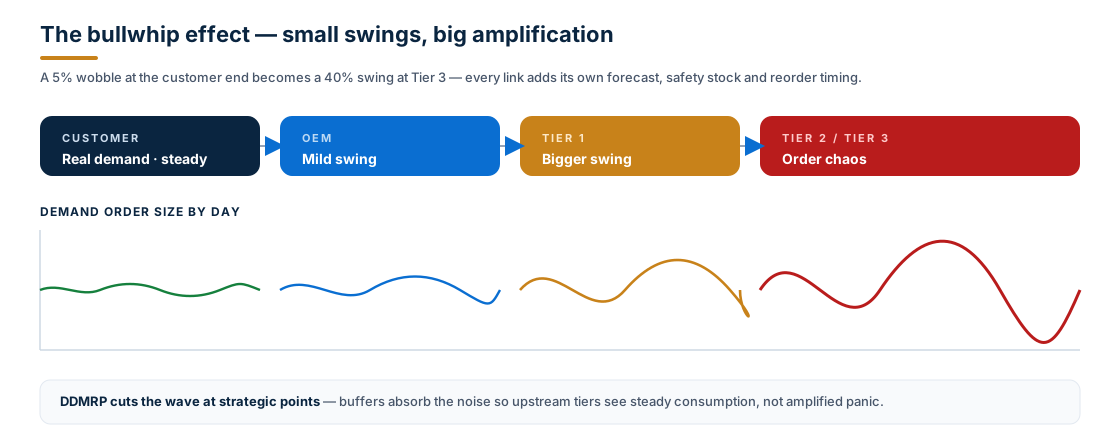
Two consequences hurt the most:
- Too much stock everywhere — every tier adds safety stock to protect against the variation it sees, but it sees inflated variation.
- Stock-outs anyway — when the forecast is finally wrong in the other direction, the safety stock can't keep up because it was deployed for the wrong distribution of risk.
DDMRP doesn't promise zero variability — variability is inherent to supply chains. It promises to stop amplifying it by breaking the dependency chain at carefully chosen points.
The big idea — Position · Protect · Pull
The five formal components of DDMRP (per the Demand Driven Institute, codified by SAP in S/4HANA's DDR module) read as five steps; in practice they collapse into a three-word mental model:
- Position — decide where in your supply chain you'll place buffers. You don't buffer everything; you buffer the parts where the bullwhip hurts most.
- Protect — size and re-size those buffers. Each buffer has three zones (Red / Yellow / Green) calculated from Average Daily Usage, Decoupled Lead Time, and two factors derived from product classifications.
- Pull — replenish from real consumption. The system tracks each buffer's net flow position; when it drops below the top of the Yellow zone, a supply order fires, prioritised by how deep it has drifted.
Plus two implementation steps that S/4HANA handles for you: dynamic buffer adjustments (the buffer re-sizes itself as ADU and lead time change) and visible execution (a colour-coded priority worklist the planner actually works through).
Push vs pull — DDMRP and MRP are complementary
This is the single most-misunderstood point: DDMRP does not replace MRP. In a typical S/4HANA plant, DDMRP runs on maybe 5–20% of materials — the ones at decoupling points — and MRP Live runs everything else.
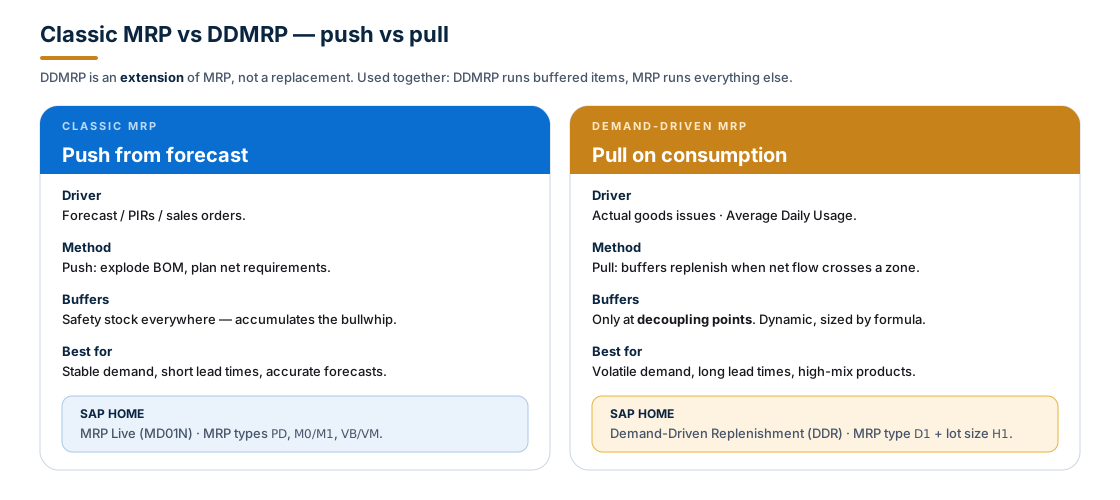
Said another way: classic MRP pushes from a promise of demand (forecast). DDMRP pulls from evidence of demand (consumption). Most plants want both — DDMRP for the volatile/long-lead handful, MRP for the predictable majority.
Position — strategic decoupling points
The first practical question is where to put the buffers. Get this right and DDMRP earns its keep; get it wrong and you've just added safety stock under a fancier name.
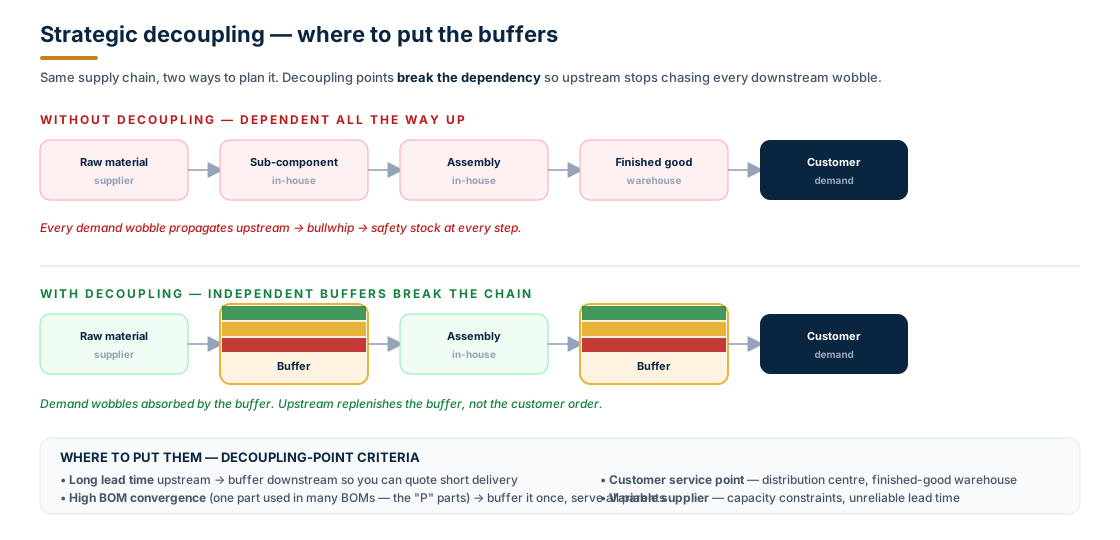
Four good rationales for putting a buffer at a particular SKU + plant:
- Long upstream lead time — if the parts feeding this node take weeks or months, buffer here so you can quote short customer lead times.
- BOM convergence — a part used in many BOMs (a "P" part in the PQR classification). Buffer once, serve all parents.
- Customer service point — a distribution centre or finished-goods warehouse where the customer expects off-the-shelf delivery.
- Supplier variability — a supplier with unreliable lead time, capacity constraints, or quality issues.
Real example. A centrifugal-pump manufacturer typically buffers three places: motor windings (12-week lead time from a specialist supplier), the impeller sub-assembly (used in every pump variant — a strong "P" part), and the finished pump at the distribution centre (the OEM customers expect 48-hour delivery).
DDMRP doesn't choose your decoupling points for you — that's a planner judgement informed by the classifications below.
Protect — the four classifications
S/4HANA gives you four out-of-the-box classifications to help identify candidates and size the buffers. The first three run together via the Schedule Product Classification (DD) app; the fourth runs separately because it depends on the first three.
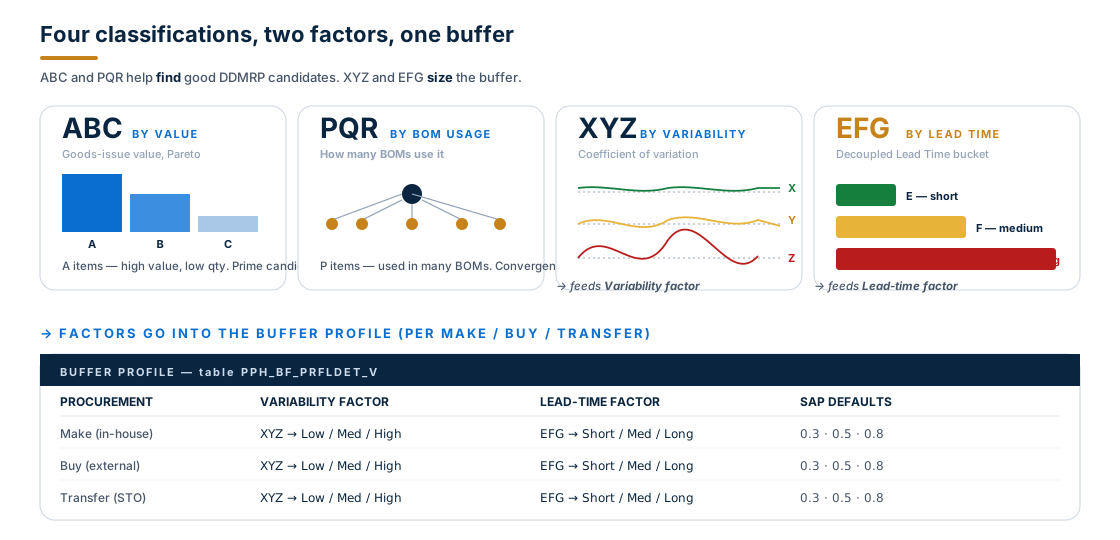
In summary:
| Classification | What it measures | How it's used |
|---|---|---|
| ABC | Goods-issue value (Pareto) | Find candidates — A items often warrant DDMRP |
| PQR | BOM usage count | Find convergence points — P parts shared across BOMs |
| XYZ | Coefficient of variation on actual demand | Feeds the Variability factor in buffer profile |
| EFG | Decoupled Lead Time bucket (short / medium / long) | Feeds the Lead-time factor in buffer profile |
The Decoupled Lead Time (DLT) is the key quantity behind EFG: it's the sum of the longest lead times of non-buffered products in a sequence headed by a DD-relevant product in the BOM. In English: how long it would actually take to satisfy demand for this buffered part if its own stock ran out. DLT is computed by the Schedule Lead Time Classification of Products (DD) app after the ABC/PQR/XYZ run, then stored on the material master MRP3 view as the Total Replenishment Lead Time.
Protect — buffer profiles and zones
Once a product is DDMRP-relevant and classified, its buffer profile decides the two multipliers used in the math. SAP ships defaults of 0.3 / 0.5 / 0.8 for Low/Medium/High variability and Short/Medium/Long lead time, separately for Make / Buy / Transfer procurement types. Most organisations tune these over months as they learn the rhythm of their supply chain.
The buffer itself is split into three coloured zones plus a fourth "overflow":
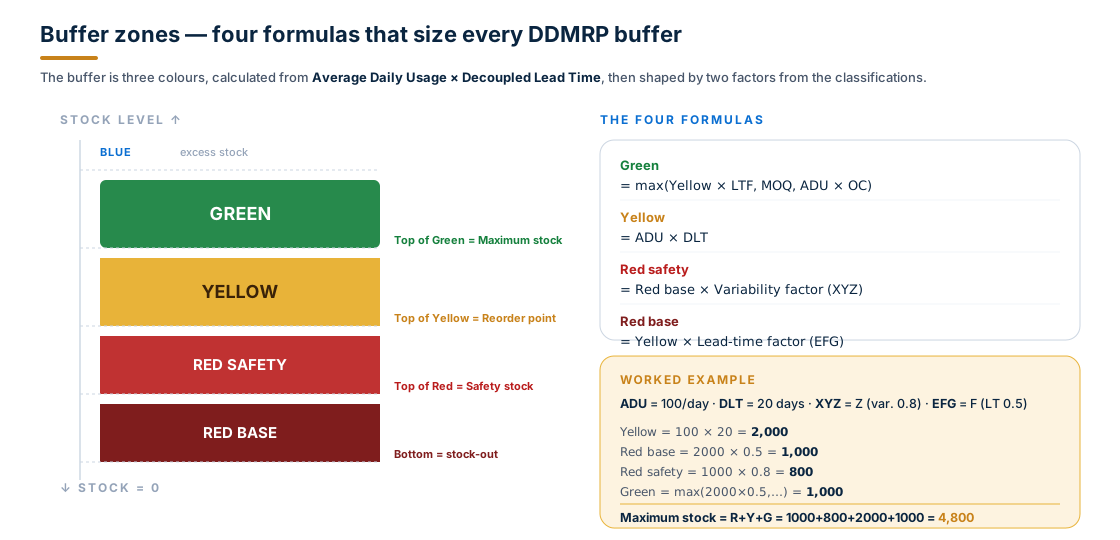
The math, top to bottom:
- Green zone =
max( Yellow × Lead-time factor, Minimum Order Qty, ADU × Order Cycle )— the replenishment zone. Receipts land in green. - Yellow zone =
ADU × DLT— the working stock. The Top of Yellow is the reorder point. - Red Safety =
Red Base × Variability factor— the variability cushion (driven by XYZ). - Red Base =
Yellow × Lead-time factor— the lead-time cushion (driven by EFG). - Sum of all three = the Maximum stock level. Anything above is Blue zone (excess — review it).
The three coloured zones map directly to S/4HANA's familiar safety stock, reorder point, and max stock — DDR writes these back to the material master after the buffer-proposal job runs.
Pull — the net flow position equation
With buffers sized, the day-to-day question is simple: do we need to order this? DDMRP answers with one equation, calculated continuously, called the net flow position.

The four ingredients:
- On-hand stock — physically in your warehouse, unrestricted.
- Open supply — purchase orders, planned orders, stock-transport requisitions in flight.
- Qualified sales demand — sales orders due today.
- Qualified spike — a future daily demand that lies above the Spike Threshold and within the Spike Horizon.
When the net flow drops below the Top of Yellow, the buffer fires a replenishment signal. The deeper it goes — into Yellow, into Red Safety, into Red Base — the higher the planning priority.
Spike horizon — why future orders sometimes count now
The spike machinery is the cleverest part of DDMRP. Average Daily Usage already smooths the day-to-day demand, but big future orders need to start replenishing now so the supply lands in time. The spike horizon is the window where they count:
Order Spike Horizon = (Spike Horizon DLT Multiplier × DLT) + Spike Horizon Constant
Inside that window, any future daily total above the spike threshold is "qualified" and subtracted from net flow today. Outside the window, even huge orders are ignored — they're either too far away to need supply yet (the next run will catch them) or they fit naturally into the ADU.
The thresholds and horizon constants are maintained per buffer profile in Buffer Profile Maintenance (table PPH_BF_PRFLDET_V / Fiori app from 1809).
Planning priority — the colour-coded worklist
The Replenishment Planning by Planning Priority Fiori app gives the planner the day's worklist, sorted by buffer penetration percentage — how deep the net flow has drifted into the zones:
| Net flow position | Zone | Action |
|---|---|---|
| Below Top of Red (very low) | Red | Expedite — risk of stock-out |
| Top of Red ≤ NFP < Top of Yellow | Yellow | Create supply order |
| Top of Yellow ≤ NFP ≤ Top of Green | Green | Nothing to do — monitor |
| Above Top of Green | Blue | Excess — investigate |
This list is the operational heart of DDMRP. A planner with thousands of materials needs to focus on the red rows first, then yellow — green rows are deliberately quiet.
The five Fiori apps — in the order you use them
S/4HANA splits DDR into configuration apps (run periodically to keep settings fresh) and operational apps (run continuously to plan and execute). The recommended cadence:
| Frequency | App | Purpose |
|---|---|---|
| Yearly | Schedule Product Classification (DD) | ABC + PQR + XYZ classification |
| As needed | Mass Maintenance of Products (DD) | Mark products as DD-relevant; flip MRP type to D1 |
| Monthly | Schedule Lead Time Classification of Products (DD) | EFG classification + Decoupled Lead Time |
| Daily | Schedule Buffer Proposal Calculation | Recalculate Red / Yellow / Green |
| Continuous | Manage Buffer Levels | Review and tune buffer settings |
| Continuous | Replenishment Planning by Planning Priority | Plan replenishment from the priority list |
| Continuous | Replenishment Execution by On-Hand Status | Expedite open POs / production orders |
| Continuous | Monitor Material Coverage | Review what MRP Live did after the buffer changes |
Configuration apps are scheduled as background jobs. Operational apps are the day-to-day tools the planner lives in.
Master data — MRP type D1 and lot size H1
Two material-master settings switch a material from classic MRP to DDR:
- MRP type =
D1(planning procedureC) on the MRP 1 view. This marks the material as DDR-relevant and routes it through the buffer-based planning logic instead of net-requirements MRP. - Lot-size procedure =
H1(replenish to maximum stock level). With this lot rule, safety stock and reorder point become mandatory fields and the buffer proposal calculation writes them automatically.
When you flip a material to D1, classic MRP Live no longer creates net-requirement-driven planned orders for it. Instead, the DDR run creates supply orders to keep the net flow position above the top of Yellow.
You don't need to touch every MRP type by hand. The Mass Maintenance of Products (DD) app lets you select all products in a classification combination (e.g. all A × P × Z parts) and flip MRP type and lot size in bulk.
Configuration prerequisites
Before any of this works, three pieces of customising have to be in place:
- Buffer profiles maintained per plant + procurement type in table
PPH_BF_PRFLDET_V(transactionSM30) or the Buffer Profile Maintenance Fiori app (from 1809). - Buffer profile assignment + spike maintenance in table
PPH_BF_PRFLASG_V— set the Spike Horizon Constant, Spike Horizon DLT Multiplier, and Spike Threshold per plant. - Classification thresholds for ABC (% of value), PQR (BOM count), XYZ (coefficient of variation), EFG (lead-time days) — configured as job parameters in the four classification apps.
A common mistake is to start the classification jobs before the buffer profiles exist — you can run the classifications, but the buffer-proposal calculation will fail or produce zeros.
When DDMRP fits — and when it doesn't
The honest version. DDMRP is not magic — and it's not free. It earns its place under specific conditions.
Strong fit:
- Demand is volatile or seasonal; the forecast is regularly off by >10%.
- Lead times are long (raw materials, supplier-far parts).
- BOMs converge — a handful of parts feed many finished goods.
- You can tolerate carrying a moderate strategic buffer (working capital is acceptable; the cost of a stock-out is high).
- You have at least 6 months of clean consumption history for the parts you'll classify.
Poor fit:
- Demand is stable and forecast is accurate — classic MRP is simpler and equally effective.
- Make-to-order with no realistic stock position (you'd be buffering a per-order custom configuration).
- Very short lead times end-to-end — there's nothing for the buffer to absorb.
- Highly seasonal with unpredictable peaks and no historical signal — DDMRP needs ADU to be statistically meaningful.
The right answer is almost always hybrid: DDMRP on the materials where the bullwhip hurts (long lead, high variability, BOM convergence), MRP on the predictable rest.
Common gotchas
A short list, all from real DDR deployments:
- Wrong MRP type left in place. A material with the right classification but still
PDinstead ofD1will be ignored by DDR and planned by classic MRP. Use Mass Maintenance. - Lot size not
H1. WithoutH1, safety stock and reorder point won't be updated automatically by the buffer proposal job — your buffer math runs in pMRP-land while operative MRP still uses the old static values. - Buffer profile not defined for the procurement type. Default Buy/Make/Transfer rows are needed. Missing one → the buffer proposal job throws errors for that subset.
- Spike Horizon Constant left at 0 (or 1) and DLT not yet known. Initially DLT isn't classified, so the spike horizon collapses to the constant. Run the EFG classification before relying on spike behaviour.
- Forecast still being maintained as PIRs. DDR doesn't use PIRs in the net-flow equation, but PIRs left active will still drive classic MRP for that material if MRP type is wrong. Clean up.
- Customer order does not change ADU. ADU is computed from historic goods issues over the averaging interval. Sales orders affect net flow through qualified demand and qualified spike, not through ADU.
- Releasing the buffer proposals. The Buffer Proposal Calculation produces proposals. They become the active safety stock / reorder point / max stock only when adopted in Manage Buffer Levels. Auto-adopt is configurable per buffer profile.
Frequently asked questions
Does DDMRP need an Integrated Business Planning (IBP) integration? No — DDR in S/4HANA is standalone for the planning + execution side. IBP integrates upstream for tactical S&OP and demand sensing, but you can run DDR on its own.
How does DDR work with MRP Live? MRP Live still runs every night. Materials with MRP type D1 are handled by the DDR logic (not net requirements). Everything else is handled by classic MRP. Both write to the same operative plan.
Can DDMRP and pMRP coexist? Yes. pMRP is a simulation sandbox; DDR is operational. When pMRP releases a simulation, it can adjust both PIRs (for classic MRP materials) and buffer levels (for DDR materials).
Do I need a separate license? DDR was introduced with S/4HANA 1709 and is enhanced through subsequent feature packs. It's part of the standard SAP S/4HANA Manufacturing and Supply Chain licensing — verify with your account team for the current product condition.
What if I have very few historic goods issues for a new product? DDR depends on ADU statistics; for a brand-new material you'll see warnings on the buffer proposal. Manually seed the buffer for the first few weeks, then let the ADU build up.
Is DDMRP the same as Kanban? They share a pull mindset, but DDMRP is more sophisticated — three zones instead of one bin level, dynamic resizing based on classifications, multi-echelon awareness, and a system-driven priority list. Kanban remains useful for shop-floor pull within a cell; DDMRP plans the chain above the cell.
Key takeaways
- DDMRP is an extension of MRP, not a replacement — used together: DDMRP for buffered critical materials, MRP for everything else.
- The mental model is three words: Position · Protect · Pull. Pick the right decoupling points, size the buffer with formulas, refill it from real consumption.
- Each buffer has three zones — Green / Yellow / Red — calculated from
ADU × DLTand shaped by two factors: variability (from XYZ) and lead time (from EFG). - The net flow position = on-hand + open supply − qualified demand − qualified spike. Below Top of Yellow → order. The deeper, the higher the priority.
- In S/4HANA, DDR is driven by MRP type
D1+ lot sizeH1plus the buffer profile table; managed via a sequence of Fiori apps (Classification → Mass Maintenance → Lead-time Classification → Buffer Proposal → Replenishment Planning / Execution). - DDMRP shines on volatile, long-lead, BOM-converging materials. On stable predictable items, MRP is simpler and equally effective.
The promise of DDMRP isn't "less inventory" or "no stock-outs" — it's the right inventory in the right places, decoupled from forecast noise, so when the chain wobbles the buffer absorbs the swing and upstream stays calm.