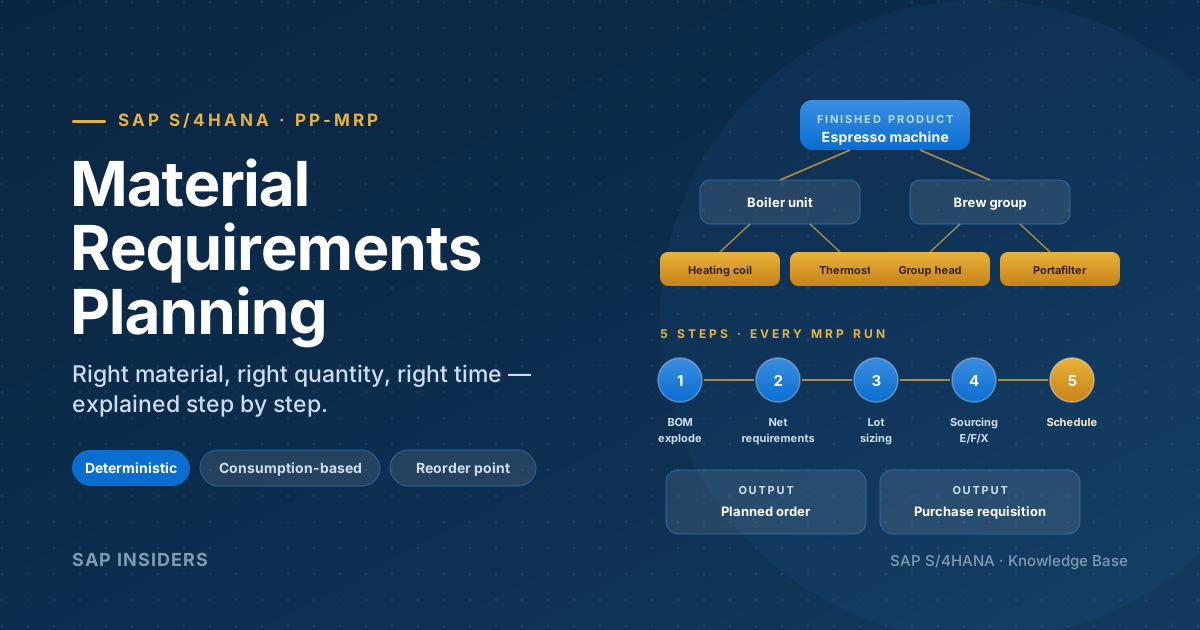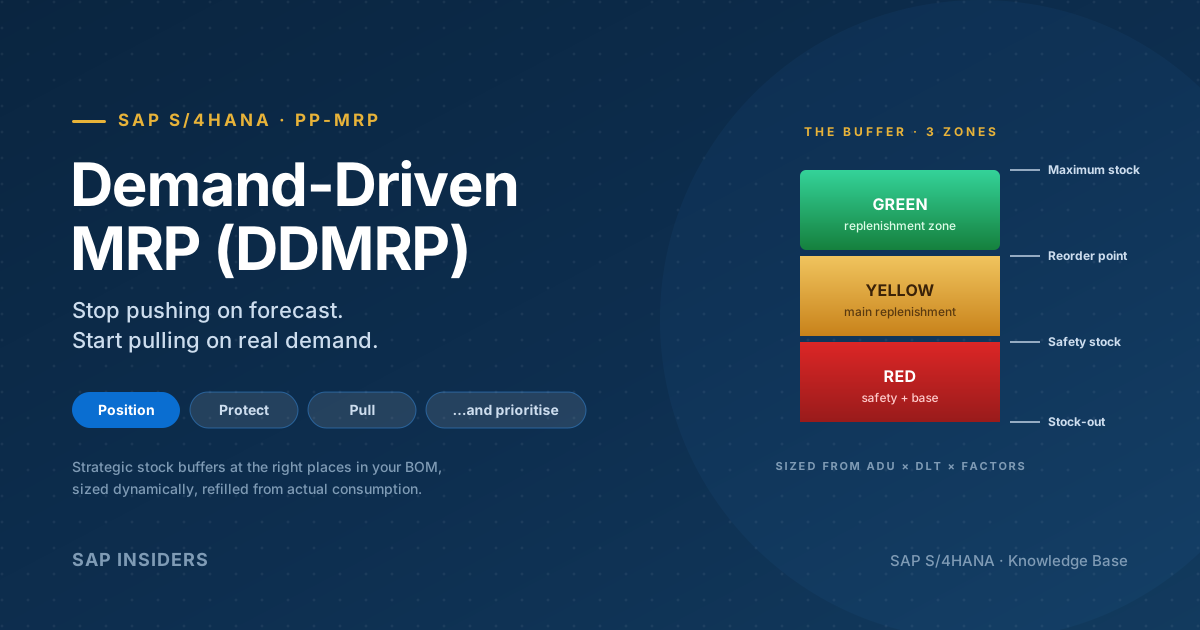
Most explanations of Material Requirements Planning stop exactly where it gets interesting. They tell you MRP "explodes the BOM", "nets the requirements" and "creates planned orders" — and then move on, as if those three phrases were self-explanatory. They are not. Behind every planned order on the Stock/Requirements List is a specific subtraction, a specific lot-sizing rule, and a specific countdown of dates. Get any one of them wrong and you either build pumps you can't sell or stop the line for the want of a six-rupee bolt.
This article does the arithmetic. We take one finished product, one bill of material, and one demand of 100 units, and we follow the number all the way down — by hand — until it becomes a fistful of planned orders and purchase requisitions. Every figure here is reproducible: you could check it with a calculator, and that is the whole point. MRP is not a black box. It is auditable arithmetic.
It is the deep-dive companion to our overview, MRP in SAP S/4HANA: How Material Requirements Planning Actually Works — where that piece maps the territory, this one walks every step with the numbers showing.
The vocabulary — read this before the math
Nine terms. One line each. Every diagram below assumes these mean the same thing to you and to SAP.
- Gross requirement — the total demand for a material on a date, before any stock is considered. Comes from sales orders, planned independent requirements (PIRs), and dependent requirements handed down from parent BOMs.
- Dependent requirement — demand for a component that exists only because its parent is being made. Build 98 pumps and you create a dependent requirement for 98 casings.
- Planned independent requirement (PIR) — forecast demand for a finished or saleable product, maintained in
MD61, independent of any sales order. - Net requirement — what's actually short after you subtract usable stock and firm receipts from the gross requirement. A positive net requirement is the seed of every procurement proposal.
- Safety stock — a reserved cushion MRP is not allowed to consume to cover ordinary demand. It is added back into the netting equation precisely because it must stay untouched.
- Firm receipts — supply already committed and dated: open purchase orders, released production orders, firmed planned orders. They reduce the net requirement.
- Low-level code (LLC) — the deepest level a material appears at in any BOM across the plant. MRP plans materials in LLC order so a shared part is netted only once, after all its parents are known.
- Lot size — the rule that converts a bare net requirement into an actually orderable quantity (lot-for-lot, fixed, minimum/maximum, rounding value).
- Procurement proposal — MRP's output: a planned order for in-house production, or a purchase requisition for external procurement.
The one question MRP answers
Strip away the configuration and MRP exists to answer a single question, for every material, every run:
"What do I need, how much, and by when — to cover demand without sitting on cash?"
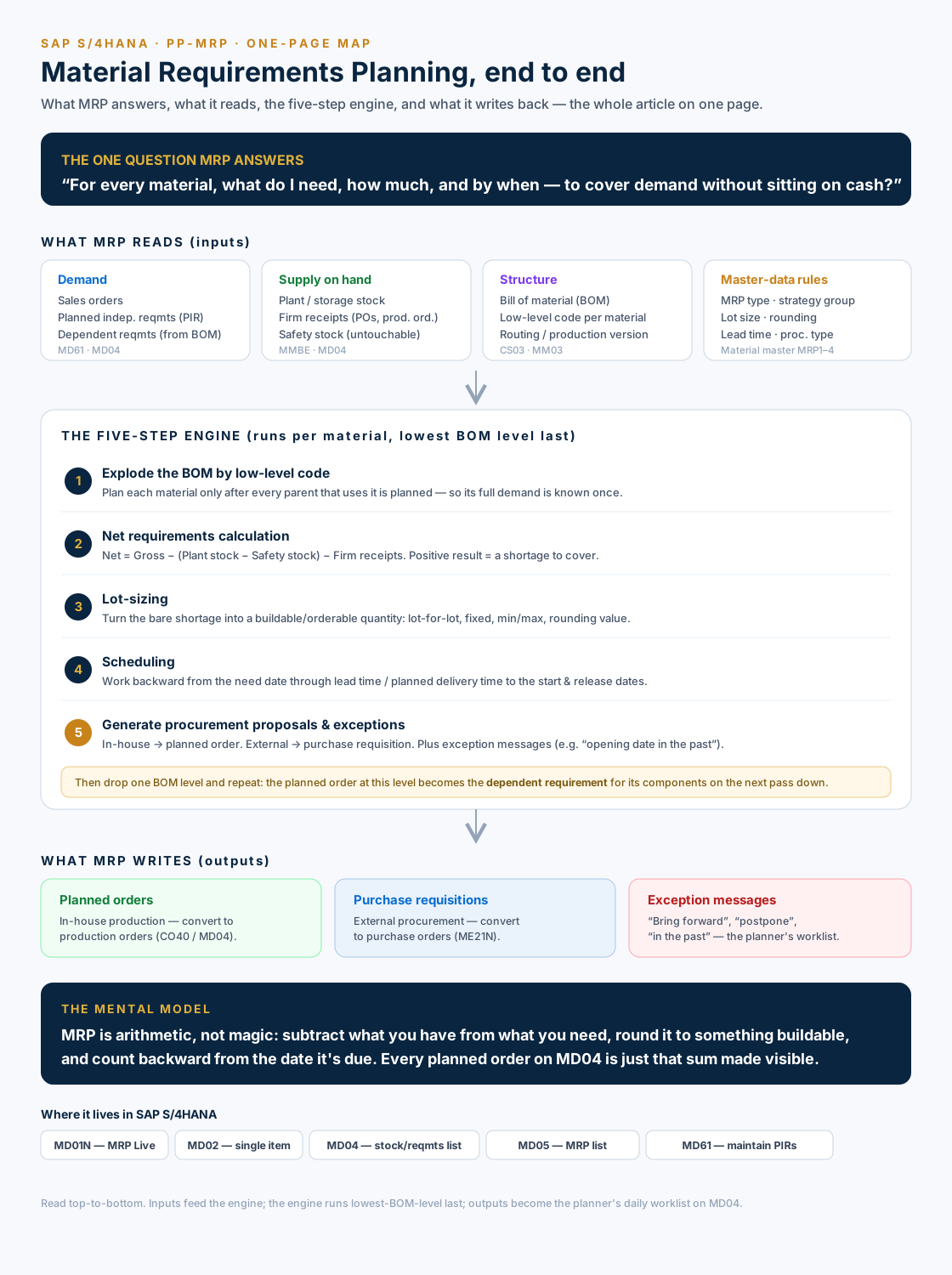
Everything below is mechanism in service of that question. Here is the whole machine on one page; treat it as the map and use the sections that follow to walk each part.
The factory — one pump, one bill of material
Meet Vajra Precision Tools Pvt Ltd, Pune. They build the VPT-PUMP-50, a centrifugal water pump. A distributor places a firm requirement: 100 pumps, due in Week 25. We're planning at the start of Week 12, in whole-week buckets, so the planning horizon and the lead times all line up neatly.
The pump's bill of material is deliberately small but has one sharp edge — a part that appears at two different levels:
| Material | Make / Buy | Used | Lead time | Notes |
|---|---|---|---|---|
| VPT-PUMP-50 | In-house | — | 1 wk | Finished pump (the FG) |
| CASING-50 | In-house | 1 / pump | 1 wk | Cast pump body |
| IMP-ASSY-50 | In-house | 1 / pump | 1 wk | Impeller sub-assembly |
| MOTOR-2KW | Buy | 1 / pump | 12 wk | 2 kW electric motor — the long pole |
| IMPELLER-50 | In-house | 1 / assembly | 1 wk | Machined impeller |
| SHAFT-50 | Buy | 1 / assembly | 2 wk | Drive shaft |
| BOLT-M10 | Buy | 4 / pump and 2 / assembly | 2 wk | Standard hex bolt |
That last row is the interesting one. The M10 bolt is used directly on the pump (4 per pump, a level-1 component) and inside the impeller assembly (2 per assembly, a level-2 component). Hold that thought — it is the reason low-level codes exist.
Low-level code — why the bolt is planned last
MRP does not plan materials in the order you'd read the BOM top to bottom. It plans them in low-level-code order: every level-0 material first, then every level-1 material, then every level-2 material, and so on. The rule it is protecting is simple but non-negotiable:
Never net a material until every parent that consumes it has already been planned.
A material's low-level code is the deepest level it appears at in any BOM. The bolt shows up at level 1 (on the pump) and level 2 (in the assembly), so SAP stamps its LLC as 2 — and defers all bolt planning until the level-2 pass, when both sources of demand are finally on the table.
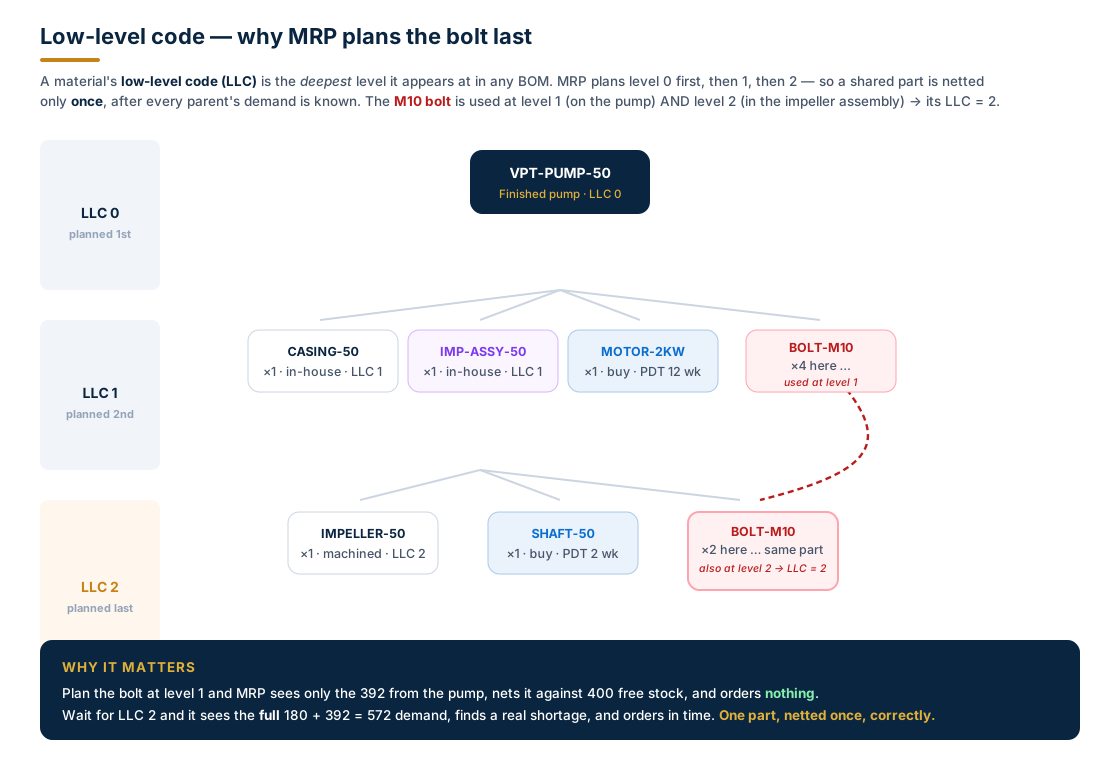
We'll see this pay off in hard numbers later. First, the engine that runs at every node.
The net requirements calculation — the formula that runs everywhere
At each material, MRP performs the same subtraction. In words:
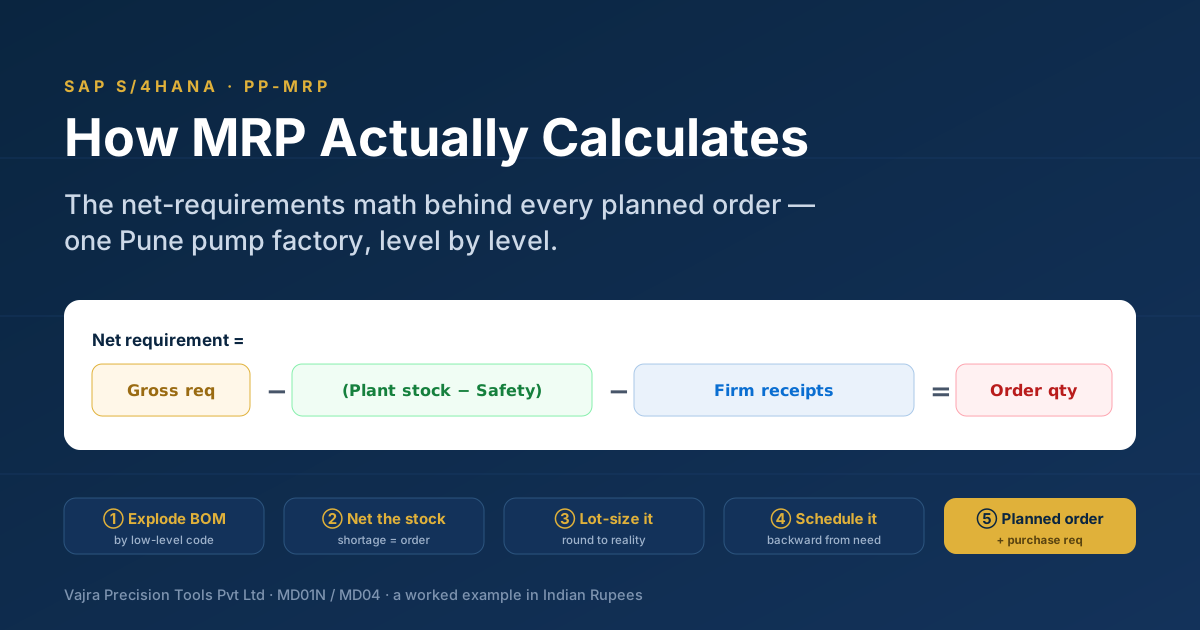
Net requirement = Gross requirement − (Plant stock − Safety stock) − Firm receipts
The bracket is the subtle bit. You can't simply subtract "stock", because part of that stock is safety stock, which MRP is forbidden to consume for ordinary demand. So the usable stock is plant stock minus safety stock; equivalently, you subtract plant stock and add safety stock back. If the result is positive, you have a shortage — and a shortage is the trigger for a procurement proposal.
Run it for the finished pump:
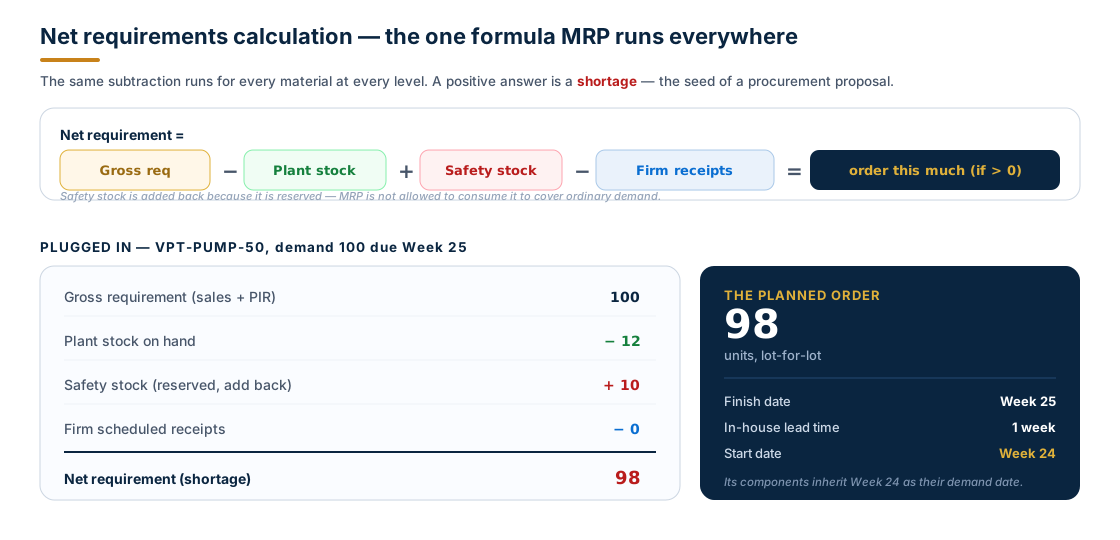
The arithmetic:
Net = Gross − (Plant stock − Safety stock) − Firm receipts
    = 100   − (12          − 10)           − 0
    = 100   − 2
    = 98
There were 12 pumps on the shelf, but 10 of them are ring-fenced as safety stock, so only 2 were usable. MRP needs 98 more. With lot-for-lot sizing it raises a single planned order for 98, due to finish in Week 25. The pump's in-house lead time is one week, so MRP schedules the order to start in Week 24 — and that start date becomes the demand date for everything the pump is built from.
Quick check Q: The pump had 12 in stock against a demand of 100. Why didn't MRP order 88? A: Because 10 of those 12 are safety stock and off-limits. Only 2 are usable, so the net requirement is 100 − 2 = 98. Safety stock is protected by adding it back in the equation.
The full run — watching 100 pumps cascade into orders
Now we let the demand fall through the BOM, level by level. The pump's planned order for 98 (starting Week 24) becomes the dependent requirement for each of its direct components: 98 casings, 98 impeller assemblies, 98 motors, and 4 × 98 = 392 bolts — all dated Week 24. Each of those materials then runs the same netting formula against its own stock, then its own lot-sizing rule.
This single diagram is the heart of the article. Read each card as gross − free stock = net → lot size → order, and follow the arrows: every order quantity becomes the demand handed to the level below.
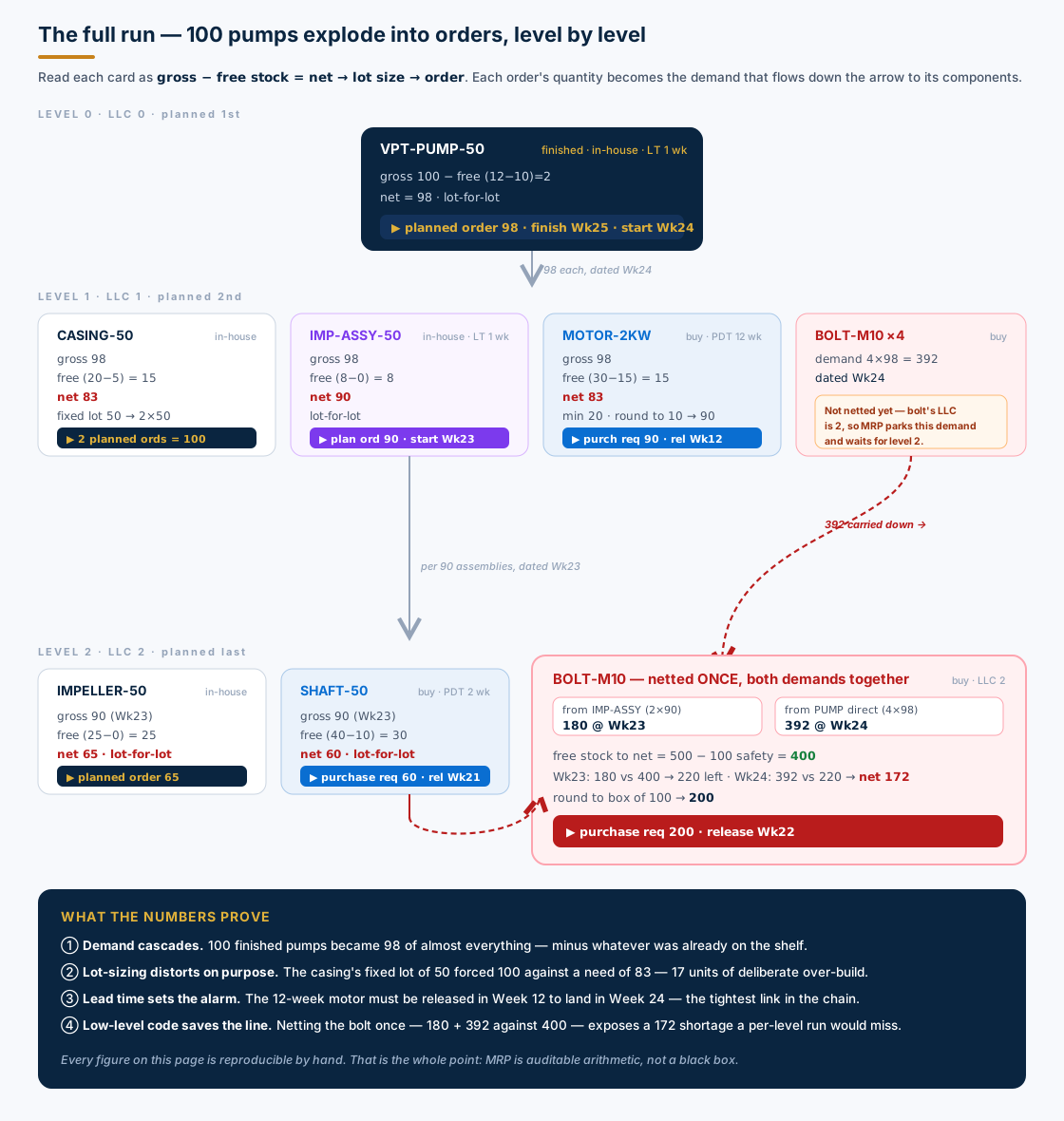
Let's verify the three most instructive cards by hand.
CASING-50 — fixed lot sizing forces over-build
Net = 98 − (20 − 5) − 0 = 98 − 15 = 83
The casting line runs in fixed batches of 50. You can't ask it for 83, so MRP rounds up to the next whole batch: ⌈83 ÷ 50⌉ = 2 lots = 100 casings. That's 17 more than needed — a deliberate consequence of the lot-sizing rule, not an error. Those 17 become opening stock for next month (and, until then, tied-up cash).
MOTOR-2KW — minimum lot and rounding
Net = 98 − (30 − 15) − 0 = 98 − 15 = 83
The motor has a minimum lot of 20 (83 clears it comfortably) and the supplier ships in multiples of 10, so 83 rounds up to 90. Because the motor is bought, MRP raises a purchase requisition, not a planned order. And because its planned delivery time is 12 weeks, the release date is the tight one — more on that under scheduling.
BOLT-M10 — the low-level-code payoff, in numbers
Here is where the LLC discipline earns its keep. The bolt has two gross requirements over the horizon:
- 180 at Week 23 — from the impeller assembly (2 × 90)
- 392 at Week 24 — directly from the pump (4 × 98)
Free stock to net against is 500 − 100 safety = 400. MRP nets the two demands in date order, once:
Week 23:  180 vs 400 free   →  220 free remaining
Week 24:  392 vs 220 free   →  net requirement 172  (shortage)
The bolt sells by the 100-box, so 172 rounds up to 200 — a purchase requisition released in Week 22.
Now picture the bug we avoided. If MRP had planned the bolt at level 1, it would have seen only the 392 from the pump, netted it against 400 free stock, and ordered nothing (392 < 400). The 180 from the assembly would surface later, at level 2, with the stock already spoken for — and the line would run 172 bolts short, three weeks before anyone noticed. The low-level code is what guarantees both demands meet before the netting happens. One part, netted once, correctly.
Quick check Q: If you "fixed" performance by letting MRP plan the bolt as soon as it appeared (level 1), what breaks? A: MRP would net the level-1 demand (392) against full stock (400) and order nothing, then discover the level-2 demand (180) too late. You'd be 172 bolts short. Planning strictly in low-level-code order is the safeguard — never disable it.
Lot-sizing — four rules, four very different orders
Notice that the net requirement was almost never the order quantity. Lot-sizing sits between them, and each rule trades inventory against order frequency in its own way. Our four materials happen to showcase the four most common procedures:
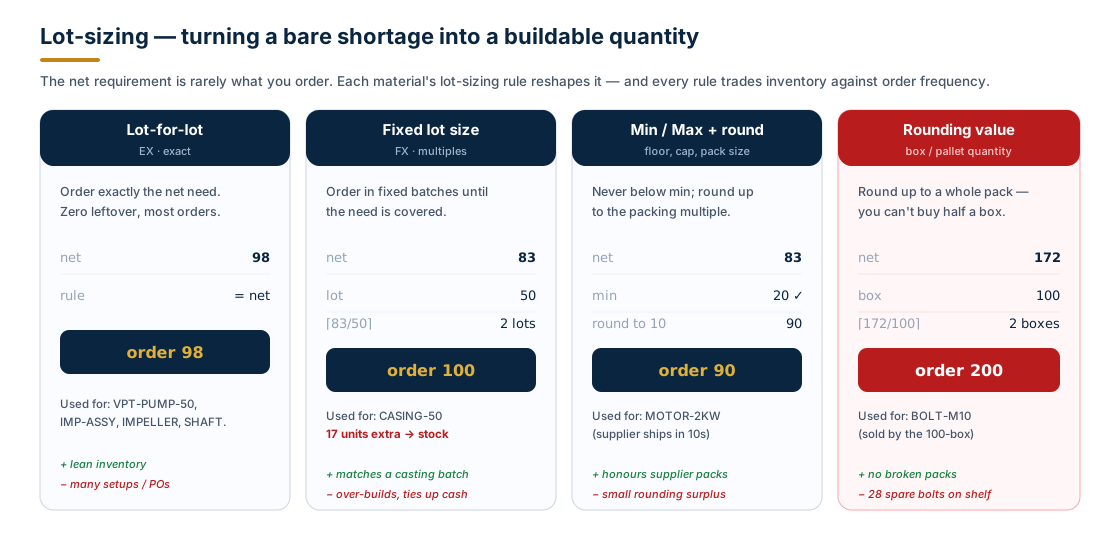
The lesson worth internalising: lot-sizing is where planners deliberately distort the net requirement to fit how the factory and its suppliers actually operate. A casting cell wants whole batches; a bolt vendor sells whole boxes; a motor supplier palletises in tens. None of that is waste per se — but every rounding decision is inventory you chose to carry, and it should be a choice, not an accident. (Configured in OMI4; the per-material rule lives on the MRP 1 view of the material master.)
Backward scheduling — counting back from the due date
A correct quantity on the wrong date is still a stockout. The second half of MRP's job is timing, and it works backwards: start at the finish date and subtract each lead time to find when work must start or an order must be released.
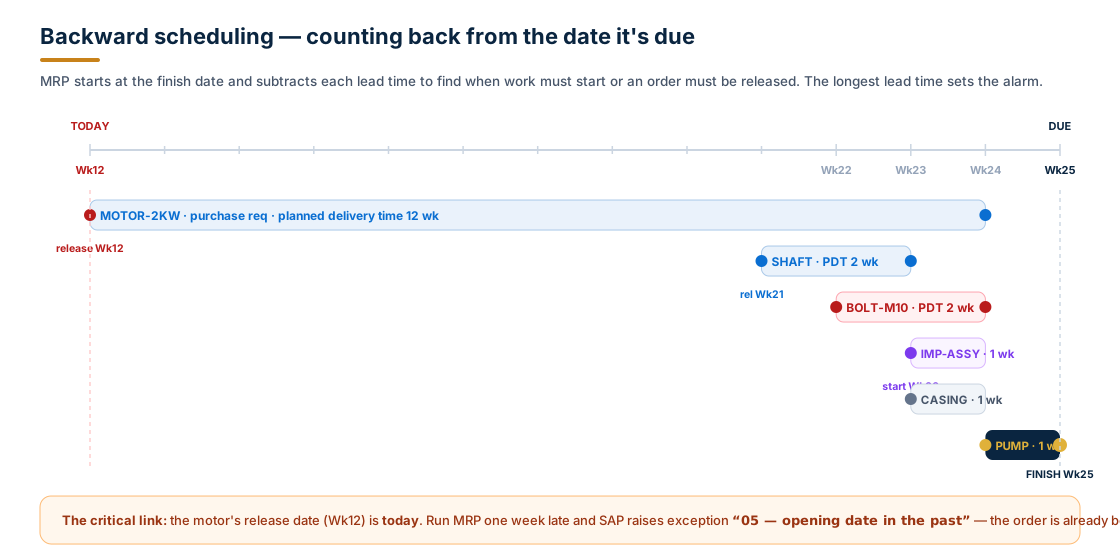
Trace the chain back from Week 25:
- Pump finishes Week 25 → starts Week 24 (1-week build).
- Casing, motor, assembly, direct bolts are needed Week 24.
- Impeller assembly finishes Week 24 → starts Week 23 → its impeller, shaft and bolts are needed Week 23.
- Shaft needed Week 23, 2-week delivery → release Week 21.
- Bolt needed Week 24, 2-week delivery → release Week 22.
- Motor needed Week 24, 12-week delivery → release Week 12 — today.
The motor is the critical path. Run the MRP a single week late and the motor's release date falls into the past; SAP flags exception message "05 — opening date in the past", and no amount of expediting downstream will fully recover it. This is why planners watch long-lead-time, externally procured A-parts more closely than anything else on the BOM. (When a start date does land in the past, MRP can switch to forward scheduling from today — producing an honest but late availability date rather than an impossible one.)
Quick check Q: Everything except the motor can be procured inside three weeks. Why does the whole order still hinge on Week 12? A: Backward scheduling is governed by the longest lead time on the critical chain. The 12-week motor must be released today to arrive by Week 24; miss it and the Week 25 promise is gone, however fast the rest moves.
A different MRP entirely — reorder point, and the setting that bites
Not every material deserves a full BOM explosion. For cheap, fast-moving C-parts — lubricants, fasteners in bulk, cleaning consumables — Vajra uses consumption-based planning with MRP type VB (manual reorder point). There's no netting cascade; MRP simply watches stock against a threshold and reorders when it drops below.
Simple — until you meet the setting that decides what counts as a shortage. Consider GREASE-EP2, bearing lubricant, reorder point 100 kg:
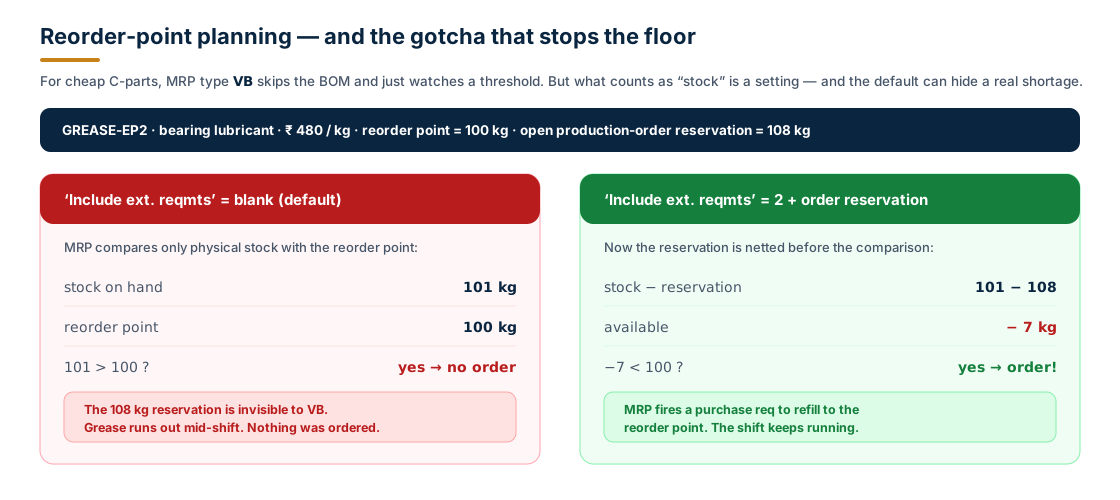
There are 101 kg on hand and an open production-order reservation for 108 kg. Common sense says you're 7 kg short and must reorder. But with the default MRP-type setting, that's not what happens:
Include ext. reqmts= blank (default): MRP compares physical stock (101) with the reorder point (100). Since 101 > 100, it orders nothing. The 108 kg reservation is invisible to it, and the grease runs dry mid-shift.Include ext. reqmts= 2, with order reservation ticked: MRP nets the reservation first — 101 − 108 = −7 kg available, which is below the reorder point — and fires a purchase requisition.
Same stock, same demand, opposite outcome — decided entirely by one customizing flag on the MRP type (SPRO ▸ Production ▸ MRP ▸ Master Data ▸ Check MRP Types). It's a favourite root cause for "MRP didn't order and I don't know why", and worth knowing exists before it costs you a shift.
Rescheduling — MRP also tells you to move what already exists
One more piece, because the real world is never a clean first run. Before MRP creates a new planned order to cover a shortage, it checks whether an existing firm receipt — an open PO or production order — could cover it if it were simply moved. This is the rescheduling check, and it speaks through exception messages on MD04:
- "10 — Bring process forward" — a receipt exists after the requirement; pull it in.
- "15 — Postpone process" — a receipt exists too early; push it out to avoid early stock.
- "30 — Plan process according to schedule" — a receipt's date no longer matches its requirement.
These don't create supply; they rearrange it. A disciplined planner clears the rescheduling exceptions before trusting the new planned orders, because moving an existing order is almost always cheaper than raising a new one.
Why the arithmetic is worth your attention
It's tempting to treat MRP as plumbing — set the master data, trust the overnight run. But every number we computed has a rupee value, and the distortions compound:
- The casing's fixed lot of 50 over-built by 17 units. At a standard price of ₹ 1,150 each, that's ₹ 19,550 of working capital parked on a shelf — per run, on one component.
- The bolt rounding left 28 spare on the shelf; trivial at ₹ 6 each, but multiply that pattern across thousands of C-parts and the "rounding tax" becomes a real number in the inventory ledger.
- The 12-week motor at ₹ 4,200 each is the line that actually decides whether the Week-25 promise is keepable. Miss its Week-12 release and you're not over-stocked — you're late, with 98 motors' worth of downstream work stranded.
A planner who can read these numbers — who knows why MRP ordered 100 casings and not 83, why the bolt was planned last, why the motor sets the alarm — is a planner who can tune the master data deliberately instead of fighting the output. That is the difference between running MRP and understanding it.
Where you run all this in SAP S/4HANA
| Transaction / App | What it does |
|---|---|
MD01N | MRP Live — the HANA-optimised total planning run across the plant |
MD02 | Single-item, multi-level planning (the whole BOM for one material) |
MD03 | Single-item, single-level planning |
MD04 | Stock/Requirements List — live view; where you read every number above |
MD05 | MRP List — a static snapshot of the last run, with exception messages |
MD61 | Maintain planned independent requirements (the demand we started from) |
OMI4 / MRP 1 view | Define lot-sizing procedures and assign them per material |
MD04 is where the worked example becomes real: open it for VPT-PUMP-50 after a run and you'll see the planned order for 98; drill into the components and the casing's 100, the motor's purchase requisition, and the bolt's consolidated 200 are all right there — each one the visible end of a subtraction you can now reproduce yourself.
Frequently asked questions
Does MRP ever consume safety stock? Not for ordinary net-requirements planning — it's added back in the equation precisely to protect it. Safety stock is only released by specific functions (e.g. certain availability checks or a deliberate safety-stock-as-demand configuration), never by routine netting.
Why plan in low-level-code order instead of just walking the BOM top-down? Because a shared component (like our bolt) can have parents at different levels. Walking top-down would net it against stock before all its demand is known, producing a phantom "no shortage" and a real stockout. LLC order guarantees every parent is planned first.
What's the difference between a planned order and a purchase requisition? Both are proposals. A planned order is for in-house production (procurement type E) and converts to a production order. A purchase requisition is for external procurement (type F) and converts to a purchase order. The procurement type on the MRP 2 view decides which one MRP raises.
Why did MRP create a purchase requisition I think is unnecessary? The usual suspects are exactly what we covered: a lot-sizing rule rounding up, a low-level-code consolidation you didn't expect, safety stock making usable stock smaller than physical stock, or — for reorder-point materials — the Include ext. reqmts flag changing what counts as a shortage.
Is this the same maths in classic MRP and MRP Live? Yes. MRP Live (MD01N) is a performance rewrite that pushes the calculation into HANA and plans far faster, but the logic — netting, low-level code, lot sizing, scheduling — is identical to what we worked by hand here.
Key takeaways
- MRP is reproducible arithmetic. Net requirement = gross − (plant stock − safety stock) − firm receipts. Positive means a shortage, and a shortage means a proposal.
- Low-level code is a correctness guarantee, not an optimisation. It ensures a shared part is netted once, after every parent is known. Our bolt would have been 172 short without it.
- Lot-sizing deliberately distorts the net requirement to fit batches, packs and pallets — every rounding decision is inventory you chose to carry.
- Backward scheduling is governed by the longest lead time. The 12-week motor, not the cheap fast parts, decides whether the promise is keepable.
- One customizing flag can hide a real shortage. For reorder-point materials,
Include ext. reqmtsdecides whether reservations count — know it exists before it stops your line. - A planner who reads the numbers tunes the master data; one who doesn't, fights the output. Understanding the math is the whole job.