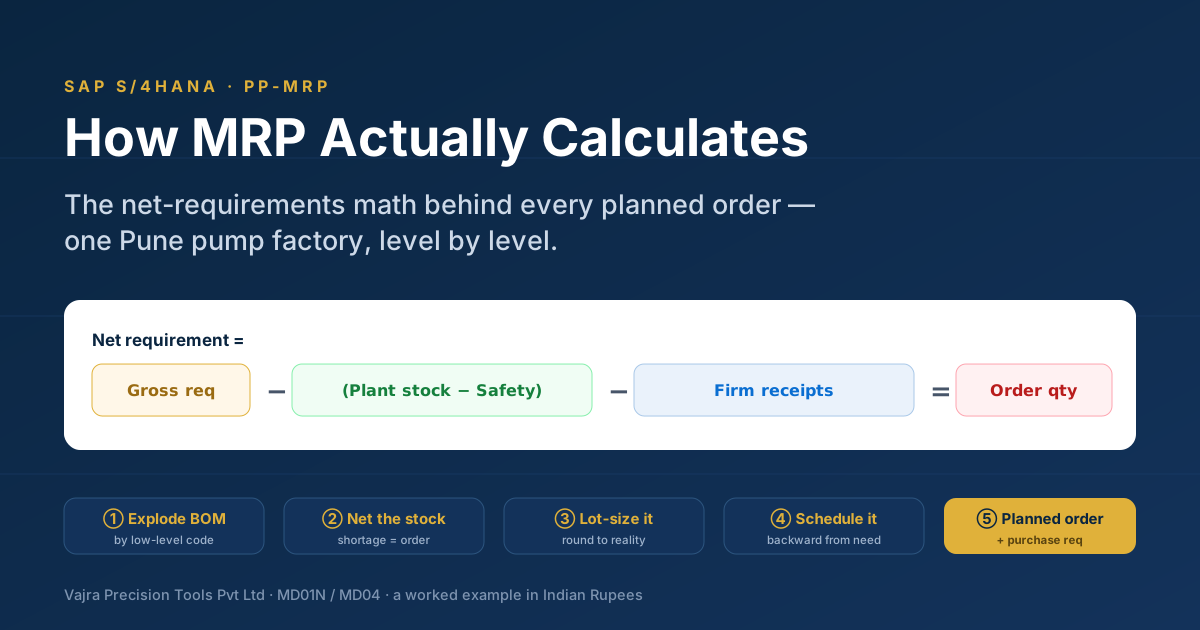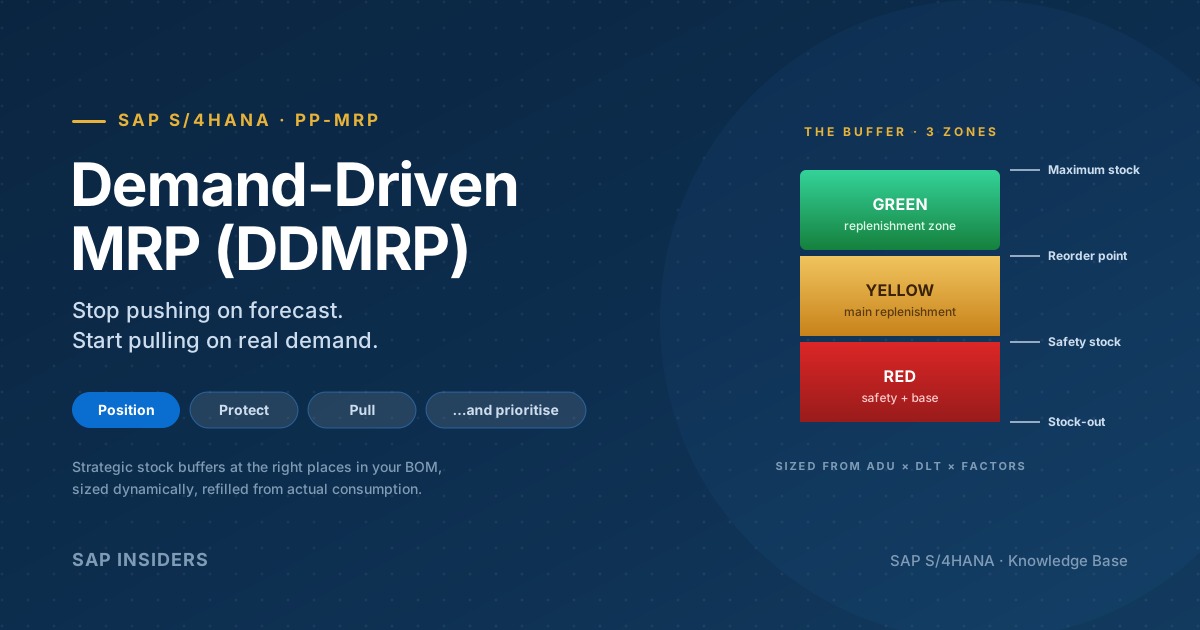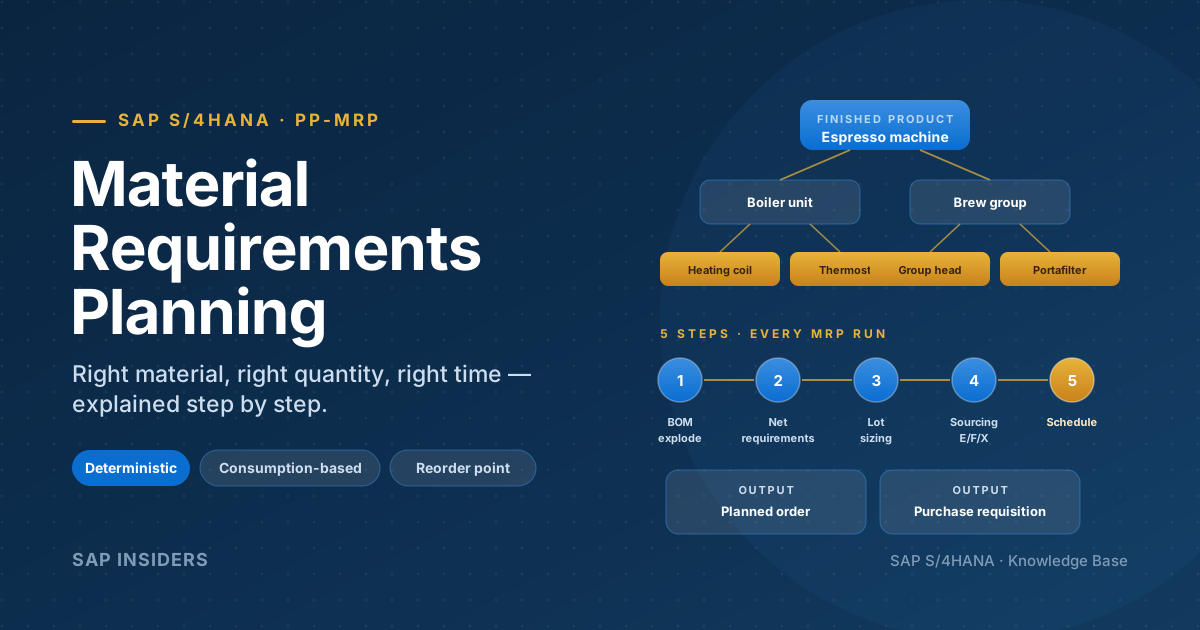
The planner's nightmare always sounds the same. The forecast says Q3 will spike. Sales has already started promising delivery dates. You run MRP overnight and the next morning the system has happily generated planned orders for materials you don't have, on a line that's already at 110% capacity, with components arriving the day after they're needed.
You knew this was coming. You just couldn't show it without committing to a plan.
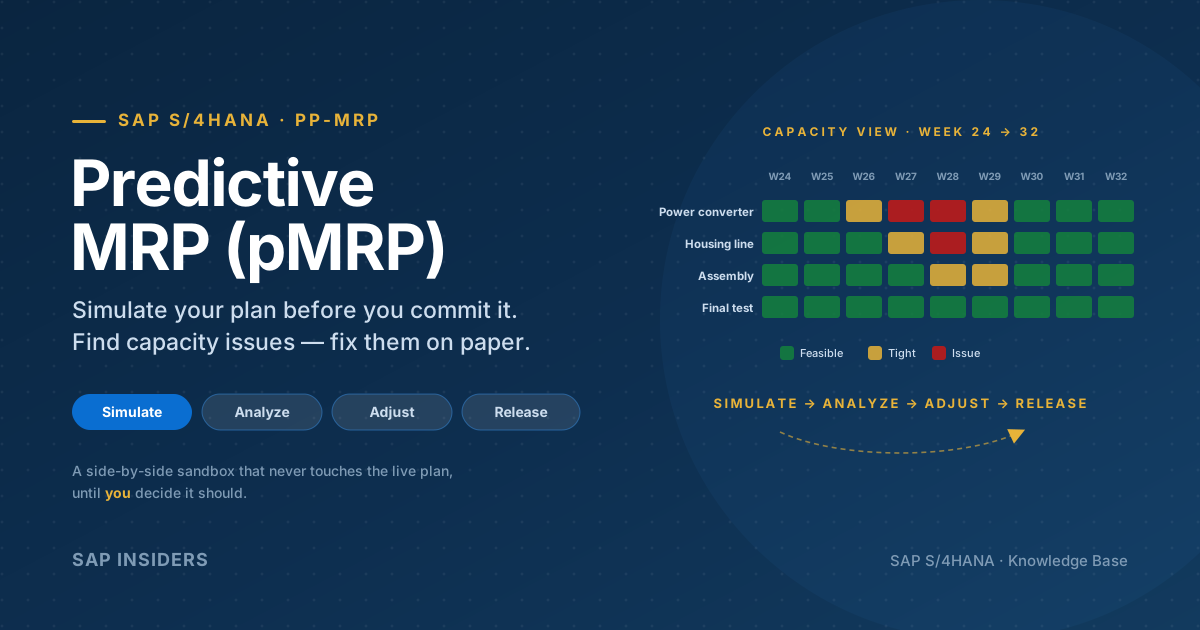
Predictive Material and Resource Planning (pMRP) in SAP S/4HANA closes that gap. It's a simulation sandbox that uses the same MRP DNA — BOMs, work centers, lead times, capacity — but writes to a copy of your master data, not the live one. You can test five different demand scenarios on a Tuesday afternoon, compare them side-by-side, then either throw them all away or push the winning one back into operative MRP.
This guide walks through pMRP the way a production planner actually uses it: when it earns its place against classic MRP, the five stages of every simulation, the three views inside the Process pMRP Simulations app, the four levers you have to fix capacity issues, how it handles configurable materials, and where it slots into your wider planning cycle.
What pMRP is — in one sentence
pMRP is a mid-range planning simulator in S/4HANA that runs a simplified MRP-style algorithm against a copy of your operative master data, so production planners can find and fix capacity, supply and feasibility issues on paper, before the operative plan is committed.
A few words in that sentence are doing real work:
- Mid-range — pMRP is for weeks to months out (typical 3–18 month horizon), not for tomorrow's shop-floor schedule.
- Simplified — pMRP uses an MRP-style algorithm, but cruder: bucketed periods (weeks or months), no detailed lot-size logic, no individual planned orders. The point is speed and approachability, not precision.
- Copy of master data — every simulation starts from a snapshot called reference data. The live plan is never affected.
- Production planners — the audience is the MRP controller and the demand planner, not the shop-floor scheduler.
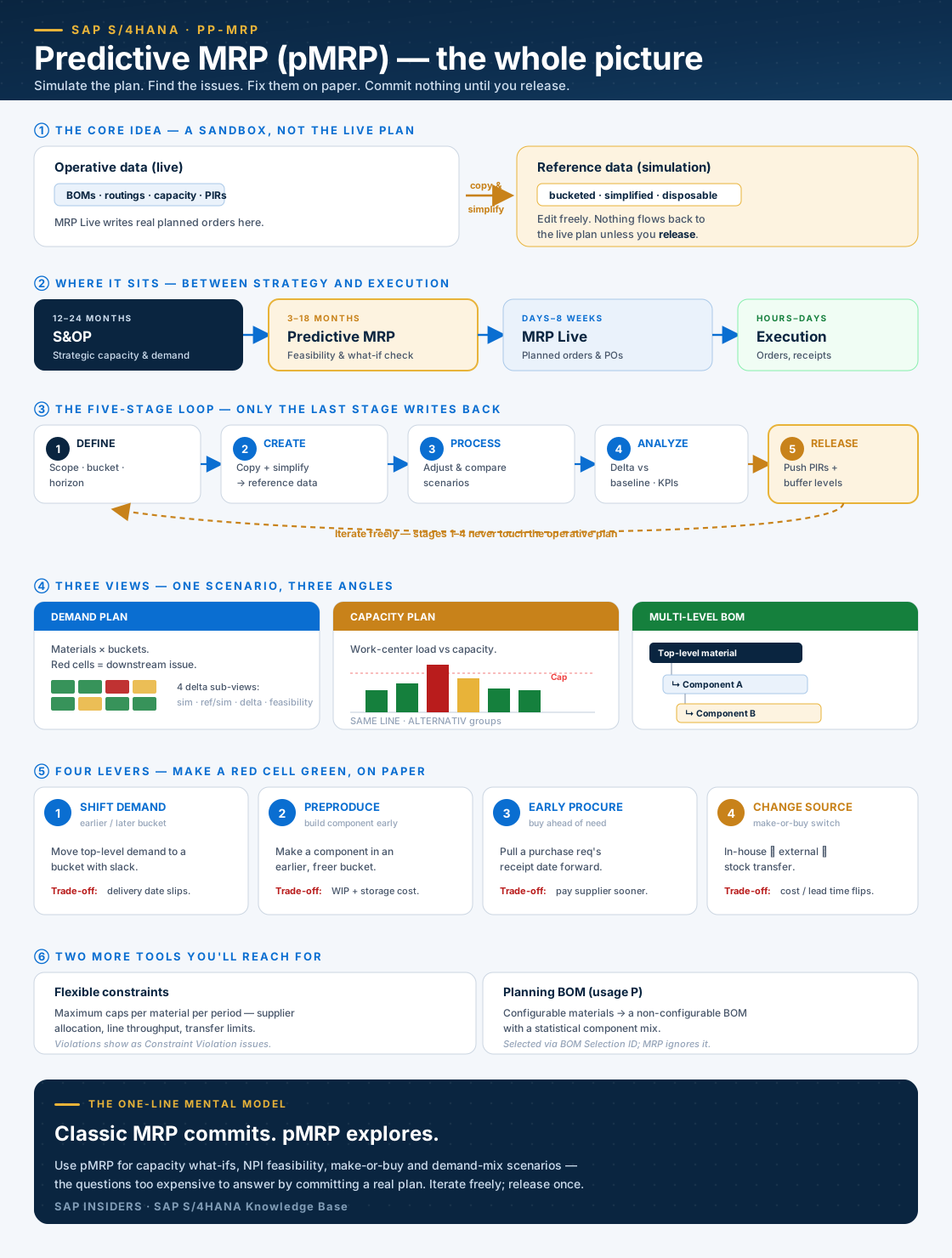
Here is the entire concept in a single frame — the core idea, where pMRP sits, the five-stage loop, the three views, the four levers and the two supporting tools. Every part is expanded in the sections that follow, so use this as your map.
pMRP vs classic MRP — when to use which
They share the same conceptual building blocks (BOM, routing, work center, capacity) but they're tuned for different jobs.
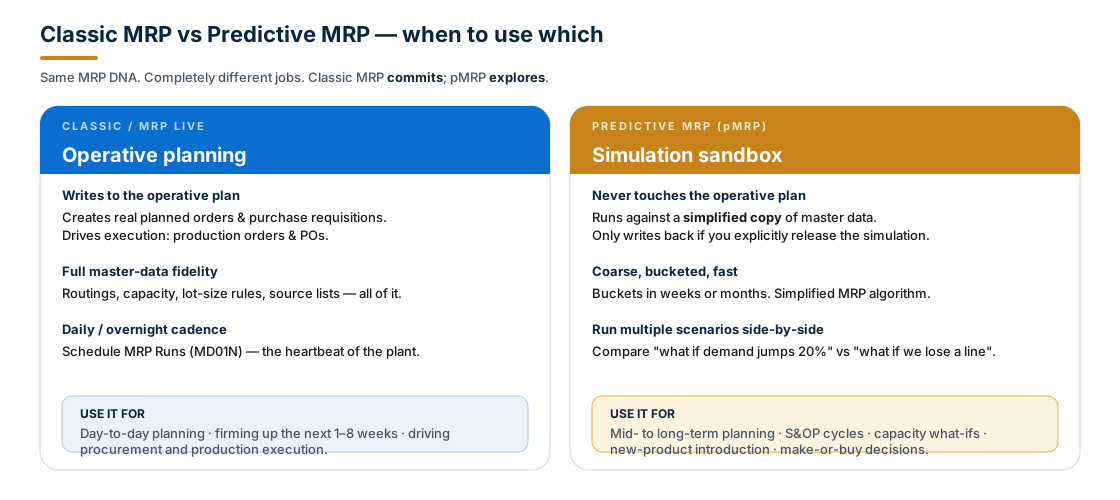
In a single line: classic MRP commits, pMRP explores.
| Question | Use… |
|---|---|
| Will tonight's MRP run create the right planned orders for next week? | MRP Live (MD01N) |
| Will the proposed Q3 build plan even fit through the converter line? | pMRP |
| Which planned orders convert into production orders today? | MRP Live + Manage Material Coverage |
| If we promise this big fleet customer 800 units by week 32, can we deliver? | pMRP |
| New product introduction — is the 18-month ramp realistic given supplier lead times? | pMRP |
| Should we make this housing in-house or outsource it next year? | pMRP |
The output of MRP Live is real planned orders and purchase requisitions. The output of pMRP is a recommendation: change these PIRs, raise this buffer level, then let MRP Live do the operational work.
The five-stage pMRP loop
Every pMRP cycle goes through the same five stages. Stages 1–4 are completely reversible — only stage 5 writes anything back to the live system, and even then only PIRs and buffer levels.
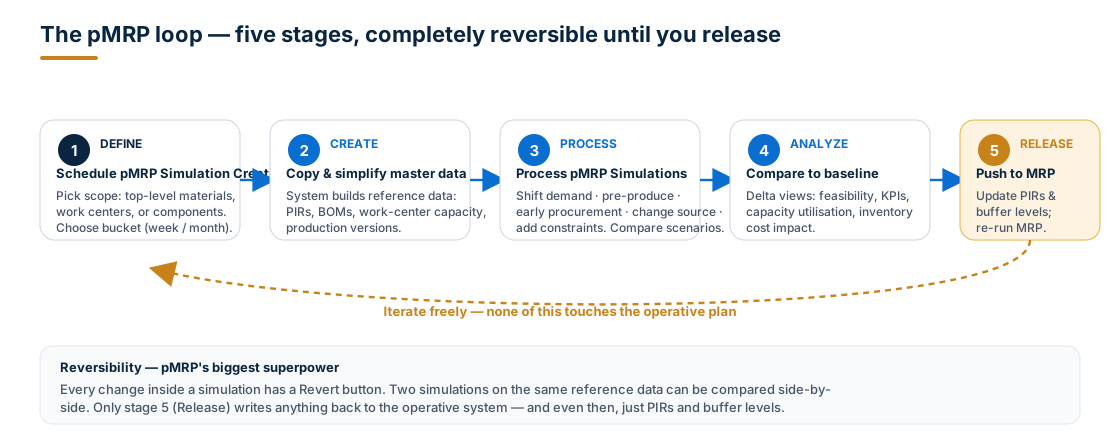
Stage 1 — Define the simulation
App: Schedule pMRP Simulation Creation (a Fiori Job Scheduling app).
You answer three questions:
- Scope — by top-level material, work center, or material component. (A pMRP run can start from any of those entry points.)
- Bucket — week or month. Coarser is faster; finer is more accurate.
- Horizon — start date and end date of the reference window. The S/4HANA documentation explicitly warns to make this wide enough: too narrow a window misses demand outside the range.
You also pick a BOM Selection ID here — this matters later for configurable materials (see below).
Stage 2 — Create (copy and simplify)
The system reads your operative MRP data — PIRs, BOMs, routings, work centers, production versions — and produces reference data: a simplified, bucketed snapshot the simulation will play against.
This is the only "heavy" step. Three job templates do the work:
Creation of pMRP Data via Top-Level Materials(SAP_SCM_PMRP_CREATE_MAT)Creation of pMRP Data via Work Center(SAP_SCM_PMRP_CREATE_WC)Creation of pMRP Data via Components(SAP_SCM_PMRP_CREATE_MATCOMP)
Once reference data exists, you can create multiple simulations against the same reference — compare scenarios head-to-head without rebuilding the snapshot every time.
Stage 3 — Process (adjust the simulation)
App: Process pMRP Simulations. This is where the planner spends the most time. Inside a single simulation you can:
- View and change material demand quantities (Demand Plan Simulation)
- Inspect work-center capacity issues (Capacity Plan Simulation)
- Drill into the multi-level BOM (Multi-Level Material Simulation)
- Pre-produce, early-procure, change the source of supply, or shift demand
- Add flexible constraints (separate app)
- Use the global change history to undo / redo or revert
Two simulations can be opened side-by-side to compare.
Stage 4 — Analyze
Once you've made changes, the app compares them against the reference data and surfaces the impact: KPIs (delivery performance, capacity utilisation), prioritised issue lists, and four delta views inside the demand plan. We'll look at those views below.
Stage 5 — Release
When a simulation is clearly the winner, you release it. What actually flows back to operative MRP is restrained on purpose:
- PIR quantities for demand-driven materials are updated (and you can choose to push them for top-level materials, sub-assemblies, or both)
- Buffer levels for products are adjusted
- Optionally, a new PIR version is created and activated
That's it. The next operative MRP Live run picks up the new PIRs and acts on them through the normal MD01N → planned orders → production orders chain.
Inside Process pMRP Simulations — three views, one scenario
The same simulation is shown three different ways. Switch between them as you investigate an issue.
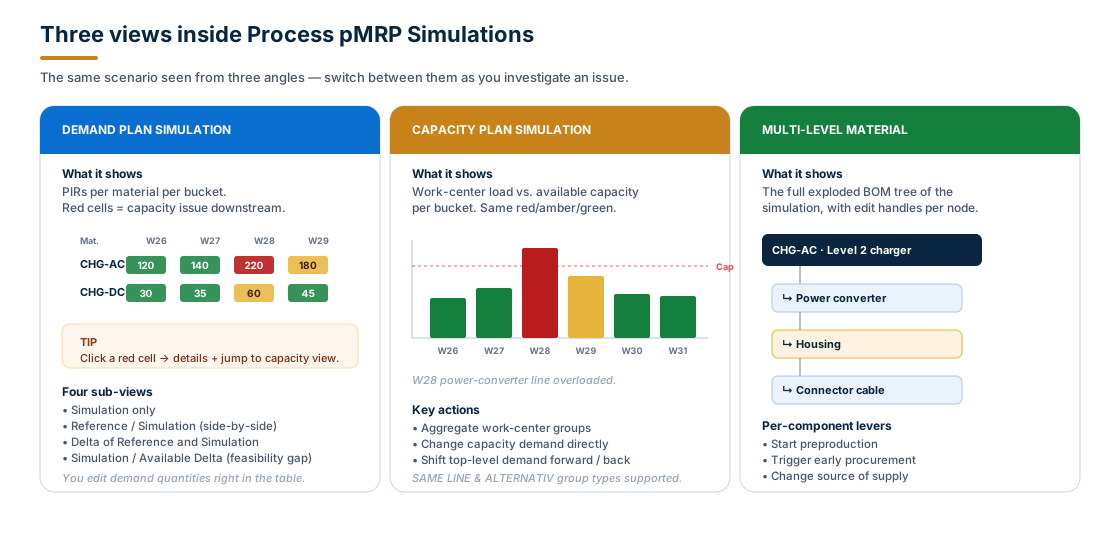
Demand Plan Simulation — the demand matrix
Materials in rows, time buckets in columns. Cells colored by feasibility. Click a red cell, see why. Edit a quantity inline and watch the rest of the matrix re-evaluate.
The view has four sub-modes:
- Simulation — just the simulated numbers
- Reference / Simulation — side-by-side with the original
- Delta of Reference and Simulation — what changed
- Simulation / Available Delta — feasibility gap (negative = required exceeds feasible)
Capacity Plan Simulation — work centers, not materials
The capacity view turns the same data inside out. Work-center load per bucket as bars; capacity line as a red dashed threshold. Red bars = overload.
A useful S/4HANA-specific feature: aggregate work centers by group type:
SAME LINE— Same Line Groups — group physically co-located work centers into one row so a line's total load is visible at a glance.ALTERNATIV— Alternative Groups — group equivalent work centers (e.g. three identical CNC machines) so capacity is pooled.
Multi-Level Material Simulation — the BOM tree
The exploded BOM, top-level material down. Each node is editable; each node has the four levers (next section). This is where you fix a problem at the component that caused it rather than at the top-level material.
The four levers to fix a capacity issue
When pMRP flags a red cell, you have four ways to make it green — without anyone in operations doing anything yet.
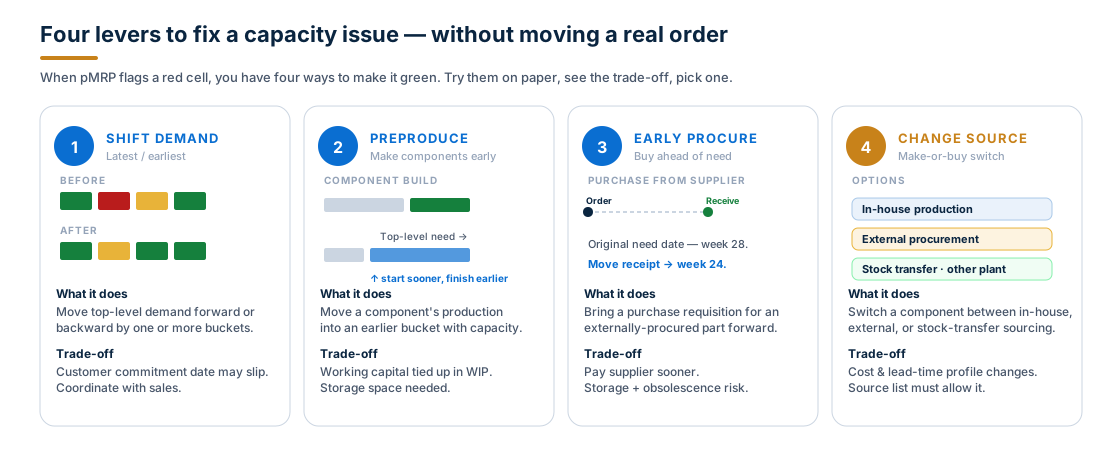
- Lever 1 — Shift demand. Move top-level demand forward or backward by a bucket. Cheapest in pMRP, expensive in real life if you've already promised a date — coordinate with sales.
- Lever 2 — Preproduce. Move a component's build into an earlier bucket where the line has slack. Trade-off: working capital tied up in WIP and storage space.
- Lever 3 — Early procurement. Pull a purchase requisition's receipt date forward for an externally-procured component. Trade-off: you pay the supplier earlier and carry inventory longer.
- Lever 4 — Change source of supply. Switch a component between in-house production, external procurement, or stock transfer from a sister plant. Real make-or-buy on paper. Trade-off: cost and lead-time profile flips; the source list in operative MRP must allow the new source for the release to be meaningful.
The point of pMRP is that all four are reversible. Try one, see the impact, undo, try another.
Flexible constraints — when the four levers aren't enough
Sometimes the limit isn't capacity, it's a contract or a policy:
- "We can only get 800 power converters a month from this supplier."
- "Our paint line can only push 200 housings a week."
- "Inter-plant stock transfer is capped at 50 units / week."
The Define Flexible Constraints app lets you add these limits explicitly. You enter a plant, a scope (single material or a group), and a constraint type (only maximum constraints are supported today). The constraint applies per time period (week or month).
When a constraint is violated in a simulation, the Process pMRP Simulations app shows a Violated Constraint issue in the simulation header and in the inspector panel under issue category Constraint Violation.
Constraints are particularly useful in two situations:
- External procurement — supplier allocation caps that won't show up as a capacity issue (because they're not a work center) but are real bottlenecks.
- Make-or-buy decisions — to test scenarios with realistic ramp limits ("we can only outsource at 100 units/week for the first 8 weeks").
Planning configurable materials — the planning BOM (usage P)
Configurable materials — products that customers configure at order entry — are pMRP's hardest case. The system can't possibly know which variant each future sales order will pick.
The S/4HANA workaround is the non-configurable planning BOM.
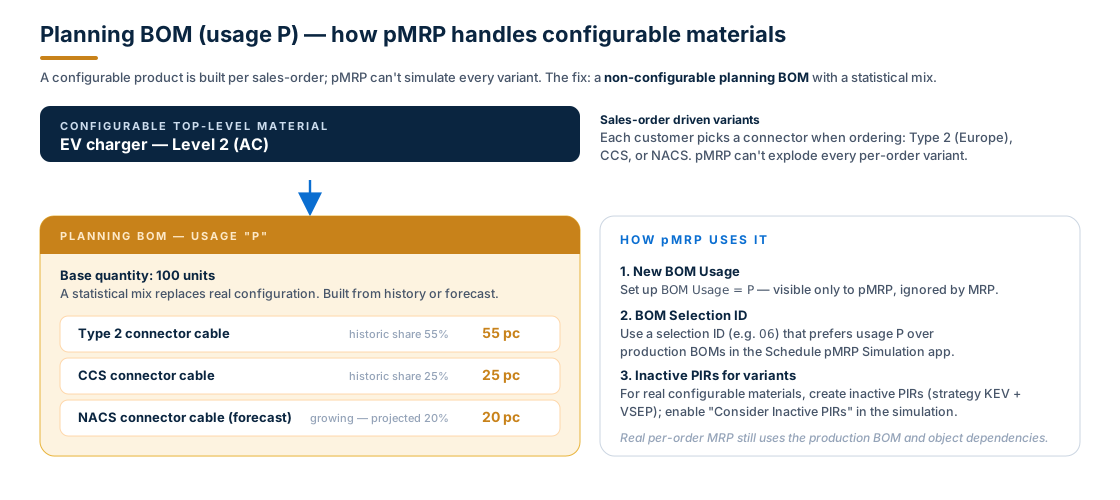
The mechanics:
- Create a new BOM Usage, conventionally
P(the SAP S/4HANA documentation suggests this letter), reserved for planning. - Build a non-configurable planning BOM that captures the statistical mix instead of object dependencies. Instead of "if connector = Type 2 then …", the BOM says "55 Type 2 cables per 100 finished units, 25 CCS, 20 NACS." Numbers come from historic data, future forecast, or both.
- Configure a BOM Selection ID (e.g.
06) that prioritises usagePover the production BOM. Set it in the Schedule pMRP Simulation Creation app. - For real configurable materials, also create inactive PIRs using a planning strategy like
KEV(Make-to-order with consumption) combined withVSEP(Planning without final assembly, no configuration). Enable Consider Inactive PIRs and Consider Inactive PIR Versions in the simulation.
The operative system continues to use the production BOM and object dependencies for real customer orders — the planning BOM exists only for pMRP.
An EV-charger manufacturer building an AC Level 2 product sells the same base unit with three connectors — Type 2, CCS, NACS. Historic data shows roughly 55/25/20 split, but NACS is rising fast. A planning BOM with that statistical mix lets pMRP test "what if NACS jumps to 40%?" without rebuilding the configurable model.
A few constraints to know:
- BOMs for configurable materials are exploded top-down only in pMRP. If you want to include a configurable material that isn't a top-level material, use the Creation of pMRP Data via Top-Level Materials job template and explicitly list the top-level materials.
- Split quotas override BOM Selection ID priority. If split quotas exist for a material, the BOMs used in the split quotas win — even over the usage-P planning BOM.
Scheduling inside pMRP — how dates flow through the BOM
pMRP schedules demand and supply across BOM levels in the background. Once you understand the rules, the dates the app shows will stop surprising you:
- Components on the same BOM level inherit the same demand date from their parent. If their BOM quantities are also equal, their PIR quantities match.
- Demand dates shift level-by-level using scheduling parameters from the material master: In-House Production Time (for E parts), Planned Delivery Time (for F parts), Goods Receipt Processing Time.
- Supply is scheduled accordingly, and demand quantities are distributed within the supply period — sometimes splitting across buckets.
A few specifics worth remembering:
- In-house production time is calculated in workdays; non-working days are skipped.
- Planned delivery time for external procurement is in calendar days — including weekends — but if the end falls on a non-working day, it moves to the previous workday.
- Goods Receipt Processing Time adds to the supply lead time, separately.
The Manage Product Master app (F1602) is where these times live: Plants → MRP Data → Procurement.
Note: the PIRs that pMRP exports on release are at the original demand date, not the scheduled supply date. Operative MRP will add the lead times itself when it creates the real supply.
Prerequisites — what must exist before pMRP runs
pMRP isn't a clean-slate tool. It needs the operative MRP picture to be in good shape:
- All MRP customising done under Production → Material Requirements Planning
- Work-center capacity planning configured under Basic Data → Work Center → Capacity Planning
- For every relevant material:
- Material master including the MRP views (MMF1 / MMB1 or Manage Product Master)
- Material BOM, usage
1 - Productionfor normal production BOMs (plus the optional usagePfor planning BOMs above) - Work centers with capacity defined
- Routings for in-house parts
- Production versions assigned to the material
- PIRs maintained in Maintain PIRs
Missing any of those and pMRP either skips the material or produces optimistic numbers.
Where pMRP fits in your wider planning cycle
pMRP doesn't replace S&OP and it doesn't replace MRP Live. It bridges them.
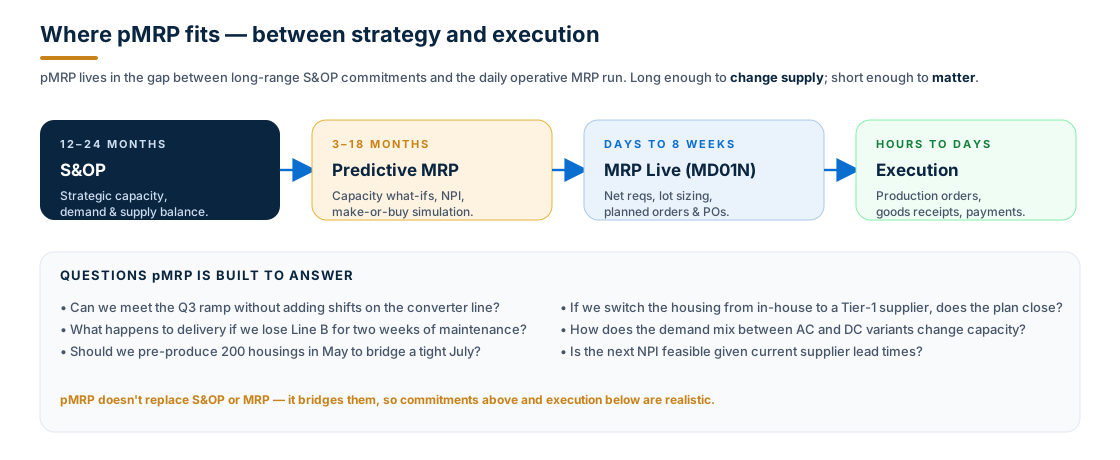
The horizons stack:
- S&OP (12–24 months) — strategic capacity and demand balance. Aggregated at product family level.
- pMRP (3–18 months) — material-and-resource feasibility check. Material-level granularity with weekly or monthly buckets.
- MRP Live (days to 8 weeks) — operative requirements planning. Material-level granularity, daily buckets, individual planned orders.
- Execution (hours to days) — actual production orders, goods receipts, payments.
Above pMRP, S&OP says what we want to commit to. Below pMRP, MRP Live says what we're actually going to make next week. pMRP is where you find out whether the commitment above is realistic, and whether what's about to be ordered below is sensible.
Common gotchas
A short list, all from real pMRP cycles:
- Reference data is stale. pMRP doesn't auto-refresh — if you change a BOM, work-center capacity, or PIR in the operative system, the simulation keeps using the old snapshot. Click Refresh reference data in the Process pMRP Simulations app before drawing conclusions.
- Horizon too narrow. The system warns about this for a reason. If your planning horizon clips before demand peaks, pMRP literally can't see the issue you're worried about.
- Bucket too coarse. Monthly buckets hide week-level capacity peaks. Use weekly when you're chasing a specific overload.
- Constraint not violated, but issue not solved. Flexible constraints only model what the constraint catches. A constraint on the supplier doesn't protect you from a missing routing inside the plant.
- Planning BOM forgotten in operative MRP. Usage
Pexists only for pMRP. The production BOM (usage1) is what real MRP and manufacturing use. Don't mix them up. - Releasing too aggressively. Release flows PIRs back to the operative system. Once those PIRs hit MRP Live, real planned orders and procurement signals start firing. Double-check the simulation summary before you release.
- Configurable material on the wrong template. Configurable materials must enter pMRP through the Top-Level Materials job template, because BOMs only explode top-down.
Frequently asked questions
Is pMRP just a Fiori re-skin of long-term planning (LTP)? No. Classic LTP did exist in ECC (with the operative-data-copy concept), but pMRP is rebuilt from scratch in S/4HANA — different data model (in-memory reference data), different apps, different release flow, and tight integration with demand-driven MRP buffer levels. The mental model is similar; the implementation isn't.
Does pMRP work with demand-driven MRP (DDMRP / DD-Replenishment)? Yes — pMRP releases buffer-level changes alongside PIRs, so a simulation outcome can adjust the red/yellow/green buffer zones used by DDMRP.
Can I run pMRP in S/4HANA Cloud? Yes, the apps are part of the Production Planner business role (SAP_BR_PRODN_PLNR) in Public Cloud and Private Cloud editions. Some advanced options (like custom BOM selection IDs) require Customizing access available in PCE.
How long does a pMRP creation job take? Depends on scope. A simulation for one plant with 50–100 top-level materials over a 12-month horizon is typically minutes; multi-plant simulations are scheduled overnight via the Schedule pMRP Simulation Creation app.
Do I need to release every simulation? No. Most simulations are exploratory — analyse, compare, throw away. Release is the exception, not the rule.
What's the difference between pMRP and Schedule MRP Runs? Schedule MRP Runs is the Fiori job-scheduler for the operative MRP Live run — it writes real planned orders. pMRP runs only against simulation data and writes nothing until you release.
Key takeaways
- pMRP is a simulation sandbox for mid-range production planning — same MRP DNA, simpler algorithm, runs against a copy of master data.
- Use it for capacity what-ifs, NPI feasibility, make-or-buy, demand-mix scenarios — the questions where committing to a real plan is too expensive to be exploratory.
- Every cycle is the same five stages: Define → Create → Process → Analyze → Release. Only release writes anything back.
- Inside Process pMRP Simulations, three views answer the same question three ways: demand, capacity, multi-level BOM. The four levers — shift, preproduce, early procure, change source — fix issues without touching the live plan.
- Flexible constraints model supplier or process caps that pure capacity can't see.
- Configurable materials need a planning BOM (usage
P) and a tuned BOM Selection ID; pMRP doesn't expand object dependencies. - pMRP sits between S&OP and MRP Live — it's what makes the strategic commitments above realistic and the operative ones below sensible.
The best planning teams use pMRP the same way a chess player thinks ahead: not to prove the move is right, but to find out before it's their turn. The plan that survives a few good simulations is the plan you actually want to commit.