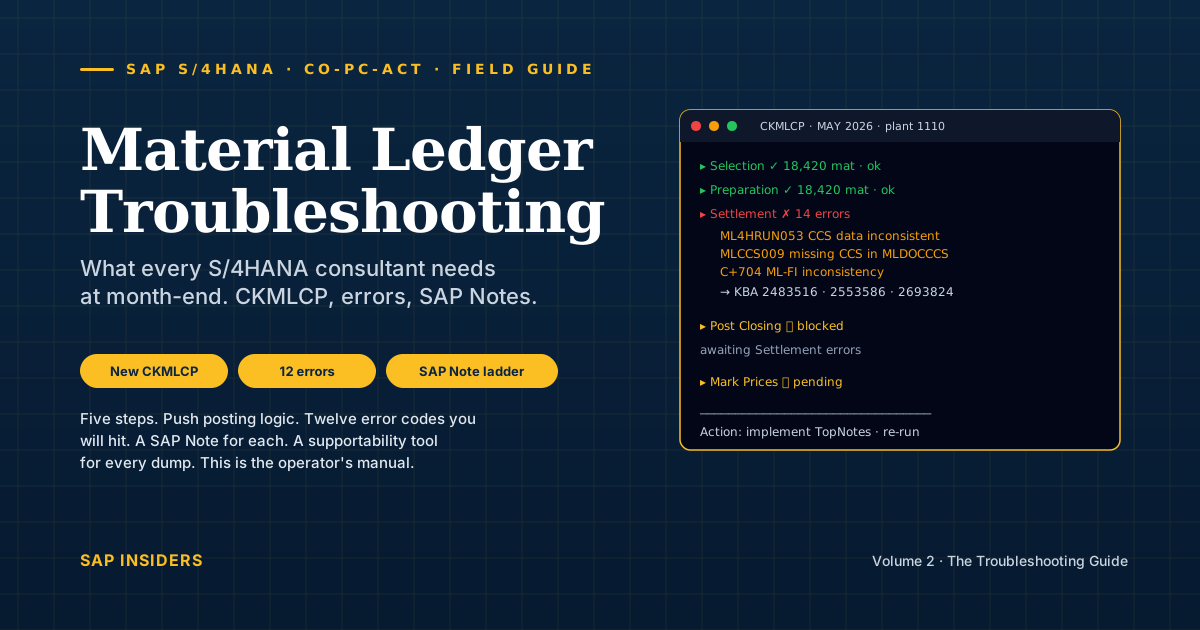
A controller at Vajra Precision Tools opens CKMLCP on 4 June at 09:15. Vajra has migrated to S/4HANA 2024 last quarter, this is the third month-end on the new system, and on the second run she got an error she's never seen in twelve years of running actual costing: ML4HRUN053. The classical 4-step CKMLCP she grew up with has been replaced by something with five steps including a "Preparation" she doesn't quite trust yet, and her audit checklist still refers to "Single-level Price Determination" — a step that no longer exists as a separate execution.
This is the article she needs. It is the operations companion to the cost-accountant's field guide. That article explained what Material Ledger is. This one explains what it does in production, what breaks, and which SAP Note fixes each break.
If you implement, configure, troubleshoot or own actual costing in S/4HANA, this is for you.
The vocabulary — terms you will hit in the SAP help portal
The first article's glossary covered the concepts. These ten terms are what you'll see in SAP Notes, error message texts and IMG nodes:
- MALENA — the new ML architecture introduced in S/4HANA 1610. Replaced the classical tables (
CKMLPP,CKMLCR,MLCD) withMLDOCandMLDOCCCS. If you read "new MALENA architecture" in a Note, it means S/4HANA 1610 or later. - MLDOC / MLDOCCCS — the two HANA tables that hold all Material Ledger documents and cost-component-split data from 1610 onwards. The old tables remain as compatibility views.
- ACDOCA — the Universal Journal. ML postings flow into it for every currency type.
- PRL — the new transaction key (introduced in 1610) for activity price differences. The "not allocated" variance bucket now sits on PRL instead of staying on the cost-centre.
- MALENA / PRL push posting — multi-level rollups are now posted in the input material's closing document, not the output's. Old SAP help refers to this as "push instead of pull". One of the architectural shifts that breaks consultants' mental models.
- Costing Run / Run Reference — a costing run can now be a rolling run (CKMLCP / CKMLCPAVR with a Run Reference) that closes period-after-period without manual re-setup. See Note 2779567.
- CKM3 vs CKM3OLD vs CKM3PH — the new CKM3 reads
MLDOC(post-migration).CKM3OLDreads the classical tables for pre-migration periods.CKM3PHis the price-history view, always available regardless of price-determination indicator. - FCMLHELP — the Material Ledger Helpdesk program (latest version 10, SAP Note 2772395). Runs consistency checks across
MLDOC/MLDOCCCS/ACDOCAand reports defects. - FINS_MIG_STATUS — the migration cockpit transaction on a S/4HANA conversion. Where you see the M10/M20/M11/M21 migration steps for ML master data and order history.
- TopNote — a SAP-classification for an unusually important Note. The four ML TopNotes (2693824, 2691272, 2610889, 2607681) plus a HotNews (3141811) are the bedrock implementation list.
Read once. These appear constantly in what follows.
The whole picture is unchanged — the cockpit isn't
The architecture from the first article still holds: one mandatory sub-ledger, three currencies in parallel, two price-determination indicators on the material master, five-stage material lifecycle. Quick refresher:
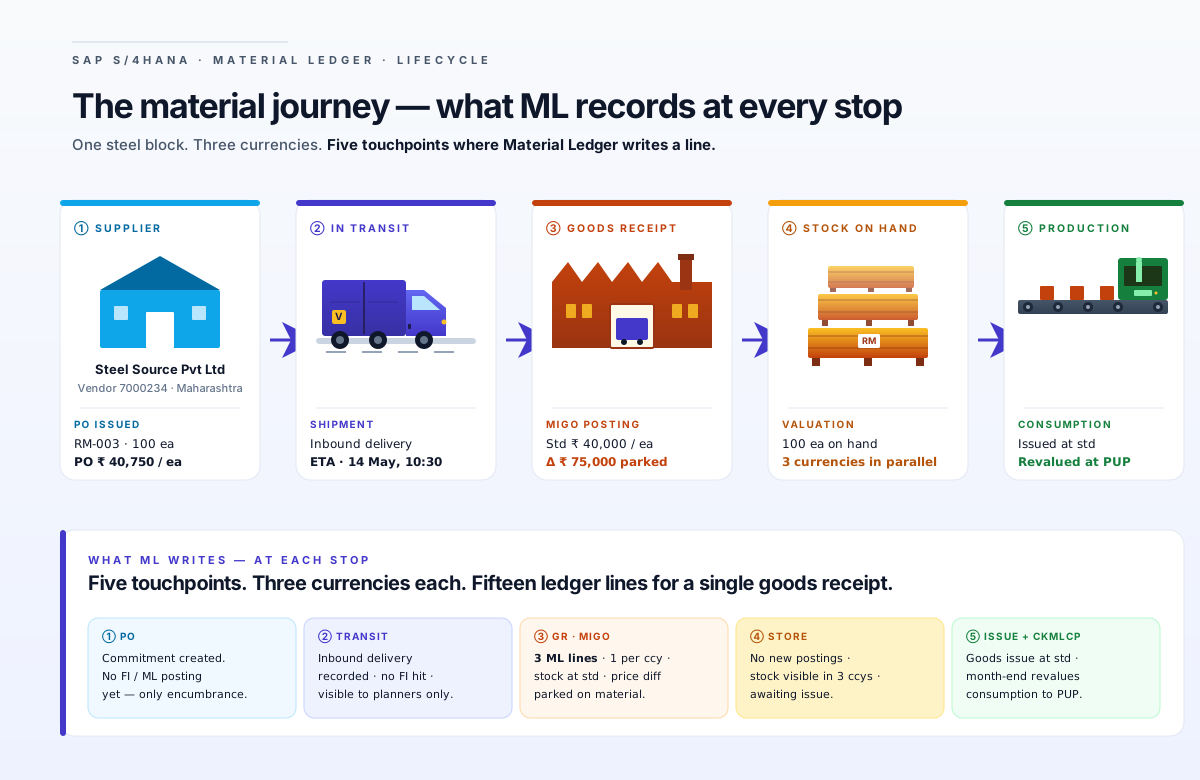
What did change in 1610 — and what makes this article necessary — is how the period-end cockpit posts those entries.
What changed in 1610 — and why it matters
In ECC and S/4HANA prior to 1610, CKMLCP ran four separate posting passes, each of which could fail independently and each of which had its own error surface:
- Single-Level Price Determination
- Multi-Level Price Determination
- Revaluation of Consumption
- WIP Revaluation
Plus Post Closing on top. Five buttons on the cockpit. Reprocessing a single material that had errors in step 2 forced you to think through whether step 3 needed manual re-run. Lots of consultants made career out of this complexity.
Here's what that classic cockpit looked like — costing run 10001406, period 8/2014, two company codes (1000 and 2000), 399 materials selected:
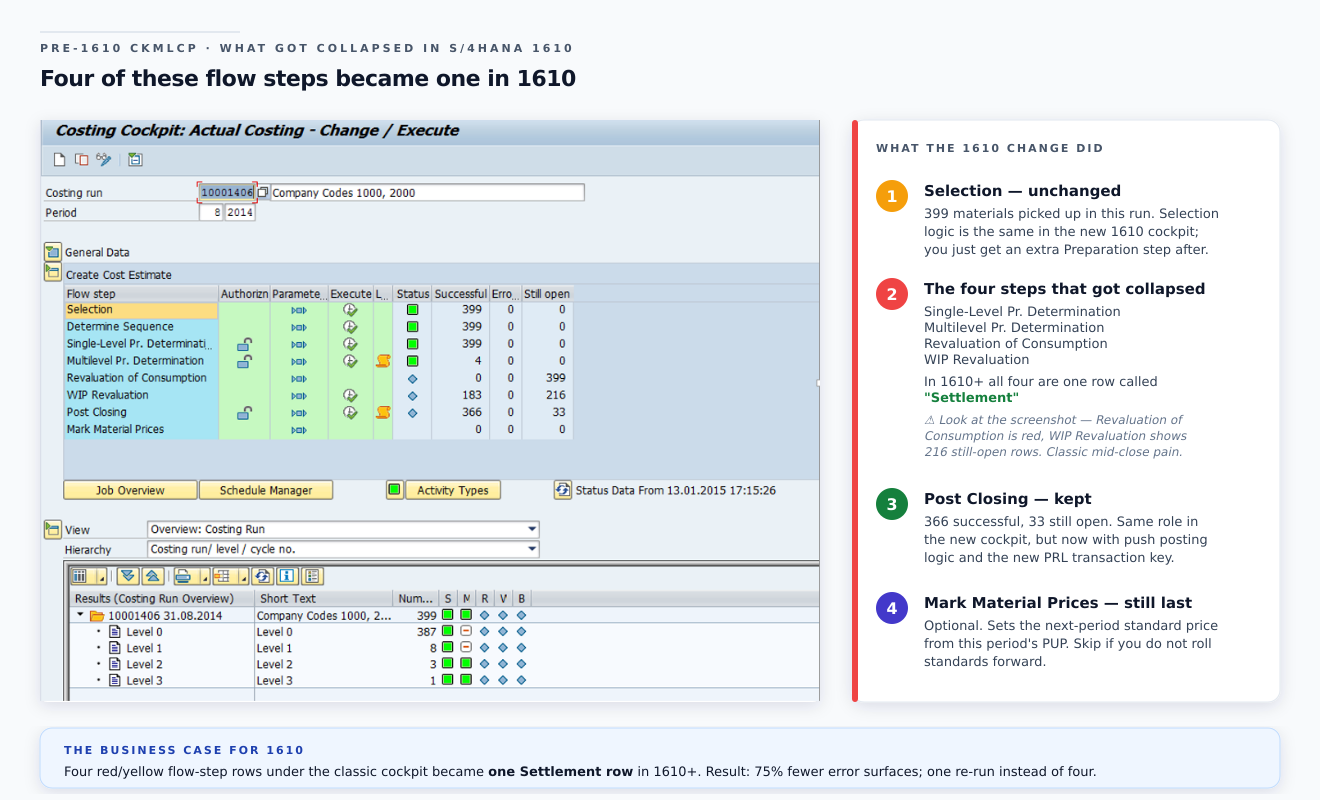
Read the status column carefully — green ticks on Selection and Single-Level, but Revaluation of Consumption is red and WIP Revaluation has 216 still open. Under the old architecture, that's the controller's nightmare scenario: she has to decide whether to push through Post Closing leaving WIP partially revalued, or stop and investigate. Either choice is risky. Under the new architecture in 1610+, those four red/yellow rows are one row — Settlement — that either fully succeeded or fully needs reprocessing. The error-handling surface area shrank by 75%.
Starting in S/4HANA 1610 (note 2558888), the architecture changed:
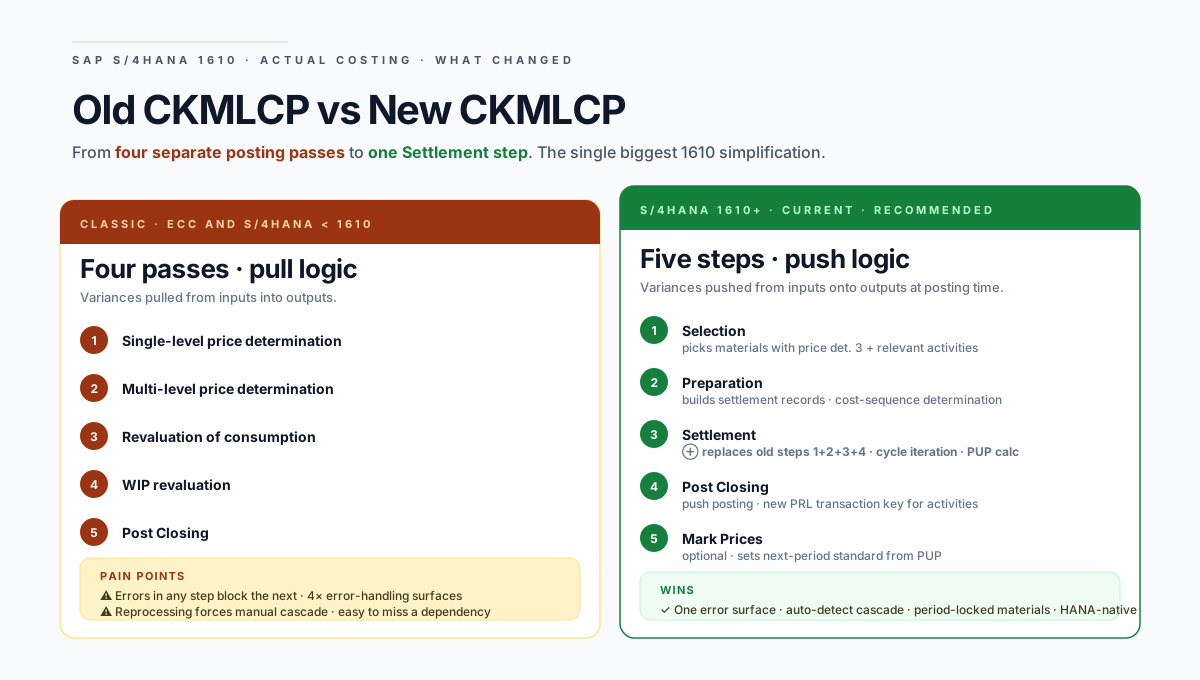
The crucial collapse: steps 1, 2, 3 and 4 of the old cockpit are all rolled into the new "Settlement" step. The Preparation step builds the work list and runs Cost Sequence Determination. Settlement does the actual costing calculation, cycle iteration, variance distribution to consumption and ending inventory, and PUP calculation in one pass. Post Closing then commits the result to FI with the new push posting logic.
Here's what a successful Settlement run actually looks like on screen — the real SAP cockpit, not a mock:

Notice the message-numbers in the log — C+ 136, ML4HR 002, ML4HR 003. These two prefixes — C+ and ML4H — are the namespaces you'll trace error codes back to throughout this article. C+ are classical Material Ledger messages dating from R/3; ML4H are the new MALENA-era message class introduced in 1610.
And the Settlement parameters screen — every consultant should know what these controls actually do:
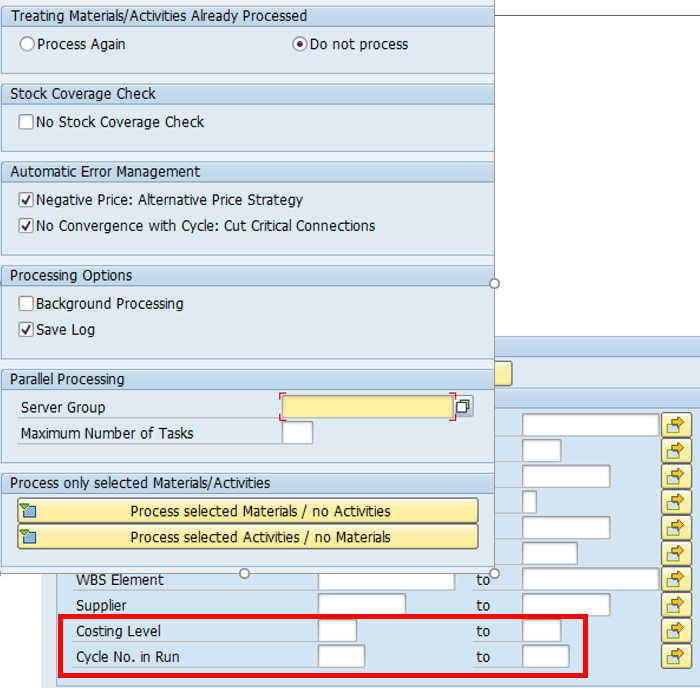
The highlighted red box at the bottom — Costing Level and Cycle No. in Run — is the 1610-era productivity gift. When Settlement fails at level 3 of a 5-level BOM, you don't re-run the whole chain. You re-run from level 3 onwards. The classic 4-step cockpit had no such surgical tool.
Quick check — the 1610 change
Q. A colleague says "run Multi-Level Price Determination" for an S/4HANA 1610+ system. What do you do? A. That separate step no longer exists. The work is now inside the Settlement step. You run Selection → Preparation → Settlement → Post Closing → (optionally) Mark Prices.
Q. Push vs pull — what's the practical difference for an auditor reading the FI documents? A. Under push, the multi-level rollup is posted in the closing document of the input material or activity, not the output. The audit trail for "where did this variance go" now starts at the input, not the finished good.
The new PRL transaction key — and why your cost-centre balance changed
The single most overlooked operational change in 1610. Before 1610, an activity price variance that couldn't be allocated to a receiver stayed on the cost-centre as a residual balance — and finance teams would either accept it or manually re-allocate.
In 1610+:
- A new transaction key PRL was introduced (Note 2558115).
- During Post Closing, activity price variances are moved from GBB-AUI (cost-centre credit) to PRL (Material Ledger price-difference account) in one single posting.
- From PRL they are then distributed to the receivers.
- "Not allocated" variances no longer remain as a balance on the cost-centre — they sit on PRL.
- Activities are always posted with valuation class = blank now.
The practical consequence on Monday morning at month-end:
- Your old "cost-centre still has residual balance" investigation now starts at the PRL account in FI.
- Your custom report that summed GBB-AUI to identify under-allocation needs to be re-pointed.
- Period-end reconciliation needs to include PRL in its scope.
If you're converting from ECC, account modification key PRL needs to be configured before your first productive CKMLCP — Note 2354768 has the technical detail.
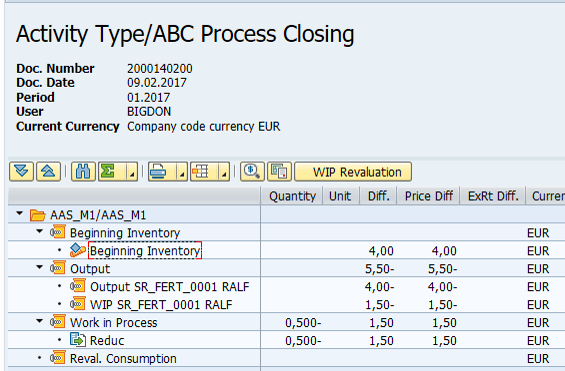
This is what the new posting actually looks like in an Activity Type / ABC Process Closing document — the WIP Revaluation button is built-in, and the Output, Work in Process and Reval. Consumption rows are all generated by the same Settlement step:
And the same closing pattern for a material — Material Ledger Settlement document for an SFG-level material — Beginning Inventory, Ending Inventory, Output (rolled-up to the parent), WIP and Revaluation of Consumption all visible:
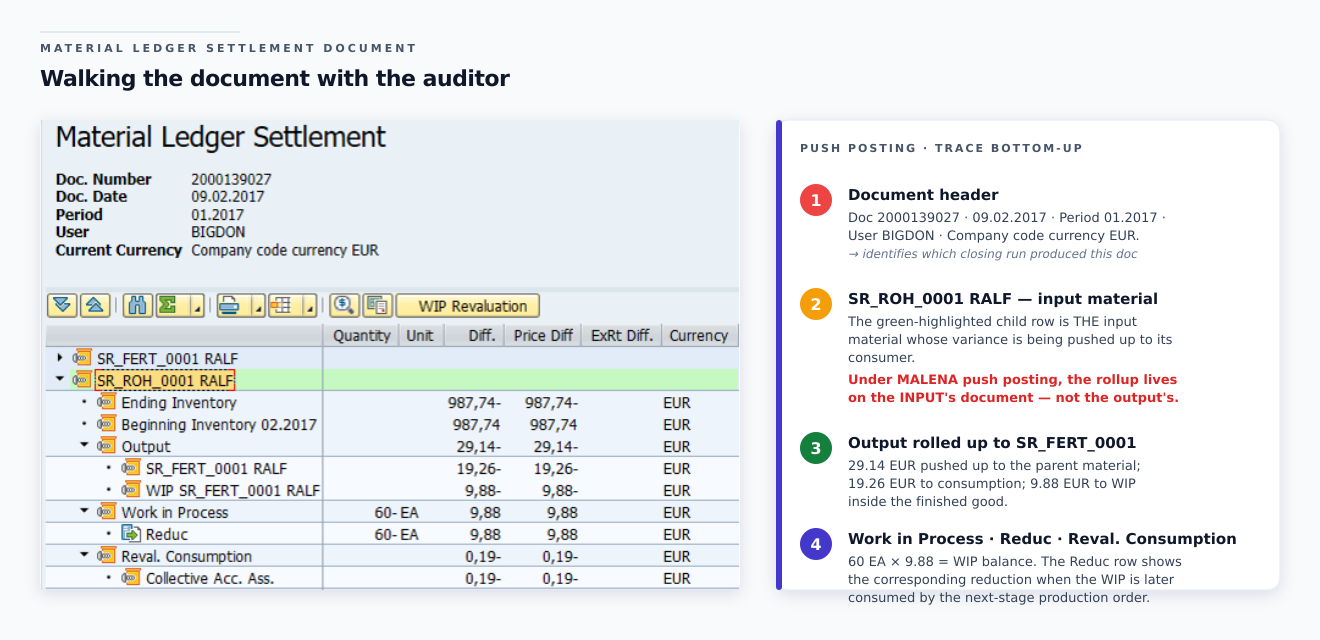
This is the document the auditor opens when they want to trace "where did the variance go". Under push posting, the multi-level rollup line lives on the input material's document (SR_ROH_0001 RALF here) — not on the finished-good's. If your existing audit procedure starts by opening the FG's Material Ledger document and walking down, you need to re-train: under MALENA you start at the bottom and walk up.
CKM3 — the report you read every day, refactored
CKM3 / CKM3N was completely redesigned in 1610 (Note 2503684). Three transactions, three jobs:
| Transaction | Reads | Use when |
|---|---|---|
| CKM3 / CKM3N | MLDOC, MLDOCCCS (new) | Periods after the 1610 migration. Active actual costing. |
| CKM3OLD | CKMLPP, CKMLCR, MLCD (old) | Pre-migration periods, or mixed periods spanning before+after migration |
| CKM3PH | Price history (independent of migration) | Any period, regardless of price-determination control or actual costing |
The new CKM3:
- No separate view for cost components — they're integrated in the main screen.
- Cost-component-split flag — choose between inventory-relevant CCS only (default) or all components.
- WIP reduction is hidden by default; when shown, both WIP reduction and consumption of WIP for the order appear in opposite signs in different folders.
- Plan/Actual Comparison view is removed.
- "Not Allocated" lines can still appear — usually from the price-limiter logic (KBA 2898738).
If you see "Data Unmigrated" warnings in CKM3, check KBA 2537912. If "Not Allocated" lines look wrong, KBAs 2898738 and 2148759 are your first stop.
Here's the new CKM3 in action — material WA-VL at plant RALF, period 1/2017, Company code currency view showing the Price Determination Structure:
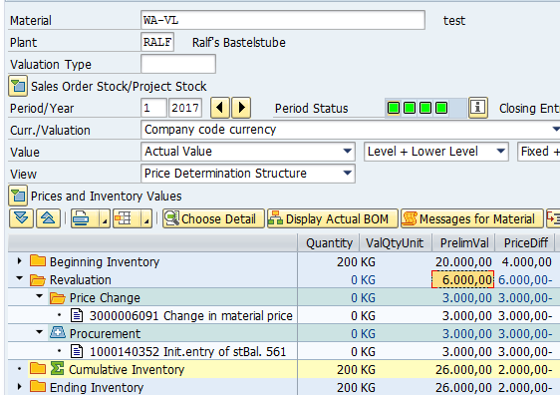
Walk the columns: PrelimVal is what the standard price said, PriceDiff is the cumulative variance ML collected during the period, and the Cumulative Inventory line shows the actual values that feed into the next-period PUP. The auditor's go-to question — "what's the variance per kg?" — is right there: 2,000.00 ÷ 200 KG = ₹10 / KG over standard.
A more complete CKM3 view — a finished material with the full picture displayed, including standard / actual / future / planned prices in a side header, and the inventory tree in the main panel:
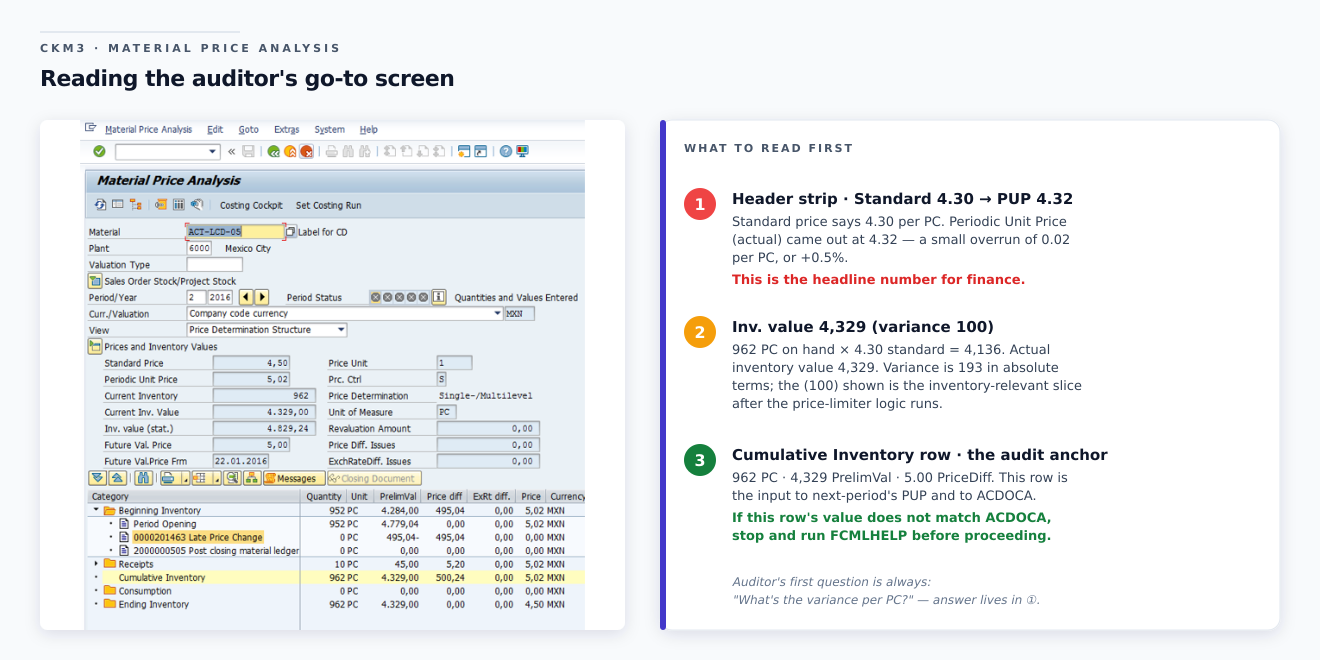
The header strip on the left is the auditor's single source of truth — every number that matters for a single material in a single period is right there, in the chosen currency, with the variance pre-calculated.
What does this look like when the material has prior-period price changes? Period-shift transactions are where C+704 and friends usually surface. CKM3 will show them via the "Late Price Change" link in the document tree:
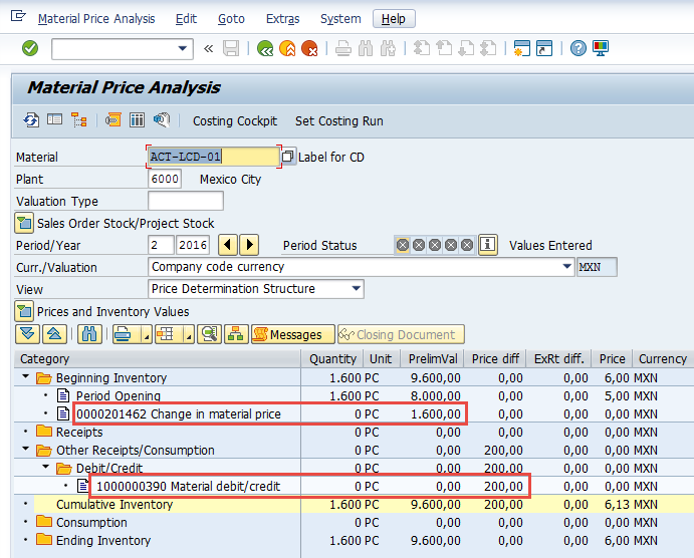
The red boxes highlight the two posting types that cause the most confusion at month-end: Period Opening (a price change applied to the beginning inventory of the new period — i.e. a late MR21 retroactive to the prior period) and Debit/Credit in Other Receipts/Consumption (a manual MR22 adjustment). Both legitimate. Both audit-traced. Both common causes of "the PUP doesn't match my expectation" calls to consultants.
For materials that have movements posted in a prior period after the period was already closed, the ML document itself carries a tab to show how each affected item resolves:
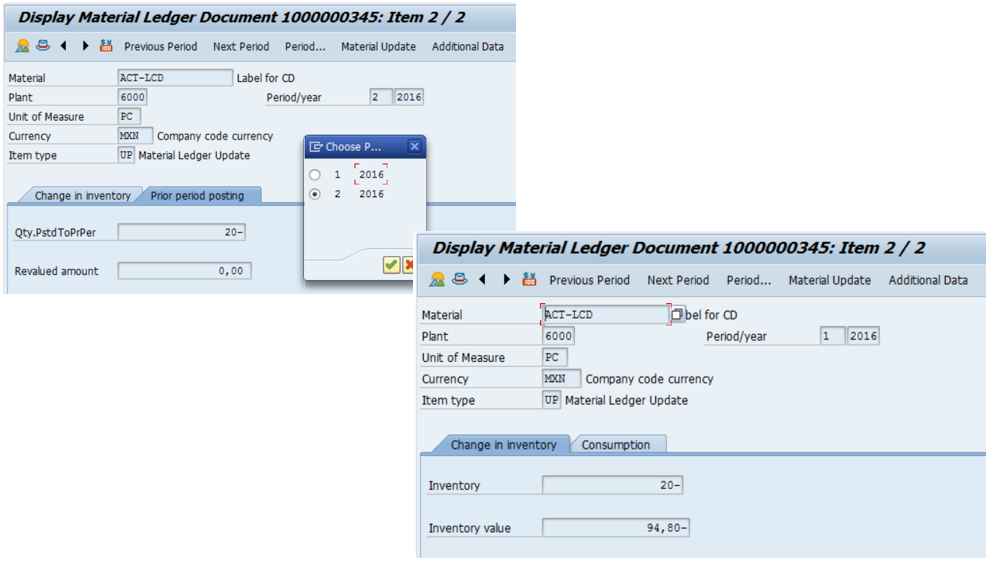
This is the screen that solves the most-frequent "why does the prior-period inventory disagree with what we filed?" investigation. The Qty.PstdToPrPer field tells you exactly how many units were posted back into the prior period after it was technically closed. The Revalued amount tells you whether the back-posting triggered a revaluation. Most of the time both are zero — when they're not, an after-the-fact adjustment happened and the auditor needs to know.
Quick check — CKM3 navigation
Q. A user calls about a January 2024 price analysis on a system that converted to S/4HANA in March 2024. Which transaction? A. CKM3OLD — the period is older than the last period of the previous year relative to conversion, so its data sits in the old tables. The new CKM3 won't show it; CKM3OLD will.
The Single-Level vs Multi-Level views in CKM3 — side by side
When the same material is on price determination indicator 3 (multi-level), CKM3 will display two parallel views — the single-level picture (showing only the material's own variances) and the multi-level picture (showing the rolled-up variances from inputs). Reading these side by side is how you verify a multi-level rollup actually happened:
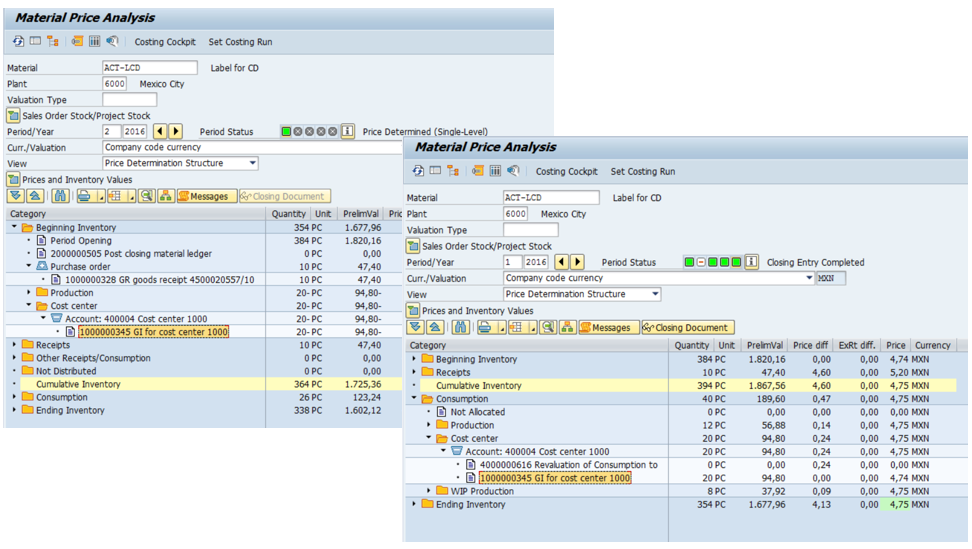
The numbers diverge as soon as multi-level postings exist. In the left (single-level) window the Cumulative PriceDiff is 4.74 — only the material's own input variances. In the right (multi-level) window the Cumulative PriceDiff is also visible but now includes the multi-level rollup contribution from the lower-level BOM items. The delta between the two views is the roll-up volume — the variance that climbed up to this material from its inputs.
Why this matters in troubleshooting: if the two views match exactly, your multi-level rollup didn't happen — either Settlement failed, or all input materials are on indicator 2, or your BOM is wrong. If they differ by an order of magnitude, you may have a unit-of-measure mismatch in the BOM. CKM3 is where you spot these patterns first.
WIP at actual costs — what Settlement now also covers
If "Activate WIP at Actual Costs" (OMXW) is on, the new Settlement step extends its scope to revalue Work in Process. The CKM3 view shows a separate Production folder where the WIP component of consumption is segregated:
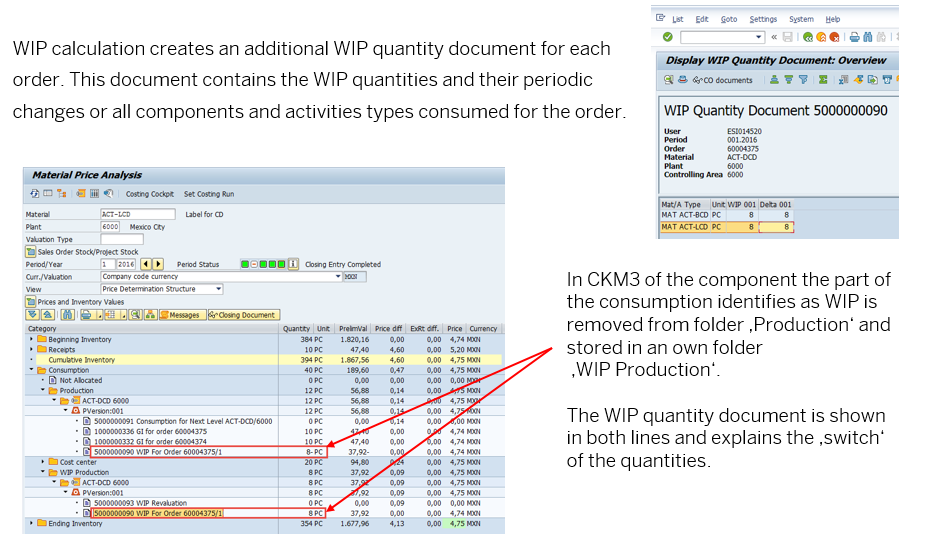
Two things to note when WIP at actuals is active:
- In CKM3 the consumption tree shows both a Production and a WIP Production folder. The WIP folder isolates the quantity that's in process — physically consumed but not yet outputted as finished goods.
- The WIP quantity document is generated per production order and shows the running WIP balance. Reconciling the WIP quantity document against the production order's confirmation history is the safest way to investigate "why did WIP move by X?".
The matching WIP Revaluation Document then shows the variances allocated to the WIP balance at month-end:
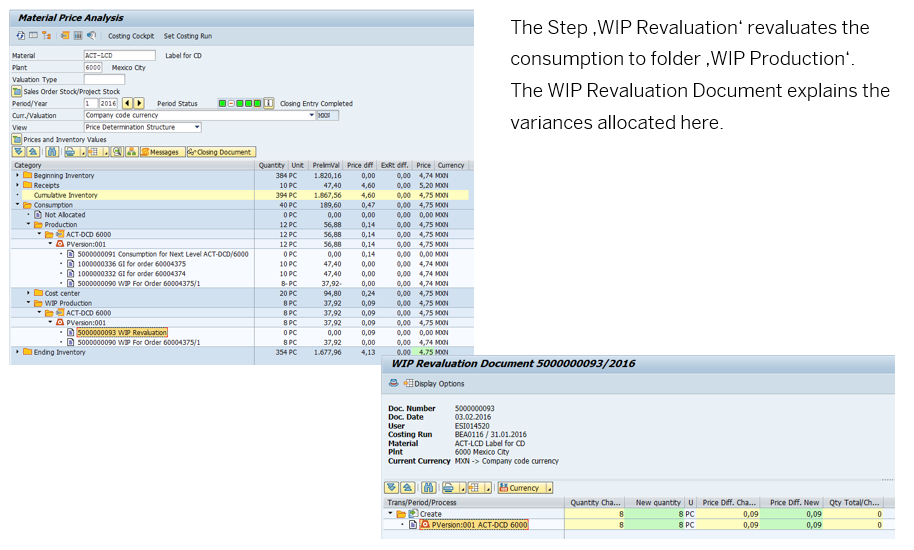
For each WIP revaluation, the document shows: the original quantity, the WIP-specific portion, the price difference (old and new), and the accumulated adjustment. The "Total" column at the right edge is where finance signs off — if it doesn't reconcile to the WIP variance you expected, this is the document you walk through line by line.
The complete Material Ledger Closing Document — what the auditor opens
Once Post Closing runs, every material gets a Material Ledger Closing Document. The auditor opens this to verify the closing entry was complete:
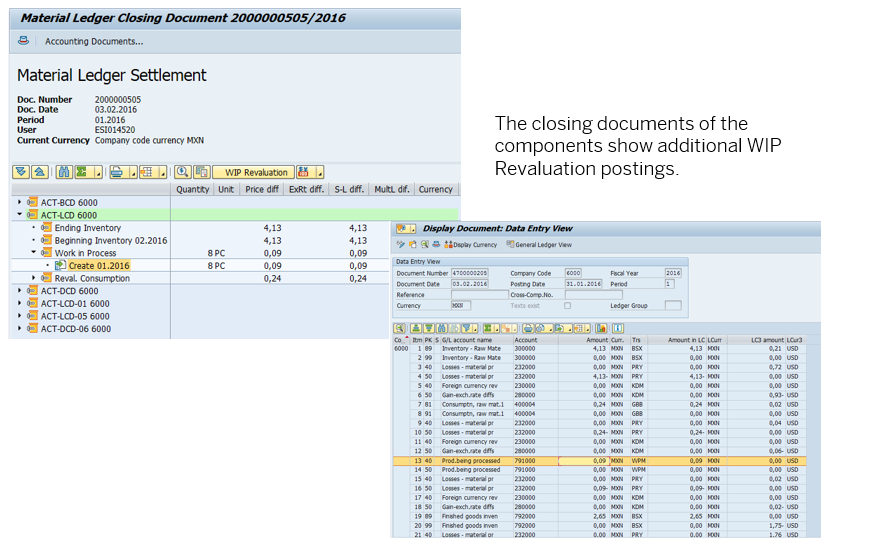
The right-hand panel is the Display Document Data Entry report, which lists every ML4HRUN document created for the closing. The numbers on the right are the actual amounts in local currency that flowed into ACDOCA. Reconciling the closing document tree (left) against the Display Document Data Entry list (right) is your "everything balanced" check — if a line on the left has no matching ML4HRUN on the right, Post Closing failed silently for that material and you need to investigate.
Currency settings — the table you must memorise
The first article said "up to three currencies". The exact options that ML supports per valuation, with their currency types — this is straight from SAP help:
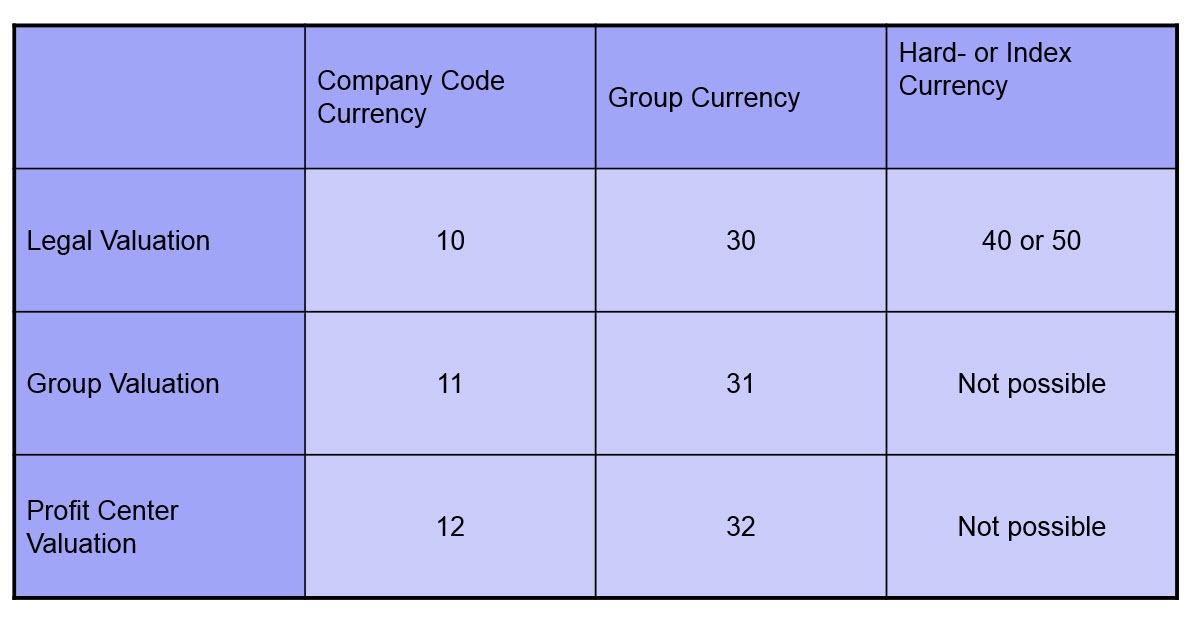
Rule: pick currency type 10 plus up to 2 additional in any valuation. For Vajra, that's 10 (INR) + 30 (USD for group) + 40 (EUR as a hard currency for IFRS pack).
Two non-obvious points the SAP help documents heavily:
- Currency type 20 vs 30 in the Controlling Area — currency type 20 is known only to cost accounting. Type 30 is known generally in FI and ML. ML integration with FI exists only if you use currency type 30 in the controlling area (Note 119428).
- Once ML is productive, you cannot change currency types without a full deactivation/re-startup (Note 53947). On a test system, deactivation runs
SAPRCKMJX— which deletes all ML data. On productive, it's a project (KBA 1511335 for the C+039 trail).
The dashboard view of the three-currency PUP is what your team actually sees in Fiori:
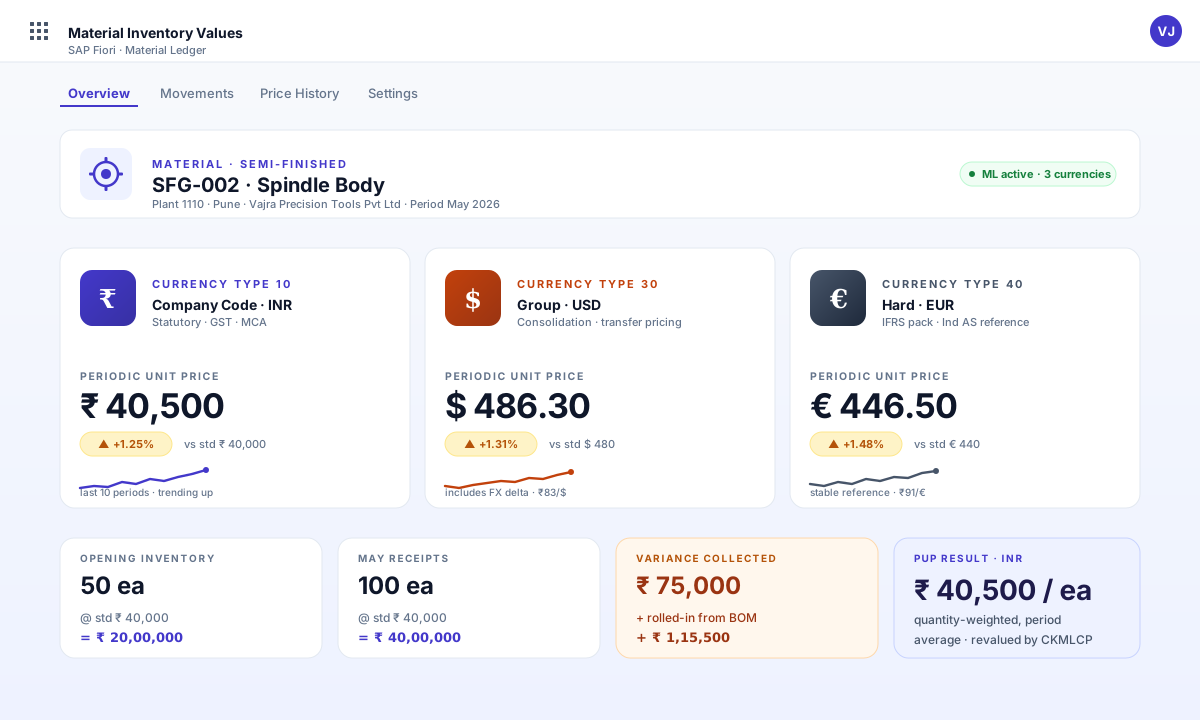
The IMG — where ML actually lives
Before CKM9, know the IMG paths. This is the customizing tree every consultant memorises — SPRO → Controlling → Product Cost Controlling → Actual Costing / Material Ledger:
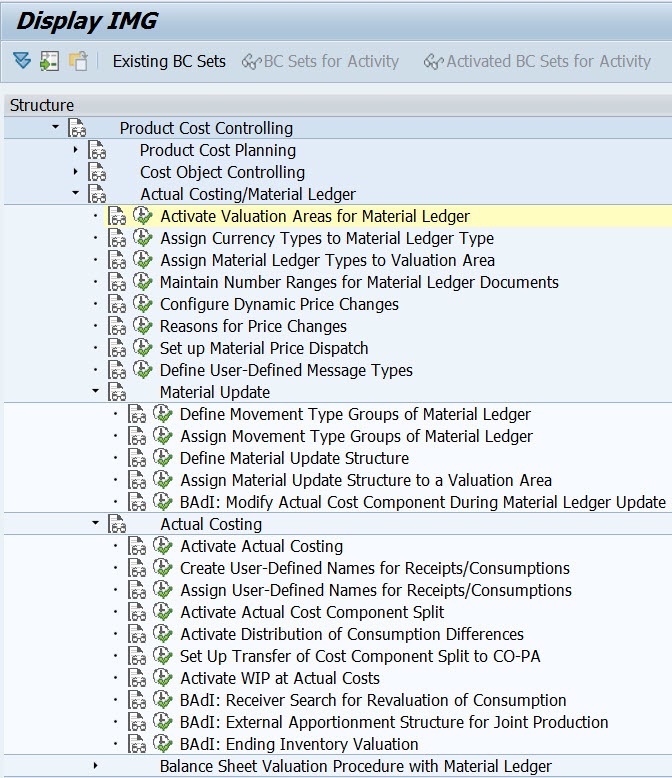
Three IMG nodes a fresh consultant must check before any go-live audit:
- Activate Valuation Areas for Material Ledger — confirms every relevant plant is ticked.
- Activate Actual Costing — without this, multi-level rollup and PUP calculation don't run, even with ML on.
- Activate WIP at Actual Costs (
OMXW) — controls whether the Settlement step touches Work in Process.
CKM9 — the customizing X-ray for any go-live
CKM9 is the report every senior consultant runs on their first day in a new system. It displays everything ML-relevant about a valuation area in one screen:
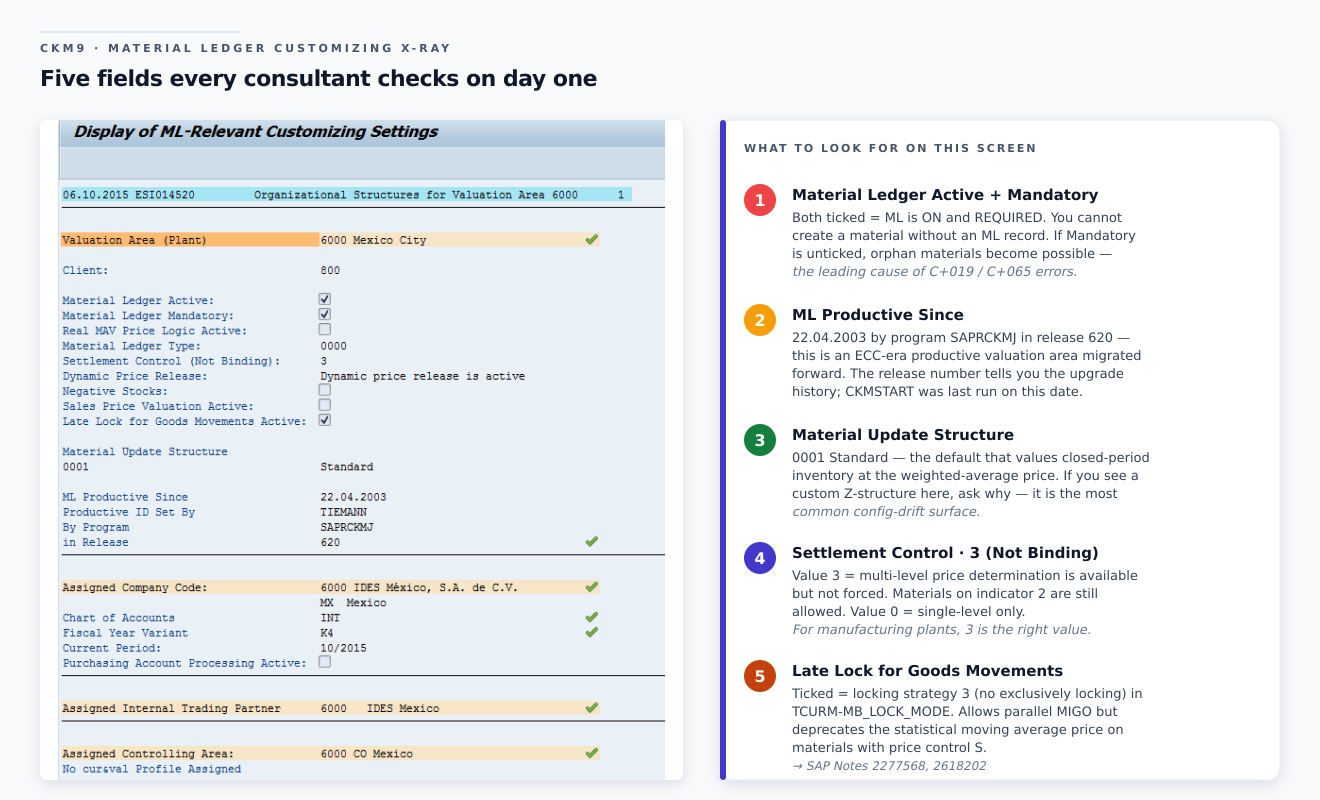
The four lines that tell the auditor's story:
Material Ledger Active + Mandatory — both ticked. ML is on AND required (you cannot create a material without an ML record).
ML Productive Since 22.04.2003 by SAPRCKMJ in Release 620 — this is an ECC-era productive valuation area, migrated forward. The release number tells you the upgrade history.
Settlement Control 3 (Not Binding) — Multi-level price determination is available but not forced. Materials with indicator
2are still allowed.Late Lock for Goods Movements Active — locking strategy. Don't change this casually; it has Performance Assistant implications.
ML Active / ML Mandatory flags
ML Type and ML Productive Since date
Material Update Structure (default
0001)Currency Types in use, with their roles (legal, group, hard)
Assigned Company Code, Chart of Accounts, Fiscal Year Variant
Assigned Controlling Area and its currency
The full Settings for Actual Cost Component Split — main vs auxiliary CCS, the data scope key (
0001= SAP standard), per-cost-element rulesML-Relevant Number Ranges with the current numbers (01 ML update, 02 ML closing, 03 ML price change, 04 ML settlement, 05 ML multi-level settlement)
Accounts Section ("Display Accounts" option) — every transaction key / valuation class combination mapped to its debit/credit GL account
If you're inheriting a system, the first three things to verify in CKM9:
- Is ML Productive Since set? If yes, when? (This tells you the data baseline.)
- Are the currency types in CKM9 a subset of what's defined in T000 / SCC4? (Mismatch causes the infamous
C+039.) - Are the number ranges (object 4 settlement, object 5 multi-level) maintained? (
C+606if not — Note 122391.)
The twelve errors you will hit — with the exact SAP Note
Some are configuration-induced (fix once, never again). Some are program errors (apply the Note, never again unless you regress). Some are inconsistencies in the data (run a Helpdesk repair).
| Error | When it fires | First-line fix | SAP Note / KBA |
|---|---|---|---|
| C+019 / C+065 | "ML flag not set in material master although ML active for plant" | Activate value update for material type — OMS2 then CKMSTART | 1511937, 574730 |
| C+039 | "Material ledger currencies are changed in CO" | Currency mismatch between T000 / SCC4 / CKM9 | 1511335 |
| C+606 | "Number range not maintained for ML object N" | Maintain in OMX4 | 122391, 1067678 |
| C+704 | "Stock movement" — ACDOCA × MLDOC inconsistency | Apply TopNote, then run consistency check | TopNote 2693824, 2646743 |
| C+099 | Missing CCS data in MLDOCCCS | Implement CCS notes | 2553586 |
| C+135 / C+136 / C+137 / C+138 | "Not distributed price differences" in CKM3 | Price-limiter logic — switch off in Settlement params, or apply Note | 2898738, 2148759 |
| ML4HRUN053 | "Differences in cost component split data" — in CKMLCP Settlement | TopNote — usually CCS inconsistency. Implement 2691272 + 2607681, then FCMLHELP repair | TopNote 2691272 / 2607681, KBA 2483516 |
| ML4HRUN101 | "Valuation Area locked for period MM year YYYY" | Another Post Closing is running, or didn't finish — wait or unlock | KBA 2693194 |
| ML4HMASTER 106 / 107 | "Close previous period for material/activity first" | Previous period not closed. Either close it, or use the new "Allow Open Status" exceptional processing parameter | KBA 2515611 |
| MLCCS009 / MLCCS202 | CCS inconsistency or incorrect delta CCS for price change | Apply TopNote 2691272 then FCMLHELP CCS check | 2691272, 2553586 |
ASSERTION_FAILED in CL_FINS_ML_CUSTOMIZING_UTIL (MIGO) | Goods movement against missing customizing | Implement note, verify CKM9 customizing | 2488876, collective KBA 2408467 |
DBSQL_DUPLICATE_KEY_ERROR in SAPLFML_ACDOCA_M_EXTRACT | Duplicate key during ACDOCA extract | Apply Note 2882344 | 2882344 |
| SPTA001 in CKMLCP | Parallel processing error | Specific to 1610 | KBA 2739591 |
The pattern: when a CKMLCP step fails, the order is almost always:
- Note the error code from the message log.
- Search the Collective KBA for the release (2784741 for 1809, 2530890 for 1709, 2416935 for 1610).
- Implement the listed Notes — they're cumulative and usually fix more than the reported error.
- Run FCMLHELP consistency check (Note 2772395) to verify the data fixed itself.
- Re-run CKMLCP from the Settlement step (the previous Selection and Preparation are still valid).
The supportability toolbox
Eight transactions / reports every consultant should have bookmarked. These are the SAP help portal's own recommended diagnostic kit:
| Tool | What it does | Get it from |
|---|---|---|
| ANST — Automated Note Search | Replays a transaction, traces the ABAP, suggests Notes and customizing entries | Standard since release 740 — Note 1818192 |
| MLHELP_SAPRCKMU | Test-mode consistency check between material master and ML tables | Note 364368 (Material Ledger Helpdesk) |
| CKMDISPTAB | Lists every ML table entry for a material/plant/period — including MBEW / MBEWH | Note 364368 |
| ML_DISPLAY_DOCUMENT | Technical view of a single material ledger document | Note 364368 |
| MLCCS_KO88_TREATMENT | Repairs missing actual CCS that breaks order settlement | KBA 1501506, Note 632752 |
| FCMLHELP — version 10 | The big consistency check across MLDOC / MLDOCCCS / ACDOCA — 10 separate reports | Note 2772395 |
| MLHELP_CYCLE_ANALYSER | Analyses cyclic structures in multi-level price determination | Note 364368 |
| ML4HVFM — Value Flow Monitor | Trace value flow end-to-end for a material (available SP03+) | Note 2482519, KBA 2681559 |
| CKM3A — Activity Consumption Analysis | Drill activity consumption per cost centre / cost element | SP03+ or Note 2527222 |
| Schedule Manager in CKMLCP | Trace and analyse errors for each step in the Actual Costing Cockpit | Standard |
A two-line rule: if the error mentions a code starting with ML4H, run FCMLHELP before anything else. If the error mentions a cost component split (MLCCS*, C+099), run MLHELP_CCS_CONS_CHECK in test mode first.
When you do need to investigate a specific run, the Display Object List filter screen on the new CKMLCP is your scoping tool — pick the costing run, the period, restrict to a flow step (Preparation / Settlement / Post Closing), and choose whether to see all materials, those with errors, those still open, or those processed successfully:
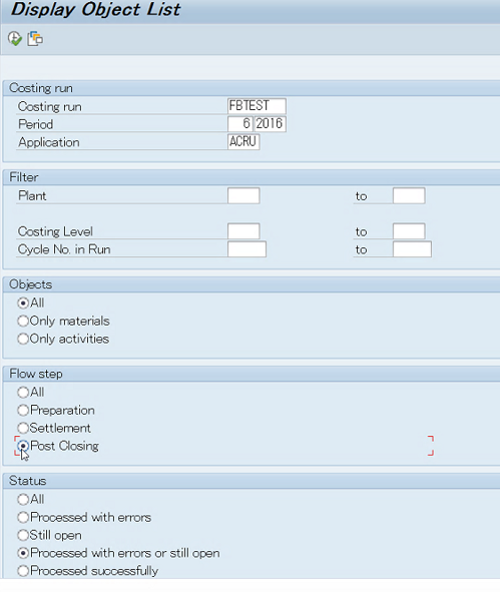
The two filters most people miss: Costing Level (drill to a specific BOM level) and Cycle No. in Run (drill to a specific iteration of the cycle solver). Combined with the Flow step filter, you can answer "which materials at level 3 failed in Settlement during cycle iteration 5?" in two clicks.
Quick check — operations
Q. A goods receipt fails with
ASSERTION_FAILEDin classCL_FINS_ML_CUSTOMIZING_UTIL. Where do you start? A. Collective KBA 2408467 — it lists every Note that touches this class. Implement the most recent in your support package, retry. If it persists, ANST trace on the MIGO replication.Q. What's the difference between MLHELP_SAPRCKMU and FCMLHELP? A. MLHELP_SAPRCKMU checks for inconsistencies between the material master and ML tables (test mode). FCMLHELP runs ten separate consistency checks across MLDOC, MLDOCCCS, ACDOCA and the closing tables (period-end view).
ECC to S/4HANA — what the migration cockpit actually runs
ML is mandatory in S/4HANA whether or not you used it in ECC. The conversion path is fixed and documented:
Customising migration (one-off):
- Currency type configuration must be reviewed before any migration step (Note 2555648).
- Account modification key
PRLmust be configured forGBB-AUI. - Material update structure (default
0001) must be assigned per valuation area.
Data migration (in transaction FINS_MIG_STATUS):
| Step | What it does | Check Note |
|---|---|---|
| M10 | Migrate ML Master Data | 2354768 |
| M20 | Check ML Master Data | 2354768 |
| M11 | Migrate ML Production Order and Purchase Order History | 1801449 |
| M21 | Check ML PO and Purchase Order History | 2389581 |
The pre-check ladder (run these before the migration starts):
- Note 2345739 — ML migration relevant SAP Notes & FAQ (the entry point).
- Note 2129306 — Customizing settings prior to upgrade.
- Note 2389581 — Resolve findings of core ERP CO-PC-ACT pre-checks.
- Note 2307844 — Pre-Simple Finance customizing check.
- Note 2245333 — Pre-Transition Checks for FIN: error messages.
Most frequent migration errors come back to: currency mismatch (C+039), missing customizing in T000 / SCC4, mismatch between Controlling Area and FI currency types. Note 2714344 is the "most frequent error messages" reference for FINS_MIG_STATUS.
A pragmatic rule from real conversions: if you weren't using ML in ECC, your conversion is simpler, not harder. There is no historical ML data to migrate — the M10/M20/M11/M21 steps still run but they have far less to do. The pain is currency type alignment, not data volume.
Special scenarios — what's documented but rarely explained
Three scenarios that come up at most manufacturers and have specific Notes:
Joint production / co-products. When a production order produces multiple finished goods (a chemical plant, a refinery, a meat-processing line), variances need to be distributed in proportion to apportionment structure, not BOM quantity. See KBA 2566647 — "How variances are distributed in a joint production scenario". The new architecture has reduced "Not Allocated" buckets here significantly.
Split valuation. A material valuated differently by valuation type (e.g. domestic vs imported batches at different prices). Note 2581465 — "Price differences distribution to materials with split valuation". The settlement now respects valuation type boundaries during multi-level rollup.
Stock In Transit / Cross-Company. Stock that has left a sending plant but not yet arrived at the receiving plant — the value sits in transit, valued at the sender's price until receipt. Composite Note 2748139 covers all the stock-transfer scenarios in ML.
WIP at Actual Costs (OMXW). If the IMG node "Activate WIP at Actual Costs" is set, the new CKMLCP Settlement step includes the WIP variances in its calculation and the multi-level rollup pushes them onto finished goods alongside material variances. The 1610 Push posting logic means WIP rollup now appears on the input activity's closing document, not the output material's — which is a reporting change to call out to your audit team.
Alternative Valuation Run (CKMLCPAVR). A second costing run that cumulates prices over several periods. The classic use case is LIFO valuation alongside FIFO. Run CKMLCP as the "main" closing, and CKMLCPAVR as the alternative — they don't interfere. Note 2559509 is the New ML Costing Cockpit for AVR. Note 2779567 introduces the "Run Reference for rolling run" concept that lets one AVR roll forward across periods without re-setup.
Movement Type Groups — what the IMG node actually configures
If you ever need to verify which goods movements trigger ML postings (and which don't), open CKMLMV009 in SE16N. This is the configuration table for movement-type groups and the corresponding ML behaviour:
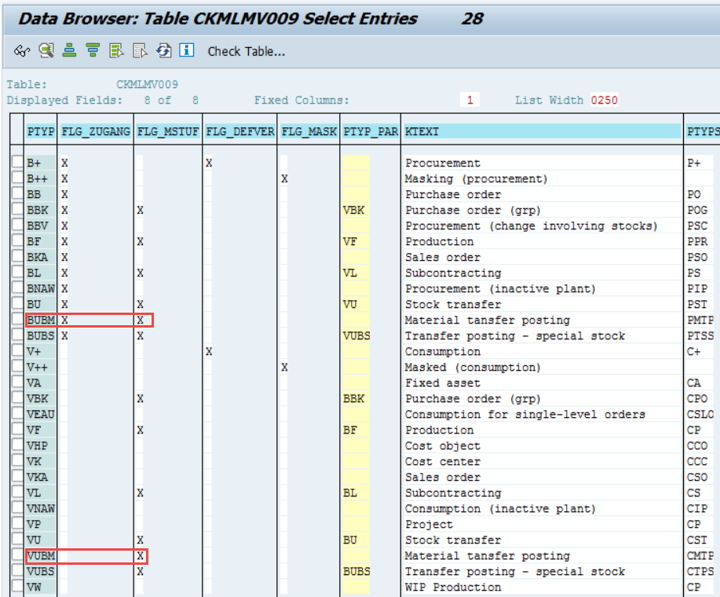
The columns to know: PTYP is the posting type, PTYP_PAR is what it rolls up into, KTEXT is the human-readable label. Movement types are mapped to one of these PTYPs in the IMG node "Define Movement Type Groups of Material Ledger". If a goods movement isn't generating an ML record, this is the first table to inspect — almost always the cause is that the movement type isn't linked to an ML-relevant PTYP.
MARV — last document timestamp per period
The MARV table (Material Master Period Closure) tells you exactly when the MM period was last closed per company code, and the timestamp of the last document posted. Critical for debugging period-shift issues:
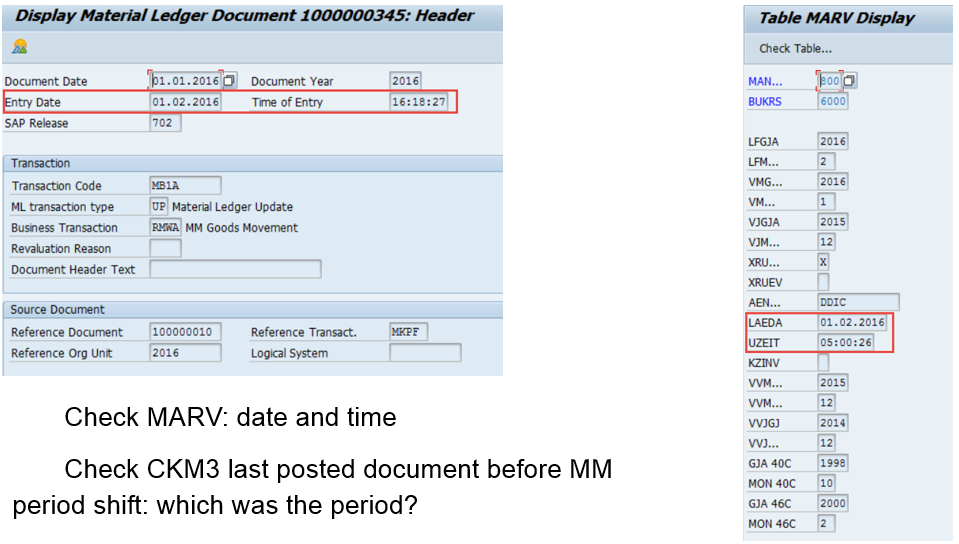
The two red-boxed fields are the diagnostic gold:
LAEDA/LZEIT— last change date/time. Last time someone touched the period closure.XAU 002and the V-prefixed fields — which periods are currently "open" for goods movements.
The most common period-shift problem is: an ML document was posted in period 2 (header date 01.01.2016 → entry date 01.02.2016) — meaning a backdated document landed in a closed period. Cross-reference the document header dates against MARV to see whether the period was open when the document hit. If not, you have a backdating exception that should appear in your control reports.
ML Drilldown reporting — what to point your BW / SAC at
If you need ML data outside CKM3, three CDS views are the canonical sources:
FCML_MAT_V— material-level summary (Note 2441212)FCML_REP_V— report-level details (Note 2441212)FCML_CCS_REP_V— cost-component-split reporting (Note 2467741)
These read from MLDOC and MLDOCCCS directly, so they pick up MALENA data automatically. Custom Z-reports against the old CKMLPP / CKMLCR tables will continue to work (the compatibility views are maintained) but will not reflect any new data after the 1610 migration. Migrate your reports.
For ad-hoc analysis you can also use the classical ML drill-down report (01MLREPORT / ML Template Report 01). Its characteristic selection screen shows everything you can slice by:
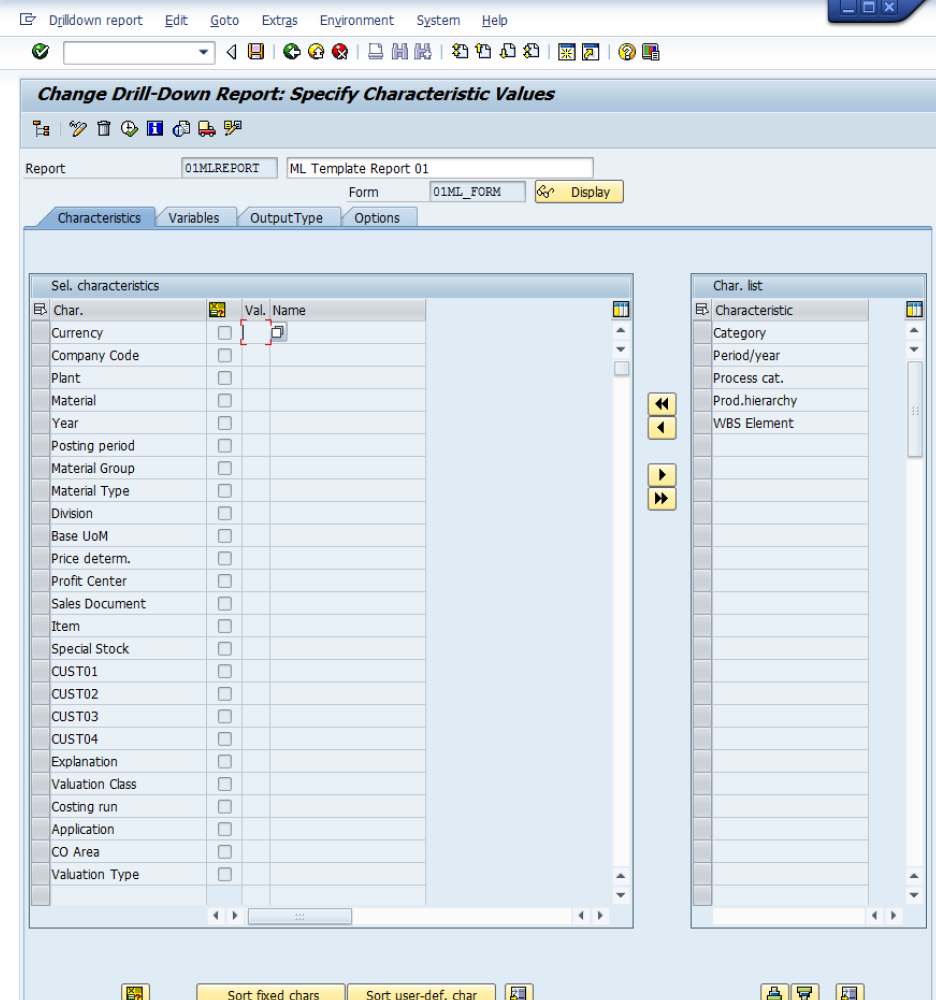
What the screen tells you about ML's data shape: everything is sliceable — currency type, plant, material, posting period, profit centre, sales document, WBS element, even custom characteristics (CUST01-CUST04 are configurable hooks). This is the same data model your custom CDS views and BW extractors should reach into.
The output looks like this — a Profitability Report cut by Posting Period, showing Quantity, Preliminary valuation, Single-level price diff, Multi-level price diff, Actual values, and Single-level vs Multi-level Exchange Rate diff per period:
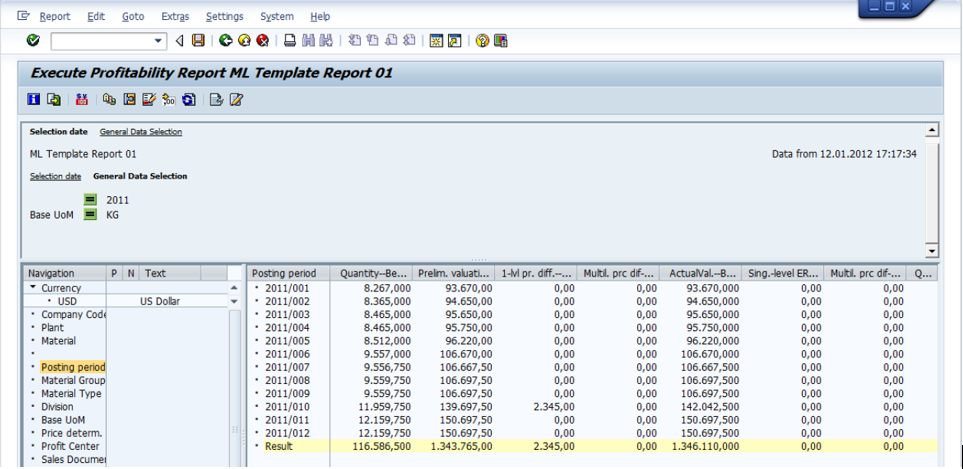
Look at the Result row at the bottom: 1,343,765.00 preliminary valuation + 2,340.00 single-level price difference + 0.00 multi-level = 1,346,105.00 actual value. That equation is the entire reconciliation between standard cost and actual cost for the year, summarised in one row. This is the report you put in front of the CFO when you need to answer "how much did our actual cost diverge from our planned cost this year, in plain numbers?".
When stock physically doesn't match the ledger — DUV
A common scenario nobody plans for: a physical inventory count finds more (or fewer) units than the ML balance. The Distribution of Usage Variances (DUV) is the mechanism that resolves the gap. CKM3 shows it as a specific section in the consumption tree:
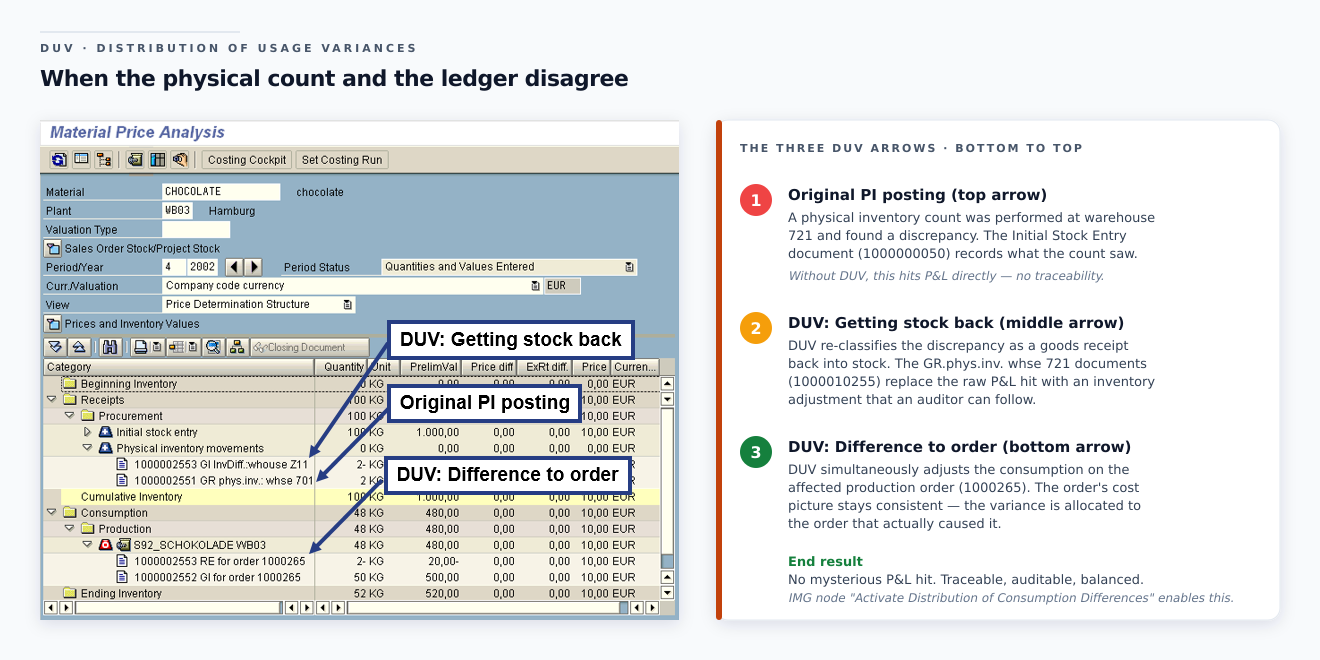
Read the arrows on the right:
- Original PI posting (red arrow 1) — the physical inventory adjustment that found the discrepancy.
- DUV: Getting stock back (red arrow 2) — DUV re-classifies the discrepancy as a goods receipt from physical inventory.
- DUV: Difference to order (red arrow 3) — DUV simultaneously adjusts the consumption for the affected production orders so the order cost picture stays consistent.
The end-to-end effect: the physical count gap doesn't show as a mysterious P&L hit. It shows as a re-classification between order-level consumption and PI adjustment — auditable, traceable, and quantitatively balanced.
The IMG node "Activate Distribution of Consumption Differences" is the on/off switch. Most manufacturers run it on. Without it, every physical inventory count gap lands as a pure P&L hit with no order-level traceability.
The Top Notes you must implement BEFORE go-live
If you are still on an old support package and seeing instability, this is the bedrock list. Implement these first, then layer the release-specific collective notes on top:
| Note | Why it's a TopNote |
|---|---|
| 3141811 (HotNews) | Fixes the program error in 3114903 that causes timeouts in CKMLCP and CKMM |
| 2693824 | ML-FI inconsistency — closing reversal creates ACDOCA × MLDOC inconsistency (C+704) |
| 2691272 | Actual cost component split: incorrect delta CCS for price changes, error MLCCS 202 |
| 2610889 | Document update C+704 with transaction incorrectly identified as prior-period |
| 2607681 | Actual CCS 2 — error during settlement with periodic unit price fallback |
| 2980434 | Incorrect MLDOC update during WIP calculation in collective processing |
| 3136485 | TopNote for CCS startup and CCS change |
For your release add the collective KBA:
- 1809: KBA 2784741
- 1709: KBA 2530890
- 1610: KBA 2416935
These KBAs are living documents — SAP updates them with every new corrective Note. Bookmark and re-check before each support-package upgrade.
FAQ
Q. We're on S/4HANA 2024. Does the old 4-step CKMLCP architecture still apply to us? No. Anything 1610 or later runs the new Selection / Preparation / Settlement / Post Closing / Mark Prices flow. Your senior consultants' ECC muscle memory needs to be retrained.
Q. Can I deactivate ML? Not in production. Once CKMSTART flips a valuation area to productive, that's it. On test systems you can run SAPRCKMJX to deactivate — but it deletes all ML data (KBA 1511335). Note 2605071 is "Enable reset of ML — only for test systems".
Q. We get C+704 on every reversal. Is this a config or program error? Program error — it's the canonical case for TopNote 2693824. ACDOCA × MLDOC inconsistency on closing reversal. Apply the Note ladder, then run FCMLHELP repair for the affected period.
Q. ML4HRUN053 keeps coming back even after we apply the Notes. The Note ladder fixes new occurrences. Existing inconsistent CCS data needs FCMLHELP cleanup (Note 2772395), or a SAP incident if FCMLHELP can't resolve it. The error itself usually points to data created in an earlier (still-buggy) period — you can apply a "data defect repair" via collective Note 2633282.
Q. Our Post Closing is failing with ML4HMASTER 106 ("close previous period first"). Previous period is closed. Why? Common in conversion environments. KBA 2515611 documents the exception. The new "Allow Open Status for Previous Period" parameter on the Preparation step is your bypass — use it only in exceptional cases.
Q. Can we run Settlement in old periods? Yes. In the new CKMLCP, you can re-execute Settlement in old periods without the workaround that was needed pre-1610 (KBA 1523233 was the old workaround). For Post Closing in an old period, the FI period must be open — ML itself doesn't restrict.
Q. Where did "WIP Revaluation" go? Into the Settlement step. The IMG node "Activate WIP at Actual Costs" (OMXW) still controls whether it happens. The execution is now part of Settlement, not a separate button.
Q. We see "Not Distributed" price differences in CKM3. Is that an error? Not necessarily. KBA 2898738 explains the price-limiter logic — if the stock coverage check decides a price would push inventory below physically valid bounds, it parks the residual as "Not Distributed". Switch off the Stock Coverage Check on the Settlement step (parameter exists) to push the variance through anyway, or accept the Not Distributed as designed behaviour.
Q. Do CKM3 and CKM3OLD ever show different numbers for the same period? Yes — for periods spanning the migration. CKM3 reads only the new MLDOC tables, CKM3OLD reads only the old ones. A period created partly before and partly after the migration may have data in both — see KBA 2503684.
Key takeaways
- The CKMLCP architecture changed in S/4HANA 1610: four old posting passes (Single-level, Multi-level, Revaluation of Consumption, WIP Revaluation) are now one Settlement step. The cockpit is now Selection → Preparation → Settlement → Post Closing → Mark Prices.
- Push posting replaced pull posting: the multi-level rollup is posted in the input material's closing document, not the output's. New transaction key PRL holds activity price variances.
- CKM3 was rewritten to read the new MLDOC tables. Use
CKM3OLDfor pre-migration periods,CKM3PHfor price history regardless of migration status. - Currency type matrix: legal valuation supports 10/30/40 or 50; group supports 11/31; profit centre supports 12/32 — hard currency not available in group or profit-centre valuation.
- The twelve common errors all have a documented SAP Note. The pattern: read message → look up the release-specific collective KBA (2784741/2530890/2416935) → implement the Notes → run FCMLHELP → re-run from Settlement.
- FCMLHELP version 10 (Note 2772395) is the period-end consistency check. MLHELP_SAPRCKMU is the master-data vs ML-table consistency check. ANST is your first-line investigator for unknown errors.
- Migration steps M10 / M20 / M11 / M21 run inside
FINS_MIG_STATUS. The pre-check ladder (Notes 2345739 / 2129306 / 2389581 / 2307844 / 2245333) catches the configuration issues before the data migration starts. - The bedrock implementation list before go-live: HotNews 3141811 + TopNotes 2693824 / 2691272 / 2610889 / 2607681 / 2980434 / 3136485. Then layer the release-specific collective KBA on top.
- The PRL account is the new home of activity "not allocated" variances. Re-point any custom report that summed
GBB-AUIresiduals.
That's the operator's manual. Pin the error table to the wall, keep the supportability toolbox in your favourites, and your next CKMLCP run will be eight minutes of clicking instead of three days of trial and error.
Screenshots: SAP Help Portal — Financials / Controlling / Actual Costing – Material Ledger CO-PC-ACT support content. Used here for educational illustration of the cockpit, customizing nodes and document structures. © SAP SE. Article content and worked examples by SAP Insiders.