A controller closes May for a precision-tools manufacturer in Pune. During the month, goods movements were valued at standard price — every receipt, every issue, every transfer. Standard prices come from last year's cost run. Steel went up 5% in April. Bearing-grade alloy went up 12%. The labour rate moved with the wage settlement. None of that is on the books yet.
At month-end the controller opens CKMLCP, runs five steps, and watches the system re-price every material — raw materials by their actual purchase price, semi-finished goods by their rolled-up raw-material variances, finished goods by the cumulative roll-up of every level beneath them. Inventory now reflects what May actually cost. P&L stops lying.
That capability is Material Ledger + Actual Costing, and in SAP S/4HANA it is not optional. ML is the mandatory sub-ledger for inventory valuation; Actual Costing is the optional add-on that takes ML's data and produces the Periodic Unit Price. This article walks the whole thing through one running Indian manufacturer with full INR examples. Read the glossary first — every term reappears in the diagrams.
The vocabulary — read this before anything else
Thirteen words. One sentence each. The whole article rests on these.
- Material Ledger (ML) — the sub-ledger in S/4HANA that holds the multi-currency, multi-valuation inventory data for every material. Sits beside Accounts Payable, Accounts Receivable and Asset Accounting under the General Ledger. Mandatory in S/4HANA — ECC tables
MBEW/EBEWare now compatibility views. - Actual Costing — the optional engine on top of ML that calculates the Periodic Unit Price at month-end and revalues inventory and consumption to actual cost. You can run ML without it; you cannot run it without ML.
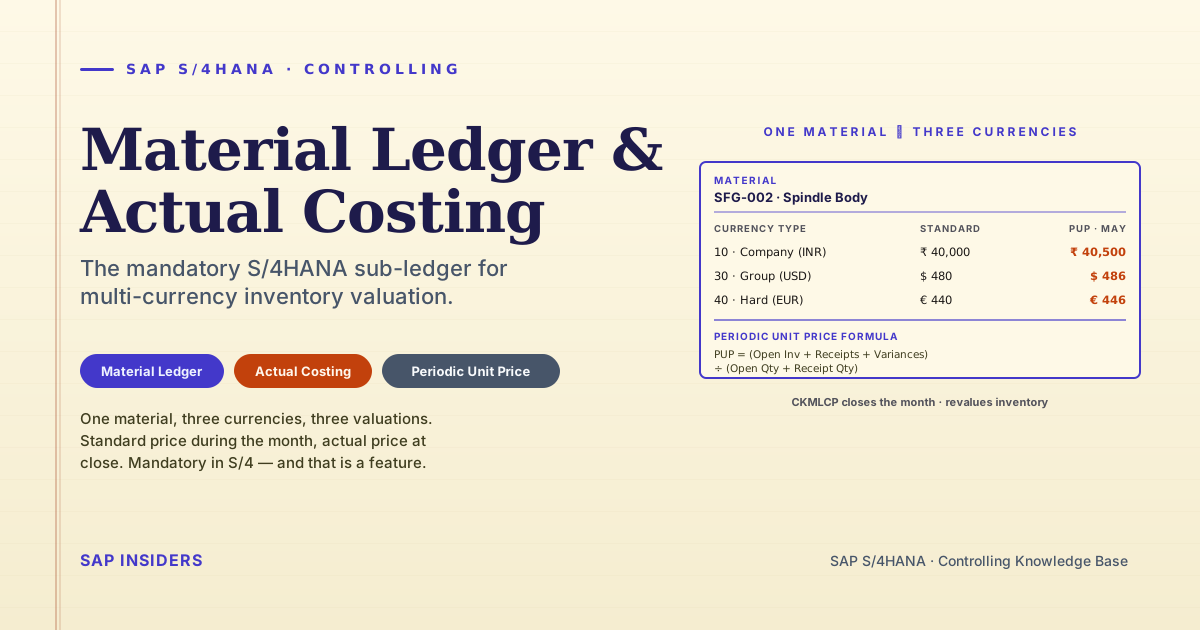
- Periodic Unit Price (PUP) — the actual cost of a material for one period. Formula:
PUP = (Opening Inventory Value + Receipts Value + Collected Variances) ÷ (Opening Qty + Receipt Qty). CKMLCP calculates it. You can also use it as next period's standard. - Currency Type — the code that labels each parallel valuation.
10= Company Code Currency (legal — for Vajra, INR).30= Group Currency (consolidation — typically USD or EUR).40/50/60= Hard / Index / Global currency (for high-inflation contexts or extra views). - Valuation Area — the lowest level at which material stock is valued. In S/4HANA almost always the plant.
- Material Ledger Type — a config object (created in OMX2) that bundles the currency types and valuation profile applied to one or more valuation areas.
- Price Control — the indicator on the material master accounting view.
V= moving average price (MAP).S= standard price. ML and Actual Costing strongly preferS. - Price Determination Indicator — also on the material master.
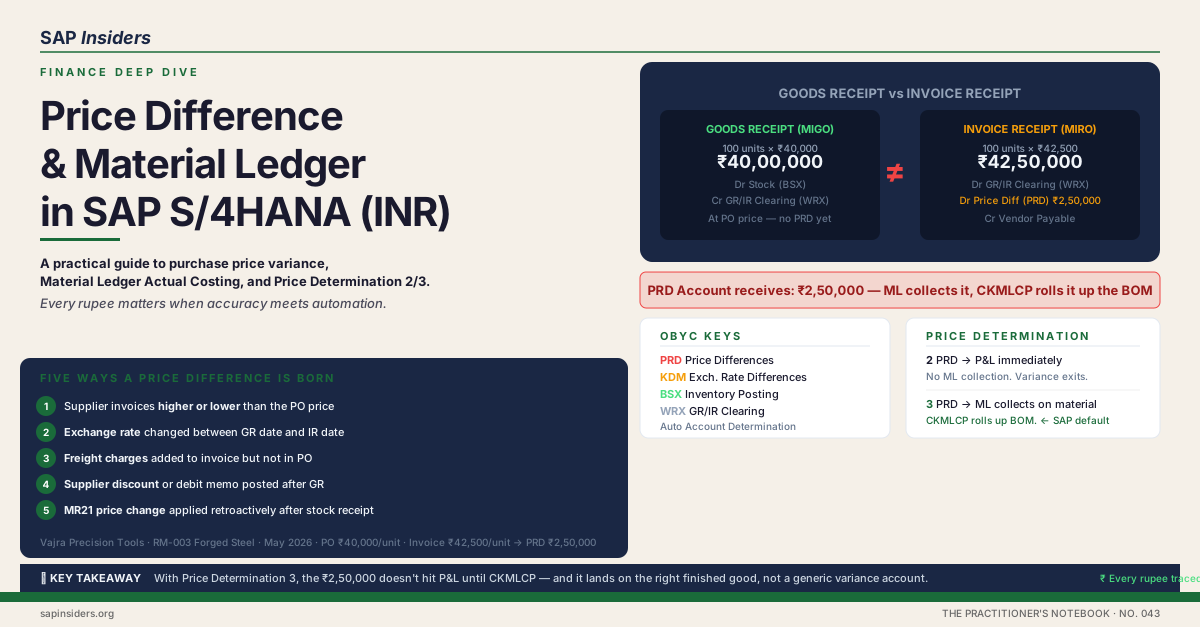
2= transaction-based (single-level, variance straight to FI).3= multi-level (variance collected and rolled up the BOM at month-end). SAP recommends3for ML. - Standard Price — the planned cost held on the material master and used to value every goods movement during the month. Set once at the start of the period (often by the standard cost estimate run, CK40N).
- Price Difference — the delta between the standard price and the actual price on a goods receipt or production confirmation. Collected on the material in ML during the month.
- Single-level price determination — the CKMLCP step that calculates a PUP for each material from its own price differences only.
- Multi-level price determination — the CKMLCP step that walks the BOM bottom-up and pushes price differences from raw materials onto semi-finished, then onto finished goods.
- CKMSTART — the production start-up program. Flips a valuation area's ML status from "red" (test) to productive. Once run, ML cannot be deactivated for that area.
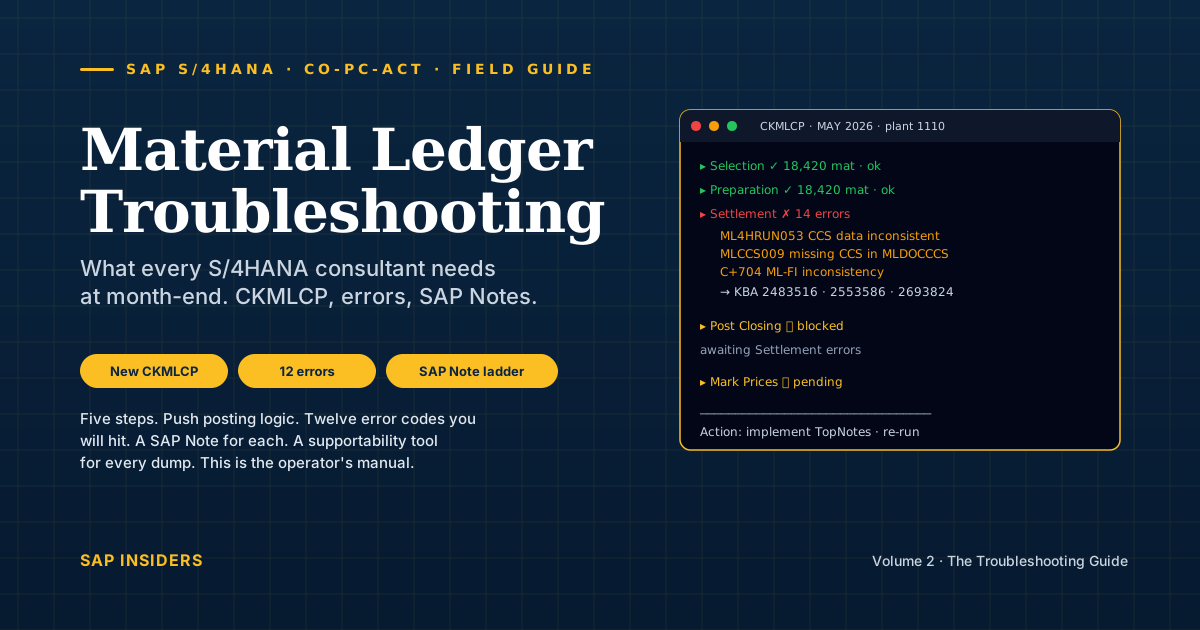
- CKMLCP — the month-end Actual Costing cockpit. Runs the five-step closing in sequence and stays on screen while it executes.
Read once. Now the diagrams will speak.
Forget the abstract for a moment. Material Ledger isn't a table — it's the system of record for the life of a material, from the truck arriving at the dock to the finished spindle leaving the production line. Five physical touchpoints. Three currencies at each one. Fifteen ledger lines for a single goods receipt.
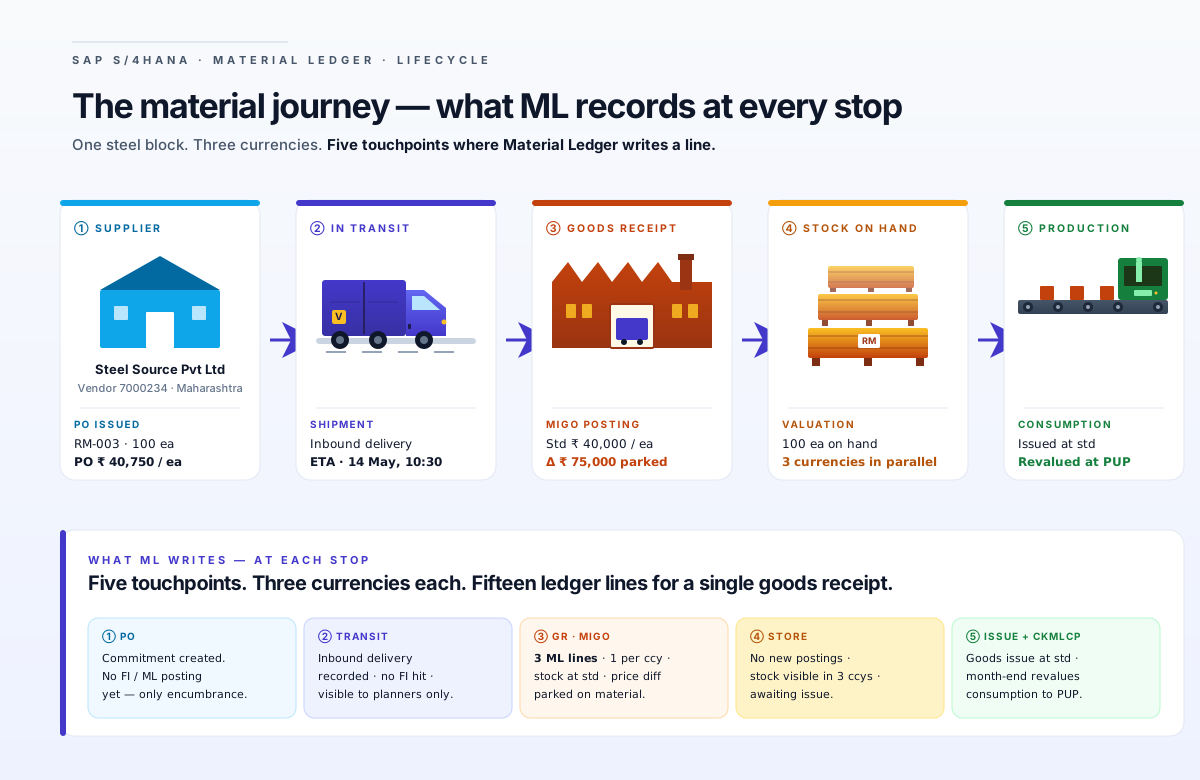
That picture is the article in one frame. Five stages. Now zoom out for the six-panel summary, and we'll work each panel underneath.
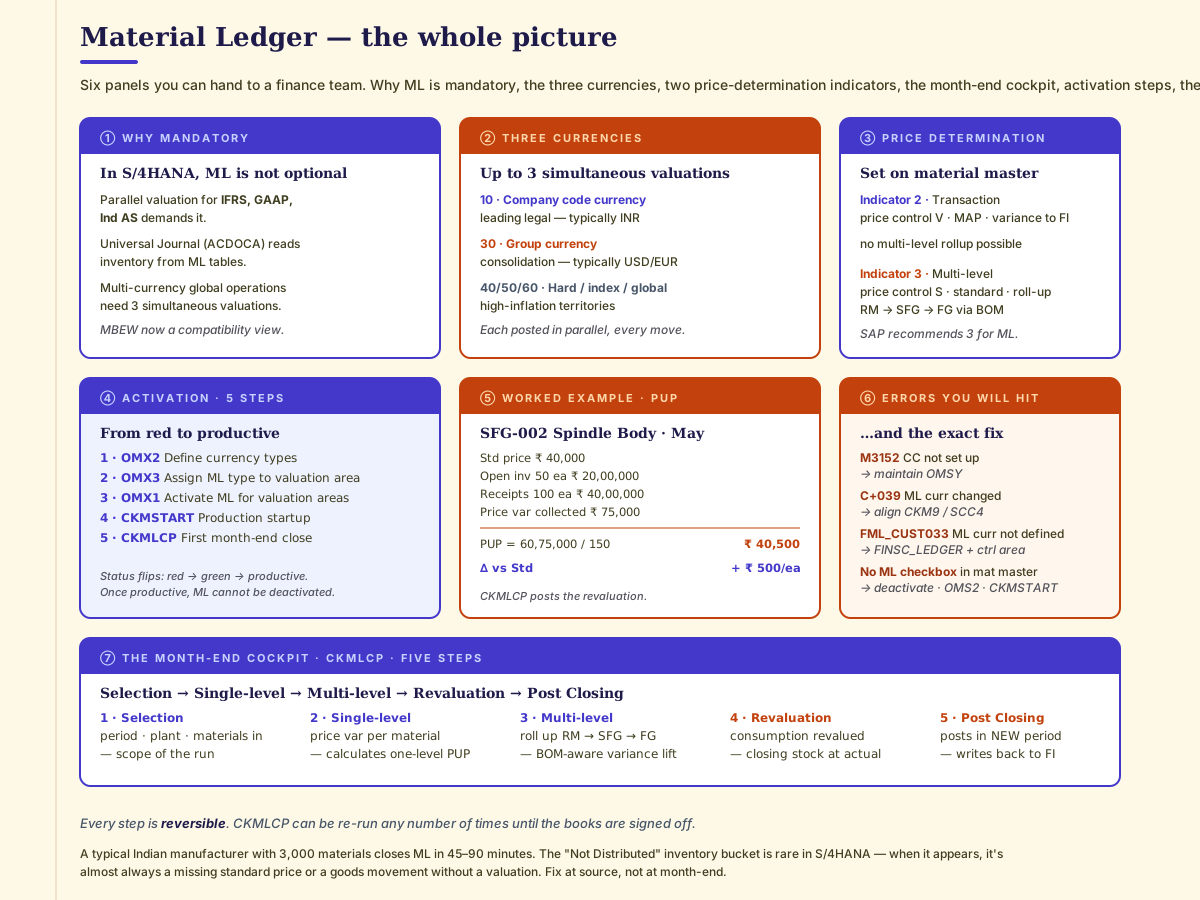
Quick check — vocabulary
Q. Is Material Ledger optional in SAP S/4HANA? A. No. ML is mandatory in S/4HANA — it's the default valuation engine. Actual Costing, the layer on top, is optional.
Q. What's the difference between price control and price determination indicator? A. Price control (V or S) decides what value sits on the material master. Price determination indicator (2 or 3) decides whether variances roll up the BOM. They're on the same accounting view but answer different questions.
Q. What does "PUP" stand for and what's the one-line formula? A. Periodic Unit Price. PUP = (Opening Inventory Value + Receipts + Variances) ÷ (Opening Qty + Receipt Qty).
Meet Vajra Precision Tools
To keep this concrete, every example below uses the same imaginary company.
Vajra Precision Tools Pvt Ltd is the same Indian precision machine-tool manufacturer from the Distribution & Assessment article. CNC milling machines and turning centres, single plant in Pune. For this article we narrow the lens to one product family so the BOM is visible end-to-end:
FG-001— CNC Spindle Assembly (Finished Good). Standard price ₹1,00,000.SFG-002— Spindle Body (Semi-finished). Standard price ₹40,000.SFG-004— Bearing Pre-assembly (Semi-finished). Standard price ₹30,000.SFG-005— Bearing Race (Semi-finished). Standard price ₹20,000.RM-003— Forged Steel Block. Standard price ₹15,000.RM-004— Bearing-grade Steel. Standard price ₹10,000.RM-005— Refractory Coating. Standard price ₹5,000.
Vajra's parent group reports in USD for consolidation, and the group also produces an IFRS pack in EUR. All three valuations are kept by ML, on every movement, with no extra effort from the controller.
What Material Ledger actually does — in one paragraph
When a goods receipt posts at Vajra, the system doesn't write one line — it writes three lines, one per currency type, one per valuation. Each line uses the standard price for that valuation, and any difference between standard and the PO price is parked as a price difference on the material. That happens for every receipt all month. At period end, Actual Costing sweeps up the parked differences, calculates the actual unit cost for each material (the PUP), walks the BOM bottom-up to push raw-material variances onto the semi-finished and finished goods that consumed them, and revalues closing inventory and consumption. The Universal Journal (ACDOCA) now carries the full multi-currency, fully-roll-up picture — and the auditor has one number for inventory that is exactly what May cost.
Three currencies, three valuations — in parallel, always
The single most important S/4HANA shift: a goods movement is no longer "one transaction". It's three — and that's exactly how the controller sees it in Fiori.
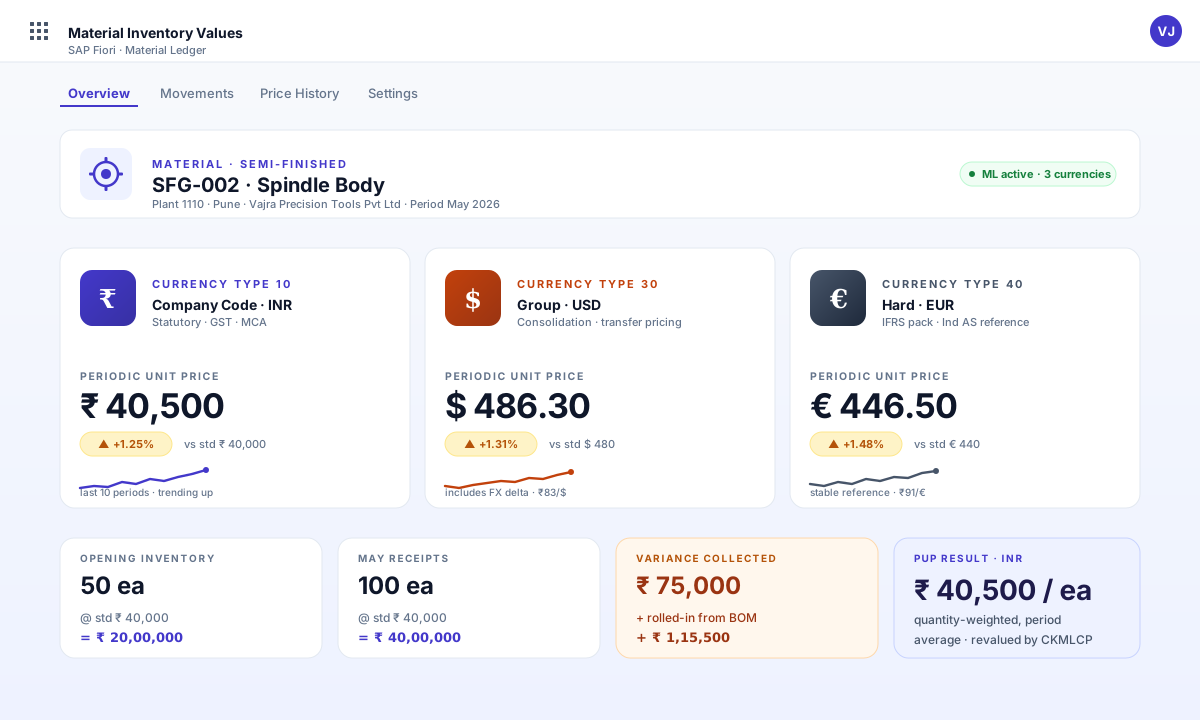
Three points the diagram cannot shout loudly enough:
- The price differences are different in each currency, because exchange rates aren't constant. ML tracks price difference, exchange rate difference, and combinations of both. The Universal Journal can map them to separate G/L accounts.
- You don't pick one and ignore the others. All three valuations are kept for every material, every day. The parent's USD consolidation pack reads currency type
30. The Companies Act books read10. They never need a manual conversion. - Single Valuation Ledger vs Multi-valuation Ledger is a structural choice you make at activation. Multi-valuation = one fiscal year variant across all currencies. Single Valuation = potentially different fiscal year variants per ledger.
Price determination — the field on the material master that decides everything
Every material in S/4HANA has a Price Determination Indicator on its accounting view. Two values. Choose carefully — once goods movements post against a material with one choice, switching to the other is a project.
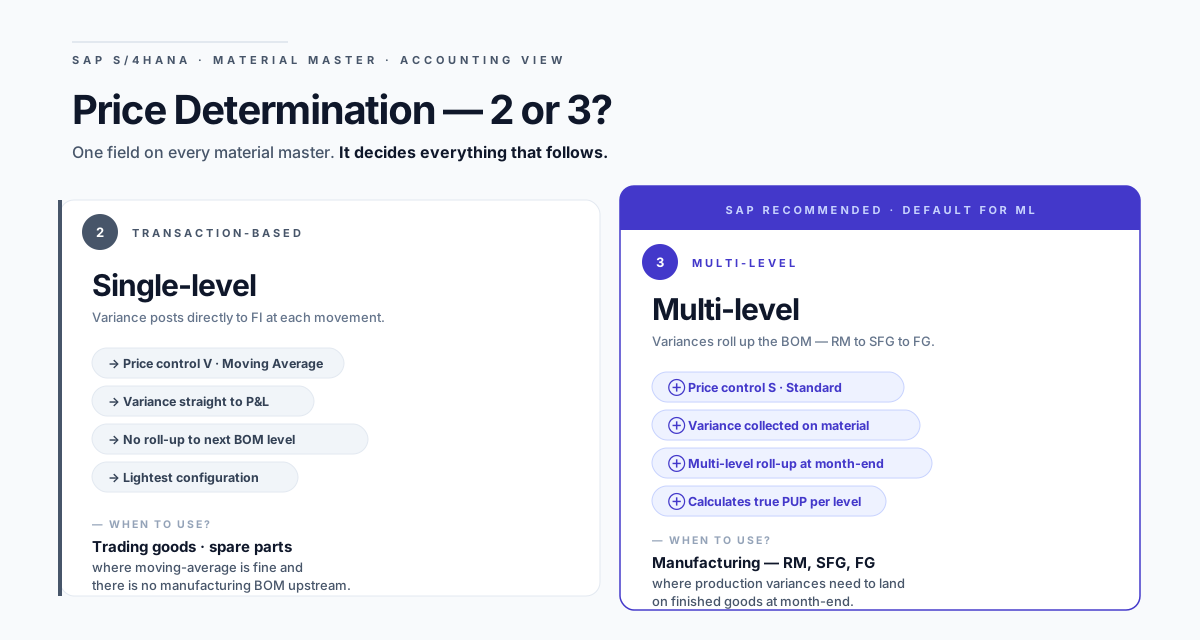
The rule of thumb for any S/4HANA manufacturer:
- Raw materials, semi-finished, finished goods → Indicator 3 (multi-level). Standard price control
S. Variances roll up the BOM at month-end. - Pure trading goods, low-value spare parts, materials with no production BOM upstream → Indicator 2 is acceptable. Moving average behaviour, no rollup, simpler config.
For Vajra, every material in the running example is indicator 3.
Quick check — price determination
Q. If a material uses indicator
2(transaction-based), can its variances be rolled up to a finished good that uses indicator3? A. No. Indicator2posts variance directly to FI on the spot — there's nothing left to roll up at month-end. The finished good will see its components at standard only.Q. Your auditor asks why one specific raw material's monthly value matches a moving-average calculation instead of standard plus rolled variance. What's the most likely cause? A. The material is set to indicator
2. Common when a material was originally created as a trading good and later promoted to a production input without updating the accounting view.
A worked example — multi-level cost roll-up in May
May closes for Vajra. Raw-material prices moved. The controller wants to know: by how much, and where does it land?
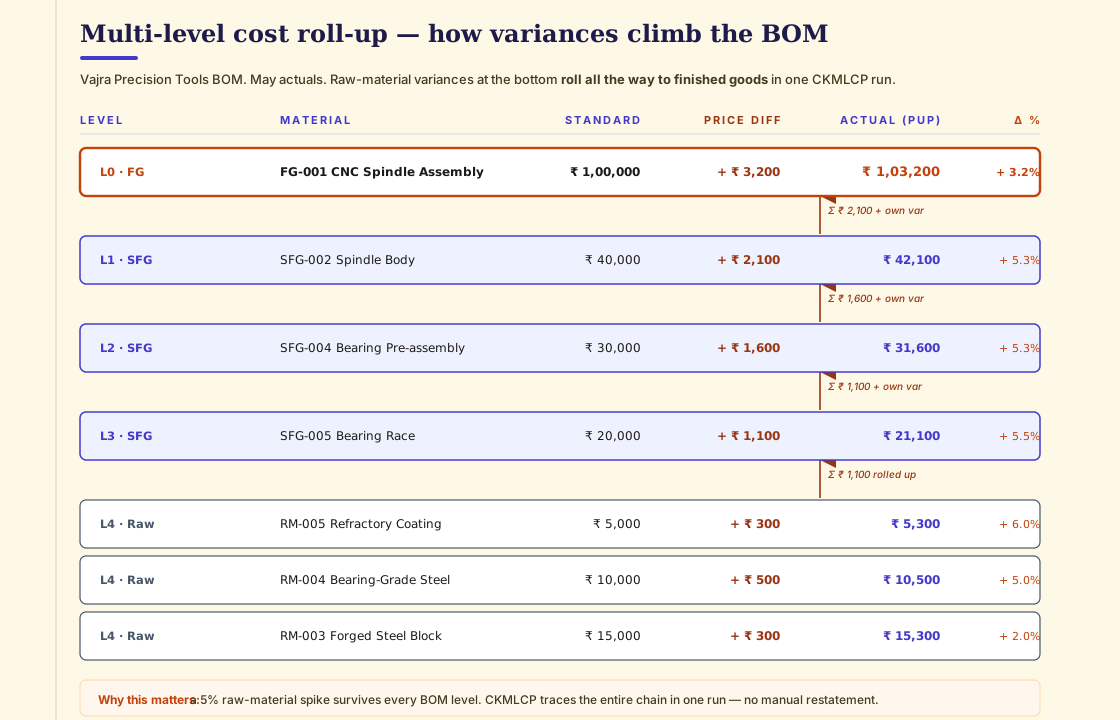
Read top to bottom. Three things to notice:
- Variances accumulate but don't multiply. A 5% jump in Bearing-grade Steel costs Vajra ₹500 per kg. That ₹500 walks up the BOM only with the quantity used in each parent. A 5% RM spike doesn't become a 25% FG spike — physics, not finance.
- The finished good ends up with a blended variance that mixes the worst raw-material jumps with the calmer ones, weighted by BOM quantity. FG-001 settled at +3.2% even though some of its raws moved 6%.
- The whole chain runs in one CKMLCP execution. No manual journals. No spreadsheet "what does this cost now?" reconciliation. The system walks the BOM, posts the deltas, leaves an audit trail of every roll-up.
Quick check — the rollup
Q. If SFG-005 Bearing Race used 0.4 kg of RM-004 Bearing-grade Steel and 1.2 kg of RM-003 Forged Steel, what's the rolled-in raw-material variance per piece of SFG-005? A. 0.4 × ₹500 (RM-004 variance) + 1.2 × ₹300 (RM-003 variance) = ₹200 + ₹360 = ₹560.
Q. Why is the Finished Good's % delta (3.2%) lower than several Semi-finished Goods underneath (5.3%)? A. Because the standard price of the FG is high enough (₹1,00,000) that the rolled-up variance (₹3,200) is a smaller share. Lower BOM levels carry the variance against a smaller denominator.
The Periodic Unit Price formula — one line, two surprises
For a single material:
PUP = (Opening Inventory Value + Receipts Value + Collected Variances)
        ÷ (Opening Inventory Qty + Receipt Qty)
Applied to Vajra's SFG-002 Spindle Body for May:
| Component | Value | Qty |
|---|---|---|
| Opening inventory (50 ea × ₹40,000) | ₹20,00,000 | 50 |
| Receipts (100 ea, std ₹40,000 each) | ₹40,00,000 | 100 |
| Price differences collected during May | ₹75,000 | — |
| Rolled-in variance from RM (per the BOM table) | ₹+1,15,500 | — |
| Numerator | ₹60,90,500 | |
| Denominator (Opening + Receipts qty) | 150 | |
| PUP | ₹40,603 ≈ ₹40,500 |
(Rounded in the diagram for legibility.)
Two surprises for finance professionals new to ML:
- The PUP uses quantity-weighted values, not the latest receipt. It is not LIFO. It is not FIFO. It is the average actual cost across the period, weighted by what was on hand.
- The "Collected Variances" line includes both price and exchange rate differences when ML is running multi-currency. In USD or EUR, FX deltas show up in the same parking lot as price deltas.
The CKMLCP cockpit — five steps, every month
ML and Actual Costing close the month through a single cockpit, CKMLCP. Five sequential steps. The cockpit stays on screen, each step turns green or red, you can re-run any step until you hit Post Closing.
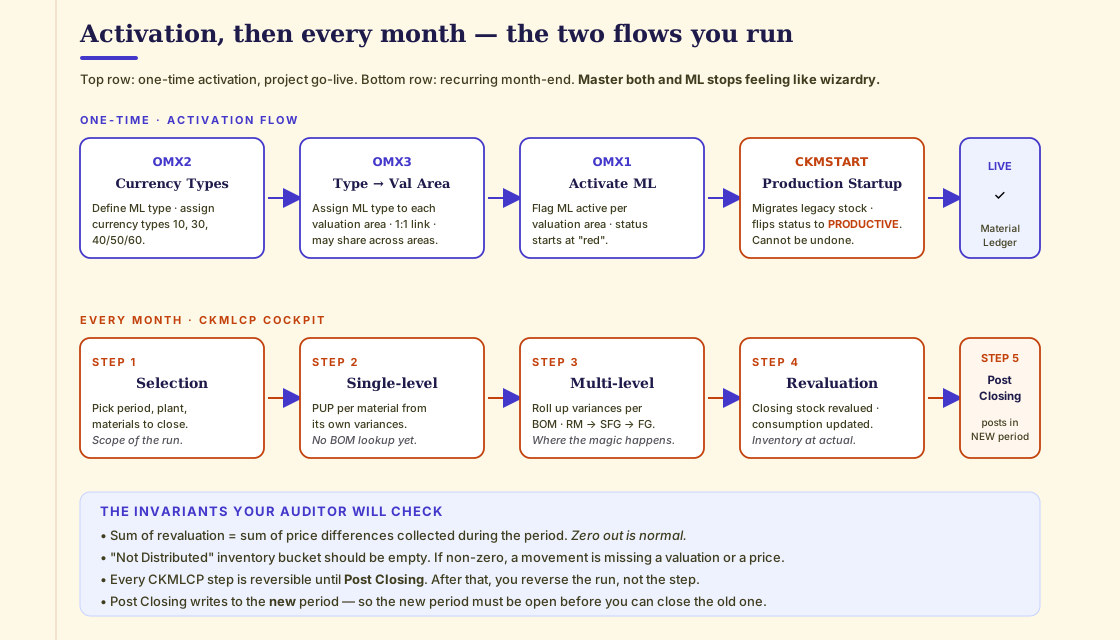
The five steps:
- Selection — pick the period, plants and materials in scope. For Vajra at single-plant the selection is a one-screen affair.
- Single-level price determination — calculates a PUP for each material from its own collected price differences. No BOM walk yet.
- Multi-level price determination — walks the BOM bottom-up. Pushes raw-material variances onto semi-finished, then onto finished goods. This is the engine.
- Revaluation of consumption — closing stock revalued at PUP; consumption postings against goods issues are corrected. Inventory now reflects actual cost.
- Post Closing — writes the revaluation postings to FI. Importantly, the postings are dated in the new period, so the new period must already be open before you can close the old one.
Quick check — the cockpit
Q. You ran Step 2 and Step 3, looked at the numbers, found a wrong standard price. Can you fix and re-run? A. Yes. Steps 1–4 can be re-run inside the cockpit any number of times. Only Step 5 (Post Closing) commits to FI.
Q. You ran Step 5 and then spotted a wrong price. Now what? A. You reverse the entire CKMLCP run from the cockpit. ML allows reversal even after Post Closing — by design, period-end is never "final".
Activation in five transactions
Before any of this is possible, ML must be activated per valuation area. Five transactions in sequence:
| Step | T-code | What you do |
|---|---|---|
| 1 | OMX2 | Define the ML Type and assign currency types (10, 30, 40/50/60) to it |
| 2 | OMX3 | Assign the ML Type to each Valuation Area (plant in S/4HANA) |
| 3 | OMX1 | Flag ML active for the Valuation Area. Status starts as red. |
| 4 | CKMSTART | Production Start-Up. Migrates legacy stock, flips status to productive. Irreversible. |
| 5 | CKMLCP | First month-end close. Validate end-to-end. |
A few notes worth pinning to the wall:
- In S/4HANA conversions, ML activation is included in the migration cockpit (SAP Notes 2694618 and 2352383). You don't run OMX2 manually on a conversion project — but you do need to configure the currency types and ML type before the migration cockpit runs.
- Once CKMSTART has flipped a valuation area to productive, ML cannot be deactivated for that area. Actual Costing on top of ML can be toggled.
- A new account modification key,
PRL, was added in S/4HANA for the cost-centre credit posting onGBB-AUI. If you're converting from ECC, you need to set this up.
Common errors during activation — with the exact fix
These four show up at most go-lives. The fixes are unambiguous, but the error messages don't help.
| Error | Meaning | Fix |
|---|---|---|
| M3152 — Company code not set up for Material Ledger | OMSY is missing entries for the company code | Maintain OMSY for the company code |
| C+039 — ML currencies have been changed since last run | The currencies in CKM9 / SCC4 no longer match what ML was activated with | Align CKM9 (ML currencies) and SCC4 (client/currency) before re-running |
| FML_CUST033 — ML currencies not defined | Universal Journal ledger configuration doesn't carry the ML currencies | Maintain FINSC_LEDGER and the controlling area's currency settings |
| "ML Active" checkbox missing on material master accounting view | ML wasn't active for this valuation area when the material was created, or the material type isn't set for quantity/value updating | Deactivate ML for the area (rare) → fix material type in OMS2 → re-run CKMSTART |
There are dozens more. The first three are almost always currency/ledger config mismatches. The fourth is almost always a material type that wasn't set for value updating in the affected valuation area.
Quick check — activation
Q. A goods receipt fails with error
C+039. The PO was placed yesterday. What's the most likely cause? A. Someone changed the company code currency or added a parallel currency in SCC4/CKM9 after ML was activated. The fix is to align the currency configuration with what ML expects, not to re-create the PO.Q. What does CKMSTART actually do — in one sentence? A. Migrates any legacy stock into the new ML tables and flips the valuation area's status from "red" (test) to "productive" — making ML the live valuation engine for that area.
ML vs Actual Costing — they are not the same thing
A confusion this article wants to crush. Two separate decisions, two separate activations:
- Material Ledger = the sub-ledger. Multi-currency, multi-valuation, mandatory in S/4HANA. You will run ML.
- Actual Costing = the engine on top of ML that calculates PUP and revalues inventory at month-end. Optional. Turn it on when the business wants true actual-cost inventory; leave it off if standard price with FI-posted variances is enough.
You can run ML without Actual Costing. You cannot run Actual Costing without ML.
For Vajra, both are on. For a trading-only business, ML on and Actual Costing off is a sensible default.
Fiori apps and old GUI transactions
The transactions you actually run, mapped to the Fiori apps that have replaced them in S/4HANA:
| Old GUI | Fiori app | What you do |
|---|---|---|
CKM3 | Material Inventory Values | View per-material values across currencies and periods |
CKMLCP | Run Actual Costing | Month-end cockpit — runs the 5 steps |
CK40N / CK11N | Run Material Cost Estimate | Set the standard prices for the next period |
MIGO | Manage Stock + Post Goods Movement | Goods receipts and issues — note: legacy MB-series transactions (MB1A, MB1C…) are removed in S/4HANA |
OMX1 / OMX2 / OMX3 | (no Fiori app — still classic UI) | One-time ML activation config |
KB31N | Manage Statistical Key Figure Values | Where SKFs live (relevant to Actual Costing when used as splitting bases) |
There is no Fiori app to process ML execution-level actions like the activation transactions. There are Fiori apps for viewing the data and for the run. Most ML troubleshooting still happens in classic UI.
Compatibility views — your old reports still work
Two questions everyone asks during migration:
Q. Are the old tables MBEW, EBEW deleted in S/4HANA? A. No. They are kept as compatibility views. Old custom programs that read them continue to work. New data, however, is written to the new ML tables (MATDOC, MLDOC, MLDOCCCS, etc.), not the old ones.
Q. Same question for old ML tables MLHD, MLIT, CKMLPP? A. Same answer — kept as compatibility views for legacy reads.
Translation: your inventory-value Z-reports will not break on go-live. Your new reports should write against ACDOCA or the new ML tables.
Common pitfalls that send auditors into orbit
A short list of things that go wrong on real projects.
1. Activating ML and forgetting to set indicator 3 on the materials. ML runs. Variances post to FI on goods receipts and never roll up to FG. Month-end inventory is correct in value, but FG carries zero variance — auditor asks why and there's no good answer.
2. Changing standard price mid-period. Variances explode. CKMLCP can still close, but the management explanation is brutal.
3. Negative inventory. S/4HANA ML does allow it, but it has to be explicitly enabled in the material master and the MM period-opening program. If it's not, the receipt fails.
4. Standard cost estimate not released. New material in the period, standard price = 0. Every receipt collects 100% as price variance. CKMLCP runs but the PUP is meaningless.
5. Currency rate type not maintained. Group currency valuations come out wrong. ML uses the rate type defined in the ML Type — if the rate isn't entered for the period, you get FX gaps.
6. Trying to deactivate ML. Once CKMSTART has run productive, ML cannot be turned off for that valuation area. You can disable Actual Costing on top, but ML itself stays.
7. Treating ML as a finance project. It isn't. PP, MM and CO all post into ML. Project governance has to span all four.
FAQ
Q. Is Material Ledger mandatory in SAP S/4HANA? Yes. ML is the mandatory inventory sub-ledger. Actual Costing on top is optional.
Q. How many currencies does ML support? Up to three simultaneously: Company Code (10), Group (30), and one of Hard / Index / Global (40 / 50 / 60).
Q. What's the difference between indicator 2 and indicator 3 on the material master? 2 (transaction-based) posts variance directly to FI on the spot — no BOM rollup. 3 (multi-level) collects variances on the material and rolls them up the BOM at month-end via CKMLCP.
Q. What is CKMLCP? The Actual Costing month-end cockpit. Runs the five-step close: Selection → Single-level → Multi-level → Revaluation → Post Closing.
Q. What is CKMSTART? The production start-up program. Migrates legacy stock and flips a valuation area's ML status from "red" to "productive". Irreversible.
Q. Can ML be deactivated? No, once a valuation area is productive. Actual Costing on top can be toggled.
Q. Why is my "Not Distributed" bucket non-zero? Almost always a goods movement without a valuation (zero standard price), or a material missing the ML active flag. Fix at the material/movement level, not in CKMLCP.
Q. Does ML impact FI and CO? Yes. ML integrates with FI for valuation postings and with CO for cost component splits and profitability analysis. ACDOCA holds the joined picture.
Q. Do I need new ML config before migrating from ECC to S/4HANA? Yes. At minimum, the currency types need to be reconfigured (if you used 0000), and the new account modification key PRL needs to be set up for the GBB-AUI cost-centre credit posting.
Q. We're on ECC 6.0 on HANA with ML already active. Anything special for the S/4 move? No special steps. You go through the normal S/4 conversion. The processing speed won't change (you already have HANA), but you can now leverage the new ML functionalities.
Key takeaways
- Material Ledger is the mandatory inventory sub-ledger in SAP S/4HANA. ECC
MBEW/EBEWare now compatibility views. New writes go to the new ML tables. - Actual Costing is optional but recommended for manufacturers. It calculates the Periodic Unit Price and revalues inventory and consumption at month-end.
- Up to three currencies are kept in parallel: company code (legal — INR for Indian operations), group (consolidation — USD or EUR), hard/index/global (for high-inflation or extra views). Each goods movement posts three lines.
- Set price determination indicator
3(multi-level) on every material that participates in a manufacturing BOM. Use price controlS. Reserve indicator2for pure trading goods. - The PUP formula:
(Opening Inventory + Receipts + Variances) ÷ (Opening Qty + Receipt Qty). Period-average, quantity-weighted. - Multi-level price determination walks the BOM bottom-up at month-end. Raw-material variances climb to semi-finished, then to finished goods, in one CKMLCP run.
- CKMLCP has 5 steps: Selection → Single-level → Multi-level → Revaluation → Post Closing. All reversible.
- Activation is 5 transactions: OMX2 → OMX3 → OMX1 → CKMSTART → first CKMLCP. After CKMSTART, ML cannot be turned off for that area.
- The four most common errors at go-live are
M3152,C+039,FML_CUST033and the missing "ML Active" checkbox. Three are currency / ledger config mismatches; one is a material type that wasn't set for value updating.
Five steps, three currencies, two price-determination indicators, one mandatory sub-ledger. That's the rhythm of Material Ledger in S/4HANA — and once these diagrams are pinned to the wall, the monthly close stops feeling like wizardry.