A purchasing operations team has the same painful flow every Monday. Suppliers email CSV attachments listing what they're about to deliver. An ops clerk opens each email, opens the CSV, opens SAP, transcribes line by line, prays nothing is mis-keyed, and creates the inbound delivery by hand. Bad emails — wrong supplier, cancelled POs, over-tolerance quantities — get rejected manually with a polite reply. Multiply by hundreds of suppliers and the whole week disappears.
This article walks through a real-world SAP CPI iFlow that replaces that loop end-to-end. The supplier emails the CSV. CPI polls the inbox, validates the sender against the BP master, parses the file, runs the same seven business rules an ops clerk would, calls the SAP Cloud Connector to talk to on-premise S/4HANA via OData, handles the CSRF handshake, posts the inbound delivery, and emails the supplier back — success with the delivery number, or rejection with a per-row status table.
No portal. No re-keying. No clerk. The supplier never logs in to anything.
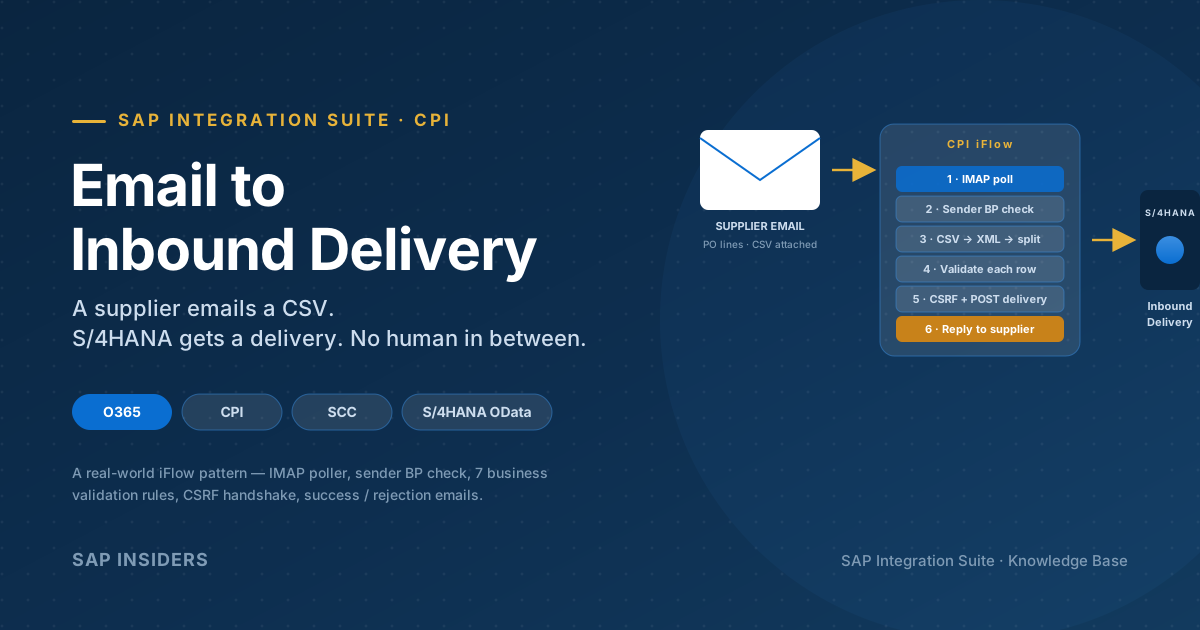
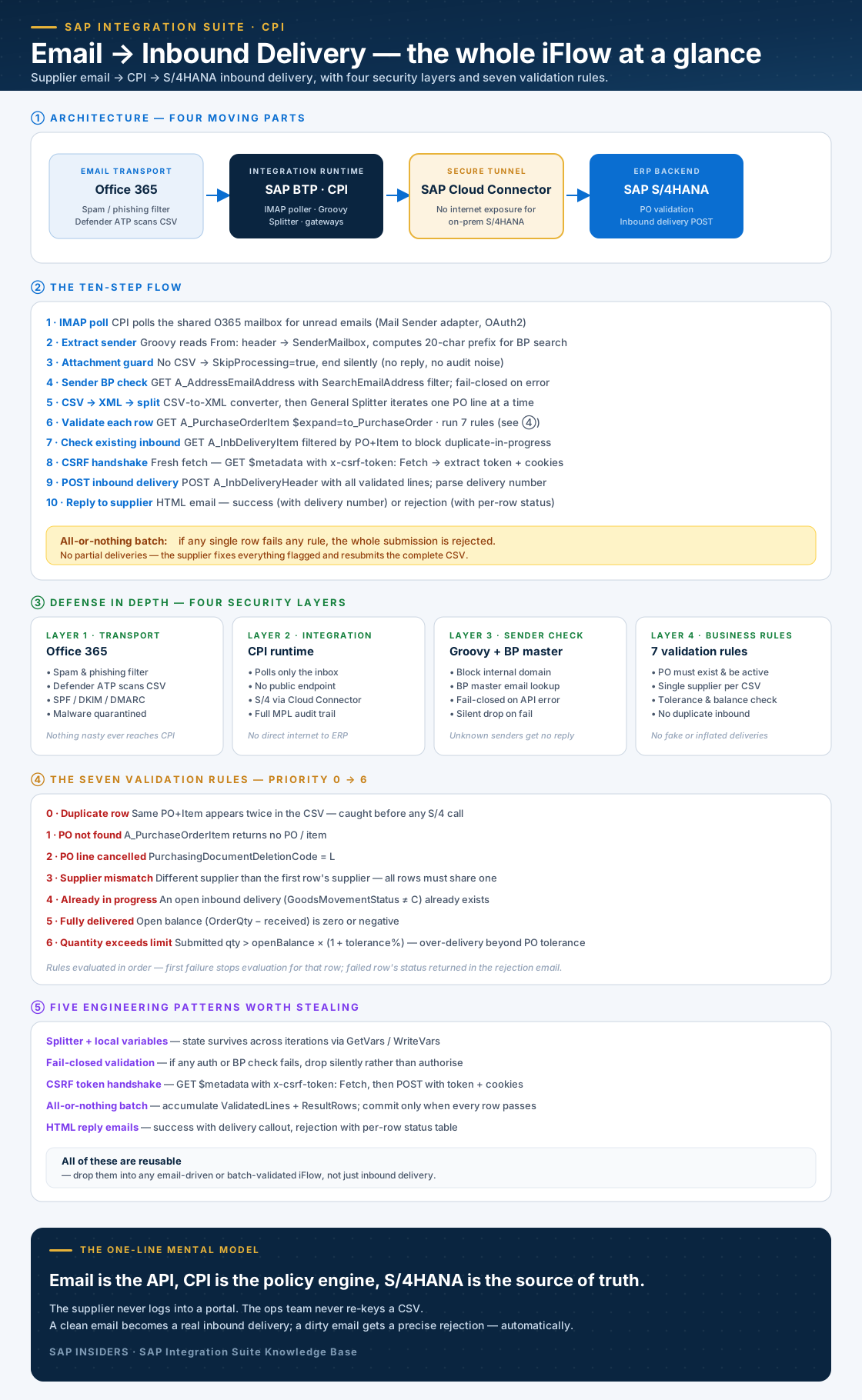
Here's the whole pattern in one frame. The sections below expand each part.
What the iFlow does — in one sentence
It polls a shared Office 365 mailbox, treats each email's CSV attachment as a list of PO lines to deliver, validates every line against S/4HANA, applies a strict business-rule chain, creates an inbound delivery if (and only if) everything is clean, and emails the supplier back with the outcome.
A few words in that sentence are doing real work:
- Shared mailbox — a single integration inbox. The mail address is the contract.
- Treats CSV as PO lines — three columns:
PO_NUMBER, PO_ITEM_NO, QTY. That's the entire schema. - Validates against S/4HANA — live OData calls to
A_PurchaseOrderItem,A_InbDeliveryItem,A_BusinessPartner. No stale data. - Strict business-rule chain — seven rules, priority 0 to 6, first failure wins.
- If (and only if) everything is clean — all-or-nothing batch. A CSV with five good rows and one bad row is rejected wholesale; the supplier fixes the bad row and resubmits the lot.
- Emails back — bidirectional. HTML email with a delivery number on success, or a per-row status table on rejection.
Architecture — four moving parts
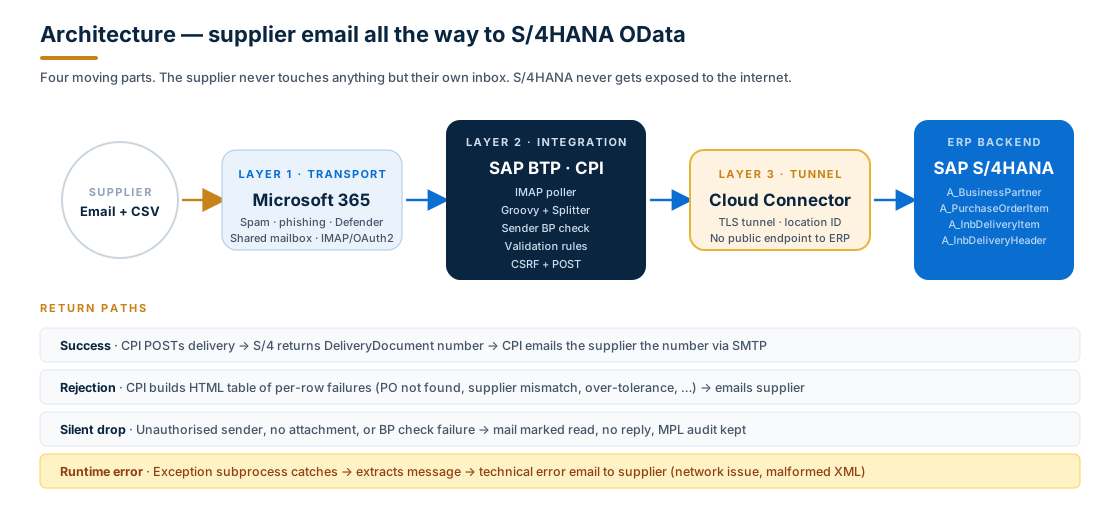
Four components — each owns a specific concern, none of them overlap:
- Microsoft 365 is the transport layer. It already has world-class spam, phishing, and malware filtering — let it do its job. CPI never sees a malicious attachment.
- SAP BTP Cloud Integration (CPI) is the integration runtime. The iFlow, Groovy scripts, splitter, gateways, content modifiers — all the orchestration lives here.
- SAP Cloud Connector (SCC) is the secure tunnel. On-premise S/4HANA is never exposed to the public internet; CPI talks to a configured location ID and SCC routes the call through.
- SAP S/4HANA is the source of truth. OData services do the actual PO validation and the inbound delivery creation. The iFlow makes decisions but doesn't keep state.
The OData entities used:
| Service | Operation | Purpose |
|---|---|---|
API_BUSINESS_PARTNER → A_AddressEmailAddress | GET | Look up sender email in BP master |
API_PURCHASEORDER_PROCESS_SRV → A_PurchaseOrderItem | GET + $expand=to_PurchaseOrder | Read PO line, tolerance, deletion flag, supplier |
API_INBOUND_DELIVERY_SRV;v=2 → A_InbDeliveryItem | GET | Find existing inbound deliveries for the PO line |
API_INBOUND_DELIVERY_SRV;v=2 → A_InbDeliveryHeader | POST | Create the new inbound delivery |
The ten-step flow
The iFlow is one straight path with a splitter in the middle. Stripping the labels off the SAP icons, here's what happens in order:
- IMAP poll. Mail Sender adapter polls the shared O365 mailbox for unread emails (OAuth2 credential).
- Extract sender. A Groovy script reads the
From:header out ofSAP_MAIL_ORIGINAL_MESSAGEand computes a 20-character uppercase prefix for the BP search (matching SAP'sSearchEmailAddressformat). - Attachment guard. If the email has no CSV, set
SkipProcessing=trueand end silently — no reply, no audit noise. - Sender BP check. GET
A_AddressEmailAddressfiltered bySearchEmailAddress eq '${prefix}'. If the sender's email isn't in any BP master, the email is silently dropped. Fail-closed: if the BP API itself fails for any reason, the sender is also treated as unauthorised. - CSV → XML → split. CSV-to-XML converter reshapes the file, then a General Splitter iterates one PO line at a time.
- Validate each row. GET
A_PurchaseOrderItemwith$expand=to_PurchaseOrderto read the PO line and its supplier. Run the seven validation rules (next section). Append a result row to an accumulating HTML table. - Check existing inbound delivery. GET
A_InbDeliveryItemfiltered byReferenceSDDocument+ReferenceSDDocumentItem. Blocks a duplicate in-progress delivery for the same PO line. - CSRF handshake. Fresh per submission, not cached. GET
$metadatawith headerx-csrf-token: Fetch→ S/4 returns the token andSet-Cookie. Extract both. - POST inbound delivery. Build the deep-create payload (
A_InbDeliveryHeaderwith nestedto_DeliveryDocumentItem) from the accumulatedValidatedLines. POST with the CSRF token + cookies. Parse the returnedDeliveryDocumentnumber. - Reply to supplier. HTML email — success with the new delivery number as a callout, or rejection with the per-row status table from step 6.
The whole iFlow takes typically 2 – 6 seconds per email end-to-end.
Defense in depth — four layers, not one
The most important architectural decision in this iFlow isn't on the happy path. It's the defense in depth: four independent layers that each catch a different class of attack, so no single layer needs to be perfect.
- Layer 1 — Office 365. Spam, phishing, malware — handled before CPI even sees the mail.
- Layer 2 — CPI runtime. No public endpoint exists. CPI polls the mailbox; the rest of the world can't push to it. All S/4 calls leave via SAP Cloud Connector. Every email is logged in MPL.
- Layer 3 — Sender validation (Groovy + BP master). Internal company domain blocked (with a small whitelist for testers). Sender email must exist in
A_AddressEmailAddress. Fail-closed: if anything errors, the sender is treated as unauthorised. Silent drop — no acknowledgement leaks information back to a potential attacker. - Layer 4 — Business rules. Even an authenticated sender can't fake an inbound delivery against a cancelled PO, a different supplier's PO, or an over-tolerance quantity. The rules below see to that.
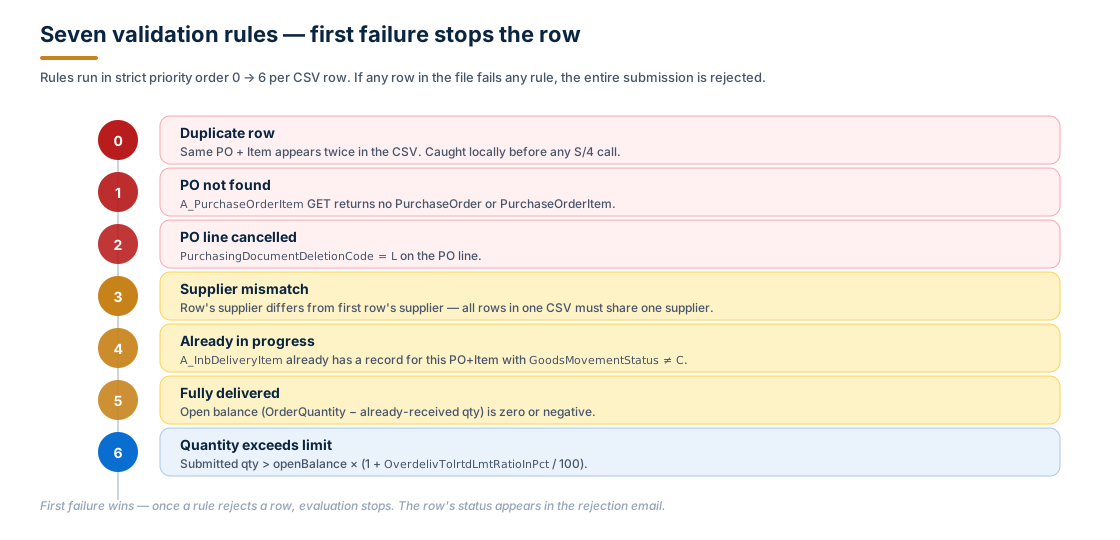
The seven validation rules
The validation chain runs in strict priority order. First failure wins; the row's status is captured for the rejection email and evaluation stops for that row.
Worked tolerance example:
OrderQuantity         = 1,000
Already received      =     0
openBalance           = 1,000
OverdelivTolrtdLmt    =   10 %
maxAllowed            = 1,000 × 1.10 = 1,100

Submit 1,050 → ACCEPT  (1050 ≤ 1100)
Submit 1,101 → REJECT  (1101 > 1100)
And the policy that ties the rules together:
- All-or-nothing batch. If any row fails any rule, the entire submission is rejected. No partial deliveries — the supplier fixes everything flagged and resubmits the complete file. This sounds harsh; in practice it's the only sane choice. Partial commits create ambiguous state ("which of my 12 lines actually made it?") and the cost of one resubmit is tiny compared to the cost of a mismatch later.
- Partial delivery vs. partial batch are different things. Partial delivery (submitting less than the full open balance on one PO line) is fine, as long as no open inbound already exists for that line. Partial batch (some rows accepted, others rejected) is not allowed.
Five engineering patterns worth stealing
The iFlow uses five patterns that are immediately reusable in any email-driven or batch-validated integration:
1. Splitter + local variables for cross-iteration state
CPI's splitter resets exchange properties on every iteration. To carry state across rows (accumulating an HTML table, tracking the supplier of row 1, listing already-seen PO+Item keys for duplicate detection), use local variables:
InitVars(Write Variables) — initialise fiveLV_*variables to#(CPI requires non-empty constants; the scripts treat#as empty)GetVars(Content Modifier) — at the start of each iteration, copyLV_*→ exchange propertiesWriteVars(Write Variables) — at the end of each iteration, copy exchange properties →LV_*
The variables you carry across iterations:
- Accumulating HTML rows — the
<tr>snippets for the rejection email, one per iteration - Valid lines —
~-delimitedPO|Item|Qtyfor valid rows only (the source of the POST payload) - Overall pass flag — the boolean that decides between POST and rejection at the end
- Expected supplier — the supplier from row 1, used for mismatch detection
- Seen keys —
~-delimitedPO|Itemkeys seen so far, used for the duplicate-row rule
2. Fail-closed validation
Every authentication or authorisation step has a "what if the check itself fails?" answer that defaults to deny:
- BP API returns 404 / 5xx → sender is unauthorised, silent drop.
- BP API returns empty list → sender is unauthorised, silent drop.
Throw Exception on Failure = falseonCheckSenderBPso a network blip doesn't cascade — but the script re-checks and explicitly rejects.
The opposite — fail-open — would be a security disaster: a CPI network glitch would let any sender through.
3. CSRF token handshake
S/4HANA OData POST requires a CSRF token. The handshake:
- Set CSRF Fetch header. A Content Modifier sets
x-csrf-token: Fetchon the outgoing request. - GET
$metadata. S/4 sees the Fetch header and returns the token inx-csrf-tokenplus session cookies inSet-Cookie. - Extract. A Groovy step reads both headers and stores them as exchange properties.
- Inject on POST. The payload-building step sets
x-csrf-tokenandCookieheaders on the outgoing POST.
Critical detail: fetch fresh per submission, never cache. A stale token from a previous run causes a hard-to-diagnose 403.
4. All-or-nothing batch
The splitter accumulates state into ValidatedLines (good rows) and ResultRows (everything). After the splitter completes, a single gateway decides:
ValidationPassed == true→ build the deep-create payload fromValidatedLines, fire CSRF + POST, send success email.ValidationPassed == false→ skip the POST entirely, send rejection email withResultRows.
The supplier only ever sees a binary outcome. No "some of your delivery happened" emails.
5. HTML reply emails
Both replies are responsive HTML with inline styles (Outlook ignores <head> styles in many configurations). The success email gets a green callout with the new delivery number; the rejection email gets a colour-coded table of every row and its status. Both end with a polite, generic footer that doesn't reveal internal system details.
Exchange properties and local variables — the ten that matter
In an iFlow this size, naming discipline matters. The properties you'll actually inspect in MPL:
| Property | Set by | What it tells you |
|---|---|---|
SenderMailbox | Extract sender | Who the email is from |
SenderAuthorised | EvaluateSender | true / false from the BP check |
PONumber, POItemNoFormatted, DeliveryQty | FormatPOItem | Current row being processed |
OrderQuantity, OverTolerancePct | ValidateResponse | What S/4 says about the PO line |
ValidationPassed | ValidateResponse / EligibilityCheck | Overall pass/fail flag |
ResultRows | accumulated | HTML snippets for the rejection email |
ValidatedLines | accumulated | ~-delimited valid lines for the POST payload |
InboundDeliveryNumber | ParseDeliveryResponse | The S/4 delivery number returned by POST |
ProcessingStatus | various | Informational status (e.g., VALIDATION_DONE, DUPLICATE_ROW_REJECTED) |
Inspecting these in Monitor → Message Processing → Properties makes troubleshooting much faster than tailing the trace.
Common pitfalls
Real-world snags from running this pattern in production:
- All senders silently dropped. Almost always
A_AddressEmailAddressnot activated, or supplier BPs don't have email entries. Fix inBPtransaction, Address tab, Communications section. - All senders authorised, including unknowns. Usually
Throw Exception on Failure = trueon the BP-check adapter — on error, theEvaluateSenderscript sees an empty body and incorrectly authorises. Set it tofalseand let the script make the decision. - CSRF 403 on POST. Stale token, or token fetched on a different OData service. Always fetch from the same service you're posting to (the
API_INBOUND_DELIVERY_SRV;v=2$metadataendpoint), in the same flow run. - Multi-row CSV but only the last row appears in S/4. Local variables (
InitVars/GetVars/WriteVars) misconfigured. The splitter is throwing away accumulated state. Verify all fiveLV_*variables are persisted across iterations. - Delivery created with wrong quantity. Often
BigDecimalcomparison with trailing zeros. UsestripTrailingZeros()in the Groovy. InspectValidatedLinesin MPL — if it reads500.000instead of500, that's the smell. - Mail picked up but no reply sent. SMTP credential expired or
send-aspermission missing on the shared mailbox. - PO validation always returns "PO Not Found". SCC not routing to the right S/4, or the OData service isn't activated. Test the URL directly in
/IWFND/GW_CLIENT. Verify the SCC mapping.
When this pattern fits — and when it doesn't
Strong fit:
- Suppliers already send delivery notifications by email; you just want to remove the manual re-keying.
- Volume is moderate — dozens to a few hundred submissions per day. CPI is built for this; not for high-frequency real-time.
- Suppliers are not technically sophisticated. A CSV emailed from Excel is the highest common denominator.
- You have an on-premise S/4HANA and SCC is already deployed.
Poor fit:
- High volume real-time integration. Use an EDI exchange (AS2 / X12 / EDIFACT) or a B2B portal API instead.
- Suppliers can integrate API-to-API. Skip the email entirely; let them call your API.
- Highly customised delivery semantics per supplier. The single-CSV-schema constraint is what makes this pattern simple — once you need per-supplier schemas, you've outgrown it.
- Tight latency requirements (sub-second). IMAP poll cadence is in seconds at best; mail transport adds more.
Frequently asked questions
Does this need SAP IDoc or PI/PO? No — pure CPI on BTP plus the S/4 OData services. No IDoc, no PI/PO, no middleware beyond the Cloud Connector tunnel.
Why CSV and not XML? Suppliers send CSVs naturally from Excel. Asking for XML increases the support burden by orders of magnitude. CPI's CSV-to-XML converter handles the bridge in one step.
Why no per-supplier API key / signed payload? Defense in depth covers it: O365's spoofing controls (SPF/DKIM/DMARC) + BP master email lookup + business rules against S/4 = no need for per-supplier credentials. Adding API keys would push complexity onto suppliers for marginal security gain in this scenario.
What about partial batch processing (accept good rows, reject bad ones)? Deliberate trade-off. All-or-nothing avoids ambiguous state, simplifies the reply email, and makes the supplier responsible for the integrity of their own submission. Partial-batch would mean keeping a "what got accepted" record per email — extra complexity, low business value.
How would this scale to high volume? Mail-driven integration tops out in the low thousands per day per iFlow. Above that, switch to a B2B exchange (AS2) or a direct API. The patterns (CSRF handshake, splitter + local vars, fail-closed, all-or-nothing) all transfer to either alternative.
Can the supplier check delivery status later? Out of scope for this iFlow. The supplier gets the delivery number in the success email; they can use that as a reference in subsequent communication. A self-service portal is the natural next step if status visibility becomes a request.
Key takeaways
- Email is the API. The supplier never logs in. The integration mailbox is the contract. CPI is the policy engine. S/4HANA is the source of truth.
- Four-layer defense in depth — O365 transport, CPI runtime isolation, sender validation, business rules — means no single layer needs to be perfect.
- Splitter + local variables is the canonical pattern for any iFlow that needs state across iterations. Five
LV_*variables and three steps (Init / Get / Write) cover almost every case. - Fail-closed at every auth step. A failed BP API call must result in "unauthorised", not "OK by default".
- All-or-nothing batch beats partial commit for clarity, audit, and supplier-side accountability — at the cost of one resubmit per bad row.
- CSRF token: fetch fresh, never cache. Always from the same service you'll POST to. This single sentence prevents a class of "works in dev, fails in prod" 403s.
- HTML reply emails turn the integration into something the supplier experiences, not just an invisible system between them and a delivery number.
A well-built email-to-delivery iFlow doesn't just save the ops team a week of re-keying. It turns "send us a CSV" into a real, accountable, auditable contract — and frees the supplier from waiting on a clerk for the delivery number to land in their inbox.