An internal order is the most detailed, action-oriented cost object in SAP Controlling (CO). Where a cost center answers "which department spent the money?", an internal order answers "which job did the money go to?" — a trade fair, a marketing campaign, a repair, a self-built machine, an annual audit fee. It collects costs for one specific measure, lets you plan and budget that measure, and then settles those costs onward to wherever they truly belong.
This guide walks through internal orders end to end, the way a CO consultant actually uses them: why they exist, the difference between real and statistical orders, the four order categories, the master data and status life cycle, settlement, and the grouping and mass-maintenance tools that keep hundreds of orders manageable — all with concrete, real-world examples.
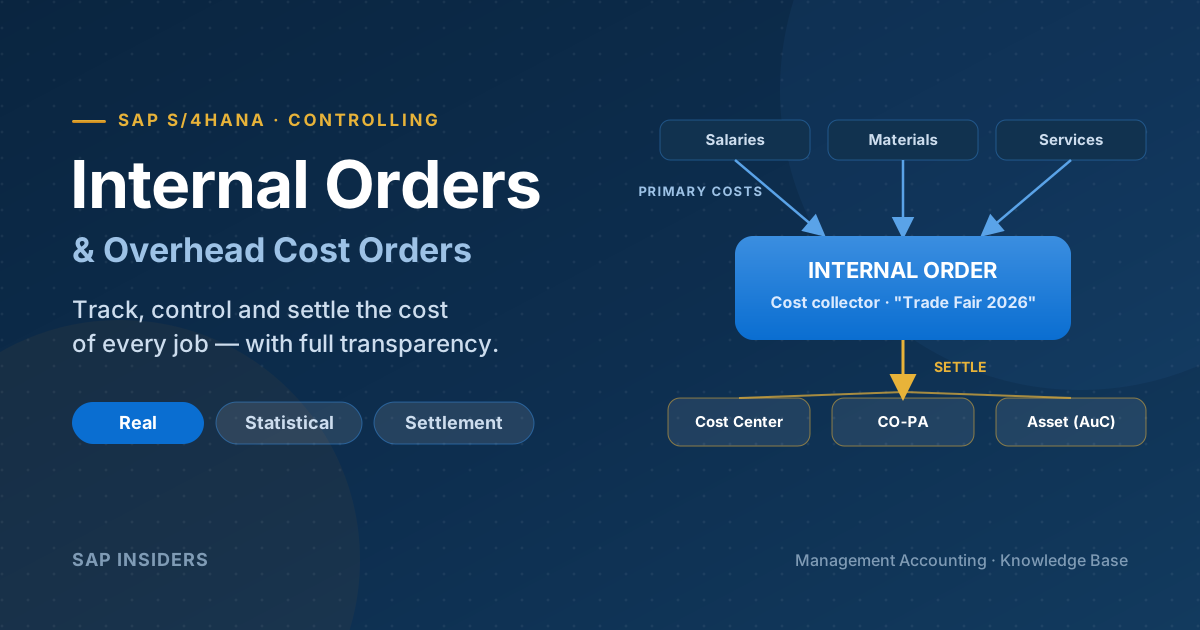
Mental model: an internal order is a temporary cost collector. Costs flow in as primary postings, sit on the order while the job runs, and flow out at period-end via settlement to a cost center, CO-PA, an asset, or a G/L account.
Why Internal Orders Exist: The Trade-Fair Problem
The cleanest way to understand internal orders is the classic SAP example: your company sponsors two trade fairs in the same quarter.
Without internal orders, you post the costs of both events — booth rental, travel, staff time, giveaways — directly to the Marketing cost center. Because the same cost-relevant G/L accounts hit the same cost center, the two events are blended into one number. You can see that Marketing spent €200,000, but you cannot tell which fair cost what, and you can make no comparison between them.
Give each event its own internal order, and the costs are collected separately. At period-end, the settlement function still allocates the costs to the Marketing cost center (so the organisational view is preserved), but you keep a clean, per-event record — so you can compare Fair A vs Fair B, report on each, and plan next year, even after settlement has run.
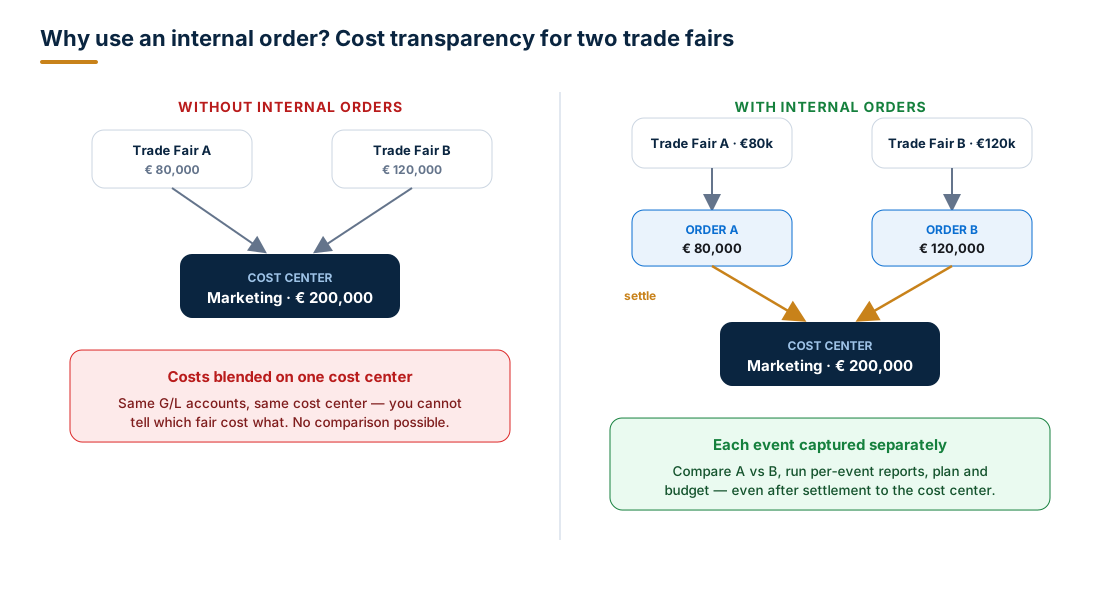
That single idea — capture granularly, settle to the organisational view — is the heart of overhead order accounting. As a bonus, orders unlock a rich set of planning and budgeting functions that cost centers alone don't give you per measure.
Internal order vs. cost center
| Cost Center | Internal Order | |
|---|---|---|
| Question it answers | Where are costs incurred (responsibility)? | Why — for which specific job/measure? |
| Lifespan | Permanent (matches org structure) | Temporary (matches the measure) |
| Typical count | Tens / hundreds | Hundreds / thousands |
| Settles costs onward? | No (allocations/distributions) | Yes (settlement to receivers) |
| Best for | Ongoing departmental cost | Discrete, comparable activities |
Real vs. Statistical Orders
When you create an order's master record, the single most important choice is whether it is real or statistical. This decides how postings behave and what you can do at period-end.
| Real order | Statistical order | |
|---|---|---|
| Purpose | Collect costs to allocate them later | Evaluate costs for information only |
| Posting | Costs land on the order (the true cost holder) | Costs land on both the order (statistical) and a cost center (real) |
| Settlement | Yes — settle to receivers | No — cannot be settled |
| Overhead rates | Can apply overhead | Cannot apply overhead |
| Company code | Required | Optional (omit it for cross-company-code reporting) |
Real order — example: a Booth at CeBIT 2026 order collects all event costs as real postings; at month-end you settle them to the Marketing cost center, which then flows to CO-PA.
Statistical order — example: you want to know what each company car costs without disturbing the fleet cost center. You post fuel and repairs to the cost center (real) and tag the car's statistical order (informational). You instantly see per-car cost in the order and the true cost on the cost center — and because statistical orders can't be settled, there's no double counting. Tip: store the cost center in the order master data and the system fills it in automatically on every posting.
The Four Categories of Internal Orders
Internal orders describe individual jobs within a controlling area, and SAP groups them by purpose. The course's focus — and most companies' bread and butter — is overhead cost orders, but it's worth knowing all four.
1. Overhead cost orders
Monitor internal actions whose costs are ultimately settled to cost centers (or CO-PA). This is the trade-fair case. Examples: marketing campaigns, exhibitions, internal events, ad-hoc repair jobs, a process-improvement initiative.
- If a job concerns a single product line, settle to the responsible cost center, which then allocates to CO-PA.
- If a job is company-wide (hard to pin to one cost center), settle it directly to CO-PA.
2. Investment orders
Monitor measures that create a fixed asset for your own use — capitalised as an Asset under Construction (AuC). A prerequisite is an investment profile in the order master record.
Example: your plant builds a mezzanine storage platform in-house. During construction, all costs (steel, contractor hours, internal labour) post to the order. At periodic settlement, costs that must be capitalised go to the AuC; non-capitalisable debits go to a cost center. When the build completes, full settlement reposts the AuC to the final asset and credits the AuC automatically. The Investment Management (IM) component orchestrates the planning and financing around this.
3. Accrual orders
Smooth irregular expenses so Cost Center Accounting isn't distorted by one-off spikes. Finance often books an expense in a single period that, in management accounting terms, covers a whole year.
Example: the annual external audit fee of €120,000 is invoiced once in Q1. Posting it all to the Finance cost center in one month makes that month look terrible. With accrual calculation, the system spreads €10,000/month across the cost centers and credits an accrual object (a cost center or internal order). Two methods:
- Percentage method — accrue as an overhead % of a reference cost element (or group).
- Target = actual method — accrue to match planned (target) values; an internal order can collect the credits.
Accrual calculation uses order category 02 (accrual calculation order).
4. Orders with revenues
If you're not using Sales & Distribution for an activity, orders with revenues let you display the cost-accounting side of a sales order, or track non-core revenue and its costs. The order type's "Revenue postings allowed" flag controls this.
Example: your company rents out its auditorium to outside groups — not your core business. An order with revenues captures both the rental income and the related costs. At period end: costs can settle to any receiver; revenues settle to profitability segments, other orders with revenues, or G/L accounts — but never to cost centers.
Order Types & Model Orders
You can only create an internal order with reference to an order type, and the order type does a lot of heavy lifting. It's client-wide, so one order type works across every controlling area.
The order type controls, among other things:
- Whether commitment management is active
- Whether revenue postings are allowed
- Status management (which status profile applies)
- Field selection — which master fields are required, optional, or hidden
- Whether the order number is internal or external, and its number range
- General defaults for settlement, planning, and budgeting
- How the master data is presented
Model orders are a productivity trick: create a model order as a template and assign it to the order type. Its settings are then pre-filled automatically every time someone creates a new order of that type — fewer keystrokes, fewer mistakes, consistent master data.
Master Data & Organizational Assignments
Like cost centers, every internal order is assigned to a company code and a controlling area. Beyond that, a few assignments are functional and the rest are informational:
| Assignment | Effect |
|---|---|
| Profit center | All actual postings to the order pass through to the profit center automatically; plan values can too. |
| WBS element (Project System) | Lets you monitor the order's value inside a project and include it in project settlement. |
| Company code / controlling area | Mandatory organizational home of the order. |
| Responsible person, location, department, etc. | Informational only — great for reporting and selection, but they don't affect cost postings. |
Those informational fields matter more than they look: they're exactly what you'll select on later for grouping, collective processing, and the information system.
Status Management: The Order Life Cycle
An order has a life cycle that begins when you create it and ends when you close it. Status management tells you which phase the order is in and, crucially, controls which business transactions are allowed at each phase.
SAP ships four system statuses:
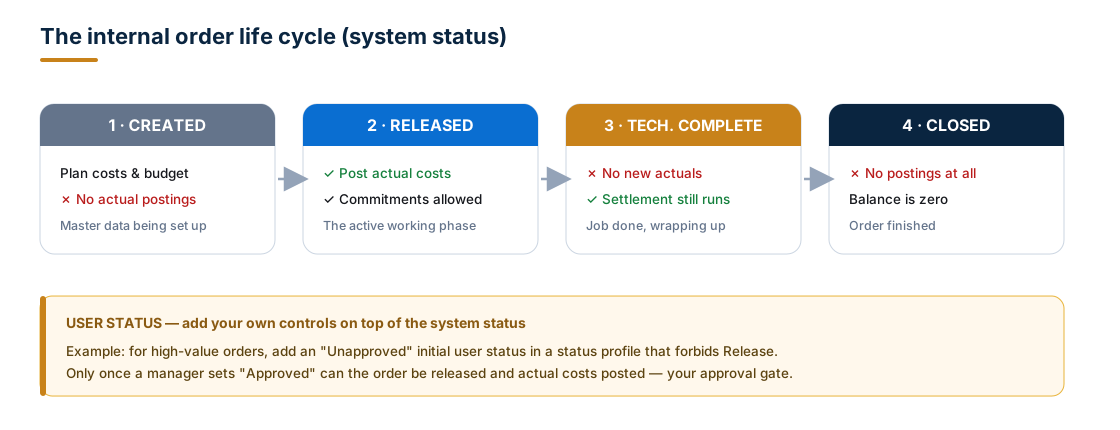
- Created — you can plan and budget, but you cannot post actual costs.
- Released — the working phase: post actuals, incur commitments.
- Technically Complete (TECO) — no new actual costs, but settlement still runs while you wind the job down.
- Closed — no postings at all; the order is finished and its balance is zero.
Changing status is itself a business transaction, recorded in the order master.
User statuses — your own controls
When the four system statuses aren't enough, define user statuses in a status profile and assign the profile to the order type. A status can allow, allow-with-warning, or prohibit a transaction. A status profile lets you:
- Define user statuses and an initial status (set automatically at creation)
- Set a status automatically when a transaction runs
- Permit or forbid specific transactions
- Drive status-dependent field selection and authorizations by life-cycle phase
Real-world approval gate: for high-value orders you want sign-off before money can be spent. Create an initial user status "Unapproved" that forbids Release. The order is born Created + Unapproved and can't be released. Only when a manager flips it to "Approved" can it be released and actuals posted.
Status numbers sequence your user statuses: only one numbered status is active at a time, and the lowest/highest settings bound where you can move next (e.g., from status number 20, with a highest of 40, you may go to 30 or 40 — never 50). A user status without a number can be toggled on/off anytime, independently.
A Full Life Cycle, Worked End to End
Putting it together for Order "Booth – CeBIT 2026" (a real overhead cost order):
| Step | Phase | What happens |
|---|---|---|
| 1. Create (KO01) | Created + Unapproved | Master data from a model order; profit center assigned. |
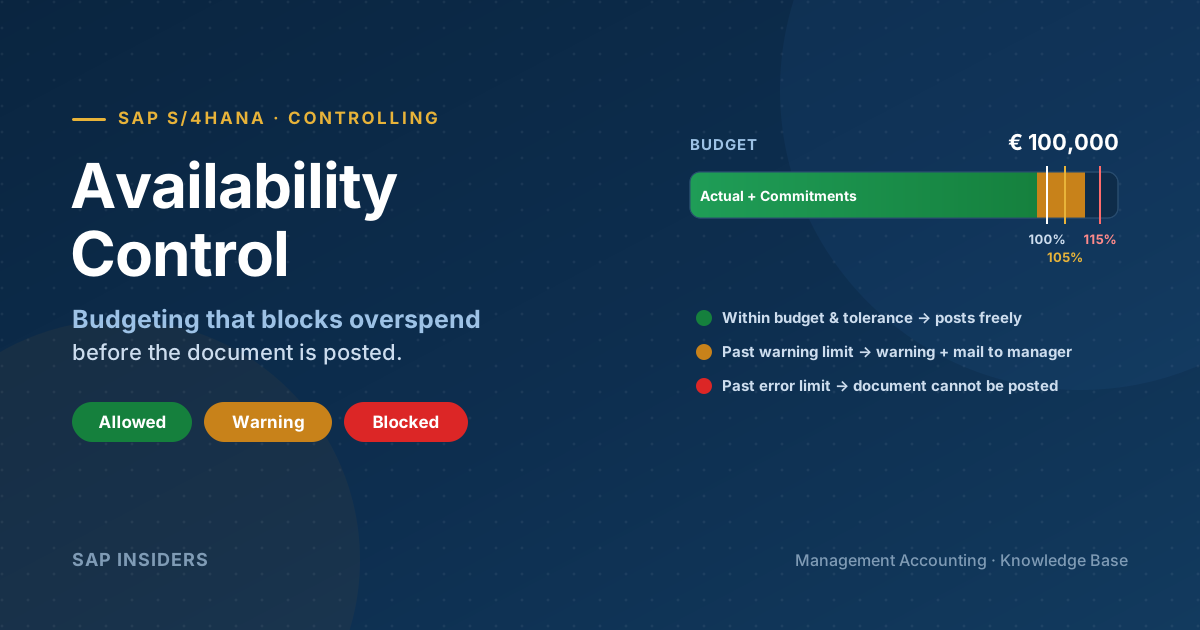
| 2. Plan & budget | Created | Plan €100,000; set an availability-controlled budget. |
| 3. Approve & Release | Released | Manager sets Approved; order released — actuals now allowed. |
| 4. Post actuals | Released | Booth €60k, travel €25k, giveaways €13k → €98k on the order. |
| 5. Period-end overhead | Released | Apply overhead surcharge (e.g., 5% admin) if configured. |
| 6. Settle (KO88) | Released | Settle €98k+ to the Marketing cost center per the settlement rule. |
| 7. TECO | Technically Complete | Event over; block new actuals, allow final settlement. |
| 8. Close | Closed | Balance zero; order archived for history and comparison. |
The order now carries a permanent, comparable record of exactly what CeBIT 2026 cost — while the Marketing cost center shows the organisational total.
Settlement: Where the Costs Go
Settlement is the period-end engine that moves collected costs from the order to their true receivers, following the order's settlement rule (defined in the master data). Real orders settle; statistical orders never do.
| Order category | Typical settlement receiver(s) |
|---|---|
| Overhead cost order | Cost center → (then to CO-PA), or directly to CO-PA |
| Investment order | Asset under Construction, then the final fixed asset |
| Accrual order | The accrual object (collects credits) |
| Order with revenues | Costs → any receiver; revenues → profitability segment / order with revenues / G/L — not cost centers |
You can split an order's costs across many receivers by percentage or amount, and settle individually (KO88) or collectively (KO8G) for a whole group of orders at month-end.
Grouping Internal Orders
With hundreds of orders, order groups are essential. Like cost center groups, they're hierarchical with as many levels as you like, and they power planning, settlement, overhead calculation, and reporting for any combination of orders you define.
Key behaviours to know:
- Client-dependent: an order-group name is unique across the whole client — you can't reuse the same name for different structures in different controlling areas. But you can assign orders from any controlling area into one group.
- Create with reference: copy an existing structure to a new group; only the top node is created physically, the hierarchy below mirrors the reference, then you adjust.
- Copy with suffix: duplicate a hierarchy and append a suffix to keep a historical view of last period's structure while you reorganise the current one.
- An order can belong to multiple groups, but there is no standard hierarchy for orders.
- Dynamic groups: assign a selection variant to an end node so the group's contents update automatically as orders come and go.
Example: an order group EVENTS-2026 with sub-nodes for TRADE-FAIRS, WEBINARS, and SPONSORSHIPS lets you report total event spend, drill into trade fairs, and settle the whole branch in one run.
Collective Processing & Substitution Rules
S/4HANA lets you process many orders at once instead of one master record at a time.
- Selection variants gather orders into a single worklist for collective master-data maintenance or settlement. You can select not just on order fields but on Boolean formulas, classification data, and settlement receivers — and turn the result straight into an order group for reporting.
- Automatic collective processing changes multiple orders in one step — e.g., flip the status of a batch or substitute values on the master record. (Run it from the SAP Easy Access menu.)
- Substitution rules drive mass changes by any criteria. Each rule has steps with two parts: a prerequisite (a selection variant, defined with Boolean logic, that finds the orders) and the substitution (the values to write into the target fields) — applied only when the prerequisite is met.
Example: at month-end, a substitution rule finds every overhead order whose event end date has passed and sets it to Technically Complete in one pass — no clicking through hundreds of orders.
Key Transactions & Fiori Apps
| Task | Classic code | S/4HANA Fiori |
|---|---|---|
| Create / Change / Display order | KO01 / KO02 / KO03 | Manage Internal Orders |
| Order Manager (one-stop cockpit) | KO04 | Manage Internal Orders |
| Order groups | KOH1 / KOH2 / KOH3 | Manage Order Groups |
| Planning / budgeting | KPF6 / KO22 | Plan / Budget apps |
| Apply overhead (period-end) | KGI2 (single) / CO43 (collective) | Run Overhead Calculation |
| Settlement | KO88 (single) / KO8G (collective) | Settle Internal Orders |
| Collective / automatic processing | KOK2 / KOK4 | Mass Maintenance |
| Actual line items / reporting | KOB1, KOB2 | Internal Order – Actuals analytics |
Transaction codes still work in S/4HANA, but the modern path is the Manage Internal Orders and Settle Internal Orders Fiori apps. Confirm exact codes against your release and configuration.
Best Practices
- Choose real vs. statistical deliberately. If you'll never settle it, make it statistical — and remember statistical orders can't carry overhead.
- Drive consistency with order types + model orders. Let the order type enforce field selection, number ranges, and settlement defaults; let model orders pre-fill the rest.
- Use status profiles as guard rails. An "Unapproved → Approved" gate prevents spend on unsanctioned orders far better than a policy document.
- Define the settlement rule early. An order that can't settle cleanly at month-end becomes a stuck balance and an audit question.
- Close the loop: TECO then Close. Don't leave finished orders Released — it invites stray postings and clutters reporting.
- Group with intent. Build order groups (and dynamic groups via selection variants) that mirror how you actually report — by campaign, event, project, or initiative.
- Automate the repetitive. Use collective processing and substitution rules for month-end status changes and mass field updates.
- Mind cross-company-code rules. Omit the company code on statistical orders only when you truly need cross-company reporting.
Summary & Key Takeaways
- An internal order is a temporary cost collector for a specific job: costs flow in as primary postings and out via settlement.
- Real orders collect and settle; statistical orders inform only (posted to order and cost center, never settled, no overhead).
- The four categories are overhead, investment (AuC), accrual, and orders with revenues — each with its own settlement destination.
- Order types (client-wide) control behaviour and field selection; model orders template the master data.
- The life cycle — Created → Released → Technically Complete → Closed — governs what's allowed; user statuses add approval gates and field/authorization control.
- Settlement routes costs to cost centers, CO-PA, assets, or G/L; order groups and collective processing / substitution rules keep large volumes manageable.
Used well, internal orders give Controlling its sharpest lens: the ability to see, compare, and steer the cost of every individual job — without losing the organisational picture that cost centers provide.