1. What is SPK 52 (Collective Order)?
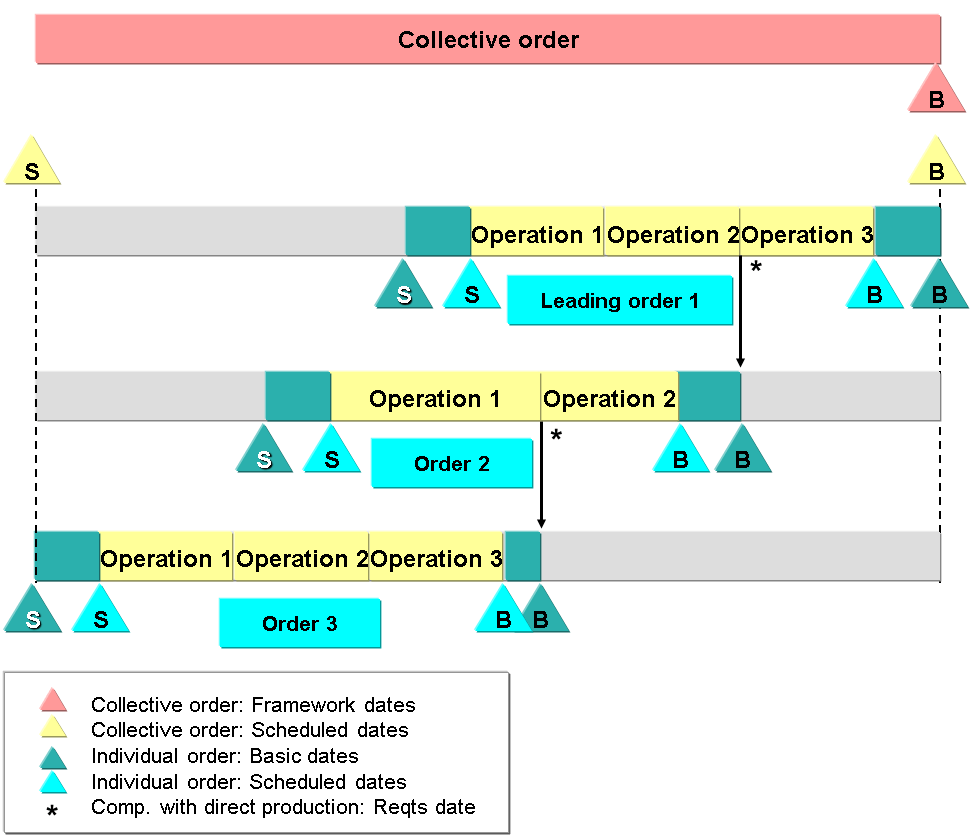
SPK 52 (Special Procurement Key 52) is used in SAP Production Planning (PP) and Controlling (CO) to manage collective orders, where sub-assemblies are linked directly to the main production order instead of being produced separately and stored in inventory.
Key Concept:
- In a collective order scenario, sub-assemblies do not have separate production orders for inventory management. Instead, they are directly created and consumed within the main production order.
- No goods receipt (101 movement type) is posted for sub-assemblies.
- Costs from the sub-assembly order are automatically transferred to the main production order without a separate settlement process.
2. Purpose & Benefits of Using SPK 52
| Feature | Purpose & Benefit |
|---|---|
| Eliminates Stock Movement for Sub-Assemblies | Sub-assemblies are not posted to inventory; they are consumed directly in the main order. |
| Cost Transparency | Costs of sub-assemblies are automatically collected in the main order. |
| Reduces Unnecessary Production Orders | Avoids the need for separate production and settlement processes for sub-assemblies. |
| Efficient Manufacturing Process | Ideal for industries where sub-assemblies are always used in finished products without intermediate storage. |
3. Real-World Example – Bike Manufacturing
Scenario:
A motorcycle manufacturer produces bikes, where the Frame Assembly is a sub-assembly used in final production. Instead of storing frames in stock, they are directly produced and consumed in the main bike assembly order.
Material Master Setup
| Material | Description | Special Procurement Key |
|---|---|---|
| BIKE_1000 | Final Bike | N/A (Main Order) |
| FRAME_2000 | Frame Assembly | SPK 52 (Collective Order) |
| TIRE_3000 | Tires | Normal Procurement |
4. SAP Process Flow (Step-by-Step)
Step 1: Define SPK 52 in SAP
- T-Code:
OMD9→ Configure Special Procurement Type - Maintain SPK 52 as:
- Procurement Type:
E(In-House Production) - Special Procurement Type:
52(Collective Order)
- Procurement Type:
Step 2: Assign SPK 52 to the Sub-Assembly in Material Master
- T-Code:
MM02→ MRP 2 View - Set Special Procurement Key: 52 for Frame Assembly (FRAME_2000).
Step 3: Create a Production Order for the Final Bike (CO01)
- T-Code:
CO01→ Create production order forBIKE_1000. - SAP automatically creates a linked production order for the sub-assembly (Frame Assembly
FRAME_2000).
Step 4: Issue Raw Materials to the Sub-Assembly (MIGO / MB1A)
- T-Code:
MIGOorMB1A - Issue raw materials (steel tubes, welding materials) to the Frame Assembly Order using 261 movement type.
Step 5: Confirm Sub-Assembly Production (CO15)
- T-Code:
CO15→ ConfirmFRAME_2000(No 101 posting). - The cost of the Frame Assembly is directly posted to the main Bike order (BIKE_1000).
Step 6: Confirm Final Bike Production (CO15)
- T-Code:
CO15→ ConfirmBIKE_1000. - The complete bike is received into inventory using 101 movement type.
Step 7: Settlement of Main Order (KO88)
- T-Code:
KO88→ Settle the main production order. - The sub-assembly costs are already part of the main order, so no additional settlement is needed.
5. How Costs and Movements Work in SPK 52
| Step | Process | Movement Type | Impact |
|---|---|---|---|
| 1 | Raw materials issued for sub-assembly | 261 | Raw materials consumed for Frame Assembly. |
| 2 | Sub-assembly production confirmation | No 101 posting | The frame is not stored in stock; costs move to the main order. |
| 3 | Final bike production confirmation | 101 (Bike GR) | The completed bike is received into stock. |
| 4 | Production order settlement | KO88 | The sub-assembly cost is already transferred to the main order. |
6. When to Use SPK 52?
Use SPK 52 When:
- The sub-assembly is never stocked but always used in the final product.
- Cost tracking should be done in the main order without separate settlements.
- Reducing WIP (Work In Progress) complexity is required.
Do Not Use SPK 52 When:
- The sub-assembly must be stored in inventory before being used.
- Batch management is required for sub-assemblies (e.g., pharmaceuticals, chemicals).
- The sub-assembly is used in multiple final products (not just one).
SAP SPK 52 (Collective Order) – Financial Postings & Impact on Balance Sheet & P&L
In SPK 52 (Collective Order), financial postings occur only at the main production order level, as sub-assembly costs flow directly into the main order without intermediate stock postings.
7. Financial Postings in SPK 52
| Step | Process | Movement Type | Debit (Dr) | Credit (Cr) | GL Account Type |
|---|---|---|---|---|---|
| 1 | Raw Material Issue to Sub-Assembly (Frame Assembly) | 261 | Raw Material Consumption (P&L) | Raw Material Inventory (B/S) | Expense & Inventory |
| 2 | Sub-Assembly Confirmation (Frame Assembly) | No 101 posting | No Accounting Entry | No Accounting Entry | - |
| 3 | Raw Material Issue to Main Bike Assembly | 261 | Raw Material Consumption (P&L) | Raw Material Inventory (B/S) | Expense & Inventory |
| 4 | Confirmation of Main Bike Production | No FI Impact | No FI Impact | No FI Impact | - |
| 5 | Goods Receipt of Finished Bike | 101 | Finished Goods Inventory (B/S) | Production Order Settlement (WIP - B/S) | Inventory & WIP |
| 6 | Production Order Settlement (KO88) | Settlement to Cost of Goods Sold (P&L) | WIP Clearing (B/S) | COGS (P&L) | Expense & WIP Clearing |
8. Detailed Financial Accounting Entries
(A) Raw Material Issue to Sub-Assembly (Frame Assembly)
T-Code: MIGO / MB1A – Issue steel, welding rods for the frame.
SAP Movement Type: 261 (Goods Issue to Order)
Financial Entry:
cssCopy codeDr. Raw Material Consumption (P&L) ₹10,000 Cr. Raw Material Inventory (B/S) ₹10,000
- Impact: Reduces raw material inventory and records expense in P&L.
(B) Sub-Assembly Confirmation (Frame Assembly)
T-Code: CO15 – Confirm production of the Frame Assembly
SAP Movement Type: No 101 posting
Financial Entry:
pgsqlCopy code(No FI Posting as costs are carried forward to the main order)
- Impact: No stock posting, cost flows into the main bike production order.
(C) Raw Material Issue to Main Bike Production Order
T-Code: MIGO / MB1A – Issue tires, engine, etc., for Final Bike Assembly
SAP Movement Type: 261 (Goods Issue to Order)
Financial Entry:
cssCopy codeDr. Raw Material Consumption (P&L) ₹50,000 Cr. Raw Material Inventory (B/S) ₹50,000
- Impact: Reduces raw material inventory and records expenses.
(D) Goods Receipt of Final Bike (BIKE_1000)
T-Code: MIGO / MB31 – Post goods receipt for BIKE_1000
SAP Movement Type: 101 (Goods Receipt for Finished Goods)
Financial Entry:
cssCopy codeDr. Finished Goods Inventory (B/S) ₹75,000 Cr. Production Order Settlement (WIP - B/S) ₹75,000
- Impact: Moves production cost into Finished Goods Inventory (Balance Sheet).
(E) Production Order Settlement (KO88)
T-Code: KO88 – Settle the production order
Financial Entry:
cssCopy codeDr. Cost of Goods Sold (P&L) ₹75,000 Cr. WIP Clearing Account (B/S) ₹75,000
- Impact: Moves the cost to COGS (P&L) and clears WIP.
9. Impact on Balance Sheet & P&L
Balance Sheet Impact (B/S)
| GL Account | Before Production | After Production | After Sales |
|---|---|---|---|
| Raw Material Inventory | ₹1,00,000 | ₹40,000 (Reduced by 261 Movements) | ₹40,000 |
| Work-in-Progress (WIP) | ₹0 | ₹75,000 | ₹0 (Cleared after KO88) |
| Finished Goods Inventory | ₹0 | ₹75,000 | ₹0 (Reduced after sales) |
| Accounts Receivable | ₹0 | ₹0 | ₹1,00,000 (After Sales) |
Profit & Loss (P&L) Impact
| GL Account | Before Production | After Production | After Sales |
|---|---|---|---|
| Raw Material Consumption | ₹0 | ₹60,000 (Frame + Final Assembly) | ₹60,000 |
| Cost of Goods Sold (COGS) | ₹0 | ₹0 | ₹75,000 (After KO88) |
| Revenue (Bike Sales) | ₹0 | ₹0 | ₹1,00,000 (After Sales Invoice) |
| Gross Profit | ₹0 | ₹0 | ₹25,000 |
10. Summary of SPK 52 Financial Impacts
| Process | Accounting Entry | GL Accounts Impacted |
|---|---|---|
| Raw Material Issue | Dr. Raw Material Consumption (P&L) / Cr. Raw Material Inventory (B/S) | Inventory & Expenses |
| Sub-Assembly Confirmation | No FI Posting (Cost Moves to Main Order) | No Direct Impact |
| Main Production Order Costs | Dr. Finished Goods Inventory (B/S) / Cr. WIP (B/S) | Balance Sheet |
| Order Settlement (KO88) | Dr. COGS (P&L) / Cr. WIP Clearing (B/S) | COGS & WIP |
11. Key Takeaways
SPK 52 (Collective Order) eliminates sub-assembly stock postings, simplifying cost tracking.
Costs from sub-assemblies automatically move to the main production order.
No 101 movement for sub-assemblies – they flow directly into the final product.
Production order settlement (KO88) moves costs to COGS and clears WIP.
12. Conclusion
SPK 52 (Collective Order) ensures that sub-assemblies are not separately stored but are directly linked to the final product’s production order.
It eliminates extra production orders and simplifies cost tracking by automatically transferring sub-assembly costs to the main order.
Ideal for industries like automotive, manufacturing, and engineering where sub-assemblies are always built into the final product.