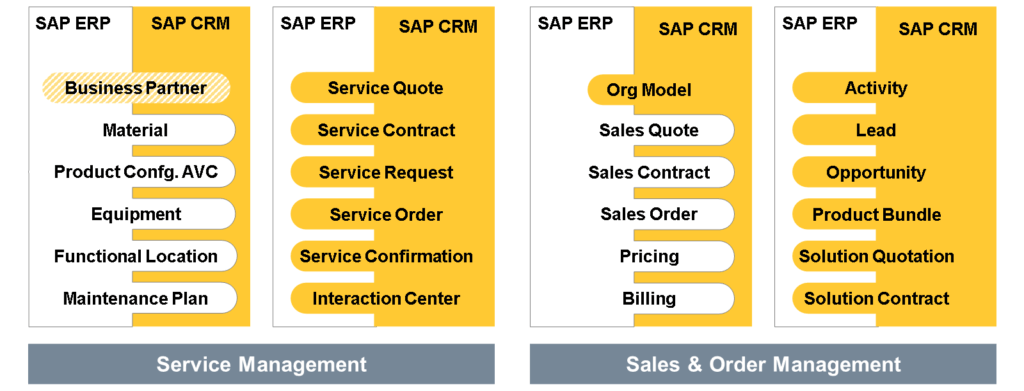
SAP S/4HANA Service is designed to help organizations transition from product-centric to outcome-centric business models, facilitating new revenue streams and enhancing customer relationships.
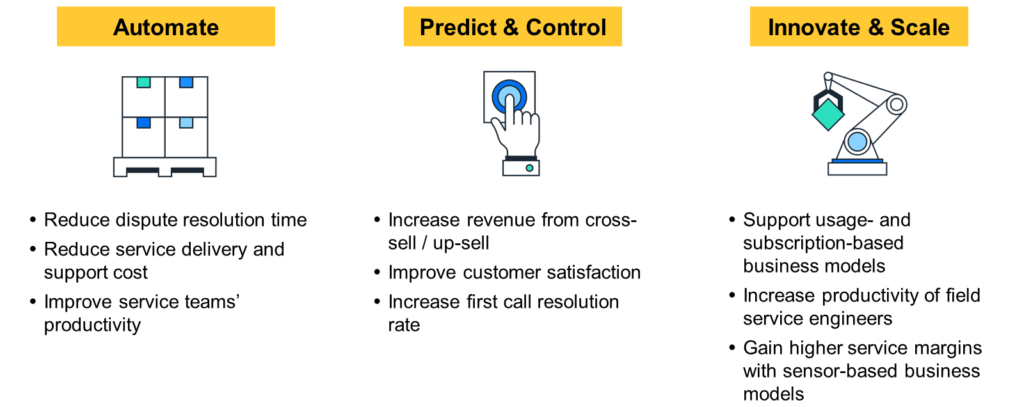
Key Components:
- Technical Service: Manages operational services from planning to fulfillment for both on-site and in-house technical support.
- Commercial Service: Handles contractual agreements, designs service portfolios, and manages bundles for services, products, subscriptions, and projects.
- Service Analytics: Provides advanced analytical tools to support service execution with interactive and intelligent analytics.
- Service Business Planning: Enables holistic management of the service business, identification of new services, and integration into the value and product chain.
The areas of SAP S/4HANA Service as well as solutions interacting closely with it can be displayed as follows:
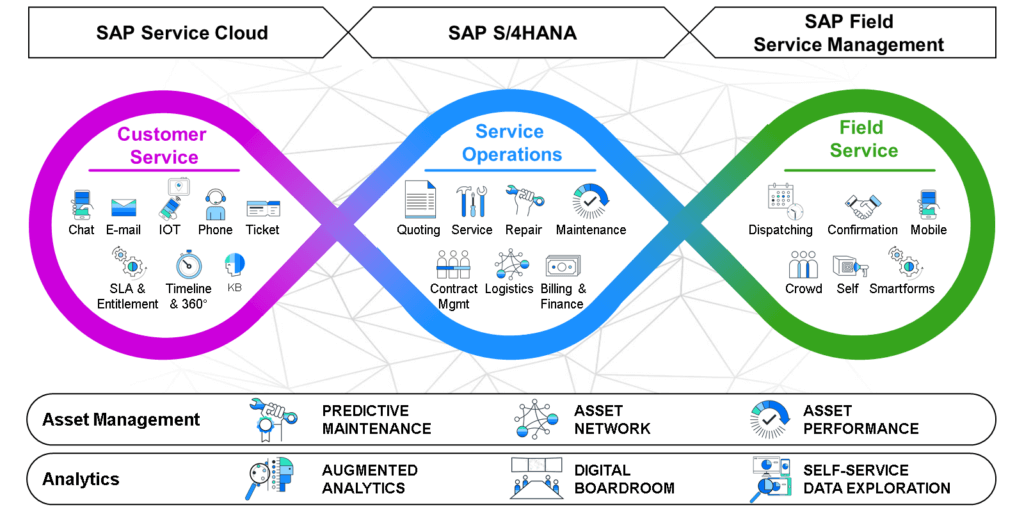
SAP S/4HANA Service – Connecting Frontline, Core, and Field Operations
In the experience-driven economy, service isn’t just support — it’s a strategic differentiator. SAP S/4HANA Service provides an integrated approach to manage customer service, service operations, and field service using a seamless trio:
SAP Service Cloud – Customer Service
Purpose: Manage interactions and issues from customers across channels.
Key Functions:
- Multi-channel support: Chat, Email, Phone, IoT, Ticketing
- SLA & Entitlement tracking
- 360° Customer View & Knowledge Base
Outcome: Faster response, improved customer experience.
SAP S/4HANA – Service Operations
Purpose: Handle backend service processes across the organization.
Key Functions:
- Quoting, Repairs, Maintenance
- Contract management, Service logistics, Billing & Finance
Outcome: Central control and efficiency in service execution.
SAP Field Service Management – Field Execution
Purpose: Optimize on-site service operations with intelligent tools.
Key Functions:
- Dispatching, Technician Mobile App, Smartforms
- Crowd service, Self-service portals, Confirmation tools
Outcome: Empowered field teams, real-time updates, cost savings.
Extended Capabilities
- Asset Management: Predictive Maintenance, Asset Network, Performance Monitoring
- Analytics: Augmented Analytics, Digital Boardroom
- Self-Service: Data Exploration tools
What is SAP Cloud for Customer (C4C)?
SAP Cloud for Customer (C4C) is a cloud-based CRM solution that helps companies manage customer relationships and sales, service, and marketing processes.
Why use SAP C4C?
- Improves customer experience and satisfaction.
- Increases efficiency in sales and customer service processes.
- Provides real-time customer insights.
- Easy to access anywhere due to cloud infrastructure.
How does SAP C4C work?
Integration with other SAP systems (like SAP ERP, SAP S/4HANA) and non-SAP applications.
Sales: Tracks sales activities, manages leads and opportunities, and forecasts accurately.
Service: Manages customer interactions, tickets, and service processes efficiently.
Marketing: Manages marketing campaigns and analyzes customer data for personalized marketing.
Example: Customer Service Request for Equipment Repair
What Happens (Description)?
A customer reports an equipment breakdown and needs urgent repairs.
Why Use Integration?
To speed up repairs, ensure spare parts availability, manage warranty, and handle billing seamlessly.
How it Works Step-by-Step:
- Ticket Creation (SAP C4C): Customer logs the issue in SAP C4C, creating a service ticket.
- Ticket Assignment & Resolution (SAP C4C): Service agent reviews the ticket, checks equipment details, warranty status, and troubleshooting guides.
- Parts & Warranty Check (SAP S/4HANA Integration): SAP C4C automatically checks warranty, spare part availability, and pricing directly in SAP S/4HANA.
- Repair & Spare Parts Shipment (SAP S/4HANA): Once approved, SAP S/4HANA initiates spare parts shipment and tracks inventory.
- Billing & Financial Settlement (SAP S/4HANA): After completion, billing is generated automatically in SAP S/4HANA and reflected back in SAP C4C.
SAP Service Solutions
SAP Service Solutions are split across:
SAP S/4HANA Service (On-Premise/Private Cloud):
Focuses mainly on:
- Planned Services: Scheduled, preventive maintenance or routine inspections.
- Complex Services: Large projects requiring detailed planning, resources, parts, and cost management.
(Previously SAP ERP Customer Service and SAP CRM Service.)
SAP Service Cloud (Public Cloud):
Ideal for simpler, quicker services:
- Self-Service: Customers resolve issues themselves via online portals, FAQs, chatbots.
- Simple Task Execution: Quick issue resolution or basic support cases.
(Evolved from SAP Cloud for Customer and Service Engagement Center.)
SAP Field Service Management (FSM):
Specifically handles mobile, on-site services:
- Mobile Field Service: Technicians manage tasks using mobile devices.
- Planning & Dispatching: Efficient scheduling and dispatching technicians.
- Customer Self-Service: Allowing customers to create, track, and follow up on service appointments.
- Smartforms: Digital forms/checklists for efficient on-site data capture.
- Analytics: Reports for service quality and performance monitoring.
(Previously known as CORE systems and integrated with SAP Cloud for Customer and SAP CRM Service Manager.)
Why Integration Matters:
Integrating these Front Office (customer interactions) and Back Office (internal processes) solutions streamlines processes, enhancing customer service and operational efficiency.
Short Example to Understand Better:
- Front Office (SAP Service Cloud) receives a customer request for urgent maintenance.
- Back Office (SAP S/4HANA Service) checks warranty, parts availability, costs, and schedules technicians.
- Field Service Management (FSM) dispatches a technician to solve the issue using a mobile app, capturing data digitally via smartforms.
Did you clearly understand the integration process, or would you like a short video link for more clarity?