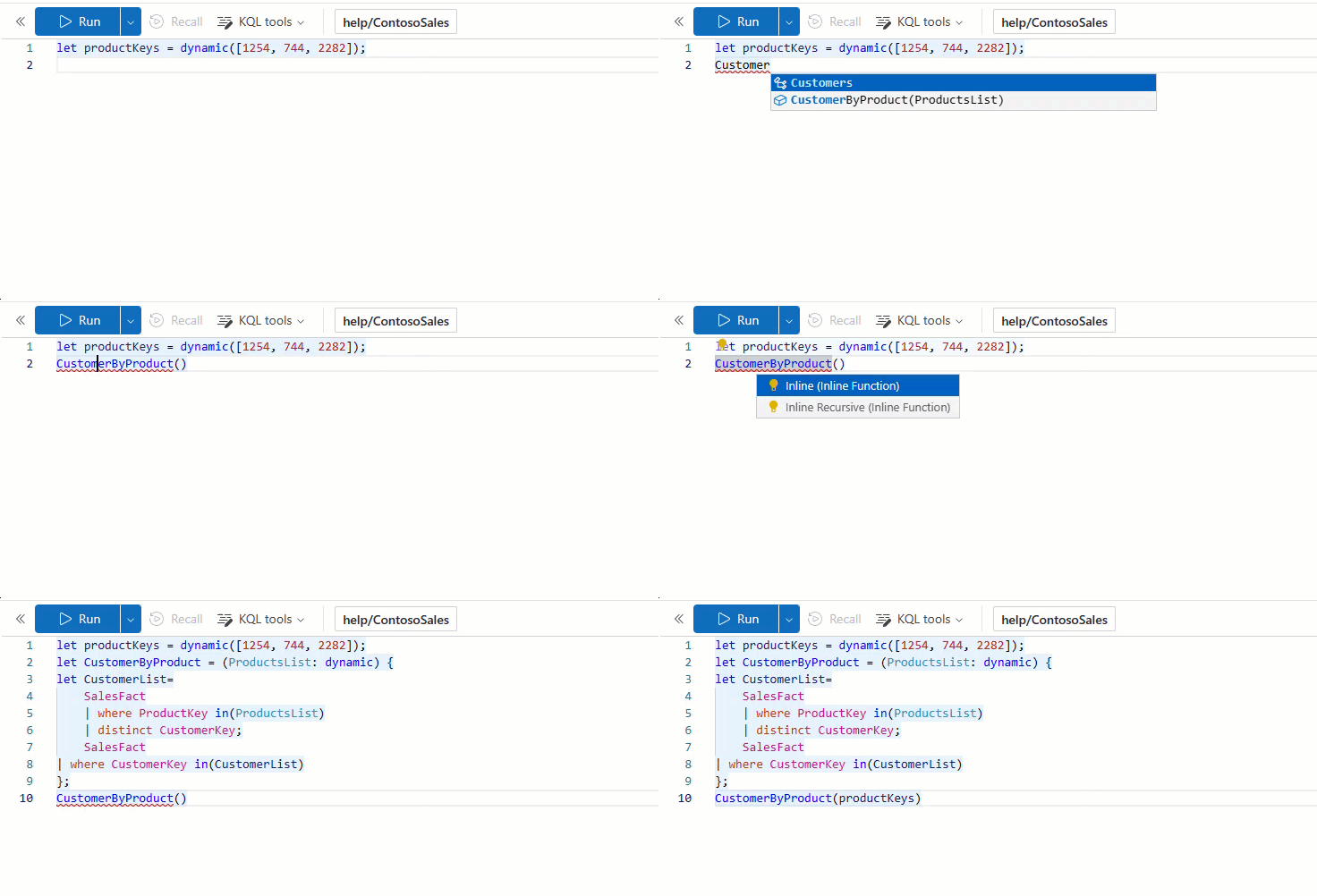
Microsoft Sentinel uses Kusto Query Language (KQL) for the analysis of data, Create Analytics, Workbooks, and performing Hunting.
KQL (Kusto Query Language) was designed to scale, have an easy-to-read syntax, and gracefully move from simple to complicated queries. Read-only KQL processes data and returns results. It's like SQL with a sequence of statements that output tabular data. Pipes (|) join these statements.
Using a data-flow approach, the request is written in plain text. The query employs databases, tables, and columns arranged like SQL.
Data, Conditions and Evidence
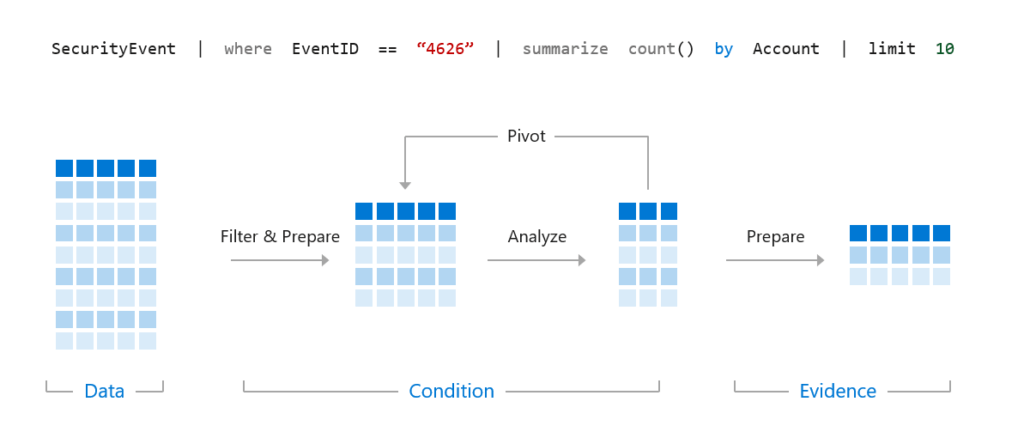
credit to microsoft.com
Construct KQL statements for Microsoft Sentinel
Search operator
Multi-table/multi-column search is available using the search operator. you can utilize search to discover data when unclear about which table or column to filter.
search "sample"
search in (SecurityEvent,SecurityAlert,A*) "sample"
Where operator
The where operator filters a table to the subset of rows that satisfy a predicate.
SecurityEvent
| where TimeGenerated > ago(1d)SecurityEvent
| where TimeGenerated > ago(1h) and EventID == "4624"SecurityEvent
| where TimeGenerated > ago(1h)
| where EventID == 4624
| where AccountType =~ "user"SecurityEvent | where EventID in (4624, 4625)
let statement
Let statements bind names to expressions.
Let statements allow for the creation of variables to be used in later statements
let timeOffset = 7d;
let discardEventId = 4688;
SecurityEvent
| where TimeGenerated > ago(timeOffset*2) and TimeGenerated < ago(timeOffset)
| where EventID != discardEventId
Let statements allow for the creation of dynamic tables or lists.
------------------------------- Tables-----------------------------
let suspiciousAccounts = datatable(account: string) [
@"\administrator",
@"NT AUTHORITY\SYSTEM"
];
SecurityEvent | where Account in (suspiciousAccounts)------------------------------- Lists -----------------------------
let LowActivityAccounts =
SecurityEvent
| summarize cnt = count() by Account
| where cnt < 1000;
LowActivityAccounts | where Account contains "SQL"
Extend operator
The extend operator will create calculated columns and append the new columns to the result set.
SecurityEvent
| where ProcessName != "" and Process != ""
| extend StartDir = substring(ProcessName,0, string_size(ProcessName)-string_size(Process))
order by operator
Sort the rows of the input table by one or more columns.
SecurityEvent
| where ProcessName != "" and Process != ""
| extend StartDir = substring(ProcessName,0, string_size(ProcessName)-string_size(Process))
| order by StartDir desc, Process asc
Project operators
The project operators control what columns to include, add, remove, or rename in the result set of a statement.
- Select the columns to include, rename or drop, and insert new computed columns.
- The project operator will limit the size of the result set, which will increase the performance
| Operator | Description |
|---|---|
| project | Select the columns to include, rename or drop, and insert new computed columns. |
| project-away | Select what columns from the input to exclude from the output. |
| project-keep | Select what columns from the input to keep in the output. |
| project-rename | Select the columns to rename in the resulting output. |
| project-reorder | Set the column order in the resulting output. |
credit to microsoft.com
SecurityEvent
| project Computer, AccountSecurityEvent
| where ProcessName != "" and Process != ""
| extend StartDir = substring(ProcessName,0, string_size(ProcessName)-string_size(Process))
| order by StartDir desc, Process asc
| project Process, StartDir
Analyze KQL statements for Microsoft Sentinel
The KQL summary operator computes. Analysts can graph results to quickly identify patterns. Visualization is done via KQL
summarize operator
The count operator with its variations will create a new column with the calculated result for the specified fields.
The result set will contain three columns: Process, Computer, and Count.
SecurityEvent | summarize by Activity
SecurityEvent
| where EventID == "4688"
| summarize count() by Process, Computer
| Function(s) | Description |
|---|---|
| count(), countif() | Returns a count of the records per summarization group |
| dcount(), dcountif() | Returns an estimate for the number of distinct values taken by a scalar expression in the summary group. |
| avg(), avgif() | Calculates the average of Expr across the group. |
| max(), maxif() | Returns the maximum value across the group. |
| min(), minif() | Returns the minimum value across the group. |
| percentile() | Returns an estimate for the specified nearest-rank percentile of the population defined by Expr. The accuracy depends on the density of the population in the region of the percentile. |
| stdev(), stdevif() | Calculates the standard deviation of Expr across the group, considering the group as a sample. |
| sum(), sumif() | Calculates the sum of Expr across the group. |
| variance(), varianceif() | Calculates the variance of Expr across the group, considering the group as a sample. |
credit to microsoft.com
Summarize operator to filter results
The arg_max() and arg_min() functions filter out the top and bottom rows respectively.
The * in the arg_max or arg_min() function requests all columns for the row.
SecurityEvent
| where Computer == "SQL12.na.contosohotels.com"
| summarize arg_max(TimeGenerated,*) by Computer
Summarize operator to prepare data
The make_ functions return a dynamic (JSON) array based on the specific function's purpose.
make_list() function
The function returns a dynamic (JSON) array of all the values of Expression in the group.
SecurityEvent
| where EventID == "4624"
| summarize make_list(Account) by Computer
make_set() function
Returns a dynamic (JSON) array containing distinct values that Expression takes in the group.
SecurityEvent
| where EventID == "4624"
| summarize make_set(Account) by Computer
Render operator to create visualizations
The supported visualizations are:
- areachart
- barchart
- columnchart
- piechart
- scatterchart
- timechart
SecurityEvent
| summarize count() by Account
| render barchart
Summarize operator to create time series
The bin() function rounds values down to an integer multiple of the bin size. Often used with summarising by (requirements)
SecurityEvent
| summarize count() by bin(TimeGenerated, 1d)
| render timechart
Build multi-table statements using KQL
The union operator merges two results sets. The join operator joins rows by key. KQL statement order influences expected results.
Union operator
The union operator takes two or more tables and returns the rows of all of them
// Query 1
SecurityEvent
| union SigninLogs// Query 2
SecurityEvent
| union SigninLogs
| summarize count()
| project count_// Query 3
SecurityEvent
| union (SigninLogs | summarize count()| project count_)
The union operator supports wildcards to union multiple tables.
union Security*
| summarize count() by Type
Join operator
The join operator merges the rows of two tables to form a new table by matching the specified columns' values from each table.
- The $left and $right preceding the field name specifies the table.
- Table columns are marked $left.columname and $right.columnname.
LeftTable | join [JoinParameters] ( RightTable ) on Attributes
The inner join will only show records from the left side if there's a matching record on the right side. The right side will also require a left-side record.
| Join Flavor | Output Records |
|---|---|
| kind=leftanti, kind=leftantisemi | Returns all the records from the left side that don't have matches from the right |
| kind=rightanti, kind=rightantisemi | Returns all the records from the right side that don't have matches from the left. |
| kind unspecified, kind=innerunique | Only one row from the left side is matched for each value of the on key. The output contains a row for each match of this row with rows from the right |
| kind=leftsemi | Returns all the records from the left side that have matches from the right. |
| kind=rightsemi | Returns all the records from the right side that have matches from the left. |
| kind=inner | Contains a row in the output for every combination of matching rows from left and right. |
| kind=leftouter (or kind=rightouter or kind=fullouter) | Contains a row for every row on the left and right, even if it has no match. The unmatched output cells contain nulls. |
credit to microsoft.com
Work with data in Microsoft Sentinel using KQL
Extract data from unstructured string fields
A lot of the time, security log data is stored in unstructured string fields that need to be "parsed" to get at the information. In KQL, there are several ways to get information from string fields. Extract and parse are the two main operators that are used.
Extract: Extract gets a match for a regular expression from a text string. You may optionally convert the extracted substring to the indicated type.
print extract("x=([0-9.]+)", 1, "hello x=45.6|wo") == "45.6"
SecurityEvent
| where EventID == 4672 and AccountType == 'User'
| extend Account_Name = extract(@"^(.\)?([^@])(@.*)?$", 2, tolower(Account))
| summarize LoginCount = count() by Account_Name
| where Account_Name != ""
| where LoginCount < 10
Parse: Parse evaluates a string expression and parses its value into one or more calculated columns. The computed columns will have nulls for unsuccessfully parsed strings.
T | parse [kind=regex [flags=regex_flags] |simple|relaxed] Expression with * (StringConstant ColumnName [: ColumnType]) *
Extract data from structured string data
Strings fields may also contain structured data like JSON or Key-Value pairs. KQL provides easy access to these values for further analysis.
Dynamic fields contain a key-value pair
SigninLogs
| extend OS = DeviceDetail.operatingSystem
JSON
| Function | Description |
|---|---|
| parse-json() or todynamic() | Interprets a string as a JSON value and returns the value as dynamic. Use either of these functions to refer to a field: JsonField.Key or JsonField["Key"] |
| mv-expand | is applied on a dynamic-typed array or property bag column so that each value in the collection gets a separate row. All the other columns in an expanded row are duplicated. mv_expand is the easiest way to process JSON arrays. |
| mv-apply | Applies a subquery to each record and returns the union of the results of all subqueries. Apply a query to each value in an array. |
credit to microsoft.com
SigninLogs
| extend Location = todynamic(LocationDetails)
| extend City = Location.city
| extend City2 = Location["city"]
| project Location, City, City2SigninLogs
| mv-expand Location = todynamic(LocationDetails)SigninLogs
| mv-apply Location = todynamic(LocationDetails) on
( where Location.city == "Canberra")
Integrate external data
- The externaldata operator returns a table whose schema is defined in the query itself.
- Use the externaldata operator to create a virtual table from an external source.
externaldata ( ColumnName : ColumnType [, …] )
[ StorageConnectionString [, …] ]
[with ( PropertyName = PropertyValue [, …] )]
Create parsers with functions
Parsers are functions that define a virtual table with already parsed unstructured strings fields such as Syslog data.
PrivLogins